Fujitsu - Fi 7300NX Wireless Document Duplex Scanner with Touchscreen - Gray/White
Fujitsu - Fi 7300NX Wireless Document Duplex Scanner with Touchscreen - Gray/White
FREE shipping to
More Buying Options

Specifications
- NetworkingWirelessScan (Color) Speed60 copies per minuteScan MethodOtherDuplex Scan FunctionYes
- Key Specs
- Networking: Wireless
- Scan (Color) Speed: 60 copies per minute (The number of color pages able to be scanned per minute.)
- Scan Method: Other
- Duplex Scan Function: true
- General
- Brand: Fujitsu
- Model Number: PA03768-B005
- Product Name: Fi 7300NX Wireless Document Duplex Scanner with Touchscreen
- Color: Gray/White
- Connectivity
- Scanner Connectivity: Ethernet, Wi-Fi
- Minimum System Requirements: Windows 7 (32/64 bits), Windows Server 2008 (32/64-bits), Windows Server 2008 R2 (64-bits), Windows 8.1 (32/64 bits), Windows Server 2012 (64-bit), Windows Server 2012 R2 (64-bit), Windows 10 (32/64 bits), Windows Server 2016 (64-bit)
- Dimensions
- Product Height: 6.7 inches (The out of box height of the item. Height is measured as the vertical distance from the bottom of the item to the top as it would be primarily used or placed.)
- Product Width: 11.8 inches (The out of box width of the item. Width is measured as the horizontal distance from one side of the item to the other as it would be primarily used or placed.)
- Maximum Document Length: 220 inches
- Maximum Document Width: 8.5 inches
- Product Weight: 10.8 pounds (The out of box weight of the item.)
- Features
- Automatic Document Feeder Capacity: 80 sheets
- Automatic Document Feeder Included: true
- Scanner Type: Document
- Scanner Resolution: Up to 600 x 600 (Refers to the number of pixels/dots, both horizontally and vertically, of the image produced by the scanner. Generally, the higher the resolution, the sharper and cleaner the produced image.)
- Image Scanner Type: Dual CCD
- Scanner Info
- Scan (Monochromatic) Speed: 60 copies per minute (The number of monochromatic grayscale pages able to be scanned per minute.)
- Included
- Included Software: ScanSnap Manager, Scanner Central Admin, Software Operation Panel, PaperStream IP, PaperStream Capture, PaperStream NX Manager
- Certifications Listings & Approvals
- ENERGY STAR Certified: false (Devices carrying the ENERGY STAR service mark, such as computer products and peripherals, kitchen appliances, and other products, generally use 20% to 30% less energy than required by federal standards.)
- TWAIN Compliant: true (Products with this label are compliant with standards set by the TWAIN Working Group for regulating communication between software and digital imaging devices. Devices that are TWAIN compliant are compatible for use with each other without requiring additional software, even if they have different capabilities.)
- Other
- UPC: 097564309151
Scan documents quickly and efficiently with this Fujitsu image scanner. Speeds of up to 120 ipm and a loading capacity of 80 pages ensure rapid document processing, and the 600 dpi maximum output produces clear, legible scans for later reading . This Fujitsu image scanner ensures secure use with various authentication methods.
- Up to 600 x 600 dpi optical resolution (1200 x 1200 dpi interpolated resolution): To capture every word and image detail with clarity.
- 8.5" x 220" maximum scan size: Enables you to capture entire pages.
- Up to 60 ppm scan speeds*: For rapidly preserving a variety of files. Duplex scanning helps you get the job done quickly.
- Built-in LCD screen: Displays clear information and lets you navigate features with ease.
- High-speed USB 3.1 Gen 1 interface: Offers easy connectivity.
- Built-in Wi-Fi: Lets you upload images instantly to your laptop, desktop or mobile device.
- ENERGY STAR certified: Designed to use less energy and meets strict energy efficiency guidelines set by the Environmental Protection Agency and U.S. Department of Energy.
Whats Included
- Fujitsu fi-7300NX
- SuperSpeed USB cable
- ADF paper chute
- ScanSnap Manager, Scanner Central Admin, Software Operation Panel, PaperStream IP, PaperStream Capture, PaperStream NX Manager
Product Manuals
Q: How many pages can I load into the scanner at once?
A: This scanner has an automatic document feeder with a capacity of 80 sheets.
Q: What is the optical resolution of this scanner?
A: The optical resolution of this scanner is up to 600 x 600 dpi.
Q: Does this scanner come with Wi-Fi capabilities?
A: Yes, this Fujitsu scanner has built-in Wi-Fi for direct uploads.
Q: Does this scanner have a duplex scan function?
A: Yes, this scanner has a duplex scan function for two-sided scanning.
Q: What is the maximum document size this Fujitsu scanner can handle?
A: The maximum scan size for this scanner is 8.5" x 220".
Q: Can you load different size originals in at once?
A: undefined
A: undefined
A: It’s not vague - that’s the description of the color of the machine.
Compare similar products

Scan documents quickly and efficiently with this Fujitsu image scanner. Speeds of up to 120 ipm and a loading capacity of 80 pages ensure rapid document processing, and the 600 dpi maximum output produces clear, legible scans for later reading . This Fujitsu image scanner ensures secure use with various authentication methods.
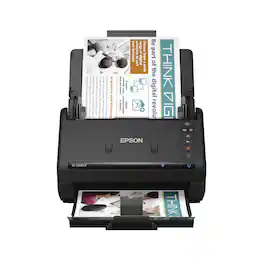
Get organized fast with the WorkForce ES-500W II wireless duplex desktop document scanner. This reliable, easy-to-use performer speeds through scans up to 35 ppm/70 ipm1, capturing both sides of each sheet in one pass. Its 50-sheet Auto Document Feeder allows you to breeze through stacks of documents of varying sizes. Intuitive Epson ScanSmart Software2 means you can easily preview, email and upload your scans. The included TWAIN driver ensures compatibility with most document management software. Wirelessly scan to cloud storage accounts2 and create searchable PDFs. You can also scan directly from your mobile device using the Epson Smart Panel app3. Color and image adjustment features such as auto crop, staple protection, dirt detection and paper-skew correction help ensure remarkable image quality.
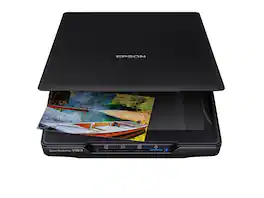
Make scanning simple with the affordable, compact and lightweight Epson Perfection V39 II. Featuring an optical resolution of 4800 dpi, this easy-to-use photo scanner delivers amazing clarity and detail at a great value. With the included Epson ScanSmart software, you can scan photos, artwork, illustrations, books, documents and more to cloud storage services as well as stitch together oversized images. Moreover, if your photos have faded, you can bring back the color in one click with Easy Photo Fix technology. The V39 II delivers high-quality letter-sized scans in as fast as 10 seconds. It also includes convenient one-touch scanning with easy-to-use buttons, so you can scan directly to PDF or email with just the touch of a button. In addition, you can create editable Microsoft Word, Excel and PowerPoint files using optical character recognition (OCR) software. The V39 II is USB powered for portability, includes a built-in kickstand for space-saving vertical placement and storage, and features a high-rise, removable lid to accommodate bulky items such as books and photo albums. Meet the nexus of stunning image quality and great value with the Epson Perfection V39 II.

Preserve what’s priceless with the Epson FastFoto FF-680W — the World’s Fastest Personal Photo Scanner. Scan thousands of photos — as fast as 1 photo per second. Easily restore, save, organize and share photos, postcards, panoramas, documents and more. The convenient mobile app enables you to capture the voice of loved ones and create slideshows, so you can easily share stories about your photos right from your smartphone, from a firsthand perspective, for generations to come. Plus, FastFoto brings old photos to life with auto enhancement, color restoration and more. Offering the ultimate in versatility, it includes a variety of format options for quick sharing, archiving and enlargements
| Pros for Fujitsu - Fi 7300NX Wireless Document Duplex Scanner with Touchscreen - Gray/White | |||
|---|---|---|---|
| There were no pros for this product— | Ease of use, Size, Scan Speed, Wireless, Duplex | Ease of use, Size, Scan Quality, Overall Performance, Resolution | Ease of use, Size, Scanning Speed, Image Quality, Software |
| Cons for Fujitsu - Fi 7300NX Wireless Document Duplex Scanner with Touchscreen - Gray/White | |||
| There were no cons for this product— | There were no cons for this product— | Connectivity, Compatibility, Kickstand, Noise Level, USB | Connectivity, Compatibility, Price, Jamming |
Specs
Reviews
Customer Images
The vast majority of our reviews come from verified purchases. Reviews from customers may include My Best Buy members, employees, and Tech Insider Network members (as tagged). Select reviewers may receive discounted products, promotional considerations or entries into drawings for honest, helpful reviews.
- Rated 4 out of 5 stars
Great scanner!!
Large scanning project of 50 bankers boxes and two of these did the job. We ship to all our offices as needed.
This review is from Fujitsu - Fi 7300NX Wireless Document Duplex Scanner with Touchscreen - Gray/White
Bruno02130 Posted
- Rated 5 out of 5 stars
Great scanner
Love the ability to scan from laptops and other wireless devices without having to connect a USB cable to it.
This review is from Fujitsu - Fi 7300NX Wireless Document Duplex Scanner with Touchscreen - Gray/White
KhojoPhi Posted
- Rated 5 out of 5 stars
GREAT product!!!!
Highly recommended if you looking for a super scanner, this is it.
This review is from Fujitsu - Fi 7300NX Wireless Document Duplex Scanner with Touchscreen - Gray/White
Thebeard Posted