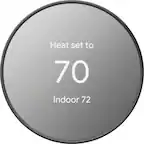
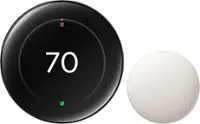
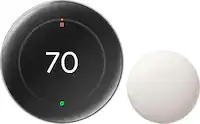
Google - Nest Smart Programmable Wifi Thermostat - Snow
Color
Snow Google - Nest Thermostat Trim Kit - Snow$14.99

More Buying Options
Related Item

Specifications
- App CompatibleYesCompatible with 24V CoolingYesCompatible with 24V HeatingYesWorks WithNestVoice Assistant Built-inNoTouch ScreenNo
- Key Specs
- App Compatible: true (The product can be connected to a program or software application on a mobile device, which then receives collected data from the product.)
- Compatible with 24V Cooling: true (Works with low-voltage (24 volts AC) cooling equipment.)
- Compatible with 24V Heating: true (Works with low-voltage (24 volts AC) heating equipment.)
- Works With: Nest (Compatible with or able to be connected to other smart devices or applications.)
- Voice Assistant Built-in: No (A digital assistant built into the device that uses voice commands to answer questions and control smart devices.)
- Touch Screen: false (Touch-screen devices make navigating more intuitive. Using a touch-screen display, you can do things such as tap to select, hold and drag to move items, swipe to scroll, and pinch to zoom.)
- Multi-Zone Control: true (Thermostats with this feature are able to control temperatures of multiple sections of a home.)
- Auto-Away Mode: true (Thermostats with this feature can automatically adjust heating or cooling to predetermined settings when the area is empty in order to conserve energy.)
- Motion Sensing: true
- ENERGY STAR Certified: true (Devices carrying the ENERGY STAR service mark, such as computer products and peripherals, kitchen appliances, and other products, generally use 20% to 30% less energy than required by federal standards.)
- General
- Brand: Google
- Model Number: GA01334-US
- Product Name: Nest Smart Programmable Wifi Thermostat
- Color: Snow
- Dimensions
- Product Height: 1.073 inches (The out of box height of the item. Height is measured as the vertical distance from the bottom of the item to the top as it would be primarily used or placed.)
- Product Width: 3.307 inches (The out of box width of the item. Width is measured as the horizontal distance from one side of the item to the other as it would be primarily used or placed.)
- Product Depth: 3.307 inches (The out of box depth of the item. Depth is measured as the distance from the front of the item to the back as it would be primarily used or placed.)
- Product Weight: 0.284 pounds (The out of box weight of the item.)
- Power
- Wire Configuration: C-wire, 4-Wire
- Power Source: Hard wired, Battery-powered
- Wire Terminals: C (common 24v power), Y (cooling), W (heating), R (power), G (fan operation), O (heat pump reversing valve), B (heat pump reversing valve) (The available connections on the device for wiring other devices to it. These are often abbreviated or coded due to the space available on the device.)
- Rechargeable Battery: false
- Battery Size: AAA (The battery size required for operation.)
- Number of Batteries Required: 2
- Number Of Batteries Included: 2
- Voltage Type: Low voltage (The kind of voltage used by the device.)
- Compatibility
- App Compatible: true (The product can be connected to a program or software application on a mobile device, which then receives collected data from the product.)
- Compatible Product(s): Heat pumps, Hot water systems
- Compatible with 24V Cooling: true (Works with low-voltage (24 volts AC) cooling equipment.)
- Compatible with 24V Heating: true (Works with low-voltage (24 volts AC) heating equipment.)
- Wireless Connectivity: Wi-Fi, Bluetooth (The manner in which a device sends data to another device over a short distance without the use of wires or cables.)
- Operating System Compatibility: Android, Apple iOS
- Works With: Nest (Compatible with or able to be connected to other smart devices or applications.)
- Voice Assistant Built-in: No (A digital assistant built into the device that uses voice commands to answer questions and control smart devices.)
- Features
- Programmable Period: 7 day
- 24-Hour Programming: true (Users can configure various temperature settings for different times of the day over a 24-hour period.)
- Touch Screen: false (Touch-screen devices make navigating more intuitive. Using a touch-screen display, you can do things such as tap to select, hold and drag to move items, swipe to scroll, and pinch to zoom.)
- Multi-Zone Control: true (Thermostats with this feature are able to control temperatures of multiple sections of a home.)
- Auto-Away Mode: true (Thermostats with this feature can automatically adjust heating or cooling to predetermined settings when the area is empty in order to conserve energy.)
- Backlit: true
- Date/Time Display: true
- Remote Sensor Capable: false (Indicates whether the thermostat is compatible with remote sensors. This capability allows for the connection of multiple sensors in order to collect temperature data from several locations in a zone for an overall assessment of the temperature needs.)
- Motion Sensing: true
- Periods Per Programmable Day: 96 (Thermostats with programmable days allow users to set desired temperatures for different days of the week. With multiple programmable periods per day, users can further customize the device to schedule temperatures for different times of day based on occupancy, schedule, etc.)
- Detector Type: Temperature, Humidity, Motion
- Energy Usage and History: true
- Furnace Filter Change Indicator: true
- Keypad Lock: true
- Certifications Listings & Approvals
- ENERGY STAR Certified: true (Devices carrying the ENERGY STAR service mark, such as computer products and peripherals, kitchen appliances, and other products, generally use 20% to 30% less energy than required by federal standards.)
- Warranty
- Warranty - Parts: 1 year
- Warranty - Labor: 1 year
- Other
- UPC: 193575007649
Meet the Nest Thermostat, the helpful thermostat with a cozy price. It can turn itself down to save energy when you leave the house. You can control it from anywhere with the Google Home app - whether you're on an errand or in bed. And it's easy to install yourself.
- Easy to install and use.: Designed so you can install yourself. Installation usually takes 30 minutes or less. You can quickly create a schedule that’s right for you. To change the temperature, swipe the touch bar on the side or use the Google Home app from anywhere.
- Control from anywhere.: You can change the temperature, adjust your schedule, and more from the free Google home app.₁ Or ask Google to change the temperature - just say, "Hey Google, turn up the heat."₂
- Compatible with the Google Home app.: Easily adjust temperature and comfort settings from anywhere using your Google Home app.₁
- Heating and cooling system care.: Your thermostat can monitor your heating and cooling system and alert you if something doesn't seem right.₃ It can also send helpful reminders like when it's time to replace your filter.
- ENERGY STAR certified thermostat.: The Nest Thermostat energy-saving features earned an ENERGY STAR from the EPA.₄ Also, the Nest Thermostat can use a built-in sensor and your phone's location to check if you've left the house. Then it can set itself to an Eco temperature to save energy.
- Designed with the environment in mind.: The Nest Thermostat is designed with recycled materials to reduce waste. Its plastic parts contain 49% recycled post-consumer plastic.
- Finds ways to help you save.: Savings finder looks for more ways to save, and suggests tweaks to your schedule.
- Monitors your systems.₅: Help catch many heating and cooling system issues early with peace of mind reminders and helpful alerts sent straight to your smartphone.
- Support a clean energy future, right from home.: Nest Renew from Google works with your compatible Nest thermostat to help you automatically prioritize usage to when energy is cleaner or less expensive.₆ ₇
- Easy to install and use.: Designed so you can install yourself. Installation usually takes 30 minutes or less. You can quickly create a schedule that’s right for you. To change the temperature, swipe the touch bar on the side or use the Google Home app from anywhere.
- Control from anywhere.: You can change the temperature, adjust your schedule, and more from the free Google home app.₁ Or ask Google to change the temperature - just say, "Hey Google, turn up the heat."₂
- Compatible with the Google Home app.: Easily adjust temperature and comfort settings from anywhere using your Google Home app.₁
- Heating and cooling system care.: Your thermostat can monitor your heating and cooling system and alert you if something doesn't seem right.₃ It can also send helpful reminders like when it's time to replace your filter.
- ENERGY STAR certified thermostat.: The Nest Thermostat energy-saving features earned an ENERGY STAR from the EPA.₄ Also, the Nest Thermostat can use a built-in sensor and your phone's location to check if you've left the house. Then it can set itself to an Eco temperature to save energy.
- Designed with the environment in mind.: The Nest Thermostat is designed with recycled materials to reduce waste. Its plastic parts contain 49% recycled post-consumer plastic.
- Finds ways to help you save.: Savings finder looks for more ways to save, and suggests tweaks to your schedule.
- Monitors your systems.₅: Help catch many heating and cooling system issues early with peace of mind reminders and helpful alerts sent straight to your smartphone.
- Support a clean energy future, right from home.: Nest Renew from Google works with your compatible Nest thermostat to help you automatically prioritize usage to when energy is cleaner or less expensive.₆ ₇
Whats Included
- Nest Thermostat
- Documentation bundle
- Mounting screws
- 2 AA batteries
- Nest Thermostat
- Documentation bundle
- Mounting screws
- 2 AA batteries
Product Manuals
Q: What are the differences between this new model and the Thermostat e?
A: The Nest Thermostat (2020) comes with a 6 cm color LCD with 240x320 resolution, and mirrored glass finish. It provides more wiring terminals (10) that work with most 24V heating and cooling systems, including furnaces, air conditioners, boilers, and heat pumps with either forced air or radiant delivery. On the other hand, the Nest Thermostat E comes with polycarbonate, ceramic-feel finished ring with a frosted display that works with fewer (86%) 24V heating and cooling systems. While both Nest thermostat models work with most two-stage heating and two-stage cooling systems, we recommend checking the Compatibility Checker on our Google Nest support site to verify if your system is compatible. You can also take a look at the following support article for the complete technical specifications of the Nest thermostats: https://support.google.com/googlenest/answer/9230098
A: It is a mirror finish. The photos don't do the product justice.
Q: Does this work without wifi if I decide not to have wifi?
A: You need to connect to wifi to set up the thermostat. As soon as you power on the thermostat, the screen displays a message to set up on the Google Home app. There’s no workaround for this. Wifi is needed.
Q: does this nest work on a two zone system with natural gas heat and elec a/c system?
A: The Nest Thermostat is designed to work with most 24V systems, even older systems. Nest thermostats are usually compatible with zoned systems that use multiple thermostats, including zoned systems with dampers. However, we recommend using the Compatibility Checker tool on our Google Nest Help page to verify if your system is compatible with Nest Thermostat here: https://store.google.com/us/widget/compatibility/thermostat
A: No. You can only use the Google Home app for the new Nest Thermostat (2020). It's the first thermostat setup that is completed entirely on the Google Home app. Here's some helpful links you might want to check out: - Nest thermostat technical specifications: https://support.google.com/googlenest/answer/9230098 - Control your devices using Google Home App: https://support.google.com/googlenest/answer/9249866
A: Nest thermostats are designed to be able to work efficiently without the need of a power wire when the heating and cooling wires of your system can deliver enough power to keep the thermostat's battery charged up. But some heating/cooling wires unfortunately can't deliver adequate power to Nest thermostats. In such cases, Nest thermostats need a common (C) wire that goes into the C terminal of the thermostat. Since you´ve already checked with our Compatibility Checker tool, the next best step would be to contact a Nest Pro technician to check your system and install a common (C) wire if needed Our support teams are always here to assist you if you have any further questions.You can contact us via the Google Nest support page here: https://support.google.com/googlenest/contactflow
Q: Can this thermostat be locked?
A: Nest Thermostat does not have the PIN lock/unlock feature unfortunately.
A: Nest Thermostat works with most 2-wire, 24V heating and cooling systems, including furnaces, air conditioners, boilers, and heat pumps with either forced air or radiant delivery. We suggest using our online compatibility checker first to ensure that your system is compatible with Nest Thermostat. Here’s the link: https://store.google.com/us/widget/compatibility/thermostat Typically, smart thermostats don’t require a common (C) wire, but every system is different. Without a common wire, your Nest thermostat will charge itself through power sharing using your existing heating and cooling wires. However, when your heating and cooling wires are not able to deliver the needed power for your Nest thermostat, you may need to connect a common or C wire since it helps deliver enough consistent power to your thermostat. When there’s a C wire, it becomes the thermostat’s go-to for power backup when power sharing doesn’t work. This can also conserve battery life since the batteries will likely only be in use when there’s a power loss to the thermostat. Also, Nest Thermostat (2020) has a backup battery. For systems that are not using a C wire, the average battery life is three to six months. However, depending on the Wi-Fi activity on the thermostat, it may be possible to extend or reduce the battery life. For further assistance, you can contact our support team here anytime: https://support.google.com/googlenest/gethelp
Compare similar products

Meet the Nest Thermostat, the helpful thermostat with a cozy price. It can turn itself down to save energy when you leave the house. You can control it from anywhere with the Google Home app - whether you're on an errand or in bed. And it's easy to install yourself.
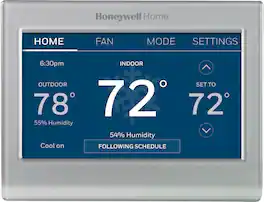
Completely customize your Wi-Fi Smart Color Thermostat to match your lifestyle and decor. The ENERGY STAR® certified smart thermostat lets you choose the temperature, schedule, display color and the devices you use to control it all.
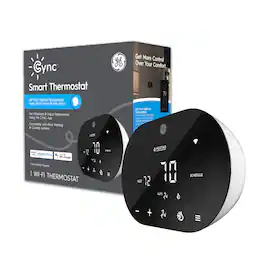
Get more control over your comfort with GE CYNC Smart Thermostat. Preset your ideal temperature around your schedule and adjust it away from home through the CYNC app. Turn up the heat or cool down the room from bed using your voice with your Google Home or Amazon Alexa device (sold separately). Set custom schedules in the CYNC app so you can cool the house down before bed and wake up to a warm room. The CYNC Smart Thermostat is compatible with most residential heating and cooling systems. Add CYNC Room Temperature Sensors (sold separately) and set your preferred temperature in the room you are in during different times of the day.

Nest 3rd Generation Smart Learning Thermostat: Take control of your home's heating and cooling without lifting a finger with this thermostat, which learns your habits and adjusts to automatically regulate your home's temperature based on your schedule. The Nest Leaf feature alerts you when you choose a temperature that's energy efficient.
| Pros for Google - Nest Smart Programmable Wifi Thermostat - Snow | |||
|---|---|---|---|
| Ease of Use, Overall Performance, Installation, Remote Control, Design | Ease of Use, Overall Performance, Installation, Remote Control, Connectivity | There were no pros for this product— | There were no pros for this product— |
| Cons for Google - Nest Smart Programmable Wifi Thermostat - Snow | |||
| Compatibility, Connectivity, Battery Life, User Interface | Compatibility, Size, Temperature Accuracy, App Functionality | There were no cons for this product— | There were no cons for this product— |
Specs
Reviews
Customers are saying
Customers frequently mention the Nest Smart Programmable Wifi Thermostat is easy to use and performs well overall. Installation is straightforward, and the remote control and scheduling features are appreciated, as is the sleek design. However, some customers have experienced connectivity and compatibility issues.
Customer Images
The vast majority of our reviews come from verified purchases. Reviews from customers may include My Best Buy members, employees, and Tech Insider Network members (as tagged). Select reviewers may receive discounted products, promotional considerations or entries into drawings for honest, helpful reviews.
- Rated 4 out of 5 stars
Clean and simple, nothing fancy
Got this to replace a 15 year old thermostat because I wanted to control my thermostat remotely through Google Home. The installation was mostly smooth, except I discovered that my old thermostat's C-Wire was not plugged in on the furnace side after the Home app reported that there was no power on the C-Wire. I was able to get it wired correctly on the furnace and then everything worked fine. I'll also note that I had to plug in a few of the wires on this unit a few times before they were all detected, so it was a little finnicky. This is a simple smart thermostat and doesn't have as many features as the more expensive Nest Thermostat or Ecobee. But, I don't really need any of those features. I just want to change the temperature through Google Assistant. The thermostat was quickly recognised by Google Home and worked flawlessly once I got the wiring issues worked out. I'm not a huge fan of the wall plate that you have to buy at extra cost. It just looks weird how it curves away from the wall. But, it's fine. The Thermostat had a shiny mirror finish to the screen which can have some glare. Also it turns off when you walk away so you can't see the temperature from far away. But you can always just check the Home app on your phone. Overall, this is a fine entry level, simple smart thermostat. I used an energy rebate to get $100 off, so check for that as well.
Posted by AdamR
- Rated 5 out of 5 stars
I got a steal on this
$46 open box is amazing, this thing has already saved me $60+ on my first month of electric bills programming a really good temperature curve that works for my roommate and I. I let it get a warm from 4PM-9PM when energy is most expensive, cool back down before bed, then in middle of the night let it creep back up at 4AM and cool the place heavily at 2PM to 4PM to weather the hot afternoons before peak energy use at, pre-condition the place. This is what works for us and saves a ton of energy compared to letting our AC flip on and off constantly. I also really like that it takes a battery, no stupid "C-Wire" requirement for power, it makes it compatible with every home.
Posted by JohnDoenut
- Rated 4 out of 5 stars
Good Thermostat
Good Product. I do not use the smart features, and it works great as a programmable thermostat
Posted by Hudson