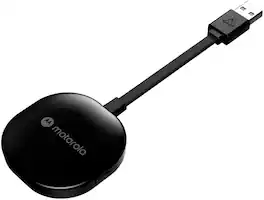
Motorola - Wireless Car Adapter for Android Auto - Black
FREE shipping to
More Buying Options
Related Item

About This Item
- Key Specs
- Model Compatibility: Not Available
- General
- Brand: Motorola
- Model Number: MA1
- Product Name: Wireless Car Adapter for Android Auto
- Color: Black
- Compatibility
- Brand Compatibility: Android
- Model Compatibility: Not Available
- Operating System Compatibility: Android 11, Android 12
- Connectivity
- USB Connectivity: true
- Number Of Connectable Devices: 1
- Bluetooth Enabled: true (The device is capable of communicating with another device via Bluetooth, provided they are within the required range of each other. A Bluetooth-enabled device must also be the same Bluetooth version or higher than the accessory it is intended to pair with.)
- Dimensions
- Product Height: 0.51 inches (The out of box height of the item. Height is measured as the vertical distance from the bottom of the item to the top as it would be primarily used or placed.)
- Product Width: 2.16 inches (The out of box width of the item. Width is measured as the horizontal distance from one side of the item to the other as it would be primarily used or placed.)
- Product Depth: 6.81 inches (The out of box depth of the item. Depth is measured as the distance from the front of the item to the back as it would be primarily used or placed.)
- Product Weight: 0.08 ounces (The out of box weight of the item.)
- Warranty
- Warranty - Parts: 1 year limited
- Warranty - Labor: 1 year limited
- Other
- UPC: 810036773140
The power of your phone on your car screen. Android Auto is a simpler, safer way to use your phone in the car. The MA1 provides a wireless connection to Android Auto on your car display to make it even easier get all your favorite maps, media and messaging apps on your car display. The MA1's requires your vehicle to be enabled with Android Auto.,
- Wireless car adapter for Android Auto: With the Motorola MA1 there are no wires, no fuss, just a seamless connection to Android Auto to safely access the apps that you need and be on your way.
- Fast media transmission: 5 GHz WiFi for wireless Android Auto.
- Seamless connection: The Motorola MA1 eliminates the need to plug your phone into your car’s infotainment system every time you get into the vehicle. This allows for easier access to your favorite navigation, media, and messaging apps.
- Easy set up: Plug the MA1 adapter into your car's existing Android Auto-enabled USB port. Pair your phone to the MA1 adapter using Bluetooth. Enjoy wireless Android Auto.
- Sleek design: The Motorola MA1 sports a low-profile industrial design for drivers who want to experience a seamless wireless connection but do not have the factory-supplied technology that allows them to do so.
- Wireless car adapter for Android Auto: With the Motorola MA1 there are no wires, no fuss, just a seamless connection to Android Auto to safely access the apps that you need and be on your way.
- Fast media transmission: 5 GHz WiFi for wireless Android Auto.
- Seamless connection: The Motorola MA1 eliminates the need to plug your phone into your car’s infotainment system every time you get into the vehicle. This allows for easier access to your favorite navigation, media, and messaging apps.
- Easy set up: Plug the MA1 adapter into your car's existing Android Auto-enabled USB port. Pair your phone to the MA1 adapter using Bluetooth. Enjoy wireless Android Auto.
- Sleek design: The Motorola MA1 sports a low-profile industrial design for drivers who want to experience a seamless wireless connection but do not have the factory-supplied technology that allows them to do so.
Whats Included
- MA1 Wireless Car Adapter for Android Auto
- Gel Pad
- Quick Start Guide
- MA1 Wireless Car Adapter for Android Auto
- Gel Pad
- Quick Start Guide
Product Manuals
Q: Why is a fast media transmission speed important for the MA1?
A: The MA1 utilizes 5 GHz WiFi for fast and efficient wireless Android Auto connectivity.
Q: Does the Motorola MA1 require a specific operating system?
A: Yes, the MA1 adapter is compatible with Android 11 or higher.
Q: What is the design aesthetic of the Motorola MA1?
A: The MA1 has a sleek, low-profile industrial design.
Q: What is the primary function of the Motorola MA1?
A: The Motorola MA1 is a wireless car adapter for Android Auto, allowing you to connect your phone to your car's infotainment system without any wires.
Q: How does the Motorola MA1 connect to my phone?
A: The MA1 adapter pairs with your phone using Bluetooth.
Q: How many devices can connect to the Motorola MA1 simultaneously?
A: The MA1 adapter can connect to one device at a time.
A: Yes. AND you'll follow some simple instructions PRIOR to this being the permanent config. You'll have to connect it WIRED to your phone first, let Android Auto start up, then you'll disconnect your phone, and plug this Motorola device in. In about 20-30 seconds, it will automatically sync up to the system and your phone and you're good to go. Keep in mind that you likely don't want to keep this AA device where you can't get to it without taking apart your dash or center console. If you decide to ADD another device to it, you have that option with the button on the back. In addition, holding down the button on the back can also reset (or factory-reset) the device which could be needed at some point, so I would purchase a short USB extension cable, depending on where the access to the device will be - Mine is 3-ft long. I did that and it pays to NOT have to take your dash apart to get to this device if needed later on.
Q: I just bought this in Jan 2023 and it is no longer working. What should I do?
A: If it's no longer working, contact Motorola's tech support. It has a 1-year warranty, so they should be able to replace it.
Reviews
Customer Images
The vast majority of our reviews come from verified purchases. Reviews from customers may include My Best Buy members, employees, and Tech Insider Network members (as tagged). Select reviewers may receive discounted products, promotional considerations or entries into drawings for honest, helpful reviews.
Compare similar products
The power of your phone on your car screen. Android Auto is a simpler, safer way to use your phone in the car. The MA1 provides a wireless connection to Android Auto on your car display to make it even easier get all your favorite maps, media and messaging apps on your car display. The MA1's requires your vehicle to be enabled with Android Auto.,

Aluratek’s wireless car adapter for Android Auto provides instant Android Auto capability for cars with OEM wired Android Auto without needing to connect your phone to the vehicle’s Android Auto enabled USB port. You can easily enjoy music, navigation, and many more Android Auto features without needing to connect cable.,

Apple CarPlay and Android Auto are intuitive, hands-free technology systems integrated into most cars that connects your smartphone to your car’s infotainment screen. Apple CarPlay and Android Auto gives you access to your favorite mobile apps like virtual assistant, navigation, music, phone and text messaging without having to pick up your smartphone while you drive.To access Apple CarPlay or Android Auto in your vehicle you must connect your smartphone to the USB port on the car’s dashboard via your phone’s charging cable.The Combo Wireless Car Adapter dongle is a newer, smaller form factor that is simple to install and provides instant wire-free connectivity without the hassle of a wired connection. Now you can use your favorite smartphone apps on your car’s infotainment screen wirelessly for a safer driving experience.

The Minix CP86 CarPlay Dongle Stick - a compact, thumb-sized solution that seamlessly converts your wired CarPlay experience into a wireless one. Enjoy effortless Plug and Play functionality, complete with a 90-degree angle adapter to fit seamlessly into various car settings. Equipped with both USB-A to USB-C connectivity, it ensures compatibility with over 800 vehicle models, offering greater stability than other CarPlay systems. Experience fast response times, seamless pairing, and no audio delays for calls, Siri commands, maps, and music. Furthermore, the auto-connect feature re-engages CarPlay every time you enter your vehicle, making your driving experience even more convenient. Upgrade your driving experience with the Minix CP86!
| Pros for Motorola - Wireless Car Adapter for Android Auto - Black | |||
|---|---|---|---|
| Connectivity, Performance, Ease of use, Android Auto, Compatibility | Performance | Connectivity, Overall Performance, Ease of Use, Setup, Size | Connectivity, Ease of Use, Overall Performance |
| Cons for Motorola - Wireless Car Adapter for Android Auto - Black | |||
| Lag, Battery Life, Price, USB | Connectivity | Lag, Audio Quality | There were no cons for this product— |