“How is this "Only @ Best Buy"? What is different or special? Same & error, or different? (I've found this elsewhere by same model & UPC.) (I'm wondering if affects the config/build, abilities, & compatibility, inckluding the Android setup).”
Answer This Question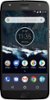
1-1 of 1 Answer
I’m not sure why it is “only @Best Buy”. Possibly standard advertising. It could also mean that the unlocked version is only available through them. My experience: I needed a new phone and my normal carrier didn’t carry 64 gb phones. So I found that Best Buy carried the unlocked version of the Moto X4, and that my carrier could support that phone. After my carrier sent me the sim card for the phone it was fairly straight forwards to set it up. My setup would have been easy if I hadn’t forgotten to download the 2fa codes from my account. With that code you could authenticate your Android while in the middle of transferring your phone number to the new phone, as you don’t have access to your sms until the phone is authenticated. If you don’t have 2FA turned on, then the whole process moves quickly. 2FA is still a good idea just don’t forget to locate the set of external codes that you downloaded either when you set it up or periodically go online to retrieve new ones. I have noticed that it as a few available options that my normal carrier doesn’t usually offer though... like mobile hotspot... And, it doesn’t have much of the “carrier based apps” that you get with a locked phone.... and the ones that are there are because I backed my old phone up into the cloud and restored everything. Otherwise, all expected functions are there.
Sorry, there was a problem. Please try again later.
