Questions & Answers
- Model:
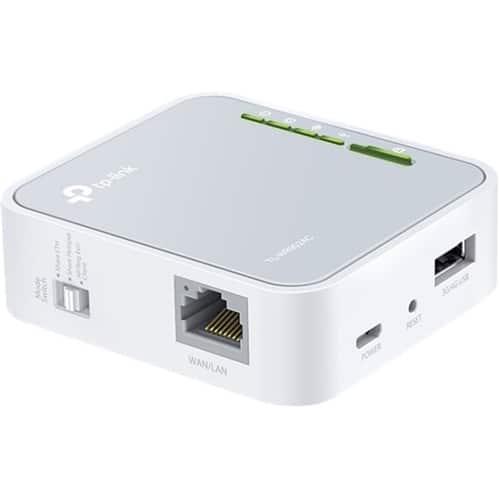
- TL-WR902AC
- |
- SKU:
- 5844810
Q: Questiondo you need to connect it to a cell phone company or the wifi works just like that ?
Asked by Anonymous.
- A:Answer WiFi is fine. It can work as a rage extender too.
Answered by KEM211
Q: QuestionIs this or isn't it a hotspot?
Asked by xJNHx.
- A:Answer This is a travel router, not a hotspot
Answered by KEM211
Q: QuestionIs this compatible with AT&T fiber internet?
Asked by Billybob.
- A:Answer It is not a modem. It works with WiFi or Eathernet
Answered by neoncord
Q: QuestionAm I able to use this device as a bridge between my hotspot and desktop? I only have mobile hotspot (which is wireless) and I need to hardwire my desktop. Will this device work?
Asked by Bellat13.
- A:Answer Yes you can wirelessly connect this router to the hotspot and then hardwire from this to the computer
Answered by KEM211
Q: QuestionDoes this device contain wifi on it already or you need wifi in your home already
Asked by Anonymous.
- A:Answer This does have wifi does not have internet
Answered by neoncord
Q: QuestionCan I connect this with my ps4
Asked by Pukan.
- A:Answer Yes, the router provides both Ethernet and WiFi connectivity for your home's wired and wireless devices. Regards, TP-Link Support
Answered by TPLinkSupport

Q: QuestionIs a portable WIFI or hotspot? Am I able to connect to WIFI on this without any cable services?
Asked by SJW33.
- A:Answer The TL-WR902AC provides portable, versatile WiFi networking capabilities; however it does not provide its own Internet service/connection. Regards, TP-Link Support
Answered by TPLinkSupport

Q: QuestionI do not have WiFi. Is this potable WiFi? I have laptop I need a portables WiFi.
Asked by Gg.
- A:Answer No, this does not provide its own Internet source - you will need an existing source of Internet for connectivity. Regards, TP-Link Support
Answered by TPLinkSupport

Q: QuestionDo I need to pay monthly?
Asked by Bruh.
- A:Answer This is not an internet service. You do not have a monthly fee after purchase.
Answered by neoncord
Q: QuestionDo I have to pay monthly?
Asked by 12345678910111213141516171819twenty2121232425.
- A:Answer No, the TL-WR902AC does not provide its own Internet service. If you require Internet connectivity, the TL-WR902AC needs to be set up in a mode that works in conjunction with your existing Internet source. Regards, TP-Link Support
Answered by TPLinkSupport

Q: QuestionCan I use this in a car?
Asked by Nini.
- A:Answer You can use it anywhere you have power to plug it in and an existing network to connect to. If you are asking if it will provide you with an internet connection where none exists, then the answer is no. This is just a router than connects to an existing internet connection/network through a cable or wi-fi and then shares that connection with other devices using wi-fi.
Answered by Snailkite
Q: QuestionWhere I live the wifi service is not to good.the signals comes and goes. Will this product help the service or will it come and go as the signals in this area?
Asked by Hyunkchoi27.
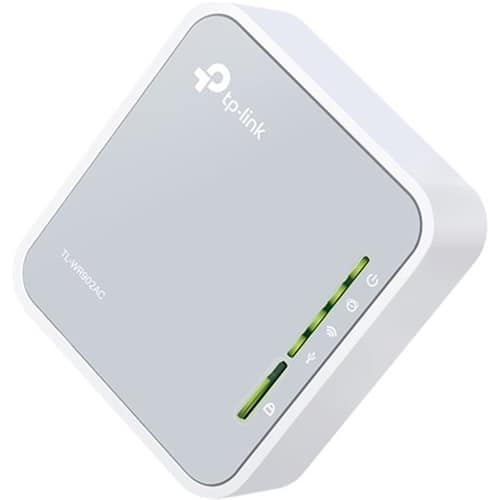
- A:Answer In short - not likely. WiFi extenders work by repeating the signal they receive from the source. If your source signal is poor or intermittent in your area, the extender will receive and repeat said signal if placed in the same area. To benefit from a WiFi extender, ideally, it should be placed in an area where the source signal is sufficiently strong; yet far enough from it to extend its range. Regards, TP-Link Suppor
Answered by TPLinkSupport

Q: QuestionIs this router unlimited wifi???
Asked by Guppy.
- A:Answer The router provides a WiFi signal, but it does not generate its own Internet connection. If you are referring to Internet when you say "WiFi", then no - you must connect the router to an existing Internet source before it can provide WiFi Internet connectivity. Regards, TP-Link Support
Answered by TPLinkSupport

Q: QuestionCan it connect with any phone regardless of the carrier ?
Asked by Anonymous.
- A:Answer Yes. You won’t have any limitations with a carrier. It would not apply in this scenario as you’re connecting devices over standard wired and wireless networking protocols.
Answered by mhonore
Q: QuestionIs this a V1 or V3 version?
Asked by GrandpaR.
- A:Answer Mine is a V3 & just bought it last month. You can upgrade the software if it is an older version.
Answered by neoncord
Q: QuestionIs this internet ? Like I need internet for my smart tv ..so is this actually internet?
Asked by 2smoked.
- A:Answer This is a router.
Answered by CommunityAnswer
Q: QuestionCan I use this on a smart TV
Asked by Anonymous.
- A:Answer Yes, you can use this on a smart TV
Answered by CommunityAnswer
Q: QuestionWill I be able to connect this to my ps4
Asked by YoungLord.
- A:Answer Yes, you can be able to connect this to your PS4.
Answered by CommunityAnswer
Q: QuestionSo when you order it and get it do you just cut it on and it give you a password and you put that in your game,laptop,phones,etc or do you already have to have a WiFi box in the house because I don’t have a WiFi box in my home so can I still use it.
Asked by Ike.
- A:Answer I hope this helps answer your question; The device has a generic password set at the factory. DO NOT KEEP THIS PASSWORD - DO NOT USE THIS PASSWORD BEYOND AS NEEDED TO SET THE DEVICE UP - ALWAYS MAKE SURE YOU ASSIGN THE DEVICE A PASSWORD ONLY YOU KNOW - THE PASSWORD YOU ASSIGN THE DEVICE WILL REPLACE THE PASSWORD THE DEVICE HAS FROM THE FACTORY - IF YOU FORGET THE PASSWORD YOU ASSIGNED TO THE DEVICE, THE FACTORY PASSWORD CAN BE RECOVERED AND PUT BACK INTO SERVICE VIA A HARD RESET OF THE DEVICE - MAKE SURE YOU PROVIDE A NEW PASSWORD FOR THE DEVICE AFTER A HARD RESET. THIS DEVICE REQUIRES ACCESS TO AN INTERNET SERVICE PROVIDER, I.S.P. TO FUNCTION. THE INTERNET SERVICE PROVIDER, I.S.P., PROVIDES THE GATEWAY, OR DOORWAY, TO THE WORLD WIDE WEB AKA; THE INTERNET, AKA; CONNECTED WORLD, AKA; INTERNET OF THINGS. The I.S.P. provides internet service, (SIGNAL), to this doorway, gateway, access to the internet with equipment built to their specifications. The I.S.P. can provide their equipment, or you can purchase your own equipment built to the providers specifications, the equipment allows you to have an account with the I.S.P., and monitored access to the I.S.P.'s internet service signal/feed and data management/dispatch/delivery equipment for which you will pay a monthly fee. All Mainstream Cellular service providers, are also I.S.P.'s and allow you to carry the internet with you via your smartphone. This all said, its my opinion based on personal experience, 98% of the time you do not need, and will have no use for, a device such as this. This device can connect to EXISTING INTERNET SERVICE. INTERNET SERVICE THAT IS ALREADY ESTABLISHED WITH AN I.S.P., AND TO WHOM THE CONNECTED CLIENT OF THIS I.S.P. PAYS A MONTHLY FEE FOR THEIR CONNECTION, LEVEL OF SERVICE, AND POSSIBLY EQUIPMENT. THE ONLY THING THIS DEVICE DOES, IF YOU HAVE THE INTERNET CLIENTS PERMISSION, IS ESTABLISH A WIRELESS RELAY CONNECTION TO THAT CLIENTS WIRELESS BROADCAST I.S.P. CONNECTION. If you travel, use public WIFI, this device will enhance the pre-established WIFI signal to that I.S.P. Clients connection to the internet via that clients pre-established WIFI router's broadcast signal. If you find yourself in a Motel on a single floor plan where the office is the center, two wings of rooms extending to the left and right of center, and the Office is the location of the I.S.P. connection and WIFI Broadcast signal. That signal may not be strong enough in the end rooms to ensure a stable internet connection, this device may be able to reliably connect to that WIFI signal, and amplify it so that your Laptop can connect. The biggest advantage to this device, the reason for having one, it's protection of your computer and the data it holds inside. Simply put, this is the brick wall between all the people using the motels WIFI I.S.P. connection, and your laptop. All those other people have to get through this device, before they can start snooping around inside your laptop. If the existing pre-established WIFI I.S.P. connections is overloaded with too many users, this device can't do anything to fix that. This device is not capable of providing internet in the absence of a PRE-EXISTING fee based I.S.P., internet connection. Even so called free access public WIFI, at the point where that WIFI signal originates, the I.S.P. connection/access, somebody is getting a bill for that service. This device will only connect to wireless internet service if you have the permission and logon credentials to use that service. I use it to communicate with my Vehicle's 3 onboard computer networks. From my home office, to my Vehicle in the driveway, I can reprogram vehicle systems attached to any one of the 12 vehicle computer modules that the vehicle manufacturer allows me to access and manipulate. Primarily convenience, comfort, visibility, and sensors that alert the driver to potential hazards. As well as run various vehicle system diagnostics, and engine diagnostic procedures. As long as I have a signal to my smartphone, I have internet access. Lastly, if you think you can use this to make an end run around mom and dads restrictions regarding your use of the residential WIFI, think again. This device does not hide well, and certainly not in plain sight. Besides, we will most certainly know about it, the problem for you is, how much we know, and for how long we knew it! Hope this helps a little.
Answered by RogerD1959
Top Rated
- $289.00Your price for this item is $289.00$349.99The comparable value for this item is $349.99
- $299.99Your price for this item is $299.99$499.99The comparable value for this item is $499.99
- $192.99Your price for this item is $192.99
- $149.99Your price for this item is $149.99
- $169.99Your price for this item is $169.99$199.99The comparable value for this item is $199.99
- $199.00Your price for this item is $199.00
- $169.99Your price for this item is $169.99$229.99The comparable value for this item is $229.99
- $89.99Your price for this item is $89.99$99.99The comparable value for this item is $99.99
- $299.99Your price for this item is $299.99
- $249.99Your price for this item is $249.99
- $379.99Your price for this item is $379.99
- $499.99Your price for this item is $499.99$599.99The comparable value for this item is $599.99
- $99.99Your price for this item is $99.99
- $149.99Your price for this item is $149.99$179.99The comparable value for this item is $179.99
- $199.99Your price for this item is $199.99
- $349.99Your price for this item is $349.99$399.99The comparable value for this item is $399.99
- $1,999.99Your price for this item is $1,999.99
- $179.99Your price for this item is $179.99$199.99The comparable value for this item is $199.99
- $229.99Your price for this item is $229.99
- $499.99Your price for this item is $499.99