Seagate - Expansion 24TB External USB 3.0 Desktop Hard Drive with Rescue Data Recovery Services - Black
Seagate - Expansion 24TB External USB 3.0 Desktop Hard Drive with Rescue Data Recovery Services - Black
Storage Capacity
24000GBFREE shipping to
- Insignia™ - 2-Bay HDD docking station$49.99

Related Item

Specifications
- Storage Capacity24000 gigabytesStorage Drive TypeHDDInterface(s)USB-C (USB 3.0 Gen1)
- Key Specs
- Storage Capacity: 24000 gigabytes (Measured in megabytes (MB), gigabytes (GB) and terabytes (TB), this is the amount available for storing files, music, movies, photos and more. The total includes the capacity of the hard disk drive and solid state drive if both are included on the computer.)
- Storage Drive Type: HDD (Traditional, mechanical hard disk drives are the most common type of storage because they're relatively inexpensive and offer huge capacities. However, they also generate both noise and heat. Solid state drives, also known as SSDs, are many times faster than hard disk drives and have no moving parts to wear out, but typically offer less capacity for the same price.)
- Interface(s): USB-C (USB 3.0 Gen1) (Refers to the types of connections that devices use to interact and communicate with each other.)
- General
- Brand: Seagate
- Model Number: STKP24000400
- Product Name: Expansion 24TB External USB 3.0 Desktop Hard Drive with Rescue Data Recovery Services
- Color: Black
- Capacity
- Storage Capacity: 24000 gigabytes (Measured in megabytes (MB), gigabytes (GB) and terabytes (TB), this is the amount available for storing files, music, movies, photos and more. The total includes the capacity of the hard disk drive and solid state drive if both are included on the computer.)
- Performance
- Storage Drive Type: HDD (Traditional, mechanical hard disk drives are the most common type of storage because they're relatively inexpensive and offer huge capacities. However, they also generate both noise and heat. Solid state drives, also known as SSDs, are many times faster than hard disk drives and have no moving parts to wear out, but typically offer less capacity for the same price.)
- Compatibility
- Internal Or External: External
- External Hard Drive Type: Desktop (Physical characteristics of the hard drive, including size, weight and how you connect to your device.)
- Interface(s): USB-C (USB 3.0 Gen1) (Refers to the types of connections that devices use to interact and communicate with each other.)
- Minimum System Requirements: Windows® 10 or higher, Mac OS ® X 10.12 or higher operating system
- Features
- Usage: Backup, Everyday computing
- Power
- Power Source: AC adapter
- Dimensions
- Product Height: 4.921 inches (The out of box height of the item. Height is measured as the vertical distance from the bottom of the item to the top as it would be primarily used or placed.)
- Product Width: 1.44 inches (The out of box width of the item. Width is measured as the horizontal distance from one side of the item to the other as it would be primarily used or placed.)
- Product Weight: 2.593 ounces (The out of box weight of the item.)
- Included
- Included Software: Toolkit backup software
- Warranty
- Warranty - Parts: 1 year
- Warranty - Labor: 1 year
- Other
- UPC: 763649182352
Ideal for the home, office, or dorm, Seagate Expansion desktop drive offers enormous desktop storage for photos, movies, music and more. Backing up and transferring content is incredibly easy — just drag and drop! To get set up, connect the USB hard drive to Windows or Mac — no software required. For Apple Time Machine, simply reformat. Included is an 18-inch USB 3.0 cable and 18W power adapter. Plus, Seagate Expansion comes with Rescue Data Recovery Services for additional peace of mind.
- 24tb storage capacity: Offers enormous desktop storage for photos, movies, music and more.
- Rescue Data Recovery Services: Enjoy peace of mind with the included limited warranty and Rescue Data Recovery Services.
- PC and Mac compatible: Automatic recognition of Windows and Mac computers for simple setup (Reformatting required for use with Time Machine).
- USB 3.0 interface: Take advantage of the fast data transfer speeds by connecting to a USB 3.0 port.
- Easy file saving: Drag-and-drop file saving right out of the box.
Whats Included
- Seagate Expansion desktop hard drive, 18-inch (45.72cm) USB 3.0 cable 18W power adapter, Quick start guide, Rescue Data Recovery Services
Product Manuals
Q: How do you save files to this Seagate hard drive?
A: You can save files to this hard drive using a simple drag-and-drop method.
Q: What is the storage capacity of this Seagate hard drive?
A: This Seagate Expansion desktop drive has a storage capacity of 24 terabytes.
Q: Does this Seagate hard drive require any software for setup on Windows?
A: No, this hard drive does not require any software to set up on Windows. It is automatically recognized.
Q: What type of interface does this Seagate hard drive use for data transfer?
A: This hard drive uses a USB 3.0 interface for fast data transfer speeds.
Q: Is this Seagate Expansion drive compatible with Mac computers?
A: Yes, this drive is compatible with Mac computers, but it requires reformatting for use with Time Machine.
A: While I haven't checked the AC adapter side, it comes with about every physical plug converter known to God plate wise (truly!).
Q: WHat is the RPM rating of this drive?
A: 7200 RPM. A review had an image from Crystaldiskinfo.
Compare similar products
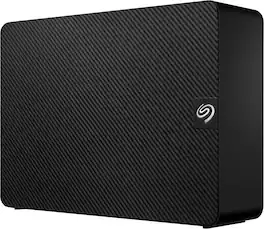
Ideal for the home, office, or dorm, Seagate Expansion desktop drive offers enormous desktop storage for photos, movies, music and more. Backing up and transferring content is incredibly easy — just drag and drop! To get set up, connect the USB hard drive to Windows or Mac — no software required. For Apple Time Machine, simply reformat. Included is an 18-inch USB 3.0 cable and 18W power adapter. Plus, Seagate Expansion comes with Rescue Data Recovery Services for additional peace of mind.
Ideal for the home, office, or dorm, Seagate Expansion desktop drive offers enormous desktop storage for photos, movies, music and more. Backing up and transferring content is incredibly easy — just drag and drop! To get set up, connect the USB hard drive to Windows or Mac — no software required. For Apple Time Machine, simply reformat. Included is an 18-inch USB 3.0 cable and 18W power adapter. Plus, Seagate Expansion comes with Rescue Data Recovery Services for additional peace of mind.
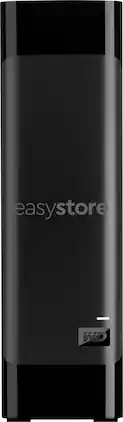
Back up important files securely with this black WD easystore desktop hard drive. The 20TB capacity provides ample space for archives and videos, while the USB 3.0 connectivity provides broad compatibility with most Windows and Mac devices. This WD easystore desktop hard drive features plug-and-play functionality for a quick, simple setup.
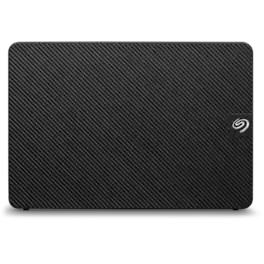
Seagate expansion desktop hard drive is the perfect solution for adding extra storage to your computer. It’s easy to set up and instantly gives you more space to store important files, photos, videos, and documents. Free up space on your internal drive and keep everything organized in one place. With Seagate’s trusted quality, you can rely on this drive to protect your data and simplify your digital life.
| Pros for Seagate - Expansion 24TB External USB 3.0 Desktop Hard Drive with Rescue Data Recovery Services - Black | |||
|---|---|---|---|
| Storage Capacity, Overall Performance, Drive Speed, Ease of Use, Size | Storage Capacity, Overall Performance, Speed, Ease of use, Price | Storage Capacity, Overall Performance, Speed, Price, Ease of use | Overall Performance, Storage Capacity |
| Cons for Seagate - Expansion 24TB External USB 3.0 Desktop Hard Drive with Rescue Data Recovery Services - Black | |||
| Noise Level | Noise | Noise, Heat, Power Button | There were no cons for this product— |
Specs
Reviews
Customers are saying
Customers have good things to say about the Expansion 24TB External Hard Drive, particularly its large storage capacity and overall performance. Users find the drive's speed to be satisfactory and appreciate its reliable connectivity. However, some customers have noted that the drive can be a bit noisy.
Customer Images
The vast majority of our reviews come from verified purchases. Reviews from customers may include My Best Buy members, employees, and Tech Insider Network members (as tagged). Select reviewers may receive discounted products, promotional considerations or entries into drawings for honest, helpful reviews.
- Rated 5 out of 5 stars
Seagate-Expansion 24TB External 3.0 Drive The Best
the Seagate Expansion 34TB External USB 3.0 is a great addition to my other Seagate drives I use every day. It's quiet, fast and I know I can depend on it. For me it was easy to just plug & play. No formatting was needed for my PC. Quick set up and use is a big plus for me. I've had no problems with the drive and it is able to store 25+ years of photos and artwork with a ton of rum to spare. Download speed is fantastic. Love all my Seagate Drives. Never had a problem with any of them. Highly recommend the product to anyone who needs more hard drive space. Super happy with it and you will be too.
WayneMcG Posted
- Rated 5 out of 5 stars
Perfect for home backups!
This external drive is both fast and also massive! Wish I'd purchased one sooner. The largest single drive I've ever had before this was 8TB. I back up our home server and each of our home computers onto this now, and it's perfect. Only con is that it does make some clicking noises when being used. This is not an issue for me at all, but something to note, and probably common with larger platter drives. Love it and will be buying more!
JamesR Posted
- Rated 5 out of 5 stars
So far, so good.
Giving this a try after using WD easystores for a few years because of the sale price for the capacity. CrystalDiskInfo reports ST24000NM002H-3KS133 which is a SATA Exos X24 24TB. CrystalDiskMark seems to be typical. Connected to a Dell Optiplex 5050 SFF. Connection is USB Micro-B. Was formatted exFAT, registered it (Start_Here_Win.exe) before quick reformatting to NTFS. All the easystores came formatted NTFS and I haven't had permission problems. Among other things, gives me more flexibility with the label name. Only had a chance so far to run chkdsk d: /f /r > chkdsk24tb.txt in an elevated command prompt. Took about 29 hours. The majority of the time was spent in Stage 5: Looking for bad, free clusters ... Will run other tests (SMART, etc.) when I get a chance. Has not been noticeably noisy so far. Will see how it sounds with more tests and when copying TBs of data to it. Have it placed on an old case fan on standoffs blowing up to provide air circulation, as I do with the easystores.
TachMN Posted