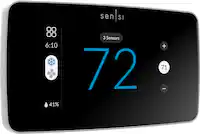
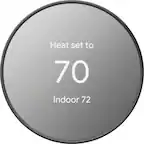
Copeland - Sensi Lite Smart Programmable Wi-Fi Thermostat-Works with Alexa - Black
- Key Specs
- App Compatible: true (The product can be connected to a program or software application on a mobile device, which then receives collected data from the product.)
- Compatible with 24V Cooling: true (Works with low-voltage (24 volts AC) cooling equipment.)
- Compatible with 24V Heating: true (Works with low-voltage (24 volts AC) heating equipment.)
- Works With: Amazon Alexa, Google Home, SmartThings (Compatible with or able to be connected to other smart devices or applications.)
- Voice Assistant Built-in: No (A digital assistant built into the device that uses voice commands to answer questions and control smart devices.)
- Touch Screen: false (Touch-screen devices make navigating more intuitive. Using a touch-screen display, you can do things such as tap to select, hold and drag to move items, swipe to scroll, and pinch to zoom.)
- Multi-Zone Control: true (Thermostats with this feature are able to control temperatures of multiple sections of a home.)
- Auto-Away Mode: false (Thermostats with this feature can automatically adjust heating or cooling to predetermined settings when the area is empty in order to conserve energy.)
- ENERGY STAR Certified: true (Devices carrying the ENERGY STAR service mark, such as computer products and peripherals, kitchen appliances, and other products, generally use 20% to 30% less energy than required by federal standards.)
- General
- Brand: Copeland
- Model Number: ST25
- Product Name: Sensi Lite Smart Programmable Wi-Fi Thermostat-Works with Alexa
- Color: Black
- Dimensions
- Product Height: 3.13 inches (The out of box height of the item. Height is measured as the vertical distance from the bottom of the item to the top as it would be primarily used or placed.)
- Product Width: 5.07 inches (The out of box width of the item. Width is measured as the horizontal distance from one side of the item to the other as it would be primarily used or placed.)
- Product Depth: 0.88 inches (The out of box depth of the item. Depth is measured as the distance from the front of the item to the back as it would be primarily used or placed.)
- Product Weight: 0.3 pounds (The out of box weight of the item.)
- Power
- Wire Configuration: C-wire, 3-Wire
- Power Source: Hard wired, Battery-powered
- Wire Terminals: Y (cooling), G (fan operation), C (common 24v power), W (heating), O (heat pump reversing valve), B (heat pump reversing valve), R (power), E (emergency heat) (The available connections on the device for wiring other devices to it. These are often abbreviated or coded due to the space available on the device.)
- Rechargeable Battery: false
- Battery Size: AAA (The battery size required for operation.)
- Number of Batteries Required: 2
- Number Of Batteries Included: 2
- Voltage Type: Low voltage (The kind of voltage used by the device.)
- Compatibility
- App Compatible: true (The product can be connected to a program or software application on a mobile device, which then receives collected data from the product.)
- Compatible Product(s): Air conditioners, Boilers, Furnaces, Heat pumps
- Compatible with 24V Cooling: true (Works with low-voltage (24 volts AC) cooling equipment.)
- Compatible with 24V Heating: true (Works with low-voltage (24 volts AC) heating equipment.)
- Wireless Connectivity: Wi-Fi, Radio Frequency (RF - 2.4 Ghz/Low Latency) (The manner in which a device sends data to another device over a short distance without the use of wires or cables.)
- Frequency Band: 2.4 GHz (Bands may be grouped into categories such as low- and high-band VHF (Very High Frequency), low- and high-band UHF (Ultra High Frequency), or certain frequency channels (measured in MHz or GHz). Generally, higher frequencies transmit information faster but have shorter range than lower frequencies.)
- Operating System Compatibility: Android, Apple iOS
- Works With: Amazon Alexa, Google Home, SmartThings (Compatible with or able to be connected to other smart devices or applications.)
- Voice Assistant Built-in: No (A digital assistant built into the device that uses voice commands to answer questions and control smart devices.)
- Features
- Programmable Period: 7 day
- 24-Hour Programming: true (Users can configure various temperature settings for different times of the day over a 24-hour period.)
- Touch Screen: false (Touch-screen devices make navigating more intuitive. Using a touch-screen display, you can do things such as tap to select, hold and drag to move items, swipe to scroll, and pinch to zoom.)
- Multi-Zone Control: true (Thermostats with this feature are able to control temperatures of multiple sections of a home.)
- Timer: false
- Auto-Away Mode: false (Thermostats with this feature can automatically adjust heating or cooling to predetermined settings when the area is empty in order to conserve energy.)
- Backlit: false
- Date/Time Display: false
- Remote Sensor Capable: false (Indicates whether the thermostat is compatible with remote sensors. This capability allows for the connection of multiple sensors in order to collect temperature data from several locations in a zone for an overall assessment of the temperature needs.)
- Outdoor Weather Sensor: false
- Periods Per Programmable Day: 8 (Thermostats with programmable days allow users to set desired temperatures for different days of the week. With multiple programmable periods per day, users can further customize the device to schedule temperatures for different times of day based on occupancy, schedule, etc.)
- Detector Type: Temperature, Humidity
- Energy Usage and History: true
- Furnace Filter Change Indicator: true
- Keypad Lock: true
- Certifications Listings & Approvals
- ENERGY STAR Certified: true (Devices carrying the ENERGY STAR service mark, such as computer products and peripherals, kitchen appliances, and other products, generally use 20% to 30% less energy than required by federal standards.)
- Warranty
- Warranty - Parts: 3 years
- Warranty - Labor: 0 Years
- Other
- UPC: 786710568732
Smart thermostats have never been so easy! Give your family’s comfort a smart upgrade. With the Sensi Lite smart thermostat, it’s never been easier. It all starts with a quick and simple installation—no common wire required with most systems. Our top-rated mobile app lets you manage your home’s HVAC from anywhere, anytime. Plus, your usage activity and personal data stays private. That’s the power of putting Sensi’s over 100 years of HVAC experience on your wall.
- Control from anywhere: The top-rated mobile app for Android and iOS devices makes it easy to control your comfort from a smartphone or tablet
- Privacy Protection**: Sensi won’t sell your personal information to third parties or leverage your thermostat activity data for targeting or advertising purposes
- Save about 23% on HVAC Energy***: ENERGY STAR-certified and packed with features that help you save money, including flexible scheduling, geofencing, remote access and usage reports
- Easy DIY Installation: Do it yourself fast with a built-in level and simple step-by-step instructions. Works with the HVAC equipment found in most homes. No common wire (c-wire) required on most systems
- Smart Maintenance: Sensi can help monitor the performance and efficiency of your HVAC system by delivering usage reports, alerts about your equipment, and maintenance reminders like filter replacement
- Backed by HVAC Expertise: More than 100 years of experience with HVAC systems went into the development of Sensi
- Control from anywhere: The top-rated mobile app for Android and iOS devices makes it easy to control your comfort from a smartphone or tablet
- Privacy Protection**: Sensi won’t sell your personal information to third parties or leverage your thermostat activity data for targeting or advertising purposes
- Save about 23% on HVAC Energy***: ENERGY STAR-certified and packed with features that help you save money, including flexible scheduling, geofencing, remote access and usage reports
- Easy DIY Installation: Do it yourself fast with a built-in level and simple step-by-step instructions. Works with the HVAC equipment found in most homes. No common wire (c-wire) required on most systems
- Smart Maintenance: Sensi can help monitor the performance and efficiency of your HVAC system by delivering usage reports, alerts about your equipment, and maintenance reminders like filter replacement
- Backed by HVAC Expertise: More than 100 years of experience with HVAC systems went into the development of Sensi
Whats Included
- Thermostat
- Mounting Hardware
- Installation Guide
- Owner's Manual
- Warranty Booklet
- (2) AAA Batteries
- Thermostat
- Mounting Hardware
- Installation Guide
- Owner's Manual
- Warranty Booklet
- (2) AAA Batteries
Q: How can I control the Sensi Lite thermostat remotely?
A: You can control the Sensi Lite thermostat remotely using the top-rated mobile app for Android and iOS devices.
Q: Does the Sensi Lite thermostat have a touch screen?
A: No, the Sensi Lite thermostat does not have a touch screen.
Q: Is the Sensi Lite thermostat compatible with 24V heating and cooling systems?
A: Yes, the Sensi Lite thermostat is compatible with both 24V heating and cooling systems.
Q: How many programmable periods are there in a day for the Sensi Lite thermostat?
A: The Sensi Lite thermostat allows for 8 programmable periods per day.
Q: What does the Sensi Lite thermostat use to connect to the internet?
A: The Sensi Lite thermostat uses Wi-Fi to connect to the internet.
Q: Can the Sensi Lite thermostat provide information on energy usage?
A: Yes, the Sensi Lite thermostat can provide information on energy usage and history.
Q: Does the Sensi Lite thermostat come with an outdoor sensor?
A: No, the Sensity Lite thermostat does not come with an outdoor sensor.
Q: Can you turn fan on manually?
A: Hi Mickey, thank you for your question about our Sensi Lite Smart Thermostat. Yes, you can set the fan to auto, on, or circulating at the thermostat. Please visit our website to see what steps you need to take to set this up:https://sensi.copeland.com/en-us/support/circulating-fan. You can also set this up in the Sensi app. Thank you again and have a great weekend.