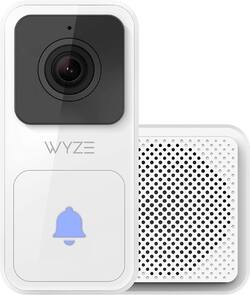
If been using the Wyze Video Doorbell+Chime for about a week now, and so far I feel like I’ve gotten a good idea of how it works. I have been a Wyze user for about 3 years, so I am familiar with their app layout and sort of what to expect from their products. This video doorbell has been on the market for about 1.5 years, so it should be pretty mature from a firmware/support standpoint.
One of the things I like about Wyze is their focus on making their products easy to set up and use while keeping that entry level price point. The doorbell is no different. The app walked me through every installation step, and it was incredibly easy to follow. I had a 24V hardwired doorbell mounted to my siding already in place. I killed power to it, pulled the old one off, added the jumpers to my chime transformer, and installed the new doorbell. I used the included horizontal wedge to get a better view of my front door. Overall, it took about 25min to install it. Once installed I connected it to the app, and I had it hooked up to my WiFi in about 2 minutes. The only issue I ran into came up while pairing the included chime with the doorbell. It said a problem came up, but it still said it completed the pairing. This wasn’t the case, so I had to go into the device settings, hit the accessories tab, select the chime and delete it. I went back through and readded it without any issues this time.
The doorbell comes with basic motion alerts and 12s recording clips without a subscription. You can opt into a subscription at any time. There are 2 tiers – CamPlus Lite and CamPlus. Cam Plus Lite gives you person detection, but you would need to upgrade to CamPlus for package detection, back-to-back, recordings and other features. I have only used the basic plan on my indoor cameras because I didn’t need anything more, but I am considering trying out a subscription to get person and maybe package detection.
The doorbell as an entry level option that has a decent set of features out of the box. It records in HD (1080p) at 20fps and has a somewhat narrow 120° field of view. I thought the image quality during daytime looked decent, but shadows make it a little muddled for things at a distance. That makes sense I guess because its meant to show me up things going on in the immediate area around my front door.
Nighttime video looks pretty good as well – I have no issue distinguishing faces and features at night. Nighttime FPS drops from 20 to 15, so video look a little choppier but still just fine. This brings round a great feature that I like – the light on the front of the doorbell. This acts like a little nightlight when I approach my door, and it helps with the nighttime picture quality immensely. The little light is also super helpful when looking for your keys or doing anything in front of the door at night. I avoid turning my porchlight on during summer because of the bugs, so I am often opening the door in pitch black. This little light changes things for sure.
Accessing the camera is done through the app, and it works well. I also have a Google Hub, but due to the 4:3 orientation it won’t display the video which kind of stinks. My other Wyze cameras display just fine though. Accessing the stream on my phone takes just a few seconds to startup before you can see the live view. Viewing a recorded event takes about the same amount of time to get connected, but you can quickly skip around to different events once a connection is made. If you use motion alerts there’s only a couple seconds before your phone gets pinged. You can define your alert area by selecting a zone for the camera to watch for movement in.
When a person rings the bell the delay is about the same as the motion alert delay. You get a notification that someone is calling from the doorbell and you can answer it – its about 7-10 seconds from the button being pushed to being able to talk. There is about a 1.5 second delay for speech relay – not perfect but similar to other cameras I have used. There is also the option to send a programmed response if you are unable to talk right away.
The included chime works great. You can make it ear splitting loud or tone it way down to just notify a small area. There are 19 different tones to choose from that include classic doorbell sounds, and other more musical or futuristic sounds. You do need to be close by the chime to connect to it and make your changes. There are 8 volume levels – I have mine set on 4 and it already louder than my original bell chime.
The only real issue I have ran into is with the motion alerts. Since I have the basic plan running my motion alerts don’t have any AI filtering. I was getting pinged constantly because the camera was picking up the movement of my plants in the wind that are just off my walkway. Shadows from my tree would also trigger notifications. I had to narrow my notification grid to just the concrete front porch and part of my walkway. This behavior is nothing new to me – my Arlo system was the same way without the subscription to enable AI filtering of movement alerts. With something like CamPlus it should help filter down some of those false positives through person detection, package recognition, etc. As of right now my narrowed detection zone works well and its giving me alerts for the area I care about.
Overall, the Wyze video doorbell works well for me. Its small form factor and easy setup were very appealing as well as its low startup price. The video quality is on par with what I had hoped for, and the chime alert works great. The only downsides I found were with the lack of Nest Hub support, and needed to tailor my motion alert zone to reduce false notifications. Other than that it has worked great for me in the week that I have used it.