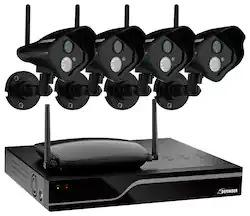
Defender - Pro 4-Channel, 4-Camera Indoor/Outdoor Wireless Security System - Black
- Key Specs
- Camera Resolution: 1024 x 768, 1280 x 1024 (Refers to the number of pixels, both horizontally and vertically, used to capture video/images. The higher the resolution the finer the detail that can be seen.)
- Night Vision: true
- Number Of Cameras Included: 4
- Number Of Channels: 4
- Recording Resolution: 640 x 480 (Refers to the number of pixels, both horizontally and vertically, used to capture video. The higher the resolution the finer the video detail that can be seen.)
- Storage Type: DVR
- Indoor Or Outdoor Use: Indoor, Outdoor (Indicates the appropriate environment product was designed to be used in.)
- Minimum Operating Temperature: 32 degrees fahrenheit (The lowest recommended ambient (surrounding) temperature in which the product can ideally operate stated by the manufacturer. Generally long-term exposure of the product to temperatures less than the minimum can result in ineffective operation.)
- Maximum Operating Temperature: 104 degrees fahrenheit (The highest recommended ambient (surrounding) temperature in which the product can ideally operate stated by the manufacturer. Generally long-term exposure of the product to temperatures more than the maximum can result in ineffective operation.)
- Audio Communication: 1-way (1-way communication devices allow a user to hear detected audio, while 2-way communication adds the ability for a user to talk back through the device.)
- General
- Product Name: Pro 4-Channel, 4-Camera Indoor/Outdoor Wireless Security System
- Brand: Defender
- Model Number: 21305
- Camera
- Camera Resolution: 1024 x 768, 1280 x 1024 (Refers to the number of pixels, both horizontally and vertically, used to capture video/images. The higher the resolution the finer the detail that can be seen.)
- Night Vision: true
- Night Vision Distance: 100 feet
- Number Of Cameras Included: 4
- Day/Night Mode: true (Captures images/video with optimal clarity by automatically adjusting settings to various light levels.)
- Number of IR LEDs: 24 (Quantity of infrared (IR) LED lights for emitting IR light and allowing the camera to detect objects in low light.)
- Image Sensor Type: CMOS (CCD and CMOS are the two main technologies used in image sensors. CCD, the older of the two types, turns analog light signals into digital pixels. This conversion happens without distortion, resulting in high-quality images. Newer CMOS sensors use transistors at each pixel to move electrical charges. CMOS sensors are typically less expensive, but also require more light to create distortion-free images.)
- Compatibility
- Camera Compatibility: Select BNC-equipped cameras
- Operating System Compatibility: Apple iOS, Windows
- Connectivity
- Camera Connectivity: Wireless (Security system cameras can be set up in several ways. Wired cameras require cables for power and footage transmission, while wire-free cameras don't need cables for either. Wireless cameras still require cables for receiving power but are able to transmit footage via a wireless network.)
- Recording & Playback
- Number Of Channels: 4
- Recording Resolution: 640 x 480 (Refers to the number of pixels, both horizontally and vertically, used to capture video. The higher the resolution the finer the video detail that can be seen.)
- Storage
- Storage Type: DVR
- DVR Storage Capacity: 1000 gigabytes
- Performance
- Indoor Or Outdoor Use: Indoor, Outdoor (Indicates the appropriate environment product was designed to be used in.)
- Minimum Operating Temperature: 32 degrees fahrenheit (The lowest recommended ambient (surrounding) temperature in which the product can ideally operate stated by the manufacturer. Generally long-term exposure of the product to temperatures less than the minimum can result in ineffective operation.)
- Maximum Operating Temperature: 104 degrees fahrenheit (The highest recommended ambient (surrounding) temperature in which the product can ideally operate stated by the manufacturer. Generally long-term exposure of the product to temperatures more than the maximum can result in ineffective operation.)
- Features
- Audio Communication: 1-way (1-way communication devices allow a user to hear detected audio, while 2-way communication adds the ability for a user to talk back through the device.)
- Dimension
- Camera Height: 1 inches
- Camera Width: 4.5 inches
- Camera Depth: 5.5 inches
- DVR Height: 8.75 inches
- DVR Width: 11 inches
- DVR Depth: 2 inches
- DVR Weight: 3.4 pounds
- Display
- Camera Color Display: true
- Included
- Camera(s) Included: true
- DVR Included: true
- Monitor Included: false
- Cable(s) Included: true
- Warranty
- Manufacturer's Warranty - Parts: 1 year
- Manufacturer's Warranty - Labor: 1 year
- Other
- UPC: 061783258118
This Defender Pro 21305 wireless security system's 1 Step Remote Viewing software networks the included DVR to your existing Internet connection, letting you remotely view footage from your enabled cell phone, tablet or computer.
- 4 security cameras: Each feature a CMOS sensor and a 3.6mm fixed lens that produce sharp, clear video with 520 TV lines and 640 x 480 resolution. The 48° viewing angle lets you monitor a broad expanse.
- Wide-angle-array IR LED: Enables night vision up to 100'. The LED automatically activates when it gets dark for ease of use.
- Weather-resistant design: Allows placement in an indoor or outdoor location for flexibility.
- 4-channel DVR: Lets you keep an eye on up to 4 different areas simultaneously. The 1TB hard drive stores more than 4 years of footage, and the 2 USB ports let you back up and transfer footage to a USB flash drive or external hard drive.
- ClearVu digital wireless technology: Automatically connects when turned on for hassle-free, cord-free setup. The 750' maximum transmission range ensures a secure, reliable signal.
Whats Included
- 4 PHOENIX Pro indoor/outdoor wireless cameras, 2 PHOENIX receivers, Sentinel Pro 4-channel DVR with 1TB hard drive
- 7 power adapters, 4 video cables with BNC adapters, Ethernet cable
- Remote with batteries, USB mouse, 4 window warning stickers, mounting hardware, software CD
- Owner's manual
A: Hello Schwartzy, thank you for your inquiry. Regretfully, Defender wireless systems require that the cameras be connected to a 120VAC power supply via the included converter/adapter.
Q: Can you use this with wifi and view anywhere with your iPhone And get alerts
A: Hello Luckbell, thank you for your interest in Defender. Yes, you are able to use wifi to remotely view your security systems video feeds and also receiver email alerts (depending on how you have your system settings).
Q: Does each camera need to be plugged into individual power sources?
A: Yes, each camera needs a power source.
A: Hello baha, Thank you for your question. The information is as follows: Camera Power Input - DC12V/1A and the Power Adapter Input -100-240V 60Hz
Q: how do you play back cameras defender pro 4 channel security system
A: Thank you for your question! You can access the playback options by visiting the search menu on your DVR. Once you have searched for existing footage, you will be able to play it with full control.
Q: what are the temperature highs and lows for the outdoor use of these cameras?
A: Hello Snoopy, thank you for your inquiry. These cameras have the following operating temperature range: -10º C ~ 50ºC (14ºF ~ 122ºF).
A: Hello and thank you for your inquiry. While our cameras are weather resistant, we do recommend placement under your roof overhang or someplace similar.
A: Hello Carl, thank you for your inquiry. The optimal transmission range of the cameras is 200'. Please note that range can be affected by the number and type of obstacles between the camera and the receiver. Defender does not have an type of signal booster available. We do not currently offer any covert cameras. For smaller cameras, we do have a wired dome style that would connect to this DVR system.






















