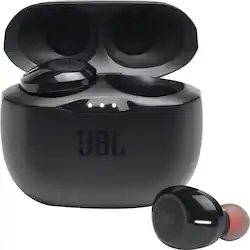
JBL - TUNE125TWS - True Wireless In- ear Headphones - Black
- Key Specs
- Connection Type: Wireless
- Wireless Connectivity: Bluetooth (The manner in which a device sends data to another device over a short distance without the use of wires or cables.)
- True Wireless: true (These headphones not only lack wires between the device and headphones, they also lack wires between the headphones themselves. (true wireless is really only possible with in-ear headphones))
- Built-In Microphone: true
- Carrying Case: true
- Headphone Fit: In-Ear
- Battery Life: 8 hours (Battery life will vary depending on the product configuration, product model, applications loaded on the product, power management setting of the product and the product features used by the customer. As with all batteries, the maximum capacity of this battery will decrease with time and usage.)
- Works With: Amazon Alexa, Google Assistant (Compatible with or able to be connected to other smart devices or applications.)
- Ear Tip Sizes Included: Small, Medium, Large
- General
- Product Name: TUNE125TWS - True Wireless In- ear Headphones
- Brand: JBL
- Ear Tip Sizes Included: Small, Medium, Large
- Model Number: JBLT125TWSBLKAM
- Color: Black
- Audio
- Sound Isolating: false
- Sensitivity: 96 decibels adjusted
- Driver Size: 5.8 millimeters
- Connectivity
- Connection Type: Wireless
- Wireless Connectivity: Bluetooth (The manner in which a device sends data to another device over a short distance without the use of wires or cables.)
- True Wireless: true (These headphones not only lack wires between the device and headphones, they also lack wires between the headphones themselves. (true wireless is really only possible with in-ear headphones))
- Bluetooth Version: 5.0 (The Bluetooth specification formalized by the Bluetooth Special Interest Group. All versions of the Bluetooth standard are backwards compatible with previous versions.)
- Features
- Built-In Microphone: true
- Carrying Case: true
- Bone Conducting Technology: false
- Design
- Headphone Fit: In-Ear
- Power
- Rechargeable: true
- Battery Life: 8 hours (Battery life will vary depending on the product configuration, product model, applications loaded on the product, power management setting of the product and the product features used by the customer. As with all batteries, the maximum capacity of this battery will decrease with time and usage.)
- Charging Accessory Included: Cable, Case
- Battery Life Provided by Charging Case: 24 hours
- Charging Interface(s): USB-C (The connection for transmitting power to charge the device.)
- Compatibility
- Works With: Amazon Alexa, Google Assistant (Compatible with or able to be connected to other smart devices or applications.)
- Warranty
- Manufacturer's Warranty - Parts: 1 Year Limited
- Manufacturer's Warranty - Labor: 1 Year Limited
- Other
- UPC: 050036373999
TUNE125TWS - True Wireless In- ear Headphones
- Feel the bass: JBL has been powering festivals and concerts around the world for decades. Now let JBL bring your own world to life with incredible Pure Bass sound.
- Freedom from wires: Tangled in your bag, caught in your jacket or stuck in your hair, wires can get in your way. Experience total freedom with no cords with the True Wireless JBL TUNE 225TWS earbuds.
- Listen for longer: With up to 25 hours of battery life, you can listen all day and all night. Keep your own private concert going for as long as you can keep up.
- Either ear, or both: Left ear, right ear, both ears? The power of Dual Connect gives you the choice to seamlessly enjoy music or make calls with either one or both buds. And the battery life keeps up with you, as you can keep one earbud charging, while using the other one.
- Fast Pair: You don’t have time to wait around. As soon as you take your earbuds out of the case, they are paired to your Android device in a single tap. After pairing, any other device can be detected even when not paired. Enjoy incredible JBL sound seamlessly.
Whats Included
- TUNE125TWS - True Wireless In- ear Headphones
A: Our JBL Tune 125TWS works with both Android and iOS.
A: Please try to manually pair the earbuds with each other: -You simply click the button on both the left and the right pod 3 times. -Take them out of the charging case first. This forces a new pairing between the pods, and the left pod should automatically pair with the right pod from now on, when you remove both pods from the charging case.
A: In the guide, look for the manual pairing controls. I had success by holding one of the earbuds button for 5 seconds ( while the other is inside of the case ) , after the 5 seconds you'll see a white light - its turned off now. Hold the button for another 5 seconds until you see white AND blue flash, you should then see the earbuds on your computer's Bluetooth list to select and pair the one that says "Audio". This one labeled "Audio" doesn't ask for a pin. If you didn't get the earbud into this pairing mode where the blue AND white light are flashing, the "Audio" device option won't show up.
A: We'd like to work with you directly so we could try some troubleshooting with your JBL Tune 125 TWS. Please reach out to our Customer Support at https://bit.ly/2Jc8wJp.
A: It is recommended to shutdown products that have Bluetooth, that are not being used. They are often the reason for interference.
Q: how do you control the volume?
A: Through whatever device you connect them to.
Q: Do these have noise canceling features?
A: No they do not.












