• Visit our Support Center
  • Check your Order Status
  • Shipping, Delivery & Store Pickup
  • Returns & Exchanges
  • Price Match Guarantee

Order & Purchases

  • Check Order Status
  • Shipping, Delivery & Pickup
  • Returns & Exchanges
  • Price Match Guarantee
  • Product Recalls
  • Trade-In Program
  • Gift Cards

Payment Options

  • My Best Buy® Credit Card
  • Pay Your Bill at Citibank
  • Lease to Own
  • Buy Now, Pay Later
  • Best Buy Business Financing

Support & Services

  • Visit our Support Center
  • Shop with an Expert
  • Schedule a Service
  • Manage an Appointment
  • Protection & Support Plans
  • Haul Away & Recycling
  • Contact Us

Rewards & Membership

  • My Best Buy Memberships
  • View Points & Certificates
  • Member Offers

Partnerships

  • Sell on Best Buy Marketplace
  • Advertise with Us
  • Affiliates: Creators & Publishers
  • Best Buy Health
  • Best Buy Education
  • Best Buy Business
  • Partner+

About Best Buy

  • Corporate Information
  • Careers
  • Corporate Responsibility
  • Sustainability
Sign in or Create Account

Get the latest deals and more.


Best Buy appLearn more ›

Share on YouTubeShare on InstagramShare on TikTokShare on FacebookShare on PinterestShare on X

Best Buy Canada

AccessibilityTerms & ConditionsPrivacyInterest-Based AdsState Privacy RightsHealth Data PrivacyDo Not Sell/Share My Personal InformationLimit Use of My Sensitive Personal InformationTargeted Advertising Opt OutCA Supply Chain Transparency Act
In-store pricing may vary. Prices and offers are subject to change. © 2026 Best Buy. All rights reserved. BEST BUY, the BEST BUY logo, the tag design, and MY BEST BUY are trademarks of Best Buy and its affiliated companies.
$(csi.user.businessName)
Skip to contentGo to Product Search
Fall Football
Top Deals
Deal of the Day
Gift Ideas
My Best Buy Memberships
Credit Cards
Gift Cards
Trade-In
Best Buy Business
Main Content

USB Wi-Fi Adapters

Filters

Skip To Results

Get it fast

Select Store
55423

Brand

Price

to
Best Buy

/

Computers & Tablets

/

Wi-Fi & Networking

/

USB Wi-Fi Adapters

USB Wi-Fi Adapters (6)

Sort by:
  • SAN CITY <<<< PRINCES ...  SYNESS Nos >>>> MAKE >>>> 129 WORLD BEEK StarTech.com CERCA 2139Y7 888, 500 NO 22  0-810-227 TELLS (2 **** But L22H619-0  2136YT AMOJEEN L22H019-0 88

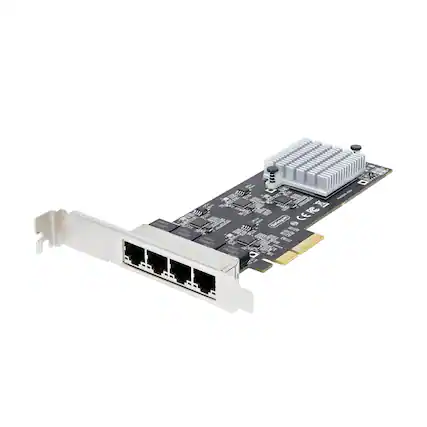
    Startech - 4-Port 2.5GBase-T Ethernet Network Adapter Card - PCIe 2.0 x4 - Black

    Not yet reviewed

    Not yet reviewed
    $234.85$23485

    Get it by Wed, Sep 30 • FREE

  • 52  
105 E484 O-Arb  
19200 2743 PINIS  
DOES 2243 PM this 50 2019  
2R2  
3 CINICINICIDA

    Startech - 10Gigabit Ethernet Card - Black

    Not yet reviewed

    Not yet reviewed
    $369.81$36981

    Get it by Wed, Sep 30 • FREE

  • 100 641
FC
02202

W NB SET CE
H

    Startech - 2-Port PCIe 10Gb Ethernet Network Card, Dual RJ45 10GBase-T/Gigabit, Broadcom BCM57416 Chipset, NIC Card, Windows & Linu - Black

    Not yet reviewed

    Not yet reviewed
    $496.70$49670

    Get it by Tue, Sep 29 • FREE

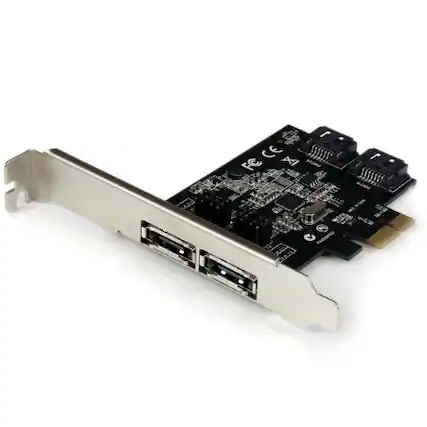
  • Front. Startech - 2 Port PCI Express SATA 6 Gbps eSATA Controller Card - Dual Port PCIe SATA III Card - 2 Int/2 Ext (PEXESAT322I) - Black.

    Startech - 2 Port PCI Express SATA 6 Gbps eSATA Controller Card - Dual Port PCIe SATA III Card - 2 Int/2 Ext (PEXESAT322I) - Black

    Not yet reviewed

    Not yet reviewed
    $59.78$5978

    Get it by Tue, Sep 29 • FREE

Sponsored
Sponsored
Sponsored

Discover what your Wi-Fi network can do

Explore

Using a USB adapter

What is a wireless USB adapter?

A good Wi-Fi connection depends on three things: the modem, which connects to the internet, the router, which creates the Wi-Fi signal, and the Wi-Fi hardware in the device you’re using. A USB Wi-Fi adaptor falls into the third category. It comes in handy if you would like to add Wi-Fi capability to a device that doesn’t have it, if you are having issues with built-in Wi-Fi hardware or if you want to upgrade the Wi-Fi standard on your device.

A wireless USB adapter is easy to use with most laptop computers or desktop computers. If you want to expand the number of USB ports (and the kinds of USB ports) on your device, you can use a USB hub in conjunction with your adapter. If your device does not have the right kind of USB port for your USB Wi-Fi adapter, you can use an adapter cable like an HDMI to USB adaptor or USB C to USB adaptor.

To use ethernet, you can also choose a USB to ethernet port adaptor, and for increased security on Wi-Fi connections, consider a Wi-Fi adapter with data encryption.
Buying a USB adapter

Choosing the right USB Wi-Fi adapter comes down to two things: the right Wi-Fi type and the right connection. The Wi-Fi type refers to the Wi-Fi networking standard. These standards develop with each generation of W-Fi technology. The standard used by your USB Wi-Fi adapter should match the standard used by your router. So, if you have a Wi-Fi 7 router, you will want a Wi-Fi 7 USB adapter. In terms of connection, make sure you have the right port or port adaptor to plug your new dongle into your device.

Easily upgrading your device’s Wi-Fi hardware to the latest Wi-Fi standard is one of the benefits of an adapter. You can improve the Wi-Fi performance of a device with new Wi-Fi tech. You might choose a wireless adaptor because you have been wanting to upgrade your gaming laptop in order to stream high-resolution games.

If you have Wi-Fi dead zones in your home, you could benefit from a Wi-Fi extender or mesh Wi-Fi. Best Buy’s professional home Wi-Fi setup can also help you troubleshoot issues or set up home Wi-Fi.

More options from $496.70
More options from $59.78