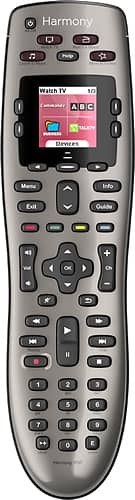
A:AnswerThe simplest solution doesn't involve tech: get yourself a small bag to keep the remote in, one that hangs from the outer aspect of your sofa arm. Attach it with a long enough cord or strap that will sit under the sofa cushions.
A:AnswerAlmost certainly compatible, but you can easily check by going to Logitech support and the My Harmony device compatibility checker... https://support.myharmony.com/en-us/compatibility
A:AnswerNo. The Fire Stick is not and IR device but instead is controlled through Wi-Fi. From the harmony web site: "Harmony remotes without Harmony Hub
As Amazon Fire TV does not accept infrared (IR) commands, Harmony remotes that do not come with a Bluetooth enabled Harmony Hub will be unable to control it."
A:AnswerThe Nest thermostat is accessed thru Wifi (which is radio frequency or RF). This logitech is IR (infra-red) only, which means it can handle 98% of the AV devices out there. This model cannot handle most of the current crop of network streaming devices such as Amazon Fire or Roku. There are a few network streaming devices that can be operated by both RF and IR and then this unit will work.
A:AnswerNot that good on models but I think it would, why don't you check with Logitech before you buy they could sure tell you and they are very nice people to deal with.
A:AnswerThis unfortunately is one of the product line defects of this model. I had two, and they both did the same thing. In addition, if you drop it, it reboots, forcing you to turn off all your devices with native remotes. And eventually the thing just goes schizo. I recommend the 700, and the Geek Squad Protection with it. It's a great remote, but has some major flaws.
A:AnswerI have an Xbox One and can confirm that this remote DOES WORK with Xbox one. You can even program it to "Play Game" and it'll turn on your XBox One, change HDMI inputs, etc.