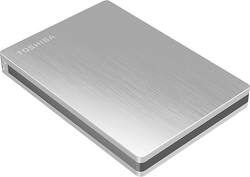
Toshiba - Canvio Slim II 1TB External USB 3.0 Portable Hard Drive - Silver
- Key Specs
- Storage Drive Type: SSD (Traditional, mechanical hard disk drives are the most common type of storage because they're relatively inexpensive and offer huge capacities. However, they also generate both noise and heat. Solid state drives, also known as SSDs, are many times faster than hard disk drives and have no moving parts to wear out, but typically offer less capacity for the same price.)
- Rotational Speed: 5400 revolutions per minute (The rate at which the hard drive spins its platters. The higher the rotational speed, the faster the drive can read and write data.)
- Interface(s): USB 3.0 (Refers to the types of connections that devices use to interact and communicate with each other.)
- General
- Product Name: Canvio Slim II 1TB External USB 3.0 Portable Hard Drive
- Brand: Toshiba
- Model Number: HDTD210XS3E1
- Performance
- Storage Drive Type: SSD (Traditional, mechanical hard disk drives are the most common type of storage because they're relatively inexpensive and offer huge capacities. However, they also generate both noise and heat. Solid state drives, also known as SSDs, are many times faster than hard disk drives and have no moving parts to wear out, but typically offer less capacity for the same price.)
- Rotational Speed: 5400 revolutions per minute (The rate at which the hard drive spins its platters. The higher the rotational speed, the faster the drive can read and write data.)
- Compatibility
- Internal Or External: External
- External Hard Drive Type: Portable (Physical characteristics of the hard drive, including size, weight and how you connect to your device.)
- Interface(s): USB 3.0 (Refers to the types of connections that devices use to interact and communicate with each other.)
- Features
- Security Features: Password Protection
- Memory
- Cache Buffer Size: 8 megabytes (The data capacity of the cache buffer (or disk buffer) that acts as temporary memory for the drive. The cache holds the most recently and frequently used data to save the drive the extra step of pulling it from permanent storage every time it's needed, which helps increase the drive's overall speed.)
- Dimensions
- Product Height: 0.5 inches (The out of box height of the item. Height is measured as the vertical distance from the bottom of the item to the top as it would be primarily used or placed.)
- Product Width: 3 inches (The out of box width of the item. Width is measured as the horizontal distance from one side of the item to the other as it would be primarily used or placed.)
- Product Weight: 5.5 ounces (The out of box weight of the item.)
- Included
- Included Software: NTI Backup Now EZ, NTFS driver for Mac, Pogoplug for PC, HDD Password Tool
- Other
- UPC: 022265426531
Back up your personal files with this Toshiba Canvio Slim II HDTD210XS3E1 portable hard drive, which features a 1TB capacity for expansive storage and NTI Backup Now EZ software for customizable backup options.
- 1TB capacity: Provides ample storage space for your music, photos, movies and other files.
- USB 3.0 interface: For connecting to your computer. Backward compatible with USB 2.0.
- Data transfer rates up to 5 Gbps via USB 3.0 or 480 Mbps via USB 2.0: Ensure speedy response while updating files.
- 8MB cache buffer: Delivers rapid processing speed.
- 5400 rpm speed: Ensures fast performance.
- 12 ms average seek time: Offers quick read and write times.
- NTI Backup Now EZ software: Scans your operating system and recommends the best coverage for your computer, allowing you to easily back up files to the Cloud, the hard drive, your computer or all 3 (compatible with PC only).
- Pogoplug PC software: Lets you access your files remotely from a wide range of Internet-connected devices, such as computers, tablets and mobile phones; also includes 10GB of Cloud storage space.
- Password-protected data encryption: Helps prevent unauthorized access to your data.
- Brushed-aluminum finish: Offers a sleek appearance.
- PC and Mac compatible: For use with your existing computer.
Whats Included
- Toshiba Canvio Slim II 1TB External USB 3.0 Portable Hard Drive
- USB 3.0 cable
- Owner's manual
Q: can i use it on my pc lap top and on my mac desk top
A: Thanks for your question. Toshiba Canvio® Slim II Portable Drives are preformatted NTFS for Windows® 10, 8, 7, and Windows® XP. But the drive comes with a NTFS driver for Mac® allowing you to store and access files from the PC and Mac® without reformatting. However, you must reformat the drive to HFS+ in order to use with Time Machine® software and the preloaded NTI Backup Now EZ software is compatible with Windows® OS only.
Q: Does this drive have to be reformatted to use on a Mac, or is it already formatted for a Mac?
A: Thanks for your question, Dave. Toshiba Canvio® Slim II Portable Drives are preformatted NTFS for Windows® 10, 8, 7, and Windows® XP. But the drive comes with a NTFS driver for Mac® allowing you to store and access files from the PC and Mac® without reformatting. However, you must reformat the drive to HFS+ in order to use with Time Machine® software and the preloaded NTI Backup Now EZ software is compatible with Windows® OS only.
Q: I have an older computer-is this compatible with Windows Vista?
A: I just installed the Toshiba Canvio Slim II 1 TB external 3.0 Portable Hard Drive and my 2008 Dell that runs Windows Vista - it will work great.
Q: Windows Vista to Windows 10
A: This hard drive will work with Windows 10 and Windows Vista.
Q: Can I use it as my main drive?
A: Yes you can. When you boot up your computer hit F12 and youl enter ther boot up menu screen. Use the arrow keys to toggle over to boot. Select the usb drive and then save and exit.
Q: Does the cord provided with this product go from a 3.0 to a 3.0 or a 2.0 to a 3.0?
A: Yes, you can use it for both. when you use it on a 2.0 usb the light on the drive is white. when it is on a 3.0 usb, the light is blue. works on both.
A: undefined
Q: does this do incremental backups after the original full backup?
A: Scheduled back ups with easy setup