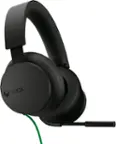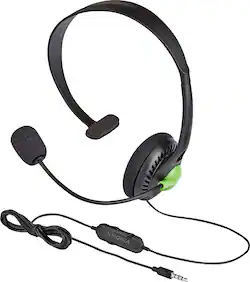
Insignia™ - Wired Chat Headset for Xbox One - Black
- Key Specs
- Connection Type: Wired
- Water Resistant: false (Resists some degree of water penetration.)
- Built-In Microphone: true
- Microphone Features: Adjustable
- Headphone Fit: Over-the-Ear
- Adjustable Headband: true
- Compatible Platform(s): Xbox One
- General
- Brand: Insignia™
- Model Number: NS-GXBOCH101
- Product Name: Wired Chat Headset for Xbox One
- Color: Black
- Audio
- Sound Isolating: false
- Connectivity
- Connection Type: Wired
- Connector Size: 1/8 in. (3.5mm)
- Detachable Cord: false
- Tangle-Resistant Cord: false
- Features
- Water Resistant: false (Resists some degree of water penetration.)
- Built-In Microphone: true
- Microphone Features: Adjustable
- Body Metrics Measured: Not Applicable
- Bone Conducting Technology: false
- Lighting Type: None
- Design
- Headphone Fit: Over-the-Ear
- Style: Gaming
- Adjustable Headband: true
- Foldable Design: false
- Compatibility
- Compatible Platform(s): Xbox One
- Dimensions
- Product Height: 7.09 inches (The out of box height of the item. Height is measured as the vertical distance from the bottom of the item to the top as it would be primarily used or placed.)
- Product Width: 2.56 inches (The out of box width of the item. Width is measured as the horizontal distance from one side of the item to the other as it would be primarily used or placed.)
- Product Length: 5.12 inches (The out of box length of the item. Length is measured as the longest dimension of the item.)
- Product Weight: 0.13 pounds (The out of box weight of the item.)
- Warranty
- Warranty - Parts: 1 year limited
- Warranty - Labor: 1 year limited
- Other
- UPC: 600603195785
Only at Best Buy
When you're on the battlefield, stepping foot on the court or reconnecting with old friends, reliable communication is key. When you add this Insignia™ Chat Headset to your Xbox One gaming arsenal, you'll be able to trash talk opponents, strategize with your teammates and chat with friends easily. The reversible microphone allows a comfortable fit on either your left or right ear. Inline controls let you simply adjust the in-headset volume or mute the microphone entirely for radio silence. Connect this Insignia™ Chat Headset to your compatible 2nd-generation Xbox One wireless controllers to expand your gaming experience.
- Insignia™ Chat Headset: Communicate with your teammates, friends and foes easily in your favorite online games with this
- Insignia™ Chat Headset: Communicate with your teammates, friends and foes easily in your favorite online games with this
Whats Included
- Insignia™ Wired Chat Headset for Xbox One
- Quick setup guide
- Insignia™ Wired Chat Headset for Xbox One
- Quick setup guide
Q: Will this mic work on a desktop computer?
A: Yes. That is what I got them for and it worked great.
Q: Does this head set plug into 2.5 phone plug
A: I use mine with my Android cell phone occasionally and Iit works quite well. I think the standard headphone jack is 3.5 mm and this fits perfectly.
A: You need the Xbox adapter that has both volume controls... The left side controls the game volume that comes through the headset causing the echo effect... The right side controls are for the player char volume.. Turn down the volume on the right side all the way to avoid the echo effect..
Q: Does it work for standard Xbox one controller port
A: This headset doesn't work with a standard controller by itself. You need the Microsoft - Xbox One Stereo Headset Adapter. If you have the adapter it will work. You don't need the adapter if you have an XBox One S controller.
Q: Will this work on a standard cordless phone ? (not cellular phone)
A: Not recommended, the 3.5mm connector pin configuration was designed to match with the Xbox One. It might be not compatible with your cordless phone. David M. - Insignia Support
Q: Does this work with an Xbox One S?
A: Yes, this is the headset for the new Xbox One S version of the controller.
A: Check other controls in the control panel. This happened to my wife and she somehow had a box checked that didn't allow the mic to work in teams/zoom calls. I can't remember what the box was however it was under the control panel settings.