A:AnswerSounds like you are using the remote to navigate through an on screen keyboard, perhaps for netflix or your media/dvr unit? If so, you need to look for the 'shift' on the on screen keyboard, nothing to do with the Harmony remote. The Harmony remote never displays a keyboard or 'log in' on it's lcd display.
A:AnswerYes, it works with a TiVo. I have a TiVo Premiere connected to my receiver which is connected to a smart TV. It knows about TiVo buttons like thumbs up/down, TiVo button, etc. Volume is sent to the receiver. An "Activity" is set to turn on the TV and Receiver (TiVo is always on) and set the receiver to send HDMI out to the TV.
I also have Activities for my DVD player, WII game, MediaPC and Microsoft Wireless Display Adapter to project my Surface, Phones, etc to the TV.
A:Answernot in the method you suggested. this remote controls devices that have an RF signal receiver on them. simply connecting a HDMI cord to your TV wouldn't guarantee playback.
A:AnswerJoe - you need to program the universal remote using the Logitech website. Without doing that, it doesn't know what hardware you have, so that's why Watch TV didn't work.
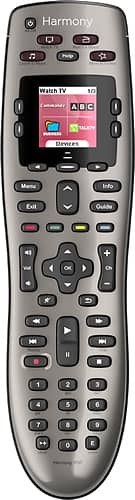
A:AnswerI don't have a Samsung Smart TV, but the top buttons are customizable to a limit. They are designed for activities, for example; "Watch a movie" can be setup so that pushing that button will turn on your TV, your Sound System, your Blu-ray player, and change the inputs for you automatically. You can also customize the LCD menu, as well as make each button below that perform a different function for each independent device.
If you do program the remote to do this, be sure to select the device you are trying to control via the LCD screen. Once you select your device, the remote will automatically change the buttons based on how you customized it. Meaning with a little tweaking in the Logitech program, you can accomplish your goal of using one button to perform two different functions on separate devices. (Without having both the Hub and DTV Guide coming up at the same time)