“where is shift I am at Log in and Password tab and I want to switch from alphabet to numbers but display only shows alphabet. I dont know how what to press for shift so I can use numbers”
Answer This Question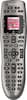
1-3 of 3 Answers
Sounds like you are using the remote to navigate through an on screen keyboard, perhaps for netflix or your media/dvr unit? If so, you need to look for the 'shift' on the on screen keyboard, nothing to do with the Harmony remote. The Harmony remote never displays a keyboard or 'log in' on it's lcd display.
Sorry, there was a problem. Please try again later.You need to add more information. What was the device you were using. This is more of an issue with the TV, Blu-Ray, or Streaming Device (Roku). If you were using the numbers and cycled through ABC, you would just keep clicking the button for it to cycle to uppercase letters. Sometimes there are more buttons on the remote under "Devices". Once you hit "Devices", Choose your device, and scroll through the many pages you see on the 4x4 screen by hitting the small buttons on the bottom of the screen. Just hit Activity when you are done looking.
Sorry, there was a problem. Please try again later.use the key pad on the remote!
Sorry, there was a problem. Please try again later.