A:Answer100%, every button is backlit, as well as the LCD screen. When you pick the remote up or push a button, the backlight comes on. When you set it down or don't push a button for a few seconds (entirely customizable, from 1 second to minutes) the backlight automatically shuts off to conserve battery life.
A:AnswerYes, it does. The reason you didn't see the buttons for Return (back), Recall (previous channel), etc. is because they're symbols. To go back to the previous channel you were watching there's a horizontal arrow that hooks around. In order to see the devices you have to program them into the remote first. Read my review dated 5/1/15. The Geek Squad guy programmed mine for me when they came and hooked-up my new Sony TV. He explained how everything worked and what I could and couldn't do with it and the only thing I can't do is operate my PS3 with the fast forward, reverse buttons, etc. He explained to me that I would have to use the controller, but as far as turning it on and off, i.e., the PS3, I can do that. The remote is seriously the TRUTH!!! As far as the cost is concerned I didn't spend over $60.00 for it, which I think was great. They do have a more expensive one though that may be a bit more sophisticated. I can operate this universal remote exactly like I operated each remote I had for the individual devices I had. It's great and you won't go wrong if you purchase it. Believe me it's worth it especially if you have to use 3 different remotes like I did before I brought this one.
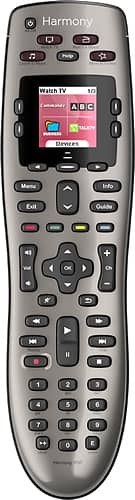
A:AnswerIt remembers what the device settings are for the current activity.
Example: Current activity is watch tv. Your TV is on, the cable box is on, the av receiver is on.
When you select the "play xbox" activity, it will (if programmed appropriately) change the tv input to the right input, turn off the cable box, switch inputs on the av reciever and turn on the xbox.
When you select off, it will then turn the tv off, the reciever off and the xbox...but it will know that the cable box is already off and not toggle the power
A:AnswerThis will work with any Roku device that has infrared remote capability. I have a Roku 2 XS that can use either Roku's Bluetooth remote or a Roku infrared remote. The Harmony 650 works with my 2 XS perfectly. The Harmony 650 will not work with the Roku Stick because it uses an RF (radio frequency) remote. If you look up Roku on Wikipedia, you can see a chart that lists what type of remote capability your particular Roku has.
A:AnswerYes. They say on the controller configuration app to make sure you're running the latest version of the OS on the Apple TV. I am and it controls my Apple TV great. It's nice having one control for everything.
A:AnswerYes, and if you have any more compatibility questions, go to the Logitech website and look for the Harmony remote support. They have a tool that can be used to look up the compatibility of devices with the harmony remote.
A:AnswerI just finished setting up my remote and I also have an Amazon Fire TV Stick. When you are in set up and adding your devices, add in Amazon Fire Stick. Harmony will recognize that you have Amazon Fire set up, but will give you an error that it will not be able to change the channels for you. It will ask you if you still want to add it anyways, say yes. I do not have cable, just Amazon Fire. There is a button at the top of your remote that says watch TV. I programmed that button to turn on my TV and to go to Input 3 where I have my Amazon Fire Stick plugged into. I then have to pick up my Amazon Fire TV remote to turn on the stick and change the channels. My harmony remote turns on the TV and adjusts the volume. I will still have to use two remotes, but it is a heck of a lot better then 6 remotes.
A:AnswerWith this remote, and previous versions batteries make a huge difference.
The other thing is the way you start your activities.
You have to have the remote pointed straight at your devices before you even press the Watch TV button, and then keep the remote pointed for around 5 seconds. This was often a source of frustration until I taught everyone to do that.
If you want a better remote, without having to do that process you should check out the Harmony Smart Control. It comes with a little hockey puck thing that you leave close to your devices. And a little IR Blaster on a cable for devices that it doesn't reach.
A:AnswerAlmost certainly compatible, but you can easily check by going to Logitech support and the My Harmony device compatibility checker... https://support.myharmony.com/en-us/compatibility. Find the model number of your cable box.
A:AnswerThe computer OS compatibility is important because before you can use the remote it has to be programmed over the Internet by the servers at Logitech to handle your specific set of devices. The programming requires that the remote be connected to your PC via a USB cable to receive the programming. Yes, the keys on the 650 are backlit (just looked at mine...). For specific device compatibility, you may have to check the Logitech web site. Hope this helps.
A:AnswerYou can assign your favorite channels to specific buttons. Up to 23, I believe. More detailed information is available on the manufacturer website.















