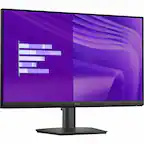
Samsung - 27" S3 (S30GD) IPS LED FHD 100Hz Monitor (HDMI, D-sub) - Black
Samsung - 27" S3 (S30GD) IPS LED FHD 100Hz Monitor (HDMI, D-sub) - Black
Screen Size
27"- Apple - Magic Mouse - Multi-Touch Surface (USB-C) - Wireless - White Multi-Touch Surface$79.99
More Buying Options
Related Item

Highlights
- Key Specs
- Refresh Rate: 100Hz (The number of frames per second the device can produce natively without enhancement. Higher rates help produce smooth, seamless pictures.)
- Maximum Resolution: 1920 x 1080 (Maximum resolution refers to the highest number of pixels that a screen can process and display. Higher resolution signals produce more detailed images.)
- Response Time: 5 milliseconds (The speed at which pixels can change colors is called response time. It is measured in milliseconds (ms).)
- Panel Type: IPS (Technology that affects response time and image quality.)
- Synchronization Technology: Not Applicable (Generally, these technologies allow syncing between a computer/console game's frame rate and the device's refresh rate for a smoother display without tearing.)
- Screen Size: 27 inches (Size of the screen, measured diagonally from corner to corner.)
- Display Connector(s): 1 x HDMI 1.4 (The number and type of connectors used to connect to an external display.)
- General
- Brand: Samsung
- Model Number: LS27D300GANXZA
- Product Name: 27" S3 (S30GD) IPS LED FHD 100Hz Monitor (HDMI, D-sub)
- Color: Black
- Operating System Compatibility: Windows
- Display
- Refresh Rate: 100Hz (The number of frames per second the device can produce natively without enhancement. Higher rates help produce smooth, seamless pictures.)
- Maximum Resolution: 1920 x 1080 (Maximum resolution refers to the highest number of pixels that a screen can process and display. Higher resolution signals produce more detailed images.)
- Native Resolution: 1920 x 1080 (Native resolution of a screen refers to its single, fixed resolution. Sometimes screens must scale an image up or down in order to fit the native resolution. This can cause a loss of resolution or detail.)
- Contrast Ratio: 1000:1 (Measured difference between a displayed image's brightest whites and darkest blacks. The larger the first number, the more detail and color that can be displayed.)
- Response Time: 5 milliseconds (The speed at which pixels can change colors is called response time. It is measured in milliseconds (ms).)
- Display Type: LED
- Panel Type: IPS (Technology that affects response time and image quality.)
- Synchronization Technology: Not Applicable (Generally, these technologies allow syncing between a computer/console game's frame rate and the device's refresh rate for a smoother display without tearing.)
- Aspect Ratio: 16:9 (The measurement of the width of a screen compared to the height of a screen, expressed as a ratio.)
- Curved Screen: false
- Brightness: 250 candela per square meter (A measure of the total light output.)
- Screen Size: 27 inches (Size of the screen, measured diagonally from corner to corner.)
- High Dynamic Range (HDR): false (An HDR-compatible 4K TV or other HDR-compatible product displays HDR video content when it's available from sources like 4K Ultra HD Blu-ray Discs and 4K streaming services.)
- Horizontal Viewing Angle: 178 degrees (The maximum angle at which the display can be viewed with acceptable visual performance from either side.)
- Vertical Viewing Angle: 178 degrees (The maximum angle at which the display can be viewed with acceptable visual performance from above or below.)
- Touch Screen: false (Touch-screen devices make navigating more intuitive. Using a touch-screen display, you can do things such as tap to select, hold and drag to move items, swipe to scroll, and pinch to zoom.)
- On-Screen Display Languages: English (The available language options for displayed text.)
- Color Gamut (NTSC): 72 percent
- Connectivity
- Number of DisplayPort Inputs (Total): 0
- Number of HDMI Inputs (Total): 1
- Number of Mini DisplayPort Inputs: 1
- Number of Thunderbolt Ports (Total): 0
- Display Connector(s): 1 x HDMI 1.4 (The number and type of connectors used to connect to an external display.)
- Number of USB Ports (Total): 0
- USB Ports: None (The number and type of USB ports the product has.)
- Headphone Jack: false (The device features an interface that allows for the connection of headphones.)
- Compatibility
- Wall Mountable: true (The product is able to be secured to a wall. Some products are designed ready to mount, while others may require additional hardware/accessories for installation.)
- VESA Wall Mount Standard: 100mm x 100mm (VESA wall mount standards refer to the spacing of screw holes built into a TV in order to fit with standard TV wall mounts. These standards are implemented into most TVs and monitors.)
- Voice Assistant Built-in: Not Applicable (A digital assistant built into the device that uses voice commands to answer questions and control smart devices.)
- Features
- Tiltable: true
- Adjustable Stand Height: false
- Anti-Glare: false (Product has features, such as a matte finish, that reduce the likelihood for screen glare.)
- Built-In Webcam: false
- Integrated Speaker(s): false
- Smart Capable: false (Smart, or smart-capable devices are able to connect directly to your home network in order to stream content from the Internet, run Internet-based apps, or connect to other smart devices.)
- Dimensions
- Product Height With Stand: 18.5 inches
- Product Height Without Stand: 14.2 inches
- Product Width: 24.1 inches (The out of box width of the item. Width is measured as the horizontal distance from one side of the item to the other as it would be primarily used or placed.)
- Product Depth (With Stand): 7.9 inches
- Product Depth Without Stand: 1.4 inches
- Product Weight: 6.4 pounds (The out of box weight of the item.)
- Stand Included: true
- Power
- Power Consumption: 25 watts
- Certifications Listings & Approvals
- ENERGY STAR Certified: false (Devices carrying the ENERGY STAR service mark, such as computer products and peripherals, kitchen appliances, and other products, generally use 20% to 30% less energy than required by federal standards.)
- EPEAT Qualified: false (The Electronic Product Environmental Assessment Tool (EPEAT) was designed to provide an environmental assessment tool for purchasers. In order to qualify for EPEAT, a product must meet all 23 required criteria.)
- Warranty
- Warranty - Parts: 1 year
- Warranty - Labor: 1 year
- Other
- UPC: 887276903217
Samsung’s 27" S3 Monitor enables smooth performance, heightened productivity, and greater comfort. The IPS Panel delivers a stunning color experience across the entire display with less color washing, offering clarity from any viewpoint so tones stay consistent and accurate. The 100Hz refresh rate reduces lag and motion blur while playing games, watching videos, or working. Game Picture Mode with optimizable game settings enables instant adjustment of color and image contrast. Eye Saver Mode protects vision, reduces blue light and screen flicker, and extends comfort even during long sessions. The ergonomic super-slim design is a stylish addition to any environment, while ultra-thin border bezels make the most of screen space. Multiple connectivity enables devices to be plugged straight into the monitor for increased flexibility.
- IPS Panel: Stay in the action when playing games, watching videos, or working on creative projects. The 100Hz refresh rate reduces lag and motion blur so you don't miss a thing in fast-paced moments.¹
- 100Hz Refresh Rate: Experience stunning colors across the entire display with the IPS panel. Colors remain bright and clear across the screen, even when you change angles. Tones and shades are represented consistently and beautifully with less color washing.
- Game Mode: Gain a competitive edge with optimizable game settings. Color and image contrast can be instantly adjusted to see scenes more clearly and spot enemies hiding in the dark, while Game Mode adjusts any game to fill your screen with every detail in view.
- Eye Saver Mode & Less Screen Flickering: Protect your vision and stay comfortable, even during long sessions. Stay focused on your work with reduced blue light and screen flicker.
- Super-Slim Design: Featuring a super-slim design with ultra-thin border bezels, this monitor enhances any setup with a sleek, modern look. Enjoy a lightweight and stylish addition to any environment.
- Multiple Connectivity: Plug devices straight into your monitor for increased flexibility, making your computing environment even more convenient.
Whats Included
- Power Cable
- HDMI Cable
Disclaimers
- ¹Default refresh rate is set to 60Hz, and may be adjusted to 100Hz in the monitor's settings.
Q: How does the Eye Saver Mode on this Samsung monitor work?
A: Eye Saver Mode reduces blue light and screen flicker to protect your vision and reduce eye strain.
Q: How does the Game Mode on this Samsung monitor enhance gaming experience?
A: The Game Mode optimizes game settings, allowing for instant adjustment of color and image contrast for clearer visuals and enhanced detail, giving you a competitive edge.
Q: What is the response time of this Samsung monitor?
A: This monitor has a response time of 5 milliseconds.
Q: Can I connect devices directly to this Samsung monitor?
A: Yes, this monitor offers multiple connectivity options for connecting devices directly.
Q: What is the benefit of the 100Hz refresh rate on this Samsung monitor?
A: The 100Hz refresh rate reduces lag and motion blur, ensuring smoother visuals, especially during fast-paced games or videos.
Q: What type of panel does this Samsung monitor use?
A: This Samsung monitor uses an IPS panel.
Q: Does this Samsung monitor have built-in speakers?
A: No, this monitor does not have built-in speakers.
Q: Does it come with an HDMI cable?
A: Yes.
Compare similar products
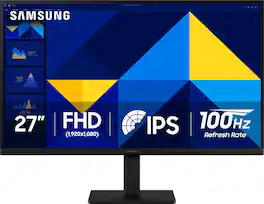
Samsung’s 27" S3 Monitor enables smooth performance, heightened productivity, and greater comfort. The IPS Panel delivers a stunning color experience across the entire display with less color washing, offering clarity from any viewpoint so tones stay consistent and accurate. The 100Hz refresh rate reduces lag and motion blur while playing games, watching videos, or working. Game Picture Mode with optimizable game settings enables instant adjustment of color and image contrast. Eye Saver Mode protects vision, reduces blue light and screen flicker, and extends comfort even during long sessions. The ergonomic super-slim design is a stylish addition to any environment, while ultra-thin border bezels make the most of screen space. Multiple connectivity enables devices to be plugged straight into the monitor for increased flexibility.
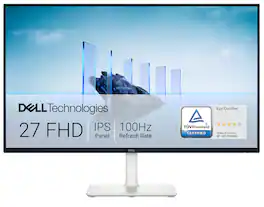
Dell 27 Monitor - S2725H. Made to be seen. And heard. With clear FHD resolution, high 100Hz refresh rate, integrated dual 5W speakers and subtle texture on the back inspired by Japanese sand raking, any activity becomes an immersive experience.
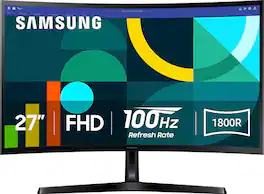
Samsung's 27" Essential S3 Curved Monitor creates an immersive viewing experience for your everyday use. The 1800R curved screen wraps more closely around the field of vision for a wider view which enhances depth perception and minimizes peripheral distractions. The 100Hz refresh rate reduces lag and motion blur to stay in the action when playing games, watching videos, or working on creative projects. Game Mode offers instant adjustment of color and image contrast, filling the screen with a clear view of every detail. Advanced eye comfort technology certified by TÜV reduces eye strain by minimizing blue light and decreasing irritating screen flicker. HDMI and D-sub enable devices to be plugged straight into the monitor for greater connectivity and convenience.

The 27" Full HD (1920 x 1080) IPS monitor delivers sharp, vibrant visuals from virtually any viewing angle—ideal for working ...and even playing from home. Whether you're tackling emails, browsing the web, or managing projects, this monitor helps you stay clear, focused, and productive. The display's ultra-slim bezels and 3-side virtually borderless design bring a clean, modern look to any home office setup. The sleek stand adds a floating feel that’s perfect for dual monitor workstations or minimal desk spaces. A 120Hz refresh rate ensures smoother scrolling and frame transitions, while 1ms Motion Blur Reduction (MBR) keeps fast-moving visuals crisp—great for multitasking or after-hours gaming. With HDR10 support and up to 99% sRGB color gamut coverage, this LG monitor delivers vivid, accurate color across everything from video calls to creative projects. Whether you're outfitting a new home office or upgrading your current work-from-home setup, the LG 27U41YA-B monitor offers the clarity, speed, and style you need to stay productive and inspired.
| Pros for Samsung - 27" S3 (S30GD) IPS LED FHD 100Hz Monitor (HDMI, D-sub) - Black | |||
|---|---|---|---|
| Overall Performance, Screen Size, Design, Resolution, Eye Comfort | Screen Size, Refresh Rate, Sound Quality, Ease of Use, Cable Management | Overall Performance, Refresh Rate, Size, Screen Curvature, Setup | Overall Performance, Size, Refresh Rate, Design, Resolution |
| Cons for Samsung - 27" S3 (S30GD) IPS LED FHD 100Hz Monitor (HDMI, D-sub) - Black | |||
| Power Button, Speakers | There were no cons for this product— | Adjustability, Stand Quality | Adjustability, Brightness |
Specs
Reviews
Customers are saying
Customers are pleased with the overall performance and large screen size of the 27" S3 monitor. Users find the resolution excellent for multi-screen setups and appreciate the ease of connectivity. The monitor's sleek design is also a plus for many users. However, some customers have noted that the power button can be difficult to access.
Customer Images
The vast majority of our reviews come from verified purchases. Reviews from customers may include My Best Buy members, employees, and Tech Insider Network members (as tagged). Select reviewers may receive discounted products, promotional considerations or entries into drawings for honest, helpful reviews.
- Rated 5 out of 5 stars
Great purchase and customer service
I purchased this monitor as a second screen to my work laptop for working from home. I do a lot with spreadsheets and needed something decently sized. This monitor has been perfect for my needs. I was also happy with the price of it. Strongly recommend, just warn that if you are buying open box, verify it has the power cord before leaving the store! I tried to buy open box twice with no power cord, and Samsung monitors don’t use the ordinary cord, it was not even available to purchase in store. I was lucky to have explained my problem to a manager who went above and beyond to make things right, ultimately swapping my open box monitor for a brand new monitor at no charge, in order to ensure I had a useable power cord that day. Very impressive customer service!
AmandaL Posted
- Rated 4 out of 5 stars
Samsung 27'' S3 monitor
I recently purchased the Samsung 27" S3 (S30GD) IPS LED FHD 100Hz Monitor from Best Buy, and I’m extremely happy with it. The picture quality is crisp, vibrant, and clear thanks to the IPS panel, which makes colors look natural from any angle. The 100Hz refresh rate is a big step up from standard 60Hz — scrolling feels smoother, and games run more fluidly with less motion blur. Setup was quick and easy, with both HDMI and D-sub connections available. The slim, modern design with thin bezels looks great on my desk, and it doesn’t take up too much space. I also appreciate that it has good eye comfort features for longer use, which makes it comfortable for both work and entertainment. For the price, this monitor delivers excellent performance and value. Whether you’re using it for everyday tasks, streaming, or light gaming, it’s a solid choice. I highly recommend it to anyone looking for a reliable and stylish monitor. Take notice that this monitor does not have speakers
DaveC Posted
- Rated 5 out of 5 stars
I Can See !!!!
I used this as a flush wall mounted monitor for my home recording studio, needed particularly due to Cubase. It works really well. Cubase has an over abundance of tiny little screen areas that, on a smaller monitor, are simply too tiny to see, let alone mouse over and click on. I also love that quiescent power consumption is SUPER LOW. One improvement for wall mounting would be to have downward facing jacks for ALL connectors (power and video). The HDMI is down facing, but the power jack points at the wall. Not a show stopper. Overall, this monitor is great !!
Droidiphile Posted