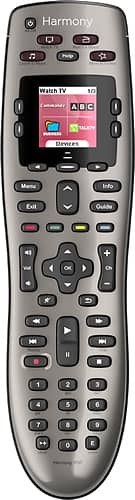
A:AnswerYou don't provide much detail about your TV or or PVR/DVR configuration, but in general, you can use the Logitech MyHarmony setup software to "teach" the 650 any button on your device's original remote, and you can use the MyHarmony software to create custom command sequences that you can then map to any button on the 650. For example, I created a custom command sequence on the 650 to jump to the Plex channel on my Roku box with a single press of a button. Hope this helps.
A:AnswerWorks just fine with mine and even added a feature Comcast said you can't do. DirectTv DVR's have a feature that rather than fast fwd or rewind, you can skip fwd 15 sec intervals and skip backward 10 sec intervals. With my Logitech remote I tried it with the Comcast DVR and it works. Great for skipping through commercials.
A:AnswerIt works with EVERYTHING!
I got it to work with ancient surround sound equipment that I didn't think even came with remotes. It will work and make it easy too.
A:AnswerYes, the Harmony Smart Control.
It has a little device that is a bit wider than a hockey puck. You just leave it in front of your cable box and the remote you have would connect to it through bluetooth. You can change channels and volume without line of site. Through walls, upstairs... Pretty good range.
Bonus, it has a smartphone / tablet app that you can use at the same time. Its smart enough to know what activity you are on regardless of who turned it on or off. Great for when you are too lazy to get the remote from across the room once you already sat down :)
A:AnswerI do not own a Harmony 700, but if it uses the same software, registration, and setup as the 650 it should all carry over during initial setup. I returned the Harmony Smart control and when I set up the 650 everything simply transferred over.
A:AnswerProbably not. If you use the HELP button right after you hit the All Off and run through the process, after about the third time (you can do this by doing it multiple times in sequence) it will realize there is an issue and start a different "FIX IT" process and try to get everything back in order. Good luck.
A:AnswerYou can copy most of the devices and commands from within the Logitech Harmony software though specific added commands and changes to the title pages may have to be reprogrammed. However, if you did not set up a Harmony account, I would recommend you do so, download the software and see whether you can synch your original device to it before you decide whether you need to have it done by someone else. The software is not that difficult to use once you know the model numbers of your devices. If you don't have the original remotes in case a command is missing, you can copy it from your original Harmony just like you would from the remote.
A:AnswerRan into the same issue at first. If you always leave your cable box on, then you need to set up your remote to leave the cable box alone in the power on/of selection when using the My Harmony app. If it's just turning The Tv on and turning the cable box off then you can select your cable box on the led screen. Click the button to enter it's folder, then toggle the power on/off button from there. The issue I had which it sounds like you are having was that one was already on while the other was off. So when you toggle both with the on/off shortcut it's turning one on and one off. So you need to either set up your remote to leave one alone or toggle the on/off manually from the remotes functions.
A:Answeraccording to the device compatibility web page (https://support.myharmony.com/en-us/compatibility), yes. even if it was not listed (which it is) you can teach it the IR commands using the devices original remote (see https://support.myharmony.com/en-us/adding-a-device-thats-not-found-in-the-harmony-database).
A:AnswerYes. That is the system I'm using and the remote works great with it. In fact, the Bose remote, being so tiny, is the main reason I bought this remote. I couldn't find the Bose remote....
A:AnswerMine controls 8 devices. From reading literature, I think it used to control 5 devices with the same model number, but was upgraded to control 8 devices. There are four dedicated buttons above the screen, then the screen itself displays the names of the remaining devices and you control them by selecting the buttons on either side of the screen.
A:AnswerIt will NOT work with the Amazon Fire. You'll need either the Harmony Ultimate or the Harmony Ultimate Home. The Harmony Ultimate One will NOT work.
support.myharmony.com/en/compatibility
A:AnswerAt this point, no. Logitech doesn't support it and there is not web app to support the programming. It WILL be possible via Crostini (linux on Chromebook) once USB devices can be seen and manipulated using tools like Concordance and Congruity but as of now there is no way to program a Harmony remote via ChromeOS. Harmony devices that us the Hub can be programmed via Android apps so that could work, but not the classic remotes.