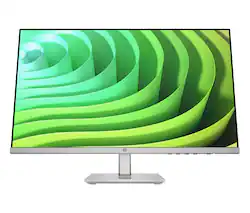
HP - 24" IPS LED FHD FreeSync Monitor with Adjustable Height (HDMI, VGA) - Silver & Black
- Key Specs
- Refresh Rate: 75Hz (The number of frames per second the device can produce natively without enhancement. Higher rates help produce smooth, seamless pictures.)
- Maximum Resolution: 1920 x 1080 (Maximum resolution refers to the highest number of pixels that a screen can process and display. Higher resolution signals produce more detailed images.)
- Response Time: 5 milliseconds (The speed at which pixels can change colors is called response time. It is measured in milliseconds (ms).)
- Panel Type: IPS (Technology that affects response time and image quality.)
- Synchronization Technology: FreeSync (AMD Adaptive Sync) (Generally, these technologies allow syncing between a computer/console game's frame rate and the device's refresh rate for a smoother display without tearing.)
- Screen Size: 23.8 inches (Size of the screen, measured diagonally from corner to corner.)
- Display Connector(s): 1 x VGA (The number and type of connectors used to connect to an external display.)
- General
- Brand: HP
- Model Number: M24h
- Product Name: 24" IPS LED FHD FreeSync Monitor with Adjustable Height (HDMI, VGA)
- Color: Silver & Black
- Operating System Compatibility: Windows, Chrome, Mac
- Display
- Refresh Rate: 75Hz (The number of frames per second the device can produce natively without enhancement. Higher rates help produce smooth, seamless pictures.)
- Maximum Resolution: 1920 x 1080 (Maximum resolution refers to the highest number of pixels that a screen can process and display. Higher resolution signals produce more detailed images.)
- Contrast Ratio: 10,000,000:1 (Measured difference between a displayed image's brightest whites and darkest blacks. The larger the first number, the more detail and color that can be displayed.)
- Response Time: 5 milliseconds (The speed at which pixels can change colors is called response time. It is measured in milliseconds (ms).)
- Display Type: LED
- Panel Type: IPS (Technology that affects response time and image quality.)
- Synchronization Technology: FreeSync (AMD Adaptive Sync) (Generally, these technologies allow syncing between a computer/console game's frame rate and the device's refresh rate for a smoother display without tearing.)
- Aspect Ratio: 16:9 (The measurement of the width of a screen compared to the height of a screen, expressed as a ratio.)
- Curved Screen: false
- Brightness: 300 candela per square meter (A measure of the total light output.)
- Screen Size: 23.8 inches (Size of the screen, measured diagonally from corner to corner.)
- High Dynamic Range (HDR): false (An HDR-compatible 4K TV or other HDR-compatible product displays HDR video content when it's available from sources like 4K Ultra HD Blu-ray Discs and 4K streaming services.)
- Horizontal Viewing Angle: 178 degrees (The maximum angle at which the display can be viewed with acceptable visual performance from either side.)
- Vertical Viewing Angle: 178 degrees (The maximum angle at which the display can be viewed with acceptable visual performance from above or below.)
- On-Screen Display Languages: 10 (English, Spanish, German, French, Italian, Netherlands, Portuguese, Japanese, T-Chinese and S-Chinese) (The available language options for displayed text.)
- Connectivity
- Number of HDMI Inputs (Total): 1
- Display Connector(s): 1 x VGA (The number and type of connectors used to connect to an external display.)
- Headphone Jack: false (The device features an interface that allows for the connection of headphones.)
- Compatibility
- Wall Mountable: false (The product is able to be secured to a wall. Some products are designed ready to mount, while others may require additional hardware/accessories for installation.)
- Features
- Tiltable: true
- Adjustable Stand Height: true
- Anti-Glare: true (Product has features, such as a matte finish, that reduce the likelihood for screen glare.)
- Eye Relief Features: Low blue light, Flicker free, Anti-glare
- Built-In Webcam: false
- Integrated Speaker(s): false
- Dimensions
- Product Height With Stand: 18.1 inches
- Product Width: 21.09 inches (The out of box width of the item. Width is measured as the horizontal distance from one side of the item to the other as it would be primarily used or placed.)
- Product Depth (With Stand): 7.96 inches
- Product Weight: 7.61 pounds (The out of box weight of the item.)
- Stand Included: true
- Power
- Power Consumption: 25 watts
- Certifications Listings & Approvals
- ENERGY STAR Certified: true (Devices carrying the ENERGY STAR service mark, such as computer products and peripherals, kitchen appliances, and other products, generally use 20% to 30% less energy than required by federal standards.)
- EPEAT Qualified: true (The Electronic Product Environmental Assessment Tool (EPEAT) was designed to provide an environmental assessment tool for purchasers. In order to qualify for EPEAT, a product must meet all 23 required criteria.)
- EPEAT Level: Gold (The Electronic Product Environmental Assessment Tool (EPEAT) was designed to provide an environmental assessment tool for purchasers. In order to qualify for EPEAT, a product must meet all 23 required criteria. Products are rated Bronze, Silver or Gold based on how many of 28 optional criteria they meet (below 50%, 50%, 75%).)
- Other
- UPC: 197029465665
Designed to help you feel your best, do your best with the HP M24h FHD Monitor. You do you with elevated comfort and crisp visuals—all in a mindful form factor for an inspo-worthy desk.
- Height and tilt adjustability: Two-way adjustability for the perfect viewing angle. Adjust the stand with 100mm height and tilt to seamlessly fit your back and neck.
- Ergonomic setup guide: Help improve your posture with the Ergonomic Setup Guide.
- HP Eye Ease with Eyesafe certification: HP Eye Ease with Eyesafe Certification is an always-on, low-blue light filter that helps keep your eyes comfortable throughout the day by reducing blue light without impacting color accuracy or adding a yellow color shift.
- Full HD display: Be prepared for brilliant visuals and crisp images with the unforgettable quality of this stunning FHD / 1080p display.
- 99% sRGB color: With 99% sRGB color gamut, this HP display provides ideal color reproduction with minimal effort. Perfect for photos, videos, and your creative pursuits. For all your pursuits, enjoy deeper, more accurate colors
- 75Hz refresh rate: Experience smooth, life-like video and clear detail with a 75Hz refresh rate that provides fluid movement from frame to frame.
- AMD FreeSync technology: See and feel the difference of fluid, responsive gameplay. By synchronizing the refresh rate (75Hz) with your GPU, AMD FreeSync makes display stutter, input lag, and screen tears ancient history.
- HP Display Center: Customize your display with easy, intuitive HP Display Center software that lets you tailor your settings, partition screens, and even dim the screen—all through the host PC.
- Integrated cable management: Cord and wire pass-through located on the display stand reduces cord-clutter and helps keep your workspace clean and organized.
- Crafted for all of us: Express yourself with a monitor that helps protect our shared future and adorns your desk. This display contains 85% recycled ITE plastics and 5% ocean-bound plastics, all while shipping in 100% recyclable packaging.
Whats Included
- HP M24h FHD Monitor
- A/C power cord
- 25W power adapter
- HDMI cable
- Warranty card
- Document kit
Product Manuals
Q: does this monitor have speakers
A: No it does not, but you can use the speaker output jack from your computer!
Q: I have an HP all in one desktop, is this compatible to be used as a second monitor?
A: Hello Ashley, thank you for your question! There is an HDMI cable in the box with the HP M24h monitor, so if your HP All-in-One desktop computer has an HDMI port, then yes, you are good to go!
A: It's adjustable from about 14 to 18 inches in height.
Q: Is this monitor compatible with a Macbook (air)?
A: Thank you for the question. Yes, the HP M24h is compatible with a MacBook Air. If you do not have an HDMI port, you can use a DisplayPort-to-HDMI adapter.
Q: Is this comparable with a Mac mini and do I need a special cable or adapter
A: Thank you for the question. The HP M24h monitor is compatible with your Mac Mini and connects via the HDMI port on the Mac. A cable is included with the monitor.
A: Grab either side of the screen and tilt, easy :)
Q: Can the monitor be mounted on an monitor arm?
A: No, this 24" monitor is not mountable.
Q: Does the monitor include cords?
A: Hello Tom, and thank you for your question. The HP M24h monitor includes the HDMI cable needed in the box.



















 ID 0217009883 DELL](https://pisces.bbystatic.com/image2/BestBuy_US/images/products/02b1baee-5e9e-4728-a97b-530b98976650.jpg;maxHeight=144;maxWidth=200?format=webp)