
Elgato - 4K X 4K144 HDR10 External Capture Card with HDMI 2.1 for Nintendo Switch 2, PS5, PS4/Pro, Xbox, PC, and Mac - Black
Elgato - 4K X 4K144 HDR10 External Capture Card with HDMI 2.1 for Nintendo Switch 2, PS5, PS4/Pro, Xbox, PC, and Mac - Black
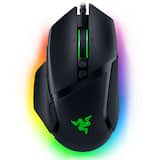
- Razer - Basilisk V3 Optical Gaming Mouse with Chroma RBG Lighting - Wired - Black$37.99$69.99

More Buying Options
Related Item

Specifications
- Video Input(s)HDMIVideo Output(s)HDMIMaximum Supported Resolution (Video Capture)2160p (4K) @ 120 FPSCompatible Platform(s)PlayStation 5, Xbox Series S, Xbox Series X, Windows, Mac, Nintendo Switch, Steam Deck, Nintendo Switch 2
- Key Specs
- Video Input(s): HDMI
- Video Output(s): HDMI
- Maximum Supported Resolution (Video Capture): 2160p (4K) @ 120 FPS (The highest video resolution supported by the device to capture video from another source.)
- Compatible Platform(s): PlayStation 5, Xbox Series S, Xbox Series X, Windows, Mac, Nintendo Switch, Steam Deck, Nintendo Switch 2
- General
- Brand: Elgato
- Model Number: 10GBH9901
- Product Name: 4K X 4K144 HDR10 External Capture Card with HDMI 2.1 for Nintendo Switch 2, PS5, PS4/Pro, Xbox, PC, and Mac
- Color: Black
- Device Type: Standalone
- Connectivity
- Video Input(s): HDMI
- Audio Input(s): HDMI
- Video Output(s): HDMI
- Audio Output(s): HDMI
- Display
- Maximum Supported Resolution (Video Capture): 2160p (4K) @ 120 FPS (The highest video resolution supported by the device to capture video from another source.)
- High Dynamic Range Format (Video Passthrough): HDR 10 (The industry standard format in which HDR content is passed through to another device. HDR technology can support one or multiple formats, each with various benefits to picture quality.)
- High Dynamic Range Format (Video Capture): HDR 10 (The industry standard format in which HDR content is captured from another source. HDR technology can support one or multiple formats, each with various benefits to picture quality.)
- Dimensions
- Product Height: 2.83 inches (The out of box height of the item. Height is measured as the vertical distance from the bottom of the item to the top as it would be primarily used or placed.)
- Product Width: 4.41 inches (The out of box width of the item. Width is measured as the horizontal distance from one side of the item to the other as it would be primarily used or placed.)
- Product Length: 0.67 inches (The out of box length of the item. Length is measured as the longest dimension of the item.)
- Product Weight: 0.29 pounds (The out of box weight of the item.)
- Compatibility
- Compatible Platform(s): PlayStation 5, Xbox Series S, Xbox Series X, Windows, Mac, Nintendo Switch, Steam Deck, Nintendo Switch 2
- Minimum System Requirements: Windows 10 (64-bit), macOS 11,iPadOS 17 or later 6th generation Intel Core i5 CPU (i5-6xxx) / AMD Ryzen 5 (or better), NVIDIA GeForce GTX 10xx (or better)
- Warranty
- Warranty - Parts: 2 years
- Warranty - Labor: 2 years
- Other
- UPC: 840006677673
4K X is game capture at its best. Equipped with HDMI 2.1, our most powerful USB card lets you capture the latest titles up to 4K with HDR at 144 frames per second, or even 1080p240. Say goodbye to screen tearing with VRR passthrough. Enjoy ultra-low latency technology that keeps your broadcast and gameplay synced. 4K X works with almost any HDMI-compatible device, including PS5, Xbox Series X, Switch, Steam Deck, PC, Mac, even your iPhone 15. And it works seamlessly with leading broadcast apps like OBS, so you can stream like a pro on Twitch, YouTube, or Discord.
- Ready for your console: Capture Nintendo Switch 2, Playstation, Xbox, Steam Deck - anything.
- Next-gen capture: Up to 4K at 144* frames per second.
- HDMI 2.1 in/out: Record high frame rates up to 240fps in 1080p resolution.
- VRR passthrough: Enjoy smooth gameplay with zero screen tearing.
- Ultra-low latency: USB 3.2 Gen 2 keeps your broadcast and gameplay synced.
- Onboard tone mapping: Play in HDR10 while capturing SDR.
Whats Included
- Game Capture 4K X
- USB 3.2 C-to-C cable
- 8K HDMI cable
Product Manuals
Q: What is the benefit of the ultra-low latency technology?
A: The ultra-low latency technology, enabled by USB 3.2 Gen 2, ensures that your broadcast and gameplay stay synced.
Q: Which platforms are compatible with this capture card?
A: The Elgato 4K X is compatible with PlayStation 5.
Q: How does this capture card handle screen tearing?
A: The Elgato 4K X features VRR passthrough, which eliminates screen tearing for smooth gameplay.
Q: Does this capture card support HDR?
A: Yes, the Elgato 4K X supports HDR10 for both video capture and passthrough.
Q: What is the maximum resolution supported by this capture card?
A: The Elgato 4K X capture card supports a maximum resolution of 2160p (4K) at 120 FPS.
Q: does this require the use of elgato studio or can it be used with Streamlabs or OBS?
A: Both Streamlabs OBS & OBS are compatible softwares with this device. Elgato Studio is not required.
A: Hi Tom, within limits. USB A-Type per default allows up to 5 Gbps, our 4K X supports up to 10 with USB C-Type. You can still use our capture card, (please make sure your A-Type is at least 3.0!) but this will result in a compression to mjpeg with higher resolutions/framerates.
Compare similar products

4K X is game capture at its best. Equipped with HDMI 2.1, our most powerful USB card lets you capture the latest titles up to 4K with HDR at 144 frames per second, or even 1080p240. Say goodbye to screen tearing with VRR passthrough. Enjoy ultra-low latency technology that keeps your broadcast and gameplay synced. 4K X works with almost any HDMI-compatible device, including PS5, Xbox Series X, Switch, Steam Deck, PC, Mac, even your iPhone 15. And it works seamlessly with leading broadcast apps like OBS, so you can stream like a pro on Twitch, YouTube, or Discord.

Showcase your gameplay at its best with Elgato Game Capture 4K S. Play and capture in crisp 4K60, ultra-smooth 1440p120, or even 1080p240—all with near-zero latency. With VRR passthrough, HDR10 capture on Windows, and analog audio input, this external USB-C card delivers pro-level features in a plug-and-play form factor. Whether you’re streaming or recording, it works seamlessly on Windows, macOS, and iPadOS—no drivers needed. 4K S is compatible with OBS Studio, Streamlabs, Discord, Zoom, and more. Connect your PS5, Xbox, or docked Switch 2, and share your gameplay in cinematic detail.

With HD60 X, capture PS5 or Xbox gameplay like a pro. Use your favorite broadcast app and create high resolution 1080p60 HDR10 or 4K30 HDR10 content for audiences on any video platform. Play high-fidelity games as intended with VRR support and up to 4K60 HDR10 passthrough. You can even enjoy high frame rate gameplay such as 1440p120 or 1080p120. HD60 X connects to your console and sends raw video in real time to both your gaming screen and computer, giving you the freedom to stream, record and edit on your terms. No subscriptions. Zero limitations.
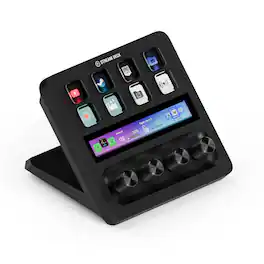
Iconic Stream Deck tech with LCD keys, dials, and touch strip. Fully customizable. Perfect for any workflow. Stream Deck + is your audio mixer, studio controller, production console – anything you want it to be. Trigger actions. Control mics and cameras. Adjust volume, lighting, and much more. Create limitless pages for different apps and swipe between them on the fly. Set up with ease in the Stream Deck app. Unlock Elgato Wave Link mixing software, and hit the Stream Deck Store for plugins, icon packs, thousands or royalty-free music tracks, sound effects, and more. With new plugins and updates added regularly, Stream Deck + evolves with your workflow.
| Pros for Elgato - 4K X 4K144 HDR10 External Capture Card with HDMI 2.1 for Nintendo Switch 2, PS5, PS4/Pro, Xbox, PC, and Mac - Black | |||
|---|---|---|---|
| Overall Performance, Ease of use, Video Quality, HDMI, Setup | Overall Performance, Video Quality, Latency, Compatibility | There were no pros for this product— | Ease of use, Quality, Knobs, Customization, Volume Control |
| Cons for Elgato - 4K X 4K144 HDR10 External Capture Card with HDMI 2.1 for Nintendo Switch 2, PS5, PS4/Pro, Xbox, PC, and Mac - Black | |||
| Lag, Connectivity, Software | There were no cons for this product— | There were no cons for this product— | There were no cons for this product— |
Specs
Reviews
Customers are saying
Customers find value in the overall performance and ease of use of the 4K X 4K144 HDR10 External Capture Card. Users appreciate the HDMI cable included, stunning video quality, and consistently high frame rates. Some users have reported experiencing lag, occasional disconnections, and the lack of a Mac version of the capture software. However, many find it easy to set up, and are impressed with its compatibility and high resolution.
Customer Images
The vast majority of our reviews come from verified purchases. Reviews from customers may include My Best Buy members, employees, and Tech Insider Network members (as tagged). Select reviewers may receive discounted products, promotional considerations or entries into drawings for honest, helpful reviews.
- Rated 5 out of 5 stars
Good quality
If you’re looking to record or stream gameplay in stunning quality, the Elgato Game Capture 4K X delivers pro-grade performance in a plug-and-play package. Its HDMI 2.1 support and 4K up to 144 fps capture let you capture crisp, high-frame-rate footage from current-gen consoles like the Nintendo Switch 2, PS5, Xbox, or your PC with ease.
Totik Posted
- Rated 5 out of 5 stars
Best Capture Card, but Check your USB ports
This is a top of the line amazing capture card I use for my PS5. The 4k gameplay I record is clean along with the crisp sound. Its easy to set up by connecting 1 HDMI from the source (in my case it was the PS5) to Elgato Capture Card, 1 HDMI from Elgato Capture Card to TV, and the provided USB-C to USB-C cable from Capture Card to PC. Download the 4K capture Utility or OBS and youre good to go. I want to provide a small warning though. Double check to make sure your usb port is compatible with this capture card. My motherboard was my only usb-c port on my PC and it experienced audio problems. My motherboard might be corrected in future updates, but I had to separately purchase a USB-C to USB-A (not included) to connect to my USB on my case. If it doesnt plug and play easily it will be a headache and all cases are different as everyone uses different hardware. Again, just make sure your computer USB can transfer speeds of 10gbps and has a USB-C port. Other than this small detail, its a great purchase.
Eric Posted
- Rated 5 out of 5 stars
Excellent.
I recently bought the Elgato 4K X and it has completely upgraded my streaming setup. Setup was super easy – just plug and play. It works flawlessly with my PS5 and DJI camera. The video quality is stunning, smooth 4K60 with no lag at all. Audio sync is perfect too. If you’re looking to stream or record in high quality, this is the best capture card you can get. Highly recommended for creators, gamers, or anyone who wants a professional setup.
ElizabethR Posted







