Customer Ratings & Reviews
 See more images
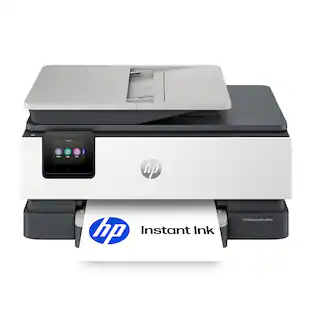
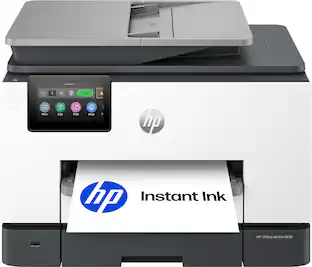
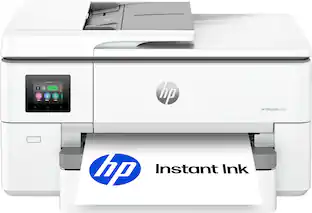
HP - OfficeJet Pro 8139 Wireless All-in-One Inkjet Printer, Scanner, Copier, AI-Enabled with 12 Months of Instant Ink - White
- Model:
- OfficeJet Pro 8139/C2VK3A#B1H
- SKU:
- 6673911
Highly rated by customers for:
Customer reviews
Top Mentions
- Rated 4 out of 5 stars
Some customizing/adjusting needed
MeDavid16 Posted
I have many HP printers, and I think this particular product/model has a few shortcomings. Not deal breakers, but I think everyone should be aware Setting up/installation was already a little bit different/took me by surprise Everything was the usual, plug it in, take out the tape, download the app, set up the wifi, align the print heads, etc. Very standard procedure. Small but slightly annoying was loading the paper. The paper tray has a button on the left, this adjusts the length of your paper. It was a little flimy and hard to push. Took me by surprise as this was unlike the other HP products I have. Not a big deal, after getting familiar with the adjusting buttons I moved on. When you first set up everything, make sure you update the printer/printer's firmware and reset the printer. For the actual printing, the speed and edges of fonts/graphics are where the product shines. Very modern, no fuss, quick clear prints, very much appreciated. I have uploaded some images for sampling. The speed at which it prints for the quality you get is very nice. Also an honorable mention was how fast going from your source (computer or phone) to the printer was also very fast wirelessly. Where it disappointed was the presentation graphics were clear, but photos came out with yellow/red tint. I adjusted a few photos, changed software, which all helped, but it was strange that the baseline had a red/yellow tint to it. Wish I didn't have to adjust photos. Less pronounced on photo paper, but noticeable in small photos when printing on regular paper. All this is fine, but then the built in software itself, I wish they continue to improve it. The HP app you get on your phone continues to be very streamline / straightforward. Not alot of bells and whistles you can do to make adjustments to printing. Small nit pick as most people will use their own software, photoshop/etc, but I just wish the 1st party app have slightly more feature instead of selling me ink. Speaking of ink, I print probably 50 pages and I got a warning sign I'm low on ink already. I will have to update this review later once I finalize how many pages I actually get from a brand new cartridge Overall, a solid 3.8 out of 5. Will round up to 4.
No, I would not recommend this to a friend - Rated 4 out of 5 stars
Fast Print,Copy,Scan,and Fax - Color and B&W
SwigglesMilam Posted
One of HP’s newest all-in-one printers is the professional-quality Officejet Pro 8139. HP offers a series of printers based on this footprint and overall design, each with different capabilities. This model is an all-in-one that copies, prints, scans, and faxes. The Officejet Pro 8139 works with various operating systems and allows you to print wirelessly from computers and mobile devices or through a USB or an Ethernet cable connection. It is equipped with reliable dual-band Wi-Fi, which makes connections easier, and is designed to help resolve some basic connection issues. The printer is designed with HP Thermal Inkjet technology and has the speed of a 1.2 GHz processor. The 8139 prints in both color and black and white. It uses the HP 923 cartridges and also the high-yield cartridges HP 923e, which print roughly twice as many pages. With the basic HP 923 cartridges, you can expect to print an average of 400 color pages or 500 pages in black and white. With the higher-yield version, color cartridges will usually yield approximately 800 printed pages or 1,000 printed pages in black and white. Color print is of professional quality, but it could be more saturated. A plus is that the color print is water-fade resistant. The black-and-white printed pages are very crisp and sharp, and quite easy to read. Using black ink only, the printer can print 20 sheets per minute (ppm) and 10 sheets per minute in color. It can print 10 envelopes at any given time. Paper can be fed into the Automatic Document Feeder (ADF), which has a capacity of 35 sheets. There is also a tray that supports up to 225 sheets of letter-size paper, 10 envelopes, and various photo paper sizes. The output tray can handle 60 sheets. Printing is fast even with 2-sided printing. Scanning on either the flatbed or the one-sided ADF works exceptionally well. Scan resolution is good, and all the basic scan formats are available, including JPG, BMP, TIFF, PDF, RTF, TXT, and PNG. This printer has scan capabilities up to 1200 dpi. Scans can be produced on either letter- or legal-size paper and sent directly to a computer or attached to an email. Sending digital files is limited to PDFs, TIFFs, or JPEGs. The copy resolution in color is 600 dpi. The ADF allows for quick printing of several types of documents, and the printer also supports duplex and borderless printing, which is a must for printing photos and brochures. The printer’s design includes a nice sized 2.7” color touchscreen that worked well and makes it easier to set up the printer to your network and to control various applications and settings. Ergonomically, the touchscreen tilts to make viewing and interacting with the settings easier. HP has an ink delivery program, and this model comes with 1 year of free ink if HP+ is activated. To get up to 8400 printed sheets in the HP+ ink program, you need to subscribe during setup. After a year, you will be charged if you do not cancel the ink program. Firmware ensures that only certified HP cartridges are used, and through the firmware and online presence, HP can monitor the number of sheets and ink used monthly by someone who opts into the program. This is a nice printer that produces professional-quality printing. I would not hesitate to recommend it. If you do a lot of business printing, I would probably look at the 9000 series, which is a little more expensive, but built for business and has higher print volumes.
I would recommend this to a friend - Rated 4 out of 5 stars
Solid printer, excellent deal for the price
Drj5j Posted
I have been using HP All-In-One printers since the original 1994 model, which actually functioned as a fax machine connected to my phone landline back then. I do not fax anymore, but I continue to use HP printers for the other functions, scanning, copying, and printing, because both the hardware and software have improved continuously over time. I find that they do need to be replaced about every five years or so, not because they stop working entirely, but because they have trouble maintaining a network connection and start undergoing a "printer maintenance" process that takes several minutes on startup before they will print a page. I currently have an HP OfficeJet Pro 9130e in one of our home offices that still works okay, and this week I replaced an HP OfficeJet Pro 8034e in our other office with the HP OfficeJet Pro 8139 that I am reviewing. If you have never set up a new HP printer, you might find the procedure a little complicated, but, trust me, HP will guide you through the process successfully. The process begins with the color touchscreen on the printer and will eventually ask you to employ either an HP app on your phone or a laptop or desktop connected to the same network. Setup, including connecting to the network, installing the ink cartridges, and adjusting the print heads, went very quickly for me, about 10 minutes. Both my HP Smart app on my laptop and phone apps worked well for basic functions like scanning and printing. There is actually a secure fax option if you want it, but I did not test it. One thing I have never understood but have come to accept is that sometimes the HP app on my computer accomplishes what I want to do with the AIO, but sometimes it directs me to the HP website with my default web browser, requiring me to sign in with my HP account. Mysterious, but it works. One touted feature that I still have not figured out is the new AI-Powered print formatting, which claims to clean up web pages before printing. There are no instructions on how to do this. When I opened my HP app for the first time, it asked me if I wanted to enable the feature, and I confirmed this. But when I went to a messy web page to test how well the feature cleaned up the page, I saw no way to do this. Something to figure out later. There is one physical feature of the printer that does drive me nuts. The cover over the paper tray requires you to push in buttons on both sides over the cover simultaneously when pulling the tray in or out. It is very difficult to get both sides to engage simultaneously. My 9130e does not have this problem as the paper tray can be pulled out without dealing with that cover because the cover does not rest directly on the paper tray. Hopefully you can see the difference between the 8139 and 9130e (which has two paper trays) in the photos. In summary, I think that this printer is a very solid choice, definitely worth the price, especially if it is on sale. The All-In-One functions all work well, the scanning and print quality of documents and pictures is excellent, and tasks are easily controlled with computer or phone apps. I highly recommend the HP ink subscription plan, which has saved me a lot of money the past few years. The 8139 printer came with a much-appreciated one year of free ink, which makes it an even better deal.
I would recommend this to a friend - Rated 5 out of 5 stars
The perfect AIO Inkjet Printer for my home office.
TheRoots Posted
I really love this HP All-in-One Inkjet printer and it was a breeze to setup. It took less then 30 minutes to unpack, connect and ready to print from all of my devices. The HP OfficeJet Pro 8139 is a compact all-in-one (Print, Scan, Copy and Fax) at an affordable price. Having separate ink cartridges for each color, an easy to load paper tray, an automatic sheet feeder, automatic duplex printing, and multiple connectivity options are what makes this inkjet printer an excellent value. Setup and Configuration: As I mentioned, my printer was ready to go in less than 30 minutes. The 8139 provides connectivity via wired Ethernet, wired USB (cable not included), WiFi, and/or Bluetooth. My printer is located in the same room as my WiFi router, so I opted for a wired Ethernet connection. It was basically plug-and-go for me. There are a few other setup options (i.e., language, auto download of firmware updates, etc.), which the HP setup process walked me through and that was it. Print: The print on the HP OfficeJet Pro 8139 is very clear and the colors are bright and realistic. This printer also allows me to print photo quality prints onto photo paper. On average, the print speed is a moderate 10ppm for color and 20ppm for black and white. For my home office, this is plenty fast for my needs. I usually only print in Black and White, unless I really need color print. I especially like the automatic duplex printing. When I want 2-sided, I specify that when I print and it prints one side, lets it dry briefly, then flips the paper and prints on the other side for professional looking documents. The print resolution is 1200 x 1200 (black and white) and 4800 x 1200 (color). Copy: I really like being able to quickly make a copy with this printer. Also, using the automatic document feeder is so much easier than copying one page at a time as with my old printer. It also lets me convert the document from 1 sided to 2 sided. The Copy function and options are controlled via the Touch Screen. The copy resolution is up to 600 x 600. Scan: The scanner is one of the main reasons I got a new printer. I have been scanning my old family photographs, cleaning them up, and sharing and archiving them. This scanner has 1200 x 1200 resolution, which is perfect for old photographs. In addition to photos, you can scan documents which can be saved as PDFs. I really like the ability to scan multiple pages via the automatic document feeder. I also love being able to scan directly from the 8139 to an email, USB drive, or to my PC with the HP App. This is an amazing time saving option for me. Fax: I don't often need to send or receive a Fax, but this is a really nice bonus. I am one of the few people that still have a landline, so I connected the fax to my home phone line and ran the fax setup. This printer allows me to send a fax from the glass platen, the automatic document feeder, or directly from my PC with the HP App. Windows recognized it had a fax and installed a separate device specifically for faxing. Summary: The touchscreen is very responsive and easy to use. The HP 8139 printer gives your home office all the functions of a business within your home. One absolute stand-out with this printer is the use of AI to minimize printing waste. Many times in the past my old printer would print blank pages or garbled pages when I would print from a webpage. While it isn't always perfect, the print from this printer did produce better results. The HP OfficeJet Pro 8139 AIO printer is perfect for my home office. The build quality on the printer is solid and designed well for anyone of any age to use. I feel this printer is an excellent value and would highly recommend it to anyone. It would also make a great gift.
I would recommend this to a friend - Rated 5 out of 5 stars
OfficeJet Pro 8139
ROBERTB Posted
I just purchased this printer. It was easy to set up and get started. So far it is printing really well. the print quality is great and the speed was exactly what I needed.
I would recommend this to a friend - Rated 5 out of 5 stars
Nice printer
LRHocker Posted
Needed a replacement printer for my home. A little bigger than expected, but it's a great printer.
I would recommend this to a friend - Rated 3 out of 5 stars
It's a workhorse
vortex0007 Posted
I’ve been using the HP OfficeJet Pro 8125 for the last year as my primary color printer. Last year I joked that its less expensive to replace the printer each year than it is to buy new ink. Thus the shiny new HP OfficeJet Pro 8139 has arrived to replace the previous model. I’m most excited that I get to keep using the same cartridges from last years model. I subscribe to the HP Instant Ink subscription service and ended up with a couple of extra boxes of new ink cartridges that I haven’t opened yet. I’m happy these can be used in this new printer model instead of going straight back to HP for recycling. What is new compared to last years model is sadly only two items. The ability to fax, a feature I’ll never use and a USB-port on the front left side of the unit which allows printing directly from a USB key. I was hoping for duplex scanning and faster color printing but HP reserved those features for the jump to the 9125 series. With regards to print quality, it remains unchanged from last years model with HP specs promising Black 1200 X 1200 rendered dpi and color up to 4800 X 1200 optimized using HP Advanced Photo paper. For black printing I can’t complain about the output. For color printing, charts and graphs and stock clipart print well, but I would not rely on this printer for photos you wish to hang on your walls.
I would recommend this to a friend - Rated 5 out of 5 stars
Printing the Modern Way
Acadius Posted
Over a year ago, I needed a new printer, but I decided to go with one of those printers that offered “cheaper ink replacements”. I regretted that purchase around the second ink replacement. Everything went wrong, and, in fact, I think it cost me more to fix the constant ink issue. And so, I decided to go with the HP Office Jet Pro. I nearly forgot what a quality printer is. Set Up: It only took me around ten minutes to set up the printer upon unpacking it. Once you connect the printer to your Wi-Fi, you can start printing wirelessly. Yes, there’s an app that connects to the printer and allows you to see the ink levels, scan/print from your device, etc. Performance: I tested how fast this printer can print by timing 250 pages being printed. The all-black ink pages took around 13 minutes. Then I printed a color photo of my cat on color paper, which only felt like a minute for a full sheet. You can scan documents using the printer itself by its top document feeder as well. The Touch Screen: I have to mention that I really appreciate that HP made a functional touch screen, whereas my other printer’s touchscreen was a bad joke because it was too small and unresponsive. I can see everything clearly on this HP printer touchscreen, and it responds well to my inputs. In a world of everything being mostly digital, it's nice to see that HP remembers where they came from.
I would recommend this to a friend - Rated 5 out of 5 stars
A Nice Printer, Especially for a Home Office
TechGuru Posted
I have been very happy with the multitude of recent HP printers I have worked with. Their quality is excellent, and they are very speedy. The HP officejet pro 8139 wireless all-in-one inkjet printer is no exception. Setup is quick and easy, it took me longer to take the printer out of the box and get it plugged in than it did to set it up. Once setup was complete, everything just worked on my Windows 11 PC. Printing is fast, approximately 20 pages per minute. The color accuracy and brightness are excellent, creating beautiful prints, whether they are brochures, or even photos on photo paper. Scanning is also excellent quality, and just worked out of the box. The HP app is excellent, allowing you to print from anywhere, check ink levels, order ink, etc. I am not a big fan of having apps for everything, but this app is worth having, giving you so much more flexibility for the printer. Finally, getting a year of ink included is a pretty amazing deal, depending on how much you print.
I would recommend this to a friend - Rated 4 out of 5 stars
Great for small businesses
DarR Posted
Out of HPs printer line-up, I’d say this series is the most balanced for home use and small business operations. I’ve had smaller ones that are good to tuck away for very rare printing needs, and I’ve had bigger ones for high-speed multi-page high customer printout needs. HPs got the printing and scanning pretty much handled in all of those printers I’ve worked on. Printing is always consistent, scanning is clean and straight. What I look for is how seamless software is, matched with how the printer fits my current needs. The capabilities of this 8139 fits my need to print out occasional coloring pages, fill experimental printing with my middle schoolers, while ensuring I manage my small business with legal documents, invoices and package labels. It does not fall short and has ample speed to get us going with our usual daily needs. First of all, set up is okay. Hardware will always be easy—unbox, place on the printer cabinet, power it up. The challenge is the software. HP has changed their software so much throughout the years that they still seem to not have it perfectly working in a 10 minute set up. Either wifi connection goes wrong or the printer will not be easily recognized. I have HP smart on my PC, on my mobile and the native PC printer add settings page. I never fail to have to cycle through them all. Although the HP AI is a nice addition to the printing features. Once it is all connected, I hardly have to manage it. With the exception of some connection drops while scanning or printing if the printer has been idle for over 2 days—software and our devices fail to see the printer and we’d have to power cycle the printer and the machine that needs to scan or print. We’ve gotten used to it, though it gets annoying when we need something fast. Again, while it is up, this printer works like clockwork. Scanning multiple pages on the feeder is easy, regardless of whether we use the hp scan app or the windows scan app. Printing fires off easily one document after another from my PC to another. Even mobile printing is easy, which is a convenient option for my few customers who prefer to visit vs do business online or over the phone. With this new HP AI, I noticed, it does not print out banner ads if I print a webpage, which saves ink and sheets for me—my printout looks clean and lean. It is not without quirks but again, I find myself relying on HP for my needs. This one comes with a year of instant ink too which is a big plus and it does not require instant ink to operate when my free ink comes to an end. It is not quiet but it is not noisy either. The paper deck holds a good amount of pages, and the feeder handles 20 pages easy without misaligning my scanned documents. I can live with the issues. The print quality, connection flexibility, consistent attempt to always improve the software and free ink is more than enough to keep me satisfied without having to look at other printers. This is the right size for my family and my small business.
I would recommend this to a friend - Rated 4 out of 5 stars
Bright, sharp images, copies, scans, digital faxes
iconoclast Posted
The HP OfficeJet Pro 8139 all-in-one inkjet printer creates beautiful, brilliant color prints and sharp black-and white prints. This model also has a scanner, copier, and can send faxes through your mobile phone. It is perfect for Home offices and small offices. Unboxing is easy. The printer sits inside a clear plastic bag with handles. Just lift the bag out of the box, and remove the two styrofoam end pieces. Take the printer out of the bag and remove a few pieces of tape and a guard on the printer assembly. Setup is quick. Plug in the printer and follow the directions on the printer screen. Download and install the HP Smart app. Wi-Fi is set up in the app, not from the printer screen. A set of four CMYK cartridges comes with the printer. Cartridges are easy to install after you open the top cover. If your black cartridge is not as wide as its receptacle, this is OK, as the starter cartridge may hold less ink than the regular one. Printer controls and design are intuitive. - The touchscreen is bright and easy to read. Tilt the bottom of the touchscreen towards you until it clicks, for a better viewing angle. - To add paper, press the two buttons on the paper tray lid to remove it. Discard the cardboard packing between the blue paper guides and adjust them to load paper. Pull out the paper holder on the paper tray lid to catch prints. - The copy function allows 1- or 2-sided copies. - The scan function allows you to send a scan to email, to a USB drive, and to a Cloud drive. You set up destinations in the HP Smart app. The HP Smart app is your "go to" for remote printing and printer status. The app displays printer status and supply levels and allows you to perform certain functions from your computer or mobile device. - You can see your HP printers on the HP Smart website, but this is not the smart app. Open the HP Smart app on your computer or mobile device. - The app is not intuitive when setting up a scan destination. You must enable shortcuts, and then add an email address or cloud drive destination. It took a bit of research before to scan destinations; then I received the expected email after I scanned a graphic design. This OfficeJet Pro Inkjet printer replaces an older version in the same product line.
I would recommend this to a friend - Rated 4 out of 5 stars
All-in-one value for home and small office
WStach Posted
For home and small office, this printer is really all in one. It even has a fax capability! After unboxing the install went fairly smooth. It tripped up on the initial wi-fi configuration but nothing I couldn’t resolve. After a couple of tries it was connected and ready to print. HP Smart is the application through which you can access scanning and faxing capabilities. HP AI works nicely to optimize the printing and saves both paper and ink. Printing documents from multiple sources is a time saver. No need to be hitched to your PC, when printing from your phone, laptop or tablet is simple. This did bring up an issue though. On occasion the printer would not be available, and it required power cycling for it to come back online. This is the second HP printer I’ve had with this peculiar bug. I found that photo/color graphic prints are not quite as nice as a photo printer. If quality color printing is something you need often, a dedicated photo printer is a better solution. The scanning and duplexing worked well for my needs. I like that you can direct the scanned output to multiple destinations using the HP Smart app. The ink is a 4-cartridge configuration. I like being able to only replace the cartridge that is used, rather than a multi-color cartridge. Once you’ve used the starter cartridges, you can sign up for the Instant Ink subscription. It comes with a 12-month subscription. After that plans for a typical 100 page subscription are $8.49 a month. A full set of replacement cartridges runs about $94 with an estimated capacity of ~400 pages. That does make the Instant Ink subscription worthwhile if you use the printer regularly. Overall, I found this to be a capable home or small office printer. I gave it 4 stars as a result of setup issues with wi-fi, random disconnects and inconsistent quality of color graphic printing.
I would recommend this to a friend - Rated 4 out of 5 stars
Easy to Set Up All-In-One Home Office Printer
gadgetguy11 Posted
This HP OfficeJet Pro 8139 Wireless All-in-One Inkjet Printer will satisfy the needs of many home office users. After removing the printer from the HP box, simply remove the tapes that are designed to protect the moving parts from damage during transit, & follow the very easy setup instructions. The first thing I noticed was the generous sized 2.7" color touchscreen. Unlike many economical printers, this touchscreen is large enough to let you actually preview tasks, check network settings & read other useful information. As you complete setup, that is the perfect time to activate HP+ free instant ink for the next 12 months, after which you will be billed a monthly fee for ink, unless you cancel this service. If you prefer, you can purchase HP 923 ink cartridges, rather than utilize the ink delivery service. My iPhone 17 Pro Max quickly located this new printer, and made a solid wireless connection. The HP mobile app enables printing, copying, scanning, & faxing directly from the smartphone. CONCLUSION: OfficeJet Pro 8139 prints 10 pages/minute color, & 20 pages/minute black; it features auto 2-sided printing. The input tray holds 225 sheets. Print quality is very good, and the ink does not smear. The top document feeder allows you to load & scan multiple documents, which is a useful time saver. All of these features with HP reliability make this an excellent choice for many home offices.
I would recommend this to a friend - Rated 5 out of 5 stars
Solid printer for everyday and office use
Olive Posted
The HP OfficeJet Pro 8139 is an excellent all-in-one printer for home use for everyday printing or small office use. Setup was easy using the HP Smart app, and connecting it to Wi-Fi only took a few minutes. Once connected, printing from my laptop and phone has been quick and reliable. What impressed me most is the speed and print quality. Black text came out crisp, and color documents was pretty accurate and not faded they looked great when I printed out some of my work presentations. The cool thing to and a must have for printers is the ability to set automatic two-sided printing to save paper (trees). The paper tray can hold up to 225-sheets which is great especially if you do a lot of printing and forget to refill or with lower capacity printers constantly refilling. Another great must have is a high capacity automatic document feeder. This one has a 35-sheet capacity for scanning and copying so you dont have to watch and feed the documents. This printer also doesn’t take up a lot of space, it compact and handles all your printing needs. Scans, copies, and fax (if you still do that). The touchscreen is a little small but clear and color and responsive to navigate printer settings and functions if printing directly. This isn’t a photo printer, but great for documents and quick paper photo prints. If you’re looking for a dependable all-in-one printer with fast printing, automatic document feeding and two sided printing, wireless connection, and everyday printing, the OfficeJet Pro 8139 is a solid choice.
I would recommend this to a friend - Rated 5 out of 5 stars
Nice home/small office printer
Duluthian Posted
The HP OfficeJet Pro 8139 is a nice all in one printer designed for home or small office. It works great, but I would say it’s more of a deluxe home printer than a small office printer. The specs are decent: printer, fax, scan and copy. 10 pages per minute color or 20 per minute b&w. The tray holds over 200 sheets of paper. All the standard ways to connect are there but I’ve only used it with WiFi and it works fine. Easy to set up and get it connected. We already have another printer but thought it would be nice to have a second one on a different level of the house. WiFi seems to connect good from anywhere in the house. Granted, it’s not a huge house but it is two levels and a basement. Print quality is good. No smudges or smearing. Scan quality is good as well but maybe a little slower than I’m used to. Certainly not a dealbreaker. Haven’t had a use for the fax as of yet simply because I rarely have a need for it. All in all it’s an excellent printer for home. My only reason for maybe not recommending it for an office is its printing speed and capacity. But if those numbers work for you in an office setting then by all means it would be just fine in an office.
I would recommend this to a friend - Rated 3 out of 5 stars
Capable ink jet printer, with strings attached
daytonadan Posted
If you need a good color ink jet printer and are looking for a painless way to get there, the HP Officejet Pro 8139 may not be the road you want to take. It is a capable printer at its heart: Printing is fast for the most part and quality is good. It is quiet. It handles basic functions, like color and black and white printing, scanning, double-sided printing. It even has a built-in document feeder. But this printer is hobbled by some questionable design decisions. The main problem seems to be that HP is so fixated on making future revenue from selling the pricey ink these printers require, it has lost sight of the idea of producing a product that just does the job and is easy to set up and use, over the long haul. You are reminded of this constantly as you attempt to set up this printer for the first time. Consider the fact this printer will not even function unless it is connected to the internet. This is ostensibly so HP can help you through the setup process and keep tabs on your ink supply. This model comes with a "free" 12 month supply of what HP calls "instant ink." (even though it may take 10 days for these new cartridges to arrive at your house, per HP. Not exactly instant). This seems like a good deal until you realized this "free" ink will not be provided unless you first hand over a credit card number. Since what you are really signing up for here is an auto-renewing subscription service. If you fail to provide payment method, the printer will mysteriously refuse to function. It spits out a cryptic error message instead: "Cannot communicate with ink cartridges." Which oddly worked fine minutes earlier during initial setup. That error message magically goes away once a payment method is supplied. HP probably hopes you will forget all about this subscription a year from now, when the "free ink" deal runs out and they can automatically charge you for another year of "instant ink." But you can cancel beforehand....if you remember. And don't even think about buying some much cheaper brand X ink for this printer. The box is plastered with warnings that it will ONLY work with cartridges that have a "new or reused HP chip" -- ie, HP branded ink. That's the real cash cow in the ink jet printer business. HP says "dynamic security measures" ensure no other ink will work. HP is not unique among printer-makers in imposing this buy-from-us-or-else mandate, but that does not make it any more palatable. Like most printers these days, this one comes with a full set "setup ink cartridges," code for cartridges with a lot less ink than you would get with new retail set. So it was no surprise when the first time I printed a full page color photo, I immediately got an email telling me HP was shipping me a new supply of ink via its instant ink program. This was a reminder that HP is always watching when I am using the printer. If these were the only hoops you had to jump through to get this printer working, it would be bad enough. But there are more. Consider the fact it comes with no setup instructions. Instead you are told to scan the QR code on the printer. Which kinda sorta helps. Except you really need to use an odd combination of that, and the printer's touch screen control panel (tiny and difficult to use), Windows own printer support and a special HP app to get everything up and running. And sometimes they don't always seem to know what the others are doing. For example: When I attempted to scan for the first time, using the printer's own control panel, it balked, ordering me to "Install HP scanning app. " It turned out that was not necessary since Windows allowed me to scan from within the built-in printer control. Which worked in conjunction with the app, which was already installed automatically by Windows. Print speed is very fast when printing simple text on plain paper. But complex graphics and photos on special paper take MUCH longer, so be prepared to wait for those. Print quality is very good but may not be what some photographers regard as not top-notch. Also be aware there are several long and complex user agreements (that no one will read) that must be signed off on before you can use this printer. Which allows HP to harvest certain informarion. All for a better user experience, of course. In the end, this printer does work and does a decent job. It just takes some effort to get it up and running. And you have to be resigned to the fact that HP will continue to keep tabs on how you use your printer from here on out.
No, I would not recommend this to a friend - Rated 5 out of 5 stars
Professionalism at home
claggtastic Posted
I love a good printer so whenever I have a printer that can do everything that the fancy printer at my job can do, I'm happy. It has a feeder scanner and it will scan both sides. I would say the one drawback to it is that it's a little slow but it's not industrial either so deal with it. It has a traditional scanner face down scans. Amazing pictures. I recommend doing the alignment a few times though. I did it once and it just wasn't enough. After doing it a second time it was spot on. From what I understand, this particular printer is ai enabled. I see settings on the application once I set up the printer and I'll get to it, but I have to justify the need for it. But it seems like it would be pretty cool. I have both Google and Alexa so I'm sure it'll work. I'm just not sure what to ask Google to do with it but believe me I'll think of something. I just love having a professional grade printer at home and connect it to my home network. I didn't use Wi-Fi. I use ethernet (RJ45)and it works like a charm. All the computers in my house picked it up like nothing. Definitely spend the money and get you one of these.
I would recommend this to a friend - Rated 5 out of 5 stars
Impressive Speed and Convenience
GoGoGomez Posted
The HP OfficeJet Pro 8139 is straightforward to set up with the HP Smart app. Once connected to my home network, printing from both my PC and phone works seamlessly. Print speeds are impressive in both color and black and white. The HP Smart app is particularly useful for monitoring ink levels and managing Instant Ink subscriptions. My initial black ink cartridge depleted quickly, but after signing up for the free year of Instant Ink, replacements were shipped automatically—a convenient feature I'm going to appreciate. The scanner function is equally impressive. It's responsive on both the glass and automatic document feeder, with numerous presets available. I primarily use the default PDF scan setting, which works perfectly for my needs. The onboard touchscreen duplicates the app's key functions and responsively displays print job status. I'm also pleased to report zero paper jams or misfeeds, despite the device's speed and print quality. This affordable printer delivers excellent performance and versatility. I'd recommend it to anyone seeking a reliable inkjet with integrated scanning capabilities.
I would recommend this to a friend - Rated 5 out of 5 stars
Great, But Not Perfect
Powerhouse01 Posted
When I got this printer, I was surprised at how easy it was to set up. There's a QR Code right on top of the printer. I scanned it with my phone, downloaded the app and walked through the steps easily. The ink comes in individual colors Black, cyan, magenta, and yellow. The printer mixes the colors based on what's being printed and I like that because it saves ink. It also came with a year of HP Instant ink which means ink will be delivered when I need it. I don't have to worry about it. That's one thing off my plate in my busy life. Documents come out clear and crisp with great color. It also has a copy feature which is really fast. It has the ability to fax but I don't need that at the moment. What I do wish that it had is a bigger try for scanning documents. Some of my documents are fifty pages or more and this printer can't scan that many. I've only been able to do about five pages at a time. But I've been able to find a work around by just feeding stack after stack until I'm finished. Overall, this is a great printer and I would definitely recommend it to everyone.
I would recommend this to a friend - Rated 5 out of 5 stars
Great home printer for any setup!!!!
ConcordCool30 Posted
HP OfficeJet Pro 8129 Wireless All-in-One printer, Scanner, copier, AI-enabled with 12 months of Instant Ink White definitely passed my expectations. Gotta start with the HP AI, which I really didn't expect much from. But I was impressed when printing things I emailed or our web pages; it automatically takes out all the Clutter and ads on the side, which was really cool. It cleaned up your print for you automatically. It has all the basics that I love, like auto two-sided printing. It also has a document feeder for scanning and copying multiple pages. It also has a super-capacity paper tray that holds up to 225 sheets of paper. And of course, wireless whole-home printing, so every device on your network can seamlessly print to this printer. To get the 12 months of free Instant Ink, which you can't be mad about. Easy navigation on a 2.7-inch touchscreen makes setup and utilities easier. The mobile printing from anywhere feature is great too. It's a pretty nice printer for home or office. Definitely worth checking out.
I would recommend this to a friend
People also viewed
 $149.89The price was $239.89
 $199.89The price was $309.89
 $119.99The price was $179.99
 $79.99The price was $159.99
 $149.00The price was $199.00
 $139.89The price was $219.89
 $159.89The price was $239.89
 Top Deal$169.99The price was $189.99