Rating 4.4 out of 5 stars with 99 reviews
4.4- Print Quality (69)
- Ease of use (4)
- Overall Performance (4)
- Display (5)
Customer Images
The vast majority of our reviews come from verified purchases. Reviews from customers may include My Best Buy members, employees, and Tech Insider Network members (as tagged). Select reviewers may receive discounted products, promotional considerations or entries into drawings for honest, helpful reviews.
- Rated 5 out of 5 stars
Excellent and Efficient Photo Printer!
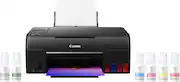
I should preface my review by saying that I purchased this printer solely for the purpose of printing my pictures. I was not concerned with documents, scans, copies, etc... as I already have a Brother printer that is perfect for such jobs. The short version: If you are primarily considering purchasing this printer for photo prints, just do so already! The quality of prints it produces, all while being incredibly more efficient/cost-effective than its cartridge-based counterparts makes this printer absolutely worth it. I couldn't care less that is has an aged LCD screen, as all of the settings/print process can EASILY be managed via a computer or Canon's smartphone app. If your only concern (like me) was to find a printer that can deliver in terms of photo quality, this is definitely it! The ONLY real downside to this printer is that you are limited to prints that can't exceed 8'5 x 11, but I figured I can always order larger prints online, while saving a tremendous amount with smaller sized prints (which are generally 90%+ of my shots) Longer Version: I honestly debated whether or not to purchase the G620, or jump up to the Pro 200/300 (primarily for quality of the print and freedom to choose almost any sized print). I ended up going with the G620, as the thought of spending $120+ in order to replace the ink cartridges for the Pro series after what would surely be just a few dozen prints was hard to swallow. I will say that this printer has exceeded all of my expectations! The prints themselves are truly stunning, and far exceed the quality you would receive with the vast majority of "printing services" (other than the higher end, more reputable ones; usually found online). It is a truly amazing feeling to be able to print all of your favorite shots, without having the constant sense of dread that your ink supply will run out any minute from now. Since its delivery (which was now 3 days ago) I have print at least 50+ 4x6 and 15+ 8.5x11, yet the ink wells have barely dropped from their initial fill level. If anything, I am now more worried about having to spend too much on photo paper, instead of ink! Not only are the prints stunning, but they are also VERY close to matching what I have on my screen. That said, I do use a Canon R5 for my shots, as well as the Canon photo print paper, so this may play a certain small role in it. In the end, I am thrilled that I chose to go with the Pixma G620, as I can now print as many of my photos as I want, instead of having to carefully choose which ones I'd rather print so as to avoid constantly paying $100+ in order to purchase new ink cartridges. Granted, I've only had it for a few days, so things can still happen. But if it continues to do what it has been doing these last few days, I will be sure to recommend the G620 to any photographer looking for an efficient way to get great prints of their favorite shots! This printer will pay for itself in no time!
Posted by AvidPhotographer
- Rated 5 out of 5 stars
best entry printer ever
i bought this for a demand it was not made to meet or even handle, this in the time i have bought it and set it up has printed ( still printing ) over 3244 high quality 4k realistic photos and blender 5.0 model > 2D designs. the printer has failed to print in most cases due to its issue over bandwidth data exceeding print quality demand exceeding 4k depth details, after some adjustment in the settings and changing the ink from the OEM to a home brew ink type it has never stopped, over heated or stall failed on a print again. for a consumer lever machine thats at most going to see 100 - 200 prints a month for a normal end user, this is by far the BEST printer you can buy at a good entry level cost if your looking at doing high detail and heavy color demands hands down! i see me getting a second one to run in tandem wwith the one i have now to keep up with the current print demand.
Posted by Joshl
- Rated 4 out of 5 stars
Good print quality
Print quality is nice but the apps that you have to use with it kinda suck
Posted by Tara
- Rated 5 out of 5 stars
Good Picture
Excellent printing machine for photography, I made a perfect purchase
Posted by CyberGame88
- Rated 4 out of 5 stars
Canon G620 versus Epson ET-8500
I am an accomplished amateur photographer, not a professional or a techie. I take photos with an iPhone 12 and a Panasonic SLR. I do not make highly technical adjustments to the images. Both of these printers produce excellent results. I purchased them for two reasons: saving on ink, and printing photographs with accurate colors. I have used Canon Pixma printers for decades, so I first tried the G620. Although I do most of my shopping on Amazon I purchased it at Best Buy for ease of potential return. It cost $330 (rounded up by a penny). THE CANON G620: PRO’s: It was easy to fill the six ink tanks. Canon cleverly designed the tops of each one so they can only be inserted into the correct tanks. No problem connecting to my wi-fi. Documents printed quickly and looked fine. The first 4x6 print I did was acceptable but not as good as I had expected. I corrected this quickly per the next bullet. By default my Windows laptop installed its own drivers for the printer. These are not as good as Canon’s. I went to the Canon website and downloaded and installed their drivers for the 6 series. Voila, very good photos, with accurate color and sharp edges! Thanks to other Amazon reviewers for calling this to my attention. Photos printed quickly enough. CON’S: The most significant one, and why I switched to the Epson, is the paper handling. There is only one input tray, at the rear of the printer, which takes all sizes and types: 8x11 plain paper, 4x6, 5x7 and 8x11 photo paper, etc. At first I didn’t think I’d mind changing the paper, but after a while I did, per next bullet. The display on the top of the printer is small, dim and awkwardly placed. I thought I might not need to use it that much, but every time you change paper you have to. You need to pull the output tray out manually. No big deal if you are at your desk, but if you are in another room and want to print out an item on your phone you have to go the printer. A minor inconvenience but a nettlesome one at times. THE EPSON ET-8500:. PRO’s: Equally easy to connect to wi-fi. Even easier to set up. The correct drivers were downloaded automatically. A terrific screen on the right front of the printer. Large, bright, easy to use. Two input trays at the front, one for 4x6 and 5x7 photo paper, the other for 8x11 paper of either type. Another input tray at the back! I use this on the relatively few occasions I print 8x11 photos, and I keep plain paper in the front tray. This is extremely convenient. When you send an item to the printer it wakes up even if it’s turned off. The G620 did not do that. The output tray comes out automatically; no need to pull it. There is a button on the screen for pushing the output tray back in and closing the front. That bright tilt-able front screen has every setting you need and is very intuitive. Everything I printed came out fine and quickly. The photos were equal to Canon’s in quality, plus there is an Epson app for making further adjustments to them. I downloaded it and found it easy to use. CON’s: The cost: $700. That’s more than double the Canon G620, which is a significant consideration. Two others that are not significant. The photo tray can be a little tricky to pull out and a tight fit when reinserting (it goes well toward the back). This can be relieved by first pulling out the 8x11 tray underneath it, giving your fingers more room. Not really a con but when the printer is finished the screen shows two items: a little Home icon on the left and a larger “Troubleshooting” message next to that. Some users might think that means there was a problem, but it’s just in case there was. Touch Home and you’re set, then touch the Close Tray button on the bottom right. BOTTOM LINE: You may be wondering, Why spend that much more? And, why not buy a Canon Ink Tank printer of equivalent cost? Re the first, for the convenience of the paper handling and ease of use of the screen. I keep printers a long time and the cost spreads out over the years, especially not needing to buy cartridges. Re the second, I did research those, but prefer the size of the Epson, which is comparable to the G620. The higher priced Canons that I looked at were bulkier. I hope this helps others. If I omitted anything you think should be included, or if you have questions or a difference of opinion, leave a comment and I’ll respond to it.
Posted by BobGoldrick