Rating 4.7 out of 5 stars with 78 reviews
4.7- Graphics Performance (52)
- Noise Level (18)
- Port Selection (10)
- Speed (10)
- Storage Capacity (7)
Customer Images
The vast majority of our reviews come from verified purchases. Reviews from customers may include My Best Buy members, employees, and Tech Insider Network members (as tagged). Select reviewers may receive discounted products, promotional considerations or entries into drawings for honest, helpful reviews.
- Rated 5 out of 5 stars
Dell Tower
I feel super satisfied with my Dell Tower , perfect price perfect item, perfect evrything. Thank you Best Buy
Posted by JoseM
- Rated 3 out of 5 stars
Corner Cutting To The Max!
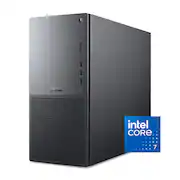
THIS… Is the Dell Tower Plus EBT2250, a medium form factor desktop with some really good specs: An intel ultra 7 265, 32gb of ram, an RTX 5060 and the promise that it will be upgradable. With the performance of now and the promise of tomorrow's upgradability, lets take a look and see how well Dell has crafted their Tower Plus. Out of the box, this is obviously an office pc with the included mouse and keyboard. The case is well done for what it is, with a metal frame and plastic where they can. There are a plethora of ports on the front of the case with 3 usb-a ports, a usb-c, headphone jack and a SD card slot to really open up the playbook on what you can do with this case. Turning to the backside, we have 6 more USB-A slots, a thunderbolt 4 and a gig ethernet port. Truly more than enough ports to start the party. Booting this PC up and putting it through the ringer shows me a few things, first, it really isn't that loud. But with only two fans, it also leaves some performance on the table. Seriously thought, there is one intake fan and one exhaust fan… this is almost a joke. My temps were always over 80c and when I was pushing this PC gaming it would frequent 90c on the CPU package. My computer not only thermal throttled once, but would do it several times in activities that pushed this machine to the max. The lack of proper airflow and a stock cpu cooler really put this PC in a bind thermally. The Dell Tower Plus is designed for a 65w cpu, which is the core ultra 7 265’s base power draw… this CPU can easily draw over 100w of power, and when it does it causes problems. Dell also limits the amount of power this CPU can draw to stave this off which is unacceptable. This is a $1500 pc with a generic cpu cooler?? When this pricepoint calls for a real tower air cooler or a water loop, I am left a bit dumbfounded by this choice. That being said, opening this case up shows just how upgradable this pc is and where dell really cut corners. First, this Tower Plus has one 5600mhz 32gb stick of ram vs two 16gb sticks which cuts your memory bandwidth in half. There are also not really any extra spots for more fans, and also not a SINGLE 4 pin power connector for one, meaning that you really can’t increase your intake or exhaust performance if you wanted to. The case is also so small that you will be limited on the air cooling towers you can fit in here. Continuing, this motherboard is so custom that I would be shocked if you could replace it with something non oem, meaning you are locked to this socket type without needing to get both a new case AND motherboard. Sure you have some spots for more storage and yes you can upgrade the CPU and ram… but long term this is really not an ‘upgradable’ system. Your thermal envelope really prevents you from upgrading your gpu as well. To wrap this up, this is the culmination of dells corner cutting… not advancements. I kept asking myself ‘What are we doing here’ time and time again and at a serious MSRP. For $1500 MSRP you can get a real computer that has everything this PC has without the corner cutting. From the single channel ram cutting your gaming performance by 10% or more to the thermal envelope keeping your cpu in a chokehold, this office pc is better suited for mild tasks and web surfing. This is all before I even mention the issues this will feed the GPU, meaning that the corner cutting is easily costing you deep into the double digit performance loss at a price that is higher than like spec builds. My next steps with this computer will be stripping it down and putting its parts in a new case with a new motherboard so that it can actually perform how it was intended to. Dell has continued to put its foot in its mouth, with small dollar corner cutting costing this big dollar computer its edge… and inevitably my recommendation. In its current state, I recommend going to another brand that takes more pride in its product than what I am witnessing here from dell. Until next time :)
Posted by Exander
- Rated 5 out of 5 stars
Premium as the previous XPS name, very capable PC
PROS: Extremely quiet Visually appealing, but minimalistic (no RGB lights) Premium build quality I love the I/O on the front panel SDD is speedy and smooth for the majority of strenuous tasks Very upgradable for RAM and storage VR Ready (out of the box) SO-SO: Price ($1500) I wish it came with at least a 5070 for this price CONS: Extremely cheap mouse and keyboard included Custom parts to the internals can cause limitations when upgrading some parts Dell has had an interesting trajectory since the days of value-centric PCs. They once catered to college students on a budget. Now, with XPS (which has evolved into "Plus"), their PCs and laptops have garnered the respect of those of us looking for a premium product beyond Apple. I currently own one of the 2024 high-end models of their XPS laptops, and it remains my favorite among the few I own. Premium is its bread and butter, and while this desktop doesn't have the flashy "premium" look, it makes up for it in its build quality and simplified, anti-gaming machine aesthetic. As premium and expensive as the tower is ($ 1,500), I'd expect a better keyboard and mouse to be included, but that's an issue that extends to most PC manufacturers. It's an interesting way to "cheapen" the product, but most of us who are serious about our PCs, more than likely, already own nice mice and keyboards. Nonetheless, it's jarring to see how cheap the mouse is when unboxing. The graphite color of the case makes this a visually appealing machine, complemented by the dual-tone silver front plate. The bottom half of the front plate has a grid of holes, adding both airflow and a touch of simple design. Again, it's not flashy, but classy compared to many "gameified" machines. I also have an ASUS ROG PC, which features a huge glass "window" that lights up like the Fourth of July. This Dell machine has a small window, and the only thing that illuminates it is the GPU inside. There are no RGB lights in the tower or inside. This makes it ideal for those who turn the lights off by default, like I do most of the time. The front panel offers a range of input and output options. You get three USB-A ports that have a speed of 5 Gbps, plus a USB-C port that supports 10 Gbps. It also features a headphone jack and an SD card slot, both of which are handy. I love the numerous options available on the front. The way my tower is positioned, it's difficult for me to plug/unplug things from it. I tend to use wired headphones when editing, and I constantly switch between using them and not, so unplugging and plugging things in is imperative. On the back of the PC, you will find the usual ports, including one more USB-C port. This should meet your needs based on the peripherals and accessories you use. If your PC doesn't have a separate graphics card, it will also feature an HDMI 2.0 port and a USB-C Thunderbolt 4 port on the back. This lets you connect up to two 4K displays. Additionally, the device features four USB-A ports, an Ethernet jack, stereo audio ports, and a Kensington lock. What makes this PC especially great is that it easily connects to a VR setup. I have a PSVR2, with the proper PC adapter, and I was able to use it extremely easily. The performance was great too! I don't do a lot of VR gaming, but I love playing Grand Turismo or Forza with a wheel, which I'm looking forward to on this PC. I respect Dell's simple latch system for removing the computer's side panel. You just need to loosen one screw at the back, and then you can pop off the side panel. This makes it so much easier to dust. Other towers of mine have up to four tiny screws that need to be loosened before they can be slid off the panel. Inside, there is plenty of space. There are removable plastic brackets on both sides of the graphics card. The slim, 750-watt power supply is held in place by a metal bracket with two screws, but swapping out the graphics card is easy. You just need to pull down a metal latch and remove a small screw. The main benefit is that you can easily replace it with newer Nvidia graphics cards in the future. To prepare for upgrades, you can also opt for a 1,000-watt power supply for an additional $50. The included Nvidia RTX 5060 is a great graphics card. It has 8 GB of VRAM. This will suffice for most modern games in smooth Ultra graphics at 1080p, but as you increase resolution and frame rate, it'll struggle a bit. However, it is the quietest machine I've ever used, by far. I tried a few games to test it out. The first was Starfield, played on Ultra settings with 2K resolution, and I was surprised by how smooth it was. I played it for a while, and only heard the machine rev up for a few minutes of intense gameplay. That's impressive! The other game I tested was Mafia III, a relatively older title. Still, I maxed out the FPS and resolution, making it a fresh experience for me. I was happy with the performance. I have a gaming laptop for more graphics-intensive gaming, so I was pleased with this PC's performance capabilities. You won't purchase this machine if gaming is your top priority. This is more of a "work machine" with the added benefit of "play." It works very well for my semi-pro photography and video editing. It's smooth, speedy, and snappy, which instantly made it my favorite machine I own to work on. The Dell Tower Plus offers good performance for a PC at this price, making it a solid choice for work tasks. Although this computer isn't primarily designed for gaming, it can handle specific gaming tasks quite well. Designers, producers, video editors, and photographers will benefit from the strong combination of the RTX 5060 graphics card and the Core Ultra 265K processor.
Posted by Bryan
- Rated 4 out of 5 stars
Solid all around computer
This Dell Tower is whisper-quiet and an overall great choice for anyone looking for a well-rounded, powerful desktop. Power-wise: You’ll really love the Ultra 7 265. It’s one of Intel’s new Meteor Lake chips and it’s blazing fast, and designed specifically for on-device AI tasks. Windows 11 is geared heavily towards local AI features like Recall, which helps you locate documents or previous actions, and this chip is built exactly for that kind of work. It also runs at a surprisingly low wattage, which is a big part of why this system stays so quiet, as the fans have little work to do. Graphics-wise: The RTX 5060 is a solid midrange card and it’s seated in a PCIe 5.0 slot, meaning future GPU upgrades won’t be an issue. It features 8 GB of Samsung GDDR7 memory, though oddly, I couldn't find this important spec wasn’t listed anywhere by Dell. The card performs well, runs cool, and helps establish a great balanced computer that has good gaming capabilities. The tower also includes two expansion bays, accessible once you open the case. I do wish Dell had made these accessible from the top though, but a lot of cases don't do this anymore. Some oddities worth noting: First, the RTX 5060 driver wasn’t preinstalled. That surprised me, and I had to download the driver through the NVIDIA app before the GPU was even recognized. Second, the 32 GB of RAM comes as a single stick. That’s not ideal, because it forces the system into single-channel mode and effectively cuts memory bandwidth in half. RAM performs best in parallel, so two 16 GB sticks would have been a much better setup. On top of that, if the single stick ever fails, you don't have another stick to limp by with until you get a replacement. I’ll likely just replace it with two 32 GB sticks instead of trying to match Dell’s proprietary memory specs. One really smart design that surprised me when I opened this up is the GPU stabilizing bar. It prevents the graphics card from sagging, takes strain off the PCIe slot, and likely reduces the chance of damage during shipping. Every manufacturer should start doing this. Overall: This is a really well-built, quiet, and capable desktop. I may sound a little picky, but the RAM configuration genuinely limits performance compared to how it could have been designed. The good news is that Dell didn’t lock this system down so there’s plenty of room for upgrades, and the internals are easy to access. It’s a smart buy for anyone who wants a clean, quiet, and upgradable PC that’s ready for upcoming era of AI computing.
Posted by CatCity
- Rated 5 out of 5 stars
This desktop surprised me, better than I expected!
I wanna start by saying the 5060 in this system is surprisingly powerful! I went in thinking it would barely be able to play games, but I was wrong. I’m very impressed and I hate to give Nvidia credit but DLSS and Frame Gen are honestly super nice for single player games. Borderlands 4 I’m able to get 60 FPS with a mix of medium and low settings, but with all the handicaps, I’m able to get 90 FPS on High presets. This was with Frame Gen x2. I am using a ultrawide monitor at 3440x1440 resolution and I have been enjoying every game I threw at it; Borderlands 4, Battlefield 6, etc. As for the system itself, the design is pretty mundane which I think is the point. It’s not ugly, but it doesn’t have anything that makes it stand out. It’s a basic system. It has two rather large fans, one in the front and one in the back. The 5060 can get loud, but for the most part it’s pretty quiet. Everything about this desktop’s design is pretty boring which is a good thing if you’re wanting this in a professional environment. I wish this desktop had a more compact design or a more premium design. Maybe some faux wood accents or something like some of its competitors. Just a little something to make it more interesting from its design perspective. Upgradability on this particular unit is good for the most part. SSDs, RAM, and even the CPU cooler. All seems pretty standard, but the GPU is not that upgradable, mainly because the power supply is too small to handle anything major. Maybe a 5060 TI would be fine in this system. I contacted Dell on getting a higher rated power supply separately for the system, and they didn’t have it available at the momen… like it’s not even an option to purchase. So I imagine eventually you’ll be able to upgrade the PSU and then upgrade the GPU. But who knows if that’ll be worth it fiscally at that point. Using the desktop is nice. I really did enjoy it! The WiFi card on it performed extremely well. I was able to play GeForce Now exceptionally well on it. Better than I could on my tablet in the same place in my house. The latency felt better to me. Gaming natively on the machine also felt really good. I did have to debloat it a ton though. McAfee and other things aren’t needed and will annoy you eventually. The SSDs are pretty quick, but the boot up felt slower than it should. I’m hunching this is because it’s in single channel memory. There’s also Dell optimizations that are kind of take it or leave it, but I set mine to “Performance” and didn’t really feel much difference between setting Windows to Performance. So at the end of the day, you get a pretty good system that will blend into any environment with its non-offensive design that is pretty ordinary. Decently quiet, and a decent performer. I would assume anyone buying this will be pretty happy with it. Feedback for Dell would be to include a higher wattage power supply in this unit. I understand it costs more money, but it would give people an option to upgrade to a 5070 or 5080 if they wanted to later, providing even more value to this unit. That said, I’d still recommend it to potential buyers, but for my family I’d recommend getting the one with a bigger power supply!
Posted by GamingBusinessGuy