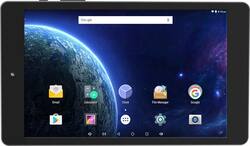
Digiland - 8" - Tablet - 8GB - Black
- Key Specs
- Screen Size: 8 inches (Size of the screen, measured diagonally from corner to corner.)
- Screen Resolution: 1280 x 800 (Screens come in a range of resolutions (measured in pixels, horizontal x vertical). The higher the resolution, the greater the picture quality.)
- Processor Model: Cortex-A7 MTK8127 (Your computer's processor is like its brain. Working in combination with system memory, the power of the processor determines the complexity of software you can run, how many programs you can have open at the same time, and how fast those programs will run. Most computers feature an AMD, Intel or Snapdragon processor.)
- Total Storage Capacity: 8 gigabytes
- Operating System: Android 7.0 Nougat (The operating system manages all software and hardware, including files, memory and connected devices. Most importantly, it lets you interact with your device and your programs in a visual way; otherwise, you'd be typing computer code to get anything done.)
- Battery Chemistry: Lithium-polymer
- General
- Brand: Digiland
- Model Number: DL8006
- Product Name: 8" - Tablet - 8GB
- Color: Black
- Year of Release: 2017
- Display
- Screen Type: IPS
- Screen Size: 8 inches (Size of the screen, measured diagonally from corner to corner.)
- Screen Resolution: 1280 x 800 (Screens come in a range of resolutions (measured in pixels, horizontal x vertical). The higher the resolution, the greater the picture quality.)
- Processor
- Processor Model: Cortex-A7 MTK8127 (Your computer's processor is like its brain. Working in combination with system memory, the power of the processor determines the complexity of software you can run, how many programs you can have open at the same time, and how fast those programs will run. Most computers feature an AMD, Intel or Snapdragon processor.)
- Storage
- Total Storage Capacity: 8 gigabytes
- Memory
- System Memory (RAM): 1 gigabytes (Random-access memory (RAM) is a computing device's short-term data storage, which allows active information to be accessed quickly. The size and type of RAM determines how efficiently the device can handle large amounts of information at one time. For example, gaming or video editing requires more RAM for optimal performance.)
- Expandable Memory Compatibility: microSD
- Compatibility
- Operating System: Android 7.0 Nougat (The operating system manages all software and hardware, including files, memory and connected devices. Most importantly, it lets you interact with your device and your programs in a visual way; otherwise, you'd be typing computer code to get anything done.)
- Operating System Compatibility: Android
- Connectivity
- Compatible Wireless Standard(s): Wireless-B, Wireless-G, Wireless-N (The wireless networking standard(s) the device is backwards compatible with. This includes networking protocols based on the IEEE 802.11 standard (alphabetically ascending) and the Wi-Fi Alliance standard (numerically ascending), both of which provide high-throughput wireless local area networks (WLANs). Devices designed to work with specific standard(s) will be backwards compatible with previous versions but may not run at optimal performance when using earlier iterations.)
- Headphone Jack: true (The device features an interface that allows for the connection of headphones.)
- Interface(s): Micro-USB, 3.5mm audio (Refers to the types of connections that devices use to interact and communicate with each other.)
- Power
- Charging Interface(s): Micro-USB (The connection for transmitting power to charge the device.)
- Battery Capacity: 4500 milliampere hours (The amount of energy stored in the battery.)
- Battery Chemistry: Lithium-polymer
- Camera
- Front-Facing Camera: true
- Front Facing Camera Megapixels: 0.3 megapixels (The more megapixels, the more detail that the camera facing the user can capture.)
- Rear-Facing Camera: true
- Rear Facing Camera Megapixels: 2 megapixels (The more megapixels, the more detail that the camera facing away from the user can capture.)
- Features
- Stylus Dock: None
- Dimensions
- Product Height: 8.5 inches (The out of box height of the item. Height is measured as the vertical distance from the bottom of the item to the top as it would be primarily used or placed.)
- Product Width: 4.9 inches (The out of box width of the item. Width is measured as the horizontal distance from one side of the item to the other as it would be primarily used or placed.)
- Product Depth: 0.4 inches (The out of box depth of the item. Depth is measured as the distance from the front of the item to the back as it would be primarily used or placed.)
- Product Weight: 12.3 ounces (The out of box weight of the item.)
- Warranty
- Warranty - Parts: 90 days
- Warranty - Labor: 90 days
- Other
- UPC: 840778100478
Enjoy entertainment with this 8-inch Digi land Android tablet. Its battery powers up to 30 hours of audio or 4.5 hours of video playback, and its 8GB of storage space lets you download numerous apps. This Digi land Android tablet has 1GB of RAM and a quad-core MTK processor to handle program operations.
- Android 7.0 (Nougat) operating system: Productivity and entertainment at your fingertips. Download apps, games, movies, music and eBooks from Google Play. Cloud integration provides a seamless experience across all Android devices.
- 8" screen with 800 x 1280 resolution: Clear, bright resolution for watching movies, surfing the Web, reading books, and more.
- 8GB internal storage plus microSD card slot: Stores your music, movies, photos, and more. Expand storage with a microSD card (sold separately).
- Quad-core processor: The right combination of fast performance and power efficiency. It allows rapid multitasking, delivers smooth response and unleashes stunning graphics.
- Dual cameras for photos and face-to-face chat: 2MP rear camera and 0.3MP front camera.
Whats Included
- DigiLand DL8006
- Power adapter
- USB cable
Q: Does this tablet carry Internet on its own? Can it be used in the car to play games?
A: This tablet can connect to the internet only through wifi. It cannot connect through a cellular connection (e.g. 3G or 4G LTE) from Verizon, AT&T, etc. If a game can be played offline, without connecting to the internet, then you can play it on this tablet when you're away from wifi. Another note about games: this tablet can handle simple games fine but may not be powerful enough to handle graphically intensive video games. That said, I just played through the first level of Super Mario Run on this tablet and it handled it without a hitch.
Q: Is it wifi?
A: Yes it has WiFi. Works well.
Q: Do you have anything in your store for around $60.00 for a tablet
A: Look at the Digiland 8" Android tablet. I got one and it works great for youtube, playing mp3s and E-reading. Worth every cent.
A: Yes it does but it functions very poorly (not accurant like a Cell phone or actual GPS unit) I tired to use this for Uber driving and it just would not function well enough for me to use. Although it is a wonderful tablet for Internet browsing and small tasks, I would not buy this for using the Google maps or and GPS maps app. (I tired all of them Google maps, Waze, and one other that I can not remember off the top of my head right now. None were accurate and very slow to update the location)
Q: How is the battery life? Also, how long does it take to charge?
A: I found it charges faster with a higher amp 2.0 or higher charger. Probably takes around 2 hours for a full charge if off. Son always plays it while charging so I don't know exactly. Lasts at least 3 hours with my 9yo playing games and YouTube.
A: Press the power button and the Down Volume key at the same time with the tablet turned off. Once the screen turns on you should be able to let the buttons go if not just keep pressing them until you get a Korean letters on the screen. Once you are there click the down volume button 5 times and then press the power button. it should restart and then it will factory reset the tablet for you so that it acts as it is brand new
Q: Will this table run excel, word, and the other microsoft office programs?
A: This is an android tablet, so check the google play store to see if those apps are available.
A: John, It sounds like the SD card may be not formatted correctly. Also it is highly recommended that you do not insert the SD card while the tablet is running. Insert the SD card while it is off and then turn it on. IF it need to it should say format SD card or it may say it is corrupt and ask to repair it. Either way tell it yes and let it fix or format the SD card. Then it should work properly. If it still does not try Factory Resting the tablet and then follow the instructions above. PCITGUYS
People also viewed
 $249.99The price was $269.99
 $629.99The price was $739.99

Today's top picks
 $449.99The price was $829.99
 $2,449.99The price was $3,199.99
 $999.98The price was $1,639.98
 $199.99The price was $249.99