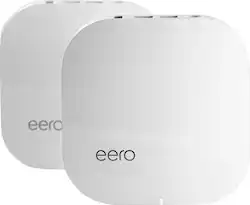
eero - AC Whole Home Wi-Fi System (2-pack) - White
- General
- Brand: eero
- Model Number: A010201
- Product Name: AC Whole Home Wi-Fi System (2-pack)
- Color: White
- Security
- Data Encryption: true
- Encryption Type: WPA2 (The security protocols or certification programs that protect the Wi-Fi network.)
- Firewall Type: NAT (The method the firewall uses to filter and process data to increase network security, primarily by blocking malicious traffic requests while allowing legitimate traffic through.)
- Security Features: WPA2 personal wireless encryption
- Network
- Ethernet Standard: 10/100/1000 (Each standard is a variation of the IEEE 802.3 set of computer networking technologies known as Ethernet. New versions evolved to include higher bandwidth, different physical media, and other new and improved features. Standards are often denoted by speeds (in Megabits per second). For example, a 10/100/1000 Ethernet port transmits at 10 Mbps, 100 Mbps, and 1000 Mbps (1 Gbps).)
- Frequency Band: 2.4 GHz, 5.0 GHz (Bands may be grouped into categories such as low- and high-band VHF (Very High Frequency), low- and high-band UHF (Ultra High Frequency), or certain frequency channels (measured in MHz or GHz). Generally, higher frequencies transmit information faster but have shorter range than lower frequencies.)
- Wireless Networking Standard: Wi-Fi 5 (The wireless networking standard used by the device. Each iteration of the standard developed by the Wi-Fi Alliance corresponds to an existing IEEE 802.11 protocol; for example, standard 802.11ac (or AC) is termed Wi-Fi 5. Refers specifically to the standard the device is designed to use, but ultimately determines product interoperability and backward compatibility including previous versions.)
- Wireless Standard: AC, N (The wireless networking protocol used by the device. Each iteration of the protocol is based on the 802.11 standard developed by the Institute of Electrical and Electronics Engineers (IEEE) Standards Association. Denoted by letters following 802.11 (802.11a, 802.11ac, etc.), each version, published in alphabetical order, encompasses all previous versions.)
- Number of 2.4Ghz Streams: 1 (A router's streams are like lanes on a highway. The more streams a router has, the less traffic congestion. Because the 2.4 GHz band is used to transmit wireless signals to a wide variety of devices, there is often high amounts of traffic on that stream. But with multiple streams, each can be designated to a specific device for optimal performance. For example, if one 2.4 GHz stream is assigned to one device, such as a desktop computer, it leaves the remaining streams open for guest users, devices that use more data, or devices with specific band compatibility.)
- Number of 5.0Ghz Streams: 1 (A router's streams are like lanes on a highway. The more streams a router has, the less traffic congestion. The 5.0 GHz band provides high speed, short-range data transmission and typically has less traffic than the 2.4 GHz band. With multiple streams, each can be designated to a specific device for optimal performance. For example, if one 5.0 GHz stream is assigned to one device, such as a streaming media player, it leaves the remaining streams open for guest users, devices that need less data, or devices with specific band compatibility.)
- Certifications Listings & Approvals
- ENERGY STAR Certified: false (Devices carrying the ENERGY STAR service mark, such as computer products and peripherals, kitchen appliances, and other products, generally use 20% to 30% less energy than required by federal standards.)
- Features
- Integrated Modem: false
- Wireless: true
- Ports
- Port Type(s): RJ-45, USB (USB 2.0 connects external drives, gaming controllers, smartphones, MP3 players and other accessories.USB 3.0 transfers data faster than USB 2.0, but only when used with USB 3.0 devices.USB Type-C provides fast speeds and versatile power, featuring connectors with identical ends that plug in upside down or right side up. Adapters allow for video as well as backward compatibility.Thunderbolt provides ultra-high bandwidth for fast data transfer between devices featuring a Thunderbolt or MiniDisplayPort connection.HDMI allows you to connect a projector or display HD media on your HDTV or monitor.Media card slots allow you to transfer photos from your digital camera or camcorder.)
- Speed
- Gigabit Ethernet Speed: true (Supports the gigabit Ethernet networking standard, which has a data rate of at least one gigabit per second, or 1,000 Mbps.)
- Dimensions
- Product Height: 1.34 inches (The out of box height of the item. Height is measured as the vertical distance from the bottom of the item to the top as it would be primarily used or placed.)
- Product Length: 4.75 inches (The out of box length of the item. Length is measured as the longest dimension of the item.)
- Product Width: 4.75 inches (The out of box width of the item. Width is measured as the horizontal distance from one side of the item to the other as it would be primarily used or placed.)
- Product Weight: 2.5 pounds (The out of box weight of the item.)
- Warranty
- Warranty - Parts: 1 year
- Warranty - Labor: 1 year
- Other
- UPC: 852582006020
Connect to the Internet reliably without any signal obstructions with this EERO Wi-Fi system. This compact unit won't take up much space on your desk or shelf, and it works with both cable and DSL connections, offering compatibility to millions of homes. This EERO Wi-Fi system pack includes two units for coverage of a large space.
- Your WiFi problems, gone: WiFi setup is the worst. With eero, simply download the app and plug one eero directly into your existing cable or DSL modem.
- You can add as many as you need eeros to cover your home: Additional eeros just need power from a wall outlet. They automatically connect to each other wirelessly.
- WiFi is no longer a black box: The eero app lets you manage your network from the palm of your hand, so youll know how many devices are connected and the Internet speed youre getting from your ISP.
- Security that's one step ahead: eero is protected with state-of-the-art WPA2 encryption, and because it controls the hardware and the software for your entire network, it ensures that youre always secure.
- No need to reset your router again: The mysterious silver bullet to many a WiFi woe is to unplug your router, then plug it back in. eero regularly runs checkups so your network is always at its best.
- The only answer is multiple access points: For fast, reliable WiFi in every room, you need a set of access points. Each eero in the network is created equal and the result is an incredibly fast, resilient network.
- Wireless connectivity: Dual-band WiFi radios, simultaneous 2.4 GHz and 5 GHz wireless, 2x2 MIMO, IEEE 802.11a/b/g/n/ac, Bluetooth Smart Ready.
- Wired connectivity: Dual auto-sensing Gigabit ports for WAN (cable or DSL modem) and/or LAN (networked device) connectivity, USB 2.0 port.
- Security and networking services: WPA2 personal wireless encryption, DHCP, NAT, VPN passthrough, UPnP.
Whats Included
- AC Whole Home Wi-Fi System (2-pack)
- Ethernet cable
- Power cords
A: I can't tell if you are serious, but assuming you are: this is a ROUTER system. The router takes the information that you get from your internet service provider (the ISP is who you pay a monthly bill to), and ROUTS it wirelessly to all your devices. This Eero is a whole hole system, meaning that you hook one up to the modem (the modem is essentially what translates the internet from your ISP into usable signal), and you plug the other two into a wall. The system then creates a mesh network, giving you full signal throughout the entire home without all the issues you would get if you used a single router or ESPECIALLY if you tried to used the ISP-provided router (because no internet service provider will give you a good enough router. It saves them money to give you a terrible router.)
A: I set up my eero system throughout my home by connecting to hardwired Ethernet connections I have throughout my home and that is truly the best way to get the strongest signal and fastest speeds.
Q: Is this first or second gen
A: 1st Gen is Model: A010301 2nd Gen is Model: B010301
Q: Would this work in an RV motorhome?
A: Yes, the Wifi system will work in an RV motorhome.
A: I have fios and works with that fiber system. Yes, it has eliminated all spotty areas in the house. We havw a 3-pack system.
A: eero should easily cover a 40 ft dist from home. I have a community pool behind my home and i can easily receive my home wifi network signal on the phone
A: Yes and no. You don't pay for the Wifi, but you DO have to pay for the internet connection to come into the house. All Wifi signals have to originate from the internet, and those are almost always originated from a plugged in network connection. (The exception is the internet connection to your phone and a technology called tethering, but that's beyond the scope here.) So, you have Internet -> Modem -> Wifi -> computer/tablet. You need to have the whole chain to browse the internet wirelessly.
Q: so this would replace my netgear router and 3 extenders? thx!
A: Yes, all the eero units are full fledged routers, so have one replace your netgear router, and use the others to expand your network.
People also viewed
 $359.00The price was $369.00


Today's top picks
 $199.99The price was $249.99
 $479.99The price was $729.99
 $789.99The price was $1,049.99
 $799.99The price was $1,199.99