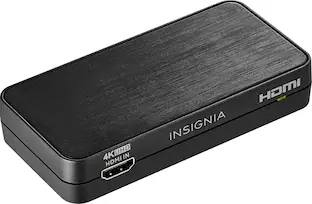
Insignia™ - HDMI 2-Output Splitter with HDR Pass-Through - Black
Customers are saying
Customers admire the overall performance of this product, with many users noting that it functions perfectly for their needs. The device is frequently praised for its straightforward setup process and its compact, space-saving design. Additionally, users appreciate the reliable functionality and the clear resolution capabilities provided by the splitter.
Features
Gain 2 HDMI outputs with one connection
Connect your laptop, gaming device, or streaming stick to view on two displays simultaneously.
Supports 4K resolution at 60Hz
Revel in crisp, detailed images with a realistic picture while streaming the big game.
Mounting keyholes or double-sided tape
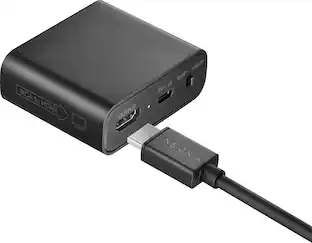
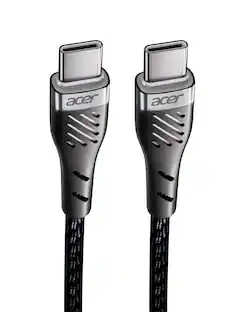
Provides flexible placement options, either mounted to a wall or secured to a flat surface. Plug in your splitter with the provided 6 ft. USB-C cable and AC adapter.
Sustainably focused
The outer package for this product has been manufactured with sustainably sourced paper, certified by the Forest Stewardship Council (FSC). FSC certification ensures that packaging comes from responsibly managed forests to help protect the planet - today and tomorrow.
Brought to you by Best Buy
Insignia brings you affordable, dependable products with all the features you need.
Specifications
- Connector Type (End 1)USB-CConnector Type (End 2)USB-A
Reviews
Rating 4.4 out of 5 stars with 89 reviews
- Overall Performance (46)
- Functionality (22)
- Setup (6)
- Resolution (3)
- Size (3)
Customer Images
The vast majority of our reviews come from verified purchases. Reviews from customers may include My Best Buy members, employees, and Tech Insider Network members (as tagged). Select reviewers may receive discounted products, promotional considerations or entries into drawings for honest, helpful reviews.
Compare similar products

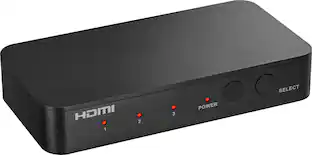
The Insignia HDMI 2-Output Splitter with HDR pass-through provides the flexibility to extend your display. Send your laptop screen to multiple projectors for a presentation, set up the ultimate gaming night with multi-display video games, or stream the big game on multiple TVs. The splitter has HDR pass-through and supports 4K resolution for a crisp on-screen picture.

Future-proof your home theater setup with the Rocketfish 2-Output Ultra HD HDMI Splitter. Designed to connect a single media device to two displays, extending your display. The splitter supports 8K at 60Hz and is compatible with HDR10 and Dolby Vision HDR for superior on-screen visuals.
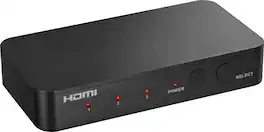
Complete your home theater setup with the Insignia HDMI 3-Port Switch with 4K HDR Inputs. The switch connects three HDMI devices, such as streaming sticks, gaming devices, computers, or Blu-ray players, to a TV screen or projector. A simple press of a button switches between the inputs to send on-screen. The switch features 4K HDR at 60Hz to support high-definition signals up to 18 Gbps, providing a crisp picture on the screen.
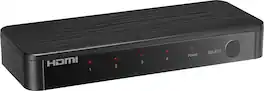
Future-proof your home theater setup with the Rocketfish 4-Input Ultra HD HDMI Switch. Designed to connect four media devices to a single display, effortlessly switching between them with the press of a button on the included remote. The switch supports 8K at 60Hz and is compatible with both HDR10 and Dolby Vision HDR for superior on-screen visuals.
| Pros for Insignia™ - HDMI 2-Output Splitter with HDR Pass-Through - Black | |||
|---|---|---|---|
| Overall Performance, Functionality, Resolution, Size, Setup | Overall Performance, Functionality, Resolution, Size | Overall Performance, Ease of Use, Connectivity, Size, Remote Control | Overall Performance, Ease of Use, Connectivity, Resolution, Audio Quality |
| Cons for Insignia™ - HDMI 2-Output Splitter with HDR Pass-Through - Black | |||
| There were no cons for this product— | There were no cons for this product— | There were no cons for this product— | Remote Size |
Specs
Questions & Answers
Is this splitter compatible with HDMI eARC?
Answered by InsigniaCustomerSupportHello, thank you for your question. No, the Insignia HDMI 2-Output Splitter, model NS-AV20SPLTR, does not support HDMI eARC. Mueez | Insignia
Can it be used to connect 2 devices for example a dvr and stream device to 1 hdmi port on the tv
Answered by InsigniaCustomerSupportHi, thank you for your question. The Insignia™ HDMI 2-Output Splitter with HDR Pass-Through - Black (Model: NS-AV20SPLTR) cannot connect two source devices, such as a DVR and a streaming device, to one HDMI port on a TV. It is designed to take one HDMI input and distribute that signal to two displays. Faisal | Insignia.
Can the Insignia HDMI 2-Output splitter extend displays?
Answered by InsigniaCustomerSupportHello Erin, thank you for your question. No, this Insignia™ HDMI 2-Output Splitter is designed to duplicate or mirror the same video and audio signal to two displays. It does not support extending your desktop across multiple displays. If you need extended display functionality, you would need a docking station, USB-C display adapter, or graphics solution that specifically supports multi-monitor extended mode. Sudeep | Insignia
Is this product sustainably focused?
Yes, the outer package for this product has been manufactured with sustainably sourced paper.
This question and answer was generated by AI based on customer and product data.How many HDMI outputs does this splitter provide?
This splitter provides two HDMI outputs with one connection.
This question and answer was generated by AI based on customer and product data.

Customers often buy these together
More to consider
 Techtober Deal$22.49The price was $24.99
Elevate your entertainment Sponsored
 Techtober Deal$59.99The price was $79.99
Discover related products
 $64.99The price was $69.99

Keep exploring
 Techtober Deal$9.99The price was $19.99