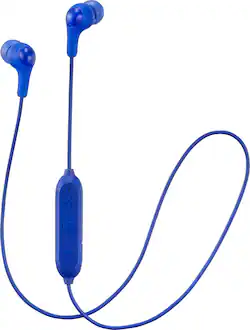
JVC - HA FX9BT Gumy Wireless In-Ear Headphones (iOS) - Blue
- Key Specs
- Sound Mode: Stereo
- Connection Type: Wireless
- Wireless Connectivity: Bluetooth (The manner in which a device sends data to another device over a short distance without the use of wires or cables.)
- True Wireless: false (These headphones not only lack wires between the device and headphones, they also lack wires between the headphones themselves. (true wireless is really only possible with in-ear headphones))
- Maximum Wireless Range: 33 feet
- Water Resistant: false (Resists some degree of water penetration.)
- Built-In Microphone: true
- Carrying Case: false
- Headphone Fit: In-Ear
- Battery Life: 5 hours (Battery life will vary depending on the product configuration, product model, applications loaded on the product, power management setting of the product and the product features used by the customer. As with all batteries, the maximum capacity of this battery will decrease with time and usage.)
- Battery Charge Time: 2.5 hours (Battery charge time will vary depending on the product configuration, product model, applications loaded on the product, power management setting of the product and the product features used by the customer. Charging time will likely decrease with time and usage of the battery.)
- Ear Tip Sizes Included: Medium, Small
- General
- Brand: JVC
- Model Number: HA-FX9BTA
- Product Name: HA FX9BT Gumy Wireless In-Ear Headphones (iOS)
- Color: Blue
- Ear Cushions: true
- Ear Tip Sizes Included: Medium, Small
- Audio
- Sound Isolating: true
- Minimum Frequency Response: 20 hertz (Describes the maximum range of frequencies or musical tones a product can reproduce, from very low tones to very high treble tones. The minimum frequency or musical tone the speaker can reproduce. High treble tones have higher frequencies while low tones and deep bass have lower frequencies.)
- Maximum Frequency Response: 20 kilohertz (Describes the maximum range of frequencies or musical tones a product can reproduce, from very low tones to very high treble tones. The maximum frequency or musical tone the speaker can reproduce. High treble tones have higher frequencies while low tones and deep bass have lower frequencies.)
- Sound Mode: Stereo
- Driver Size: 9 millimeters
- Connectivity
- Connection Type: Wireless
- Wireless Connectivity: Bluetooth (The manner in which a device sends data to another device over a short distance without the use of wires or cables.)
- True Wireless: false (These headphones not only lack wires between the device and headphones, they also lack wires between the headphones themselves. (true wireless is really only possible with in-ear headphones))
- Bluetooth Version: 4.1 (The Bluetooth specification formalized by the Bluetooth Special Interest Group. All versions of the Bluetooth standard are backwards compatible with previous versions.)
- Maximum Wireless Range: 33 feet
- Features
- Water Resistant: false (Resists some degree of water penetration.)
- Built-In Microphone: true
- Carrying Case: false
- Bone Conducting Technology: false
- Design
- Headphone Fit: In-Ear
- Style: Travel
- Power
- Rechargeable: true
- Battery Life: 5 hours (Battery life will vary depending on the product configuration, product model, applications loaded on the product, power management setting of the product and the product features used by the customer. As with all batteries, the maximum capacity of this battery will decrease with time and usage.)
- Battery Charge Time: 2.5 hours (Battery charge time will vary depending on the product configuration, product model, applications loaded on the product, power management setting of the product and the product features used by the customer. Charging time will likely decrease with time and usage of the battery.)
- Other
- UPC: 046838076633
Take music on the go with these JVC Gumy Wireless headphones. They provide five hours of listening time before needing to charge, and they're constructed from elastomer material for a comfortable fit. These JVC Gumy Wireless headphones have a three-button remote for controlling the volume and skipping through tracks.
- In-ear design: Fits securely and directs music into your ears for full, uninterrupted audio.
- Bluetooth interface: Enables simple wireless pairing with your Bluetooth-enabled device.
- Rechargeable battery: Offers up to 5 hours of use on a charge.
- In-line microphone: Lets you enjoy hands-free calls.
- 9mm drivers: Deliver powerful sound.
- Stereo design: Delivers crisp tones.
- Elastomer exterior: For stylish looks and durability.
Whats Included
- JVC HA-FX9BT Gumy
- 2 pairs of ear tips (small, medium)
Product Manuals
Q: Is this going to work with Android/Samsung and iPhone? Thanks...
A: I have a SG7 and it links like a charm
Q: Does it come charged or do you have to charge it before the first use?
A: yes it comes charged
Q: Do these earbuds provide noise cancellation? I enjoy being submerged in my music in the car.
A: Annie, that is a great question. They provide good isolation, but they are not noise cancellation headphones. Please check your local, state, and federal laws about wearing headphones while driving.
Q: Can you use these to answer and talk on your phone and if so how is the voice call quality?
A: It's fine for hearing the incoming voice but I've been told by the person on the other end of the line that I sound far away. They're grateful when I switch to speaker phone or some other system.
Q: Do these work with iOS 11 - iPhone 8
A: yes they do. But theyre horrible sound quality.
Q: Can I use these with my MACbook Air to watch work out videos in the gym?
A: The answer is yes: Make your Mac discoverable, then connect it with a Bluetooth keyboard, mouse, trackpad, headset, or other audio device. You need to connect your Mac with the device only once and the device usually remains connected until you remove it.. Make sure the device is turned on: On your Mac, choose Apple menu > System Preferences, then click Bluetooth. Your Mac is now discoverable. Select the device in the list, then click Connect. If asked, click Accept.To remove a device, Control-click its name.
Q: I lost the manuel and wondering how do I connect it to my phone?
A: While the headphones are powered off, you may press and hold the center control button for 7 seconds. The blue and red LED lights will blink alternately. You may then search for Bluetooth devices on your phone. The phone will display the model number and allow you to pair and connect.
People also viewed
 $199.99The price was $249.99
 $299.00The price was $429.00
 $194.99The price was $249.99