Rating 4.7 out of 5 stars with 38 reviews
4.7- Left-handed (21)
- Silent clicks (17)
- Comfortable grip (8)
- Thumb buttons (6)
- Long battery life (5)
- Large size (2)
- Compatibility (1)
- Design (1)
- Limited availability (1)
Customer Images
The vast majority of our reviews come from verified purchases. Reviews from customers may include My Best Buy members, employees, and Tech Insider Network members (as tagged). Select reviewers may receive discounted products, promotional considerations or entries into drawings for honest, helpful reviews.
- Rated 5 out of 5 stars
Excellent left-handed mouse
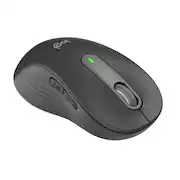
I got this mouse for my teenage daughter who is left-handed. She is used to using the generic shaped mice with less buttons, because most of the premium options have the additional buttons on the wrong side. Now not only does she have configurable thumb buttons she can use, but a very well-designed mouse overall. - Comfortable curved shape and soft touch plastic - Quiet and smooth operation of both the scroll wheel and buttons - Easy setup: perforated packaging is easy to open; the battery is preinstalled and once I pulled the tab my computer recognized the mouse immediately (over Bluetooth) - Easily replaceable AA battery included - Multiple connection options: Bluetooth or USB wireless receiver - USB receiver can be stored in the battery compartment when not in use - 2 thumb buttons - on the correct side for left-handed users (normally forward and back, but configurable with the Logitech app) - No issues with tracking on every surface we have tried. I would definitely recommend and I might get the right-handed version for myself! The variable speed scrolling and quiet buttons would be a useful upgrade from my current mouse at work.
Posted by MGoose
- Rated 5 out of 5 stars
If you are left handed, with larger hands....
If you are left handed, with larger hands the LOGI M650 is for us. The left hand mouse allows the natural left hand thumb to access the two (2) programmable side buttons. Pairing is fast and easy with Bluetooth. No Bluetooth, the M650 comes with the standard USB transceiver for rock solid mouse operation. The feel of the embossed rubber fins is awesome. They make the mouse a pleasure especially for long periods of use. The center wheel not only serves as a center button, but smooth scrolling as well. Super accurate laser scanning over most surfaces, even glass. Happily, the single AA battery is said to last 2-years. Along with that is a true on/off switch.
Posted by JerryZ
- Rated 5 out of 5 stars
smooth & ease to use for performance
Review of M650 Lefthand - Large Size. The Logitech M650 for left hand is simple and easy to use inline with most of Logi mouses. It’s key attributes are: - Made for large sized left hands; - SmartWheel - Silent Clicks - Customizable Side Buttons - Comfort and upgraded for long hours - Connect via Bluetooth or with included Logi Bolt USB Receiver - Comes in smaller size. Upon unpacking and connecting to MacBook or Windows machines were straight and simple. It need to go through regular setting to customize to adjust to personal preferences. In this aspect it doesn’t require or have any differences with existing models. I have used the smart wheel and silent clicks mostly. And the silent click was most remarkable way of using compared to previous or other models. As click doesn’t feel that plastic touching noise that we are used. As click, works perfectly but smooth almost like something is missing but in the same time glad it is the way. It is battery based charging and according to the manufacturer claim should last 24 Months. But naturally will vary one length of personal usage.
Posted by MigDigital
- Rated 4 out of 5 stars
Solid mouse for lefty users, could be flashier
Logitech Signature M650 Left Mouse Despite being right-handed I choose to use my mouse left-handed (software engineer war story = right shoulder blade pinched nerve) I’d become accustomed to having to deal with awkward ergonomics, and disabling usage of the right mouse left side buttons. This Logitech M650 mouse finally alleviates that for me. Having relatively large hands most mice feel too small. I thought this one would actually be larger. It’s actually slightly smaller than the right-handed Alienware mouse that had fit the bill with great ergonomics but the wrong side buttons were an issue. Using this mouse feels very natural, the scroll wheel that adjusts between precision mode and quick scroll mode is a nice touch. If I had one suggestion, nit pick complaint, it would be to flash it up a little more like Alienware or other gaming mouse rotating colors. Pros + Comfort + SmartWheel toggle precision to quick scroll + Silent Click Silent Touch technology + Side button for shortcuts + OptionsPlus app to configure Cons -not as flashy as Alienware LED colors -had to search for included USB dongle (in body) Conclusion: recommended buy if you’re a large handed lefty mouse user.
Posted by TechReviews
- Rated 5 out of 5 stars
The Scroll Wheel is as Smooth as Warm Butter
I am inherently a right-hand dominant person who had to train himself to become left-hand dominant for medical reasons. As a result, for the last 17 years, I have been searching for the perfect left-handed mouse and now I found it! The Scroll Wheel on the M650L turns smoother than any Scroll Wheel I’ve ever used in my entire life; and I’ve been using computers nonstop since 1985! It’s like sliding your finger through warm butter. The Scroll Wheel impressed me immediately. Also, the slider pads on the bottom of the mouse allow the mouse to slide across a metal gaming pad with almost no effort. I mean it almost wants to slide by itself. It’s that slick! The left and right buttons push so very gently with almost no resistance. I am completely blown away by how very little finger strength is required to activate the Left and Right buttons and to roll the Scroll Wheel. The ease of use of a desktop computer mouse is very important to me because of a disability I have with my hands. Years ago, I had a spinal cord tumor in my cervical spine which nearly destroyed the use of my hands. My right hand is nearly useless, so I can only use a computer mouse with my left hand, and that hand has less than 1 pound of grip strength and 0 pounds of pinching strength. Consequently, sliding the mouse around and pushing the buttons and using the scroll wheel on a regular computer mouse will cause pain and fatigue in my left hand after just a few hours use. I’ve been using the M650L for about five days now for about 8 to 9 hours a day and have suffered no fatigue or discomfort! Good job Logitech. I am so impressed with this mouse that the day I received it through Tech Insider Network, I went to Best Buy.com and ordered two more M650L Left mice to have as spares in case I were to damage or wear out my first one. They’ve already been received. Please see the image I included with this review. My left hand lacks the fine motor skill and strength to utilize the side buttons on any computer mouse including the M650L. So, I will have to leave the evaluation of those buttons to the other members of the Tech Insider Network. I installed the Logi Options+ Beta version software. This software allows you to reconfigure the cursor speed and the preset functions for all the buttons and scroll wheel. The software seems fairly mature for a beta version as I did not run into any bugs, limitations, or configuration problems. Once again, good job Logitech. Overall, the Logitech SIGNATURE M650 L Wireless Left-Handed Mouse is a delight to use especially for someone lacking hand strength and fine motor skill. If the M650L can make using a computer easier for me with my disability, it will make it easier for you also. I can find nothing bad to say about it and it comes highly recommended by me.
Posted by Steve62305