Rating 0 out of 5 stars with 0 reviews
0.0Customer Images
The vast majority of our reviews come from verified purchases. Reviews from customers may include My Best Buy members, employees, and Tech Insider Network members (as tagged). Select reviewers may receive discounted products, promotional considerations or entries into drawings for honest, helpful reviews.
- Rated 5 out of 5 stars
Comparison of the Kone Pro Air and Kone Pro
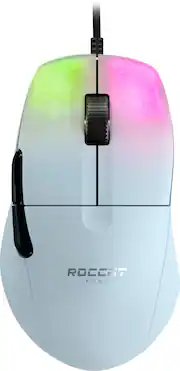
I initially picked up the Pro Air while it was on sale, and then the next week the Kone Pro went on sale and Best Buy sent me a $15 gift. Outside of the nearly $60 price difference, there is one key difference about the regular Kone Pro I do prefer and that's the weight. The Pro Air is by no means heavy, but the regular pro is about 8-9 grams lighter on my scale, which ends up being pretty noticeable to me. Another difference is the black coating is glossier picking up every smudge, and this probably a personal issues but made my hands sweat. I love wireless and had zero issues with it, but Roccat put a nice cable on the Pro and with a bungie you can't notice it. I'm going to stick it out with the Pro for those reasons, but I love this mouse and could have gone either way. Haven't had an ergo shape before, but I love the shape and larger size, while still being light weight. This mouse has become my new main. I don't have any serious complaints about it, but I do think the clicks are kind of muted and not my favorite sounding. The switches are also not what I would consider a fast, and I would consider more tactile. I also wish the side grooves by the side buttons actually had some grip, and I ended up ordering my own grips to help with it. It's kind of good and bad, but the Swarm software isn't the most user friendly, but offers a lot customization. I would recommend either of these mice, especially if you can get them on sale. Also, I would recommend the white edition for the coating.
Posted by Nick
- Rated 4 out of 5 stars
Best Lightweight ergonomic mouse
Avid Valorant fps gamer here. I own a ton of gaming mouse. Having a light mouse is important for flicking and easier on the wrists. My previous main was the legendary Roccat Burst Core mouse. My wrists started to hurt after a few games and especially when speed aiming on aimlabs. I moved over to the razer viper which is my current main but kept clicking the right side buttons. I thought I'd give this a shot as it is on sale. I'll try to give a detail and comparison to similar ergonomic mouse. The other ergonomic mouse include the coolermaster mm720, Kain 100/200, Logitech g403/703, razer basilisk. The Kone pro is lighter than all of these save for mm720. The mm720 just didn't have an accurate sensor. The other mice on the list were just too heavy for me, it felt like playing with a brick. I wish roccat would make a lightweight Kain 120 with optical switches. PROS The mice feet are better than 3rd party pads. They are perfectly rounded, glides like tiger arcs. They do not stick like corepads. Wish Roccat would sell these heat treated pads. They are supposed to be broken in with the heat. Love the fact they added an extra set in the box. Comfortable to use, the thumb rest really helps you stabilize your mouse form. Your thumb will not drag on mouse pad. You can clawgrip and fingertip this mouse, although finger just feels better on ambidextrous mouse. The lightweight makes it possible to figertip. Not recommended but definitely doable. I switch between clawgrip and figertip depending on the range of my shot in game. Software easy to use Cable is better than Roccat burst core. Accurate sensor, low click latency from optical switches CONS A little post travel on m1 and m2 Some other people had issues with scroll wheel scrolling backwards at times. DPI button underneath- maybe done to lower the weight, not a deal breaker but I miss it from the burst core. Conclusion- It all about the lightweight comfort of this mouse. Seems like roccat make really original mouse designs, great engineering. They have really decent quality control. They are a little more pricier, but I've never regretted a purchase. Wait until they go on sale. They support their products with firmware updates. Please make a light weight Kain 300 with optical switches. Would give 5 stars but price a little too high.
Posted by SenTENZ
- Rated 4 out of 5 stars
Great mouse with one downside.
Used to the mouse for a couple of days and honestly the mouse has a really nice coating to it. Sort of similar to the Roccat Kone Pure Ultra. The cable on it is very flexible, identical to the Roccat Burst Pro. The shape is actually really nice but it does cramp my thumb a bit on extensive use due to how sharp the curve is. The heat treated feet glide smoothly on my Endgame Gear MPC450. The only thing I’m not a fan of are the clicks. They feel muted and cheap. Is it worth your $80? If the shape, feet, cable isn’t the issue. Go for it. It gets a 4/5 stars due to the muted clicks. (And yet the sidebuttons are nice and snappy. Don’t understand why the main buttons are so muted)
This review is from ROCCAT - Kone Pro Ultralight Wired Optical Gaming Mouse with 19k DPI and RGB Lighting - Wired - Ash Black
Posted by fortyniner
- Rated 5 out of 5 stars
Colorful and accurate.
Highly colorful and accurate. Not overly sensitive, but just to my taste. Been using it for some time and am feeling comfortable with the grip.
This review is from ROCCAT - Kone Pro Ultralight Wired Optical Gaming Mouse with 19k DPI and RGB Lighting - Wired - Ash Black
Posted by Stout
- Rated 5 out of 5 stars
Good reliable mouse
Great mouse for the price. My daughter loves how well it goes with her new build
Posted by BernardM