Rating 3.9 out of 5 stars with 250 reviews
3.9- Sound quality (106)
- Easy setup (24)
- Price (17)
- Subwoofer (16)
- Display location (12)
- Connectivity issues (7)
- Defective product (4)
Customer Images
The vast majority of our reviews come from verified purchases. Reviews from customers may include My Best Buy members, employees, and Tech Insider Network members (as tagged). Select reviewers may receive discounted products, promotional considerations or entries into drawings for honest, helpful reviews.
- Rated 5 out of 5 stars
Excellent Soundbar!!!! - Things You Need To Know!
I researched for several months which surround system to install with my brand-new Samsung Q-LED Q90t 65" TV. I researched every brand of surround system and more and kept coming back to the matching Samsung HW-Q950T ATMOS Surround Soundbar with Sub and rear speakers. I was very concerned with all the complaints I read about!! I have not had ANY complaints with mine whatsoever! But I have learned a lot and may help those who have issues with my review. First, Be Sure to run your DVD player or ROKU directly into the soundbar FIRST using a good HDMI cable then the Soundbar to the TV in the ARC HDMI port. Yes, the TV has smart features but you will not enjoy deep loud bass or good surround sound using the Smart features off the tv. You MUST use a separate ROKU that can connect directly to the Soundbar first. I have a separate 2020 4K ROKU ULTRA stand-alone box and using good brand-new 4K HDMI cables run the ROKU into the Samsung Soundbar and then the Soundbar into the TV. I do this also with my Samsung 4K UHD DVD Blu-ray Player. The Sound is MUCH better with Deep Bass!!!! Again, You MUST run your Source THROUGH the Soundbar. If you use the built-in Apps or watch Free local tv channels you will not have much Surround sound and the Bass will be so poor. BIG Difference when you run the source THRU the Soundbar first and select the input of the device on your soundbar. I am using HDMI-1 on the Soundbar for ROKU and HDMI-2 on the Soundbar for my Blu-ray player. The Difference is AMAZING!!!! If I watch a Netflix movie on the built-in APP on the Smart TV I will NOT have good bass and little surround sound. BUT If I run my separate stand-alone ROKU 4K Ultra box on its Netflix APP the Sound is 4X louder and the Bass will knock the potted plant I have on it off the top by the end of the Movie!!! I had to learn this by trial and error because I had poor surround sound and hardly any bass until I learned this is the way it MUST be connected. NOW the Soundbar will display ATMOS when playing my 4K UHD Blu-ray DVD Player! It's better than being at the Movies!!!! I also found some REALLY NICE speaker stands for the rear speaker. They are made especially for this HW-Q950T rear speakers and fit them perfectly, you can see the attached photos. Look Under Amazon for: "Vebos Floor Stand HW-Q950T Black Set - Compatible with Samsung Q950T, Samsung HW-N950 and Samsung HW-K950" They are VERY WELL made!!!!! Worth the high price tag of $165 plus $75 shipping and arrived in just days from the Netherlands. You can even order longer AC cords up to 10ft for these speaker stands, just standard Samsung cords, or cut and add length to make your own. I am so happy with my Samsung Q950T Surround System. It fits PERFECTLY under my 65" Q90t with a little space left over. It was made to fit the Q90t perfectly in every way! My internet box is only 3 feet away running dual-band 2.1 GHz and 5GHz and I have not had ANY problems at all in the past month since installing everything. When I installed my system I took it out of the box and read all instructions and watched every YouTube video. I updated the software FIRST THING. Because when I first installed it and tried the system it cut out often and sounded bad. I thought I was experiencing all the bad issues I had read. Then I did the update successfully and everything has worked 100% Flawlessly since that day without any issues whatsoever. - Use Good 4K UHD HDMI Cables (one will come with the system) - Run your Source (ROKU, DVD, Cable/Sat Box) directly into your Soundbar using good HDMI cables. - Then Run the Soundbar to the tv's ARC HDMI port - Select the Input on the Soundbar for the device you want to listen to (ROKU, DVD, Cable/Sat Box) Example: My ROKU is HDMI1 and Blu-ray is HDMI2 on the Soundbar's input. - Set your settings like others have suggested using the remote for the Soundbar. - If you have everything connected correctly, You will see ATMOS displayed on the Soundbar when you are playing a 4K UHD Movie on your 4K UHD Blu-ray DVD player and you will HEAR the difference!! - If you are still having issues then unplug your source (ROKU, DVD player) to reset it and then try playing the device to hear a much better sound. The Raw ATMOS Audio needs to go straight into the Soundbar unmodified so the Soundbar can effectively decode it. Adjust your settings accordingly on the Soundbar. I've enclosed some photos of my setup to help. It is a clean set up with my Samsung Q90t 65" TV and Samsung HW-Q950T Soundbar and you can read more about my full set up under my other reviews. I have a Panamax surge suppressor and many other devices hidden inside my BDI Mirage 8227 Media Center which I purchased ALL thru BestBuy. I could not be happier with my system. It looks and sounds great!
Posted by etech152
- Rated 3 out of 5 stars
Great when it works!
For the price of this thing it should work flawlessly! But it doesn't. Out if the box setting everything up was easy. Followed the directions and everything synced up fine. The sound is good. Front center speakers sound a little flat when listening to dialogue. Yes you can hear speaking parts clearly over the rest of the movie. Music sounds awesome! Depending on your house size it’ll fill your whole house with clear uncrackly music at volume 20. But you won’t wanna be in the same room as the sound bar cause it’ll be LOUD! Atmos movies sound good. Depending on the movie you do get that feeling of something above and around you. Bass is great. For movies and music. ISSUES: while listening to music through Alexa ever once in awhile (every other song) music just drops for a split second? Movies, at first the sound wouldn’t play and when it did it would drop completely to the point I really wanted to return the unit. I have it ran with HDMI using the eARC to my Q90 TV. After messing with setting and modes I’d have to physically unplug the power to the sound bar in order to get the sound to work. Very annoying. It seems to be working better now. Maybe there was an update? Remote is basic but that’s all you really need. The display on top is very dumb! To have to get up and see what’s going on the stupid! While yes this eliminates any glow while watching movies in the dark, it just sucks. And the app works good for some settings but not all setting can be adjusted through the app. CONCLUSION: when it works it sounds great! Do Not pay full retail for this! Not worth it. Even at the sale price of $1399 is high for it not performing flawlessly. Hopefully Samsung continues fixing and updating the issues plagued with this unit.
Posted by SilentJ
- Rated 5 out of 5 stars
I’m sure my neighbors can hear this
Set up is a pain in the butt. But hang in there. It is amazing. The first movie I could “crank the sound” for was fast and the furious. It sounded like I was in the car with them. The boom boom is true. It’s not screechy. I have this hooked up to an 85in Q80 and it’s like I’m at the theater. I would 10 out of 10 recommend. Even on a low setting I’m sure the neighbors can hear this.
Posted by Nikki3
- Rated 5 out of 5 stars
Dolby Stadium Theater
Excellent JBL far exceeded my expectations better than Bose
Posted by Stoogatz
- Rated 3 out of 5 stars
Amazing Atmos System, but Who Stole the Bass?
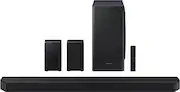
On paper, the Samsung Soundbar Q950T is a really nice piece of kit. In reality, it has two main shortcomings. There is a distinct, and concerning lack of bass from the subwoofer. The system sounds decent when cranked up, when you get the speakers working, you hear the bass kick in, but even then it isn’t anywhere near as defined and sonorous as I expected it to be, especially in this price range. The display is in totally the wrong place. It makes absolutely no sense at all to be on top of the soundbar. When sat enjoying your soundbar, you cannot see the display at all. Even the viewing angle is sharp, so you have to be pretty much on top of it to view it. A self-dimming, larger front display would have been a much better option on device. Out of the box, you get the main sound bar, the subwoofer, two rear wireless speakers, an HDMI cable and 4 power cables. (The rear speakers have power cables to them, but the audio signal is wireless). Set up was simple, all speakers paired up straight away with the soundbar and I was able to connect via Bluetooth to my phone very easily. I chose to purchase additional wall mount brackets for the rear speakers and attached them to the wall, near power outlets in my son’s playroom. They are relatively unobtrusive as far as rear surround speakers go. They have front firing and Atmos top firing speakers built into them. Being an immersive Dolby Atmos 9.1.4 system, it definitely throws the sound around the room and is one of the better soundbars I’ve tested at moving the sound around the room. The .4 in the name is for the 4 Dolby Atmos speakers, 2 of which are on top of the rear speakers and 2 are on the top of the sound bar. The soundbar throws the sound far and wide very well. The first show I watched was Lost in Space on Netflix. With a 4K passthrough and Dolby Atmos signal, it really looked and sounded great in the room. But as I mentioned above, the bass response is next to nothing at lower volumes, and fairly mild at higher volumes. I even disconnected the sub from the soundbar and re-paired them together and it didn’t make any difference. I power cycled it as well, still with no improvement. The soundbar has 3D Audio Codec Support, offering up an immersive 3D soundscape, using either a Dolby Atmos or DTS:X signal. The sound really does surround you, far better than other soundbars I’ve used. The soundbar is also optimized for the Samsung QLED Q-Symphony TVs which expands the soundscape further. The wireless speakers have performed flawlessly, remained connected consistently, and offer a warm, and present sound, helping engulf you in your audio experience. The soundbar also has ‘Alexa Built-In’, and I thought it was neat to know that when you power down the soundbar, you can say ‘Alexa’ and the soundbar will wake up and respond. It was quick to respond and accurate with the information. Pairing the soundbar to the Samsung Smart Things App was easy, but didn’t really add a lot of benefit. You can adjust the subwoofer input, but moving the slider really didn’t make a lot of difference to me at all. You can adjust the equalizer as well, but again, didn’t make a huge amount of difference at all either. You can check your wifi connectivity/and perform software updates (there are none at this time). I found that you get the full impact of the bass at 100% volume, but at that volume, the center channel and additional sound becomes tinny and overbearing, with the want to keep that bass sound, but tone down the rest of the sound, but you simply can’t do it. In contrast, I have another soundbar at a similar price point in my study and even in it’s lowest volume settings, the bass is present and thumping. So I was really disappointed to find the Samsung really lacking in the bass department. In summary, the Dolby Atmos sound really is impressive from this soundbar, but listening to that amazing sound without a strong and competent bass not to accompany it, you are missing half the experience. Explosions don’t sound like explosions, they sound like an inconvenience. And the display being on top of the soundbar is a complete oversight by the designers. I was really excited to get the soundbar set up, and came away disappointed.
Posted by Cupra