
Lockly - Secure Plus Smart Lock Bluetooth Replacement Latch with Touchscreen/Fingerprint Sensor/Key Access/Auto Lock - Venetian Bronze
Lockly - Secure Plus Smart Lock Bluetooth Replacement Latch with Touchscreen/Fingerprint Sensor/Key Access/Auto Lock - Venetian Bronze
Color
Venetian BronzeRelated Item

Highlights
- Key Specs
- Color Finish: Venetian bronze
- Lock Type: Handle
- Lock/Unlock Mechanism: Fingerprint, App, Electronic guest keys, Touchscreen (There are several technologies used by smart locks to manage access, such as biometrics, Bluetooth, or NFC. Some locks allow codes to be entered via a keypad or touchscreen; digital keys can often be sent to multiple authorized devices or temporarily shared with guests.)
- Power Source: Battery-powered
- Installation Type: Replacement
- Wireless Connectivity: Bluetooth (The manner in which a device sends data to another device over a short distance without the use of wires or cables.)
- General
- Brand: Lockly
- Model Number: PGD628FVB
- Product Name: Secure Plus Smart Lock Bluetooth Replacement Latch with Touchscreen/Fingerprint Sensor/Key Access/Auto Lock
- Color: Venetian Bronze
- Color Finish: Venetian bronze
- Features
- Finish: Bronze
- Lock Type: Handle
- Lock/Unlock Mechanism: Fingerprint, App, Electronic guest keys, Touchscreen (There are several technologies used by smart locks to manage access, such as biometrics, Bluetooth, or NFC. Some locks allow codes to be entered via a keypad or touchscreen; digital keys can often be sent to multiple authorized devices or temporarily shared with guests.)
- Auto Unlock: true (Locks with this feature automatically unlock when certain conditions are met, such as coming within range of a home wireless network or when activated via a mobile app.)
- Unlock Notifications: true
- Power
- Power Source: Battery-powered
- Rechargeable Battery: false
- Battery Size: AA (The battery size required for operation.)
- Number of Batteries Required: 4
- Batteries Included: true (Indicates whether the product comes with the required batteries for its operation.)
- Compatibility
- Installation Type: Replacement
- App Compatible: true (The product can be connected to a program or software application on a mobile device, which then receives collected data from the product.)
- Wireless Connectivity: Bluetooth (The manner in which a device sends data to another device over a short distance without the use of wires or cables.)
- Operating System Compatibility: Android, Apple iOS
- Works With: Amazon Alexa, Google Home (Compatible with or able to be connected to other smart devices or applications.)
- Performance
- Minimum Operating Temperature: 4 degrees fahrenheit (The lowest recommended ambient (surrounding) temperature in which the product can ideally operate stated by the manufacturer. Generally long-term exposure of the product to temperatures less than the minimum can result in ineffective operation.)
- Maximum Operating Temperature: 140 degrees fahrenheit (The highest recommended ambient (surrounding) temperature in which the product can ideally operate stated by the manufacturer. Generally long-term exposure of the product to temperatures more than the maximum can result in ineffective operation.)
- Warranty
- Warranty - Parts: 5-Year Mechanical & Finish Warranty and 2-Year Electronics Warranty & Lifetime Technical Support
- Warranty - Labor: 5-Year Mechanical & Finish Warranty and 2-Year Electronics Warranty & Lifetime Technical Support
- Other
- UPC: 850003895079
Lock your door remotely with this Lockly Secure Plus smart latch door lock in venetian bronze finish. The included app lets you use your smartphone to unlock the door for guests and issue digital keys for time-limited access. This Lockly Secure Plus smart latch door has a fingerprint sensor that grants secure access using advanced LED touchscreen technology. This IPX4 certified versatile smart lock with meticulous design is made for protecting what matters most to you with high security and reliability. Best for your home, Airbnb rental property management and offices.
- Multiple Ways to Unlock: Patented PIN Genie digital keypad, 3D biometric fingerprint reader, Smartphone app, Alexa or Hey Google or Physical key.
- Peek-Proof Digital Keypad: Patented PIN Genie keypad has four virtual buttons with three different numbers per button. The numbers change after each use by mixing the location of your PIN number. Super easy to use - Impossible for someone else to guess, even if they are watching you enter your code.
- Your Finger is Your Key: Quick access with fingerprint recognition in <0.3sec & lock opening in <0.5sec. Second Gen 3D biometric fingerprint sensor stores up to 99 fingerprints.
- Mobile App Control: Lock and unlock your door using the Lockly App. Monitor open/closed door status from anywhere with real-time alerts sent to your smartphone (with the optional Wi-Fi hub).
- Voice Control: Lock and unlock your door using the Lockly App.
- Programable Auto Locking: Never worry about forgetting to lock the door with customizable auto-lock feature.
- eBadges & eKeys: Grant revokable access to family, friends and visitors via Lockly app.
- Offline Access Codes: Grant access code that can be used offline without Wi-Fi or Internet to trusted users.
- Real-Time Monitoring & Alerts: Monitor open/closed door status from anywhere with real-time alerts sent to your smartphone (with the optional Wi-Fi hub).
- Easy DIY Installation: Installs in no time with common household tools.
- Rekeying Capability: Replace the key cylinder without changing the lock (with standard rekey kit).
- Venetian bronze finish: Offers a warm and rustic appearance.
- Battery operated: Eliminating the need for unsightly wires or cords.
- Weather resistant: Ensures durability in all seasons.
- Option to add Wi-Fi capability: Augment the capability by adding a Secure Link Wi-Fi Hub. Through the use of Lockly’s Secure Link Wi-Fi Hub, Lockly Secure Plus can be remotely controlled anytime, anywhere via the Lockly App, which also enables features such as voice control with Hey Google or Alexa and real-time alerts. Model PGH200; also sold on BestBuy.com.
- Multiple Ways to Unlock: Patented PIN Genie digital keypad, 3D biometric fingerprint reader, Smartphone app, Alexa or Hey Google or Physical key.
- Peek-Proof Digital Keypad: Patented PIN Genie keypad has four virtual buttons with three different numbers per button. The numbers change after each use by mixing the location of your PIN number. Super easy to use - Impossible for someone else to guess, even if they are watching you enter your code.
- Your Finger is Your Key: Quick access with fingerprint recognition in <0.3sec & lock opening in <0.5sec. Second Gen 3D biometric fingerprint sensor stores up to 99 fingerprints.
- Mobile App Control: Lock and unlock your door using the Lockly App. Monitor open/closed door status from anywhere with real-time alerts sent to your smartphone (with the optional Wi-Fi hub).
- Voice Control: Lock and unlock your door using the Lockly App.
- Programable Auto Locking: Never worry about forgetting to lock the door with customizable auto-lock feature.
- eBadges & eKeys: Grant revokable access to family, friends and visitors via Lockly app.
- Offline Access Codes: Grant access code that can be used offline without Wi-Fi or Internet to trusted users.
- Real-Time Monitoring & Alerts: Monitor open/closed door status from anywhere with real-time alerts sent to your smartphone (with the optional Wi-Fi hub).
- Easy DIY Installation: Installs in no time with common household tools.
- Rekeying Capability: Replace the key cylinder without changing the lock (with standard rekey kit).
- Venetian bronze finish: Offers a warm and rustic appearance.
- Battery operated: Eliminating the need for unsightly wires or cords.
- Weather resistant: Ensures durability in all seasons.
- Option to add Wi-Fi capability: Augment the capability by adding a Secure Link Wi-Fi Hub. Through the use of Lockly’s Secure Link Wi-Fi Hub, Lockly Secure Plus can be remotely controlled anytime, anywhere via the Lockly App, which also enables features such as voice control with Hey Google or Alexa and real-time alerts. Model PGH200; also sold on BestBuy.com.
Whats Included
- Lockly Secure Plus Bluetooth Latch
- 4AA Batteries
- Lockly Secure Plus Bluetooth Latch
- 4AA Batteries
A: Thanks for your inquiry. The Lockly Smart Lock can both fit in left and right open doors. We have included detail instructions on how to change handle direction in our user manual as well as our 3D interactive video on BILT App. and as always, please feel free to call our Lockly customer care hotline at 669 500 8835. we are here to answer your questions and make sure your Lockly smart lock always works perfectly.
A: We're so happy to hear you love your Lockly smart locks! The Wi-Fi hub can support up to 5 Lockly locks and each Lockly must be within Bluetooth range of the WiFi hub. Generally, Bluetooth range is 25-30 feet (unobstructed); however, walls and other obstructions can reduce the range. The optimal range is 10-15 feet. Please also keep in mind that each WiFi Hub only comes with one door sensor.
Q: Can I schedule a lock or unlock? For instance, lock the door at 10pm and unlock it 7am every day.
A: Hi Homer! Yes, with the Lockly Secure Plus Smart Lock, you can schedule automatic locking and unlocking. Lockly offers this feature, which allows you to set specific times for your door to automatically lock or unlock. For example, you can set it to automatically lock the door at 10 PM every day and unlock it at 7 AM. This can be done through the Lockly app. Note: This feature is usually available when the lock is connected to Wi-Fi through the Lockly Gateway. If you need further assistance with this feature, please reach out to us directly. [email protected] 669-500-8835
Q: can you lock the door from the inside making it where the codes don't work? like a "privacy feature"
A: It is possible to turn off the display from the inside deactivating the ability to use pin codes to unlock the door, however, other options like the physical key or the Lockly app could still be used to unlock the door.
A: Hi Bob, Yes, your Lockly lock can be set to allow free entry and exit using Welcome Mode. With this feature, you can schedule times when the door stays unlocked—perfect for when clients or visitors need to come and go during business hours. There’s also an option to require a first unlock verification (such as a code or fingerprint) before Welcome Mode activates, adding an extra layer of control. Once the schedule ends, the lock automatically returns to its normal secured mode. Everything is managed easily through the Lockly app. Need help setting it up? Reach us at 📧 [email protected] or 📞 (669) 500-8835.
Q: Will this work in extreme North dakota winters
A: Hi Matt, Thank you for reaching out with your question regarding the Lockly Secure Plus Smart Lock and its performance in extreme North Dakota winters. The Lockly Secure Plus is designed to operate in cold climates, with an official operating temperature range of -4°F to 140°F (-20°C to 60°C). Many customers in colder regions have used this lock successfully, especially when it’s installed under a covered entryway or sheltered location. However, it’s important to note that North Dakota winters can sometimes experience temperatures well below -4°F, which may affect the lock’s performance, including battery life and touchscreen responsiveness. Please don’t hesitate to reach out if you have any other questions or need additional assistance! 📧 [email protected] 📞 669-500-8835
Q: Will the lock work with Alexa
A: Hello, Yes, the Lockly Secure Plus Smart Lock (Bluetooth touchscreen/fingerprint/latch) can work with Alexa, but you'll need to add Lockly’s Secure Link Wi‑Fi Hub separately. By itself, the Secure Plus only has Bluetooth, so Alexa can’t reach it. But once connected to the Hub, Alexa voice control becomes available.
A: The Lockly Secure Plus can work with Wi-Fi but does not come with the Secure Link Wi-Fi hub needed to utilize its Wi-Fi capabilities. The Secure Link Wi-Fi hub can be purchased separately or with the lock in the Secure Pro package.
Compare similar products

Lock your door remotely with this Lockly Secure Plus smart latch door lock in venetian bronze finish. The included app lets you use your smartphone to unlock the door for guests and issue digital keys for time-limited access. This Lockly Secure Plus smart latch door has a fingerprint sensor that grants secure access using advanced LED touchscreen technology. This IPX4 certified versatile smart lock with meticulous design is made for protecting what matters most to you with high security and reliability. Best for your home, Airbnb rental property management and offices.

eufy Smart Lock C33, Fingerprint Keyless Door Lock with Handle, Built-in Wi-Fi, APP Remote Control, Biometric Door Knob for Entry Door, Auto Lock, IP53 Waterproof

Upgrade your door with the Assure Lever, a smart keypad lever lock for key-free entry. The lever has Wi-Fi and Bluetooth so it allows you to lock/unlock, share access and see who comes and goes all using your app, from anywhere! For ultimate convenience, your Assure Lever will unlock automatically as you approach the door and it will relock once the door is closed! Plus, you can lock, unlock or check current status with voice assistants including Amazon Alexa, Hey Google or Siri. The lock features a backlit keypad so even when you don't have your phone, you can unlock your door without the hassle of keys. It's super easy to use and installs in minutes with just a screwdriver on standard doors (1-3/8" to 1-3/4" thick). Compatible with doors with no deadbolt (i.e. side entry, garage entry, basement, home office, etc.)
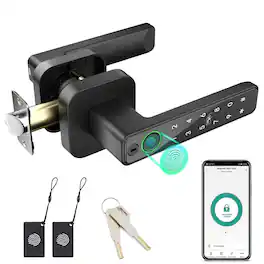
This smart door handle lock blends traditional reliability with modern convenience. Featuring five unlocking methods — fingerprint, password, IC card, mechanical key and TUYA Bluetooth App — it adapts to a wide range of use cases from family homes to short-term rentals and workplaces. The minimalist handle design houses a sensitive touch keypad and a high-performance smart chip for smooth operation and easy password management. The upgraded fingerprint sensor delivers fast, accurate recognition (up to 99%) and can unlock in as little as 0.1 seconds, dramatically improving entry speed and convenience. For best performance and power saving, please wake the lock before using the fingerprint or password. Using the TUYA Bluetooth App, you can share temporary or permanent e-codes (passwords), review access history, receive security alerts and centrally manage user permissions. Designed for quick, no-drill installation on most US standard left/right doors, this lock includes a physical key as an emergency backup and is powered by 4×LR3 (AAA) 1.5V alkaline batteries (batteries not included). Before purchasing for high-traffic or unusual door types, please confirm door thickness and specifications to ensure full compatibility.
| Pros for Lockly - Secure Plus Smart Lock Bluetooth Replacement Latch with Touchscreen/Fingerprint Sensor/Key Access/Auto Lock - Venetian Bronze | |||
|---|---|---|---|
| Ease of use, Fingerprint Sensor | Setup Ease | Ease of use, Installation, Keypad, Overall Performance, Connectivity | There were no pros for this product— |
| Cons for Lockly - Secure Plus Smart Lock Bluetooth Replacement Latch with Touchscreen/Fingerprint Sensor/Key Access/Auto Lock - Venetian Bronze | |||
| There were no cons for this product— | There were no cons for this product— | Battery Life | There were no cons for this product— |
Specs
Reviews
Customer Images
The vast majority of our reviews come from verified purchases. Reviews from customers may include My Best Buy members, employees, and Tech Insider Network members (as tagged). Select reviewers may receive discounted products, promotional considerations or entries into drawings for honest, helpful reviews.