Early Black Friday DealsNew Doorbusters every Friday.Shop now

Main Content

Questions & Answers

Your price for this item is $124.99
The comparable value price is $179.99
Page Showing 61-80 of 105 questions
  • QuestionIs it possible to turn off the wi-fi signal?

    Asked by steve.

    • Answer Hello there, Steve. Thank you for your question. The LG 32LR655BPUA TV does support Wi-Fi, but unfortunately, there isn't a direct setting within the TV's menu to completely turn off the Wi-Fi signal. However, you can disable the Wi-Fi by disconnecting from your network through the TV's settings: Go to the Settings menu on your TV. Select Network. Choose Wi-Fi Connection and disconnect from your Wi-Fi network. This will effectively disable the Wi-Fi connection. For completely disabling the Wi-Fi module, you would need to either disable the Wi-Fi router or use a power strip to turn off power to the TV. https://www.lg.com/us/tvs/lg-32lr655bpua-fhd-tv#pdp_specs If you have any more questions or need additional support, feel free to reach out to us on Social Media @LGUSSupport. Thank you for choosing LG! —Renzo

      Answered by LG Digital Customer Care

  • QuestionCan it be connected to a laptop

    Asked by Anonymous.

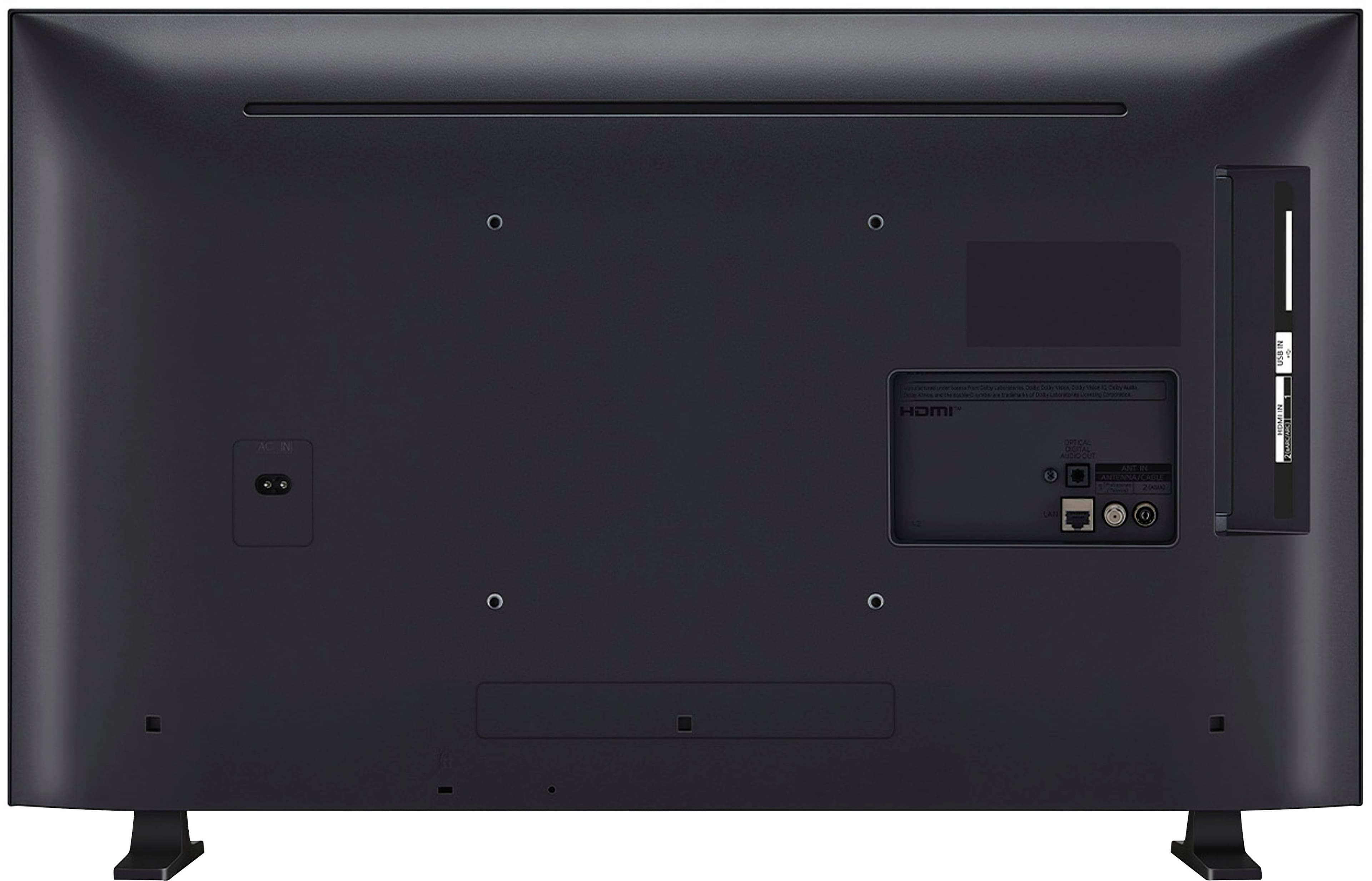
    • Answer Hi there. Thank you for reaching out with your question about connecting the LG 32LR655BPUA to a laptop. We understand that you'd like to explore using this TV with your laptop, and we’re here to help! The 32LR655BPUA model can indeed be connected to a laptop using an HDMI cable. Simply plug one end of the HDMI cable into one of the HDMI ports on the TV (either HDMI 1 or HDMI 2) and the other end into your laptop’s HDMI output. Make sure that your laptop’s display settings are set to extend or duplicate the screen to the TV for optimal viewing. Additionally, the TV supports Wi-Fi and Google Cast, so if your laptop is compatible with casting, you can wirelessly mirror your screen as well. https://www.lg.com/us/tvs/lg-32lr655bpua-fhd-tv#pdp_specs If you run into any issues or need more specific guidance, please feel free to send us a private message on Social Media @LGUSSupport, and our team will be more than happy to assist you further. We appreciate your patience! —Renzo

      Answered by LG Digital Customer Care

  • QuestionIs there a warranty with open box TVs?

    Asked by JanaT.

    • Answer i imagine there is

      Answered by satisfiedconsumer

  • Questionwill this TV come with a remote control?

    Asked by Dante.

    • Answer Yes!

      Answered by PaulineB

  • QuestionDoes this TV support WPA3 security

    Asked by Djkfisher.

    • Answer Hi there! Thank you for reaching out. We understand your question about the LG 32LR655BPUA TV and whether it supports WPA3 security. Based on the specifications and features provided, the TV supports Wi-Fi 5 (802.11ac), but there’s no direct mention of WPA3 support. Typically, WPA3 security is more commonly associated with routers and Wi-Fi networks rather than individual devices, and not all smart TVs specifically list WPA3 compatibility. The LG 32LR655BPUA likely supports WPA2 security, which is the current standard for most Wi-Fi devices. If you have a WPA3-compatible router, the TV should still be able to connect via WPA2 security. For detailed information on network settings or compatibility, we recommend contacting @LGUSSupport via Social Media for further clarification on your network setup. https://www.lg.com/us/tvs/lg-32lr655bpua-fhd-tv#pdp_specs If you have more questions or need assistance with anything else, feel free to reach out, and we’ll be happy to assist you! We appreciate your interest in LG! —Renzo

      Answered by LG Digital Customer Care

  • QuestionCan I play loop on this tv?

    Asked by FiberOptics.

    • Answer Hi there! Thank you for your question about the LG 32LR655BPUA FHD TV. We understand you're interested in playing a loop on the TV. Yes, this TV supports looping content via USB or connected apps. If you have media saved on a USB drive, you can use the USB input to play videos and set them to loop. You can also use webOS features like media apps (YouTube, for example) to play content in a loop, depending on the app's functionality. https://www.lg.com/us/tvs/lg-32lr655bpua-fhd-tv#pdp_specs For more detailed steps, feel free to send us a private message on Social Media @LGUSSupport, and our team will be happy to guide you further. We appreciate your patience! —Renzo

      Answered by LG Digital Customer Care

  • QuestionDoes this tv have a prop 65 warning

    Asked by Cb.

    • Answer It is mentioned on the box after I brought it home. They should list it on the website before you purchase.

      Answered by Anonymous

  • QuestionIs there a protective film already applied to the display? I only noticed the film around the sides that are removed on setup, not on the screen itself.

    Asked by AtoZ.

    • Answer Hi there. Thank you for your question about the LG 32LR655BPUA FHD TV! This model comes with protective film around the sides, which is removed during setup, but it does not have an additional protective film on the display itself. https://www.lg.com/us/tvs/lg-32lr655bpua-fhd-tv#pdp_specs If you have more questions about setup or need any assistance, please feel free to reach out to us on social media @LGUSSupport. We’re here to help ensure your TV is set up perfectly! —Renzo

      Answered by LG Digital Customer Care

  • QuestionWhat is the amperage of Model:32LR655BPUA ?

    Asked by Robo.

    • Answer Hi there, Robo. We understand that you’d like to know the amperage of your 32LR655BPUA. With a power consumption of 26 watts and a standard voltage of 120V, the amperage can be calculated using the formula: Amps = Watts / Volts. In this case, the TV draws about 0.22 amps. This low amperage reflects the TV's efficient energy use. https://www.lg.com/us/tvs/lg-32lr655bpua-fhd-tv#pdp_specs If you need any more assistance or have further questions, please reach out to us on social media @LGUSSupport, and our team will be ready to assist. —Renzo

      Answered by LG Digital Customer Care

  • QuestionDoes Model:32LR655BPUA have line level audio out for connecting to external audio amplifier?

    Asked by billfru.

    • Answer Hello there! Thank you for your inquiry. The LG 32LR655BPUA does not have a dedicated line-level audio output, but it does offer several other ways to connect to external audio devices. You can connect to an external amplifier or sound system via Bluetooth, HDMI eARC (for audio return), or use the LG Sound Sync feature to synchronize audio with compatible soundbars. We understand that having multiple audio connection options is important, and we hope this helps clarify things! https://www.lg.com/us/tvs/lg-32lr655bpua-fhd-tv#pdp_specs If you have more questions or need further assistance, please feel free to send us a private message on Social Media @LGUSSupport, and our team will be happy to assist you. —Renzo

      Answered by LG Digital Customer Care

  • Questionwill a MR22GN magic remote work with 32LR655 tv?

    Asked by Jerry.

    • Answer Hi there, Jerry! Thank you for your question about the 32LR655BPUA TV. The MR23GN Magic Remote is indeed compatible with this model, so you’ll be able to enjoy the added convenience of features like voice control. You may access this link for more information, go to "All Specs": https://www.lg.com/us/tvs/lg-32lr655bpua-fhd-tv. If you have any other questions or need assistance, please don’t hesitate to reach out to us on social media @LGUSSupport. We’re here to help make your experience seamless! —Avril

      Answered by LG Digital Customer Care

  • QuestionDoes it work with coax cable connection? Most smart TVs say they do but can't find the cable channels.

    Asked by Hazel.

    • Answer Hi there, Hazel! Thank you for your question about the 32LR655BPUA. Yes, this model does support a coaxial cable connection, allowing you to access cable channels. After connecting the coax cable, please ensure you go to Settings > Channels > Auto Tuning to scan and add all available channels. This step helps the TV recognize and display cable channels correctly. You may access this link related to your concern:https://www.lg.com/us/support/help-library/lg-tv-how-to-program-overtheair-channels--20151006511119. If you continue having trouble or need further assistance, please reach out via private message on Social Media @LGUSSupport. We’ll be glad to help you get set up! —Avril

      Answered by LG Digital Customer Care

  • Questioncoaxial connection?

    Asked by jm.

    • Answer Hello there, JM! Thank you for your question about the 32LR655BPUA. This model does indeed have a coaxial connection, which allows you to connect it to a cable or antenna for TV viewing. If you need assistance with the setup or have any other questions, please feel free to send us a private message on social media at @LGUSSupport, and we’ll be glad to help. We appreciate your interest in LG! —Avril

      Answered by LG Digital Customer Care

  • QuestionWill this work with a Sanus MF 215 wall mount?

    Asked by Ray.

    • Answer Hello there, Ray. Thank you for your inquiry about the LG 32LR655BPUA FHD TV. This model is compatible with VESA 200 x 200 wall mounts, just make sure the Sanus MF 215 wall mount supports VESA patterns of 200 x 200, and it should work with your TV. https://www.lg.com/us/tvs/lg-32lr655bpua-fhd-tv#pdp_specs If you have any further questions or need assistance, please feel free to send us a private message on Social Media @LGUSSupport. We’re here to help! —Renzo

      Answered by LG Digital Customer Care

  • QuestionCan I use my DirecTV remote with this TV?

    Asked by Armygirl14.

    • Answer Hi there! Thank you for your question about using a DirecTV remote with the LG 32LR655BPUA FHD TV. We understand you're looking to integrate your existing remote. Yes, you can use your DirecTV remote with this TV! However, please note that while the TV is compatible with other remotes, using the LG Magic Remote can provide additional features and functionality. The TV is also compatible with the Smartphone Remote App for convenient control. https://www.lg.com/us/tvs/lg-32lr655bpua-fhd-tv#pdp_specs If you have any more questions or need further assistance, please send us a private message on Social Media @LGUSSupport, and our team will be happy to help. We appreciate your inquiry! —Renzo

      Answered by LG Digital Customer Care

  • QuestionCan you download pandora and you tube tv

    Asked by Hm.

    • Answer Hi there! Thank you for your question about the LG TV Model 32LR655BPUA. We understand that having access to your favorite streaming services is important for your viewing experience. This model operates on the webOS 23 platform, which supports a variety of apps. You can download both Pandora and YouTube TV through the LG Content Store. Just make sure that your TV is connected to the internet, and you can search for these apps directly from the App Store on your TV. https://www.lg.com/us/tvs/lg-32lr655bpua-fhd-tv#pdp_specs If you encounter any issues while downloading or using these apps, please send us a private message on Social Media @LGUSSupport, and our team will be more than happy to assist you further. We appreciate your patience! —Renzo

      Answered by LG Digital Customer Care

  • QuestionCan this TV download the Optimum TV app? I was told by BestBuy that Sony and LG can download the Optimum TV app - but want to double check. Also, if yes, in what year was this added and is this available on all SmartWeb OS TVs?  Thanks.

    Asked by BionicHips.

    • Answer Hello there. Thank you for reaching out! We understand you're looking to confirm whether the LG 32LR655BPUA can download the Optimum TV app. Based on the owner's manual of this model, it is equipped with the LG webOS platform, which supports a wide range of apps like Netflix, Disney+, and more, the availability of specific apps like Optimum TV can vary by region and app developer support. You can check the Optimum TV app if its available for download on LG webOS TVs. Please send us a private message on Social Media @LGUSSupport, and we'll be happy to assist you further. https://www.lg.com/us/tvs/lg-32lr655bpua-fhd-tv#pdp_specs We appreciate your time and look forward to helping you! —Renzo

      Answered by LG Digital Customer Care

  • QuestionIs this TV compatible with T-Mobile 5G WiFi?

    Asked by Tael.

    • Answer Hi there, Tael. Thank you for your question about the LG 32LR655BPUA TV. This model should be compatible with any WiFi network, including T-Mobile 5G WiFi, as long as the network is broadcasting a 2.4GHz or 5GHz signal. However, WiFi performance can depend on factors like signal strength and distance from the router. If you have further questions or need assistance with setup, feel free to send us a private message on social media @LGUSSupport. We’d be happy to help! Thank you for reaching out. —Avril

      Answered by LG Digital Customer Care

  • QuestionEven though this TV supports voice, the remote that was furnished is NOT voice capable. Isn't this false advertizing? Can LG or Besf Buy supply a compatible voice remote free of charge? Otherwise I would may have to return it. Voice remote is a must.

    Asked by BradW.

    • Answer Hello there. Thank you for sharing your experience with the 32LR655BPUA. While the TV does support voice commands, it may come with a standard remote that doesn’t have this functionality. A voice-compatible remote, such as the LG Magic Remote, can usually be purchased separately. We recommend reaching out to Best Buy regarding their policies for potential upgrades or replacements. If you'd like further assistance or information on compatible remotes, feel free to send us a private message on social media @LGUSSupport, and we'll be happy to assist. We appreciate your patience and understanding. —Avril

      Answered by LG Digital Customer Care

  • QuestionDoes this TV require external speakers or Soundbar? Does it have internal speakers?

    Asked by SammyN.

    • Answer Hello there! Thank you for your question about the LG 32LR655BPUA. This TV comes equipped with internal speakers, so it does not require external speakers or a soundbar to function. However, if you're looking for enhanced audio quality, connecting a soundbar or external speakers can improve your overall viewing experience. If you have any further questions or need assistance, please send us a private message on Social Media @LGUSSupport, and our team will be glad to help! —Avril

      Answered by LG Digital Customer Care