Wacom - Intuos Graphics Drawing Tablet, Includes Training & Software; Compatible with Chromebook Mac Android & Windows - Black
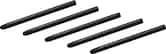
- Wacom - 4K Pen - Black$30.95The price was $47.00

More Buying Options

Specifications
- Screen Size0 inchesActive Area6.0 x 3.7 in.Total Storage Capacity0 gigabytesWireless ConnectivityNoneBattery ChemistryNot battery poweredPressure Levels4096
- Key Specs
- Screen Size: 0 inches (Size of the screen, measured diagonally from corner to corner.)
- Active Area: 6.0 x 3.7 in. (The size of the screen area that a user interacts with, either by stylus and/or touch (if supported).)
- Total Storage Capacity: 0 gigabytes
- Wireless Connectivity: None (The manner in which a device sends data to another device over a short distance without the use of wires or cables.)
- Battery Chemistry: Not battery powered
- Pressure Levels: 4096 (Allows the device to recognize different pressures from a compatible pen or stylus, which may control line thickness, opacity, or color. The more pressure levels, the more responsive the pen will feel.)
- General
- Brand: Wacom
- Model Number: CTL4100
- Product Name: Intuos Graphics Drawing Tablet, Includes Training & Software; Compatible with Chromebook Mac Android & Windows, Black
- Color: Black
- Year of Release: 2018
- Display
- Screen Size: 0 inches (Size of the screen, measured diagonally from corner to corner.)
- Stylus Input: Active (Electromagnetic Resonance) (An active stylus/pen is able to communicate directly with a compatible device; active electromagnetic resonance (EMR) pens are powered via a device's screen and active electrostatic (AES) pens require an additional power source. A passive stylus does not have electronic features and is compatible with most capacitative touch screens.)
- Graphic Resolution: 2540 lines per inch (The resolution generated by the device. The higher the resolution, the finer the detail that can be seen and reproduced.)
- Active Area: 6.0 x 3.7 in. (The size of the screen area that a user interacts with, either by stylus and/or touch (if supported).)
- Storage
- Total Storage Capacity: 0 gigabytes
- Compatibility
- Operating System Compatibility: Mac OS, Windows, Chrome, Android
- System Requirements: Windows 7 or later, Mac OS X 10.11 or later; Chromebook (devices running the latest Chrome OS), and Android smartphones/ tablets (OS version 6.0 or later); Easy plug-in via USB-A: some devices require USB-C or OTG adapters; internet access (The software that a product must have for it to be able to integrate with another product.)
- Connectivity
- Wireless Connectivity: None (The manner in which a device sends data to another device over a short distance without the use of wires or cables.)
- Interface(s): USB-A (Refers to the types of connections that devices use to interact and communicate with each other.)
- Power
- Charging Interface(s): USB-A (The connection for transmitting power to charge the device.)
- Battery Life (up to): 0 hours (Battery life will vary depending on the product configuration, product model, applications loaded on the product, power management setting of the product and the product features used by the customer. As with all batteries, the maximum capacity of this battery will decrease with time and usage.)
- Battery Capacity: 0 milliampere hours (The amount of energy stored in the battery.)
- Battery Chemistry: Not battery powered
- Features
- Pressure Levels: 4096 (Allows the device to recognize different pressures from a compatible pen or stylus, which may control line thickness, opacity, or color. The more pressure levels, the more responsive the pen will feel.)
- Number of Shortcut Keys: 4 (Allows for convenient access to frequently used software shortcuts.)
- Dimensions
- Product Height: 0.35 inches (The out of box height of the item. Height is measured as the vertical distance from the bottom of the item to the top as it would be primarily used or placed.)
- Product Width: 7.87 inches (The out of box width of the item. Width is measured as the horizontal distance from one side of the item to the other as it would be primarily used or placed.)
- Product Depth: 6.3 inches (The out of box depth of the item. Depth is measured as the distance from the front of the item to the back as it would be primarily used or placed.)
- Product Weight: 8.1 ounces (The out of box weight of the item.)
- Included
- Stylus Included: true
- Stylus Model Included: Wacom 4K Pen
- Stylus Stand Included: true
- Warranty
- Warranty - Parts: 1 year
- Warranty - Labor: 1 year
- Other
- UPC: 753218986887
Transform your creative ideas into digital reality with Wacom Intuos drawing tablets. Perfect for casual or aspiring artists this compact graphics tablet delivers reliable Wacom-quality precision at an accessible price. The battery-free, pressure-sensitive pen provides natural, responsive drawing with no charging needed - just pick up and draw, with smooth, jitter-free lines and consistent pressure response. Get started immediately with over $240 in included downloadable creative software and trials, including 2 years of Clip Studio Paint Pro, 12 months of Boris FX Optics, and much more. The paper-like surface texture and four customizable ExpressKeys make digital art, photo editing, illustration, and design feel natural and efficient. Select models (CTL4100WL, CTL6100WL) offer Bluetooth wireless connectivity, letting you create freely at your desk, sofa, or anywhere in the room - with the option to switch to wired mode for ultimate flexibility. The wireless freedom is especially popular with educators and presenters who use the drawing tablet to control their computer while moving around a classroom or conference room. Certified to work with Chromebook and compatible with Windows and Mac, Wacom Intuos seamlessly integrates with Adobe, Corel, and all major creative applications. Backed by Wacom's 40+ years of industry leadership, you're choosing the same pen technology trusted by professional studios worldwide - at a creator-friendly price.
- COMPLETE CREATIVE STARTER KIT:: Register your Intuos tablet and gain access to some of the best creative software and online training.
- NATURAL, PRECISE DRAWING EXPERIENCE:: Battery-free pressure-sensitive Wacom EMR technology delivers accurate control with no charging or batteries needed - just pick up the pen and draw with instant response and true-to-life precision.
- PERFECT FOR BEGINNERS & EDUCATION:: Easy setup gets you drawing in minutes on Windows, Mac, or Chromebook; ideal for drawing, sketching, photo editing, note-taking, document annotation, and classroom use.
- COMPACT & COMFORTABLE:: Lightweight design with a paper-like drawing surface and four customizable ExpressKeys for instant access to your favorite shortcuts; small active area perfect for limited desk space while maintaining full creative control.
- RELIABLE PERFORMANCE:: Wacom's proven reliability works seamlessly with your computer – no driver headaches, mysterious disconnects, or frustrating "why isn't this working?" moments common with cheaper alternatives.
- READY FOR YOUR FAVORITE SOFTWARE:: Works seamlessly with all major creative applications such as Photoshop, Krita, Affinity, Sketchbook, as well as OneNote or Canvas for notes, presentations, annotation and markup.
- COMPLETE CREATIVE STARTER KIT:: Register your Intuos tablet and gain access to some of the best creative software and online training.
- NATURAL, PRECISE DRAWING EXPERIENCE:: Battery-free pressure-sensitive Wacom EMR technology delivers accurate control with no charging or batteries needed - just pick up the pen and draw with instant response and true-to-life precision.
- PERFECT FOR BEGINNERS & EDUCATION:: Easy setup gets you drawing in minutes on Windows, Mac, or Chromebook; ideal for drawing, sketching, photo editing, note-taking, document annotation, and classroom use.
- COMPACT & COMFORTABLE:: Lightweight design with a paper-like drawing surface and four customizable ExpressKeys for instant access to your favorite shortcuts; small active area perfect for limited desk space while maintaining full creative control.
- RELIABLE PERFORMANCE:: Wacom's proven reliability works seamlessly with your computer – no driver headaches, mysterious disconnects, or frustrating "why isn't this working?" moments common with cheaper alternatives.
- READY FOR YOUR FAVORITE SOFTWARE:: Works seamlessly with all major creative applications such as Photoshop, Krita, Affinity, Sketchbook, as well as OneNote or Canvas for notes, presentations, annotation and markup.
- COMPLETE CREATIVE STARTER KIT:: Register your Intuos tablet and gain access to some of the best creative software and online training.
- NATURAL, PRECISE DRAWING EXPERIENCE:: Battery-free pressure-sensitive Wacom EMR technology delivers accurate control with no charging or batteries needed - just pick up the pen and draw with instant response and true-to-life precision.
- PERFECT FOR BEGINNERS & EDUCATION:: Easy setup gets you drawing in minutes on Windows, Mac, or Chromebook; ideal for drawing, sketching, photo editing, note-taking, document annotation, and classroom use.
- COMPACT & COMFORTABLE:: Lightweight design with a paper-like drawing surface and four customizable ExpressKeys for instant access to your favorite shortcuts; small active area perfect for limited desk space while maintaining full creative control.
- RELIABLE PERFORMANCE:: Wacom's proven reliability works seamlessly with your computer – no driver headaches, mysterious disconnects, or frustrating "why isn't this working?" moments common with cheaper alternatives.
- READY FOR YOUR FAVORITE SOFTWARE:: Works seamlessly with all major creative applications such as Photoshop, Krita, Affinity, Sketchbook, as well as OneNote or Canvas for notes, presentations, annotation and markup.
Whats Included
- 3 replacement pen nibs
- Nib removal tool
- Quick start guide
- Regulation sheet
- USB cable
- Wacom Intuos Graphic Drawing Tablet (Small) with Bonus Software included
- Wacom Pen 4K
- 3 replacement pen nibs
- Nib removal tool
- Quick start guide
- Regulation sheet
- USB cable
- Wacom Intuos Graphic Drawing Tablet (Small) with Bonus Software included
- Wacom Pen 4K
- 3 replacement pen nibs
- Nib removal tool
- Quick start guide
- Regulation sheet
- USB cable
- Wacom Intuos Graphic Drawing Tablet (Small) with Bonus Software included
- Wacom Pen 4K
Q: Does the Wacom Intuos pen require batteries?
A: No, the Wacom Intuos pen is battery-free.
Q: Does this tablet come with any software?
A: Yes, the tablet comes with creative and educational software that can be accessed after registering the device.
Q: What operating systems are compatible with this drawing tablet?
A: This tablet is compatible with Mac (OS X 10.11 and above), PC (Windows 7 and above), Chromebook (devices running the latest Chrome OS), and Android smartphones/ tablets (OS version 6.0 or later).
Q: What is the active area size of this drawing tablet?
A: The active area of the tablet is 6.0 x 3.7 inches.
Q: How many pressure levels does the Wacom Intuos pen have?
A: The Wacom Intuos pen has 4096 levels of pressure sensitivity.
A: Hovering the pen over the tablet moves the mouse icon on your computer screen to show you where you would be drawing if you were to press down.
A: Hi there, thanks for asking. All you need to have is an internet connection and from there you can register following the steps inside the box. Best
Compare similar products
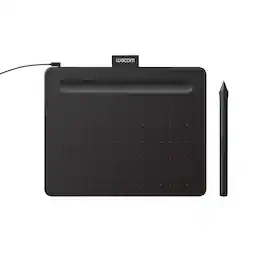
Transform your creative ideas into digital reality with Wacom Intuos drawing tablets. Perfect for casual or aspiring artists this compact graphics tablet delivers reliable Wacom-quality precision at an accessible price. The battery-free, pressure-sensitive pen provides natural, responsive drawing with no charging needed - just pick up and draw, with smooth, jitter-free lines and consistent pressure response. Get started immediately with over $240 in included downloadable creative software and trials, including 2 years of Clip Studio Paint Pro, 12 months of Boris FX Optics, and much more. The paper-like surface texture and four customizable ExpressKeys make digital art, photo editing, illustration, and design feel natural and efficient. Select models (CTL4100WL, CTL6100WL) offer Bluetooth wireless connectivity, letting you create freely at your desk, sofa, or anywhere in the room - with the option to switch to wired mode for ultimate flexibility. The wireless freedom is especially popular with educators and presenters who use the drawing tablet to control their computer while moving around a classroom or conference room. Certified to work with Chromebook and compatible with Windows and Mac, Wacom Intuos seamlessly integrates with Adobe, Corel, and all major creative applications. Backed by Wacom's 40+ years of industry leadership, you're choosing the same pen technology trusted by professional studios worldwide - at a creator-friendly price.
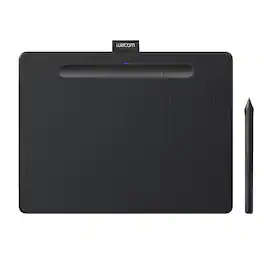
Transform your creative ideas into digital reality with Wacom Intuos drawing tablets. Perfect for casual or aspiring artists this compact graphics tablet delivers reliable Wacom-quality precision at an accessible price. The battery-free, pressure-sensitive pen provides natural, responsive drawing with no charging needed - just pick up and draw, with smooth, jitter-free lines and consistent pressure response. Get started immediately with over $240 in included downloadable creative software and trials, including 2 years of Clip Studio Paint Pro, 12 months of Boris FX Optics, and much more. The paper-like surface texture and four customizable ExpressKeys make digital art, photo editing, illustration, and design feel natural and efficient. Select models (CTL4100WL, CTL6100WL) offer Bluetooth wireless connectivity, letting you create freely at your desk, sofa, or anywhere in the room - with the option to switch to wired mode for ultimate flexibility. The wireless freedom is especially popular with educators and presenters who use the drawing tablet to control their computer while moving around a classroom or conference room. Certified to work with Chromebook and compatible with Windows and Mac, Wacom Intuos seamlessly integrates with Adobe, Corel, and all major creative applications. Backed by Wacom's 40+ years of industry leadership, you're choosing the same pen technology trusted by professional studios worldwide - at a creator-friendly price.
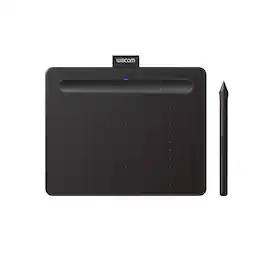
Transform your creative ideas into digital reality with Wacom Intuos drawing tablets. Perfect for casual or aspiring artists this compact graphics tablet delivers reliable Wacom-quality precision at an accessible price. The battery-free, pressure-sensitive pen provides natural, responsive drawing with no charging needed - just pick up and draw, with smooth, jitter-free lines and consistent pressure response. Get started immediately with over $240 in included downloadable creative software and trials, including 2 years of Clip Studio Paint Pro, 12 months of Boris FX Optics, and much more. The paper-like surface texture and four customizable ExpressKeys make digital art, photo editing, illustration, and design feel natural and efficient. Select models (CTL4100WL, CTL6100WL) offer Bluetooth wireless connectivity, letting you create freely at your desk, sofa, or anywhere in the room - with the option to switch to wired mode for ultimate flexibility. The wireless freedom is especially popular with educators and presenters who use the drawing tablet to control their computer while moving around a classroom or conference room. Certified to work with Chromebook and compatible with Windows and Mac, Wacom Intuos seamlessly integrates with Adobe, Corel, and all major creative applications. Backed by Wacom's 40+ years of industry leadership, you're choosing the same pen technology trusted by professional studios worldwide - at a creator-friendly price.
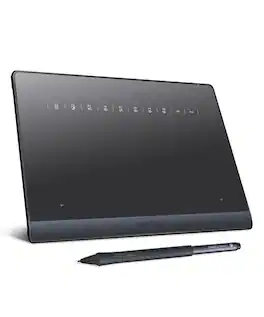
Experience unrestricted creativity with DIGIDRAW TW410, a refined Bluetooth graphics tablet engineered for creators, students, and professionals who require seamless performance across every workspace. Merging natural pen-on-paper tactility with advanced, battery-free stylus technology, TW410 delivers precise control and consistent responsiveness—whether sketching, illustrating, annotating, or designing. With both Bluetooth and wired connectivity, it offers flexible integration across Windows, Mac, Chromebook, and Android, ensuring your ideas move effortlessly from concept to creation wherever you are.
| Pros for Wacom - Intuos Graphics Drawing Tablet, Includes Training & Software; Compatible with Chromebook Mac Android & Windows - Black | |||
|---|---|---|---|
| Ease of use, Overall Performance, Size, Price, Software | Ease of use, Size, Wireless, Quality, Drawing | Ease of use, Overall Performance, Size, Wireless, Price | There were no pros for this product— |
| Cons for Wacom - Intuos Graphics Drawing Tablet, Includes Training & Software; Compatible with Chromebook Mac Android & Windows - Black | |||
| Setup, Pen, Connectivity, Features | Lag, Setup, Software, Compatibility, Learning Curve | Lag, Setup, Surface | There were no cons for this product— |
Specs
Reviews
Customer Images
- Rated 5 out of 5 stars
Finally, a Digital Pen That Actually Keeps Up with
If you are still trying to sign documents or sketch diagrams with a mouse, stop. Switching to this Wacom tablet has been the single biggest upgrade to my workflow this year. Tactile Feel: The surface has just enough "tooth" to feel like high-quality paper, not glass. Precision: The pressure sensitivity is pinpoint accurate. Whether I’m masking photos or taking handwritten notes, there is zero lag. Ergonomics: The pen is lightweight and battery-free, meaning no frantic searching for a charging cable mid-project. The Verdict: It’s a seamless extension of your hand. If you value your time and your wrist health, this is a non-negotiable tool
Farhan777 Posted
- Rated 4 out of 5 stars
Good Esp For the Price
I bought this tablet not too long ago and immediately started working on a project. The pen is okay but is sometimes a little laggy and occasionally I would have to restart my comp to be able to connect to the tablet again. It's pretty small and portable, I take it with me everywhere. It's convenient and works well enough. It doesnt have a screen like some other graphic tablets but it gets the job done; it's especially good for beginners or people who travel a lot.
ValO Posted
- Rated 5 out of 5 stars
Save yourself time and pain - BUY THIS NOW!
I’m an editor (photo/video) and spend a good amount of time touching up images. This pen has saved my hand and arm. Less pressing and holding and more drawing to correct an image has saved me so much pain. Absolutely love this tablet. If you’re a graphic designer, you’ll want to upgrade to the larger model with a display, it might be pricey, but it’ll save you time in the long run.
showkal Posted