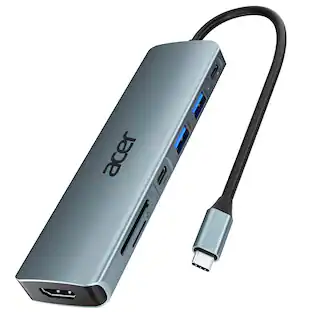
Acer - USB C Docking Station Dual Monitor With 4K HDMI, 9-IN-1 Hub with USB A&C 3.0, SD/Micro SD, 100W Charging - Gray
Customers are saying
Customers are satisfied with the overall performance and connectivity of this USB-C dock, which users find easy to set up and highly versatile for expanding their workspace. Many appreciate the generous port selection and the compact design that helps keep their desks organized. While the device is highly regarded for its functionality, some users noted that the cable is relatively short and that the unit can become warm during operation. Additionally, a few customers mentioned the occasional need for an external power source to ensure optimal performance.
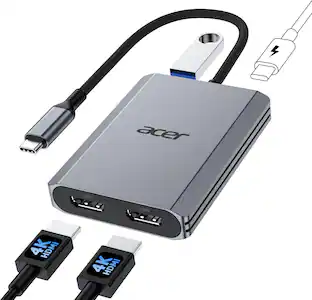
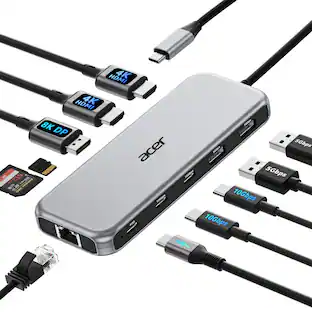
【9-in-1 USB-C Docking Station】
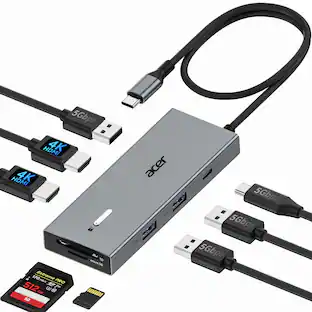
This Acer laptop docking station includes 2 HDMI, 3 USB-A (5Gbps), 1 USB-C (5Gbps), 100W PD charging, SD/MicroSD slots (104Mbps). 📌Note: 𝐏𝐥𝐞𝐚𝐬𝐞 𝐞𝐧𝐬𝐮𝐫𝐞 𝐲𝐨𝐮𝐫 𝐥𝐚𝐩𝐭𝐨𝐩 𝐡𝐚𝐬 𝐚 𝐔𝐒𝐁-𝐂 𝐩𝐨𝐫𝐭 𝐰𝐢𝐭𝐡 𝐯𝐢𝐝𝐞𝐨 𝐨𝐮𝐭𝐩𝐮𝐭 (𝐃𝐢𝐬𝐩𝐥𝐚𝐲𝐏𝐨𝐫𝐭 𝐀𝐥𝐭 𝐌𝐨𝐝𝐞) 𝐬𝐮𝐩𝐩𝐨𝐫𝐭.
【Stunning Dual 4K Display】
This USB-C docking station supports dual monitors via two HDMI ports, making screen extension or mirroring easy. 𝐓𝐡𝐞 𝐟𝐢𝐧𝐚𝐥 𝐨𝐮𝐭𝐩𝐮𝐭 𝐫𝐞𝐬𝐨𝐥𝐮𝐭𝐢𝐨𝐧 𝐝𝐞𝐩𝐞𝐧𝐝𝐬 𝐨𝐧 𝐲𝐨𝐮𝐫 𝐥𝐚𝐩𝐭𝐨𝐩’𝐬 𝐜𝐚𝐩𝐚𝐛𝐢𝐥𝐢𝐭𝐢𝐞𝐬, 𝐇𝐃𝐌𝐈 𝐜𝐚𝐛𝐥𝐞𝐬, 𝐚𝐧𝐝 𝐭𝐡𝐞 𝐝𝐨𝐜𝐤𝐢𝐧𝐠 𝐬𝐭𝐚𝐭𝐢𝐨𝐧 𝐬𝐩𝐞𝐜𝐢𝐟𝐢𝐜𝐚𝐭𝐢𝐨𝐧𝐬.
【Fast Data Transfer & Easy Access】
This Acer USB-C docking station offers 1 USB-C (5Gbps), 3 USB-A (5Gbps), and dual SD/MicroSD slots (up to 104Mbps) for fast, reliable file transfers.
【Thoughtful Details】
This docking station has a 0.66FT built-in cable, an aluminum alloy body, and a lock button for device security. Single click locks Windows; press and hold 3s for Mac.
【𝐏𝐫𝐞-𝐔𝐬𝐞 𝐒𝐞𝐭𝐮𝐩 𝐆𝐮𝐢𝐝𝐞】
𝐅𝐨𝐫 𝐌𝐚𝐜: System Settings > Privacy & Security > Accessories, then set it to Always Allow. 𝐅𝐨𝐫 𝐖𝐢𝐧𝐝𝐨𝐰𝐬: Plug-and-play ready, enable external devices in Settings > Devices. After setting, reconnect the docking station and wait for your computer to recognize the device.
- Maximum Number of Displays Supported2Maximum Supported Resolution4K (2160p)Number of DisplayPort Outputs (Total)2
Reviews
Rating 4.6 out of 5 stars with 47 reviews
- Overall Performance (20)
- Connectivity (18)
- Port Selection (7)
- Portability (7)
- Design (3)
- Cable Length (3)
- Heat Dissipation (3)
- Power Supply (3)
Customer Images
The vast majority of our reviews come from verified purchases. Reviews from customers may include My Best Buy members, employees, and Tech Insider Network members (as tagged). Select reviewers may receive discounted products, promotional considerations or entries into drawings for honest, helpful reviews.
Compare similar products

Hardware Interface:HDMI, USB 3.0, USB Type C ;Special Feature:Fast Data Transfer, Plug and Play, Portable;Compatible Devices:𝐖𝐢𝐧𝐝𝐨𝐰𝐬 𝐚𝐧𝐝 𝐦𝐚𝐜𝐎𝐒 𝐝𝐞𝐯𝐢𝐜𝐞𝐬 𝐰𝐢𝐭𝐡 𝐃𝐢𝐬𝐩𝐥𝐚𝐲𝐏𝐨𝐫𝐭 𝐀𝐥𝐭𝐞𝐫𝐧𝐚𝐭𝐞 𝐌𝐨𝐝𝐞 (𝐃𝐏 𝐀𝐥𝐭 𝐌𝐨𝐝𝐞)—𝐒𝐮𝐩𝐩𝐨𝐫𝐭𝐢𝐧𝐠 𝐝𝐢𝐬𝐩𝐥𝐚𝐲, 𝐜𝐡𝐚𝐫𝐠𝐢𝐧𝐠, 𝐚𝐧𝐝 𝐝𝐚𝐭𝐚 𝐭𝐫𝐚𝐧𝐬𝐟𝐞𝐫. Including Acer, Dell, Lenovo, Surface, HP, ASUS, MacBook, Samsung laptops and smartphones, as well as accessories like mice and keyboards.

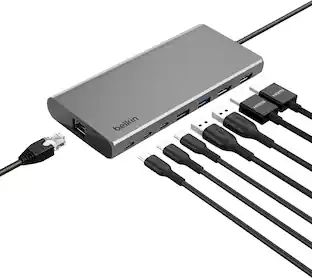
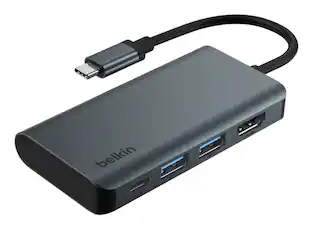
Connect your laptop to a 4K monitor, projector, and other devices with our USB-C 4-in-1 Multiport Adapter. This compact USB-C adapter is the perfect solution for home, the office, or in-between workstations. It features two USB-A ports to charge and connect your smartphone, tablet, keyboard, thumb drive, mouse, or other high consumption device while its HDMI port connects your MacBook Pro, Chromebook, or other USB-C laptop to a display with up to 4K resolutions. This Belkin USB-C Hub supports pass-through charging up to 100W so you don’t have to choose between port expansion and power. Gain up to 5 Gbps of bandwidth between connected devices, for quick data transfer between computer and peripheral devices. This computer docking station also supports high-definition display resolutions up to 4K through the HDMI Port. Encased in a sleek aluminum finishing that matches popular devices, this compact USB port hub is a stylish addition for your work, study, or play setup.
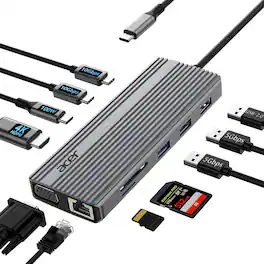
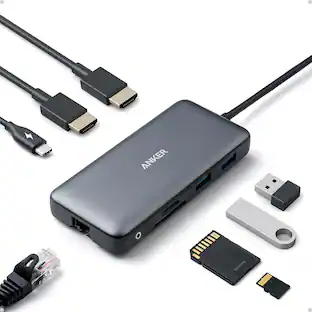
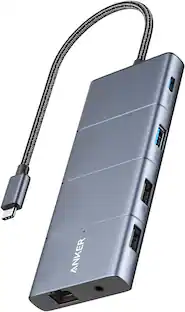
Acer 11 in 1 USB C HUB Multiport Adapter with 4K@60Hz HDMI, 1080P VGA, 2x10Gbps USB C, 2x5Gbps USB A, 100W PD Port, 1000Mbps Ethernet, SD/TF, Dual Monitor Docking Station for PC, Laptop, Desktop
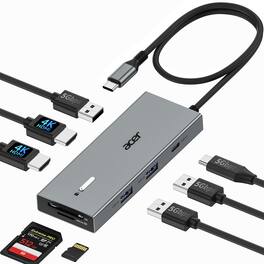
Hardware Interface:HDMI, USB 3.0, USB Type C ;Special Feature:Fast Data Transfer, Plug and Play, Portable;Compatible Devices:𝐖𝐢𝐧𝐝𝐨𝐰𝐬 𝐚𝐧𝐝 𝐦𝐚𝐜𝐎𝐒 𝐝𝐞𝐯𝐢𝐜𝐞𝐬 𝐰𝐢𝐭𝐡 𝐃𝐢𝐬𝐩𝐥𝐚𝐲𝐏𝐨𝐫𝐭 𝐀𝐥𝐭𝐞𝐫𝐧𝐚𝐭𝐞 𝐌𝐨𝐝𝐞 (𝐃𝐏 𝐀𝐥𝐭 𝐌𝐨𝐝𝐞)—𝐒𝐮𝐩𝐩𝐨𝐫𝐭𝐢𝐧𝐠 𝐝𝐢𝐬𝐩𝐥𝐚𝐲, 𝐜𝐡𝐚𝐫𝐠𝐢𝐧𝐠, 𝐚𝐧𝐝 𝐝𝐚𝐭𝐚 𝐭𝐫𝐚𝐧𝐬𝐟𝐞𝐫. Including Acer, Dell, Lenovo, Surface, HP, ASUS, MacBook, Samsung laptops and smartphones, as well as accessories like mice and keyboards.
| Pros for Acer - USB C Docking Station Dual Monitor With 4K HDMI, 9-IN-1 Hub with USB A&C 3.0, SD/Micro SD, 100W Charging - Gray | |||
|---|---|---|---|
| Overall Performance, Connectivity, Port Selection, Portability, Design | Overall Performance, Connectivity, Ease of use, HDMI, Size | Data Transfer Speed, Ease of Use | There were no pros for this product— |
| Cons for Acer - USB C Docking Station Dual Monitor With 4K HDMI, 9-IN-1 Hub with USB A&C 3.0, SD/Micro SD, 100W Charging - Gray | |||
| Cable Length, Heat Dissipation, Power Supply | Cable Length, Price, Heat | There were no cons for this product— | There were no cons for this product— |
Specs
Would this docking station work with an Acer Swift laptop without Displayport USB c or DP Alt mode? (My laptop has USB C USB 4 with DC-in)
Answered by TeamAcerNo. The Acer UC911D docking station relies entirely on DisplayPort Alternate Mode (DP Alt Mode) to transmit video. Without a USB-C port that supports DP Alt Mode or Thunderbolt, the dock's HDMI ports and external monitor capabilities will not function.
I have an HP laptop and this works for a wired keyboard and mouse but not the HDMI, why?
Answered by TeamAcerIf your mouse and keyboard work but the HDMI port on your dock doesn't, the issue is almost always that your laptop's USB-C port lacks "DisplayPort Alternate Mode" (DP Alt Mode). The mouse and keyboard use basic USB data, while the HDMI port requires a high-bandwidth video signal passed directly through the port.
is this compatiable with hp desk top
Answered by TeamAcerThis USB docking station should work fine with most any PC that has a USB-C connection.
Does this docking station support HDMI video for Linux Ubuntu. My current dock uses DisplayLink which does not work with Linux.
Answered by TeamAcerYes, the Acer UC911D dock supports HDMI video output for Linux Ubuntu, but it relies on DisplayPort Alternate Mode (DP Alt Mode) instead of DisplayLink. Because it uses native hardware signaling rather than DisplayLink's software-compressed video, it acts as a true plug-and-play device on Linux.
Is this docking station compatible with Dell laptops?
Answered by TeamAcerYes, this docking station should work fine with most any brand that has the same connections.

Customers often buy these together
 60th Anniversary Deal$11.99The price was $13.99
 60th Anniversary Deal$11.99The price was $19.99


Customers ultimately bought
 60th Anniversary Deal$124.99The price was $139.99
 Clearance$55.99The price was $69.99
 $38.99The price was $48.99
 60th Anniversary Deal$34.99The price was $39.99
 $49.99The price was $59.99


Explore tech essentials Sponsored




Discover related products
- 60th Anniversary Deal$11.99The price was $19.99
 $12.99The price was $19.99
 60th Anniversary Deal$11.99The price was $12.99
 $30.99The price was $32.99



Keep exploring
 $119.99The price was $139.00
 $9.99The price was $11.99