Rating 4.5 out of 5 stars with 77 reviews
4.5- Overall Performance (33)
- Charging Speed (21)
- Portability (14)
- Magnetic Strength (4)
- Design (3)
- Size (4)
Customer Images
The vast majority of our reviews come from verified purchases. Reviews from customers may include My Best Buy members, employees, and Tech Insider Network members (as tagged). Select reviewers may receive discounted products, promotional considerations or entries into drawings for honest, helpful reviews.
- Rated 5 out of 5 stars
Reliable and Easy to Use
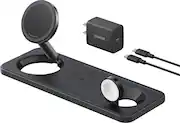
I’ve been using this 3-in-1 charging station for a few weeks now, and it has exceeded my expectations. It charges my iPhone, Apple Watch, and AirPods all at once without overheating or slowing down. The magnetic alignment for the phone is strong and ensures a consistent connection every time. The build quality feels premium, and the design is compact and modern—perfect for a nightstand or desk setup.
Posted by GeorgeS
- Rated 5 out of 5 stars
In love with my new toy!
I love the this wireless charger! The clock display when I place my iphone on the magnet is beautiful. All three of my devices charge simultaneously and at a great speed. And not to mention it looks beautiful on my nightstand!
Posted by Elizabeth
- Rated 5 out of 5 stars
Strong hold, good quality at sale price
This is a steal at $50. basically paying 17 bucks for each charger and they all charge well and the build quality feels good. looks great on my desk. Idk if i would pay $100 but $50-60 is great.
Posted by CollegeStudent
- Rated 5 out of 5 stars
Perfecto
Works superbly well, aldo very compact and space friendly
Posted by Overcomer
- Rated 5 out of 5 stars
Station charger of Anker
This station charger of Anker so good 3 in 1 when I go to trip no need charger a lot because I need only one can charge my iPhone earphone Apple Watch
Posted by PHEARA