Labor Day Appliances SaleEnds 9/16. Limited quantities. No rainchecks.Shop now

Skip to contentGo to Product Search
Main Content
In Motherboards

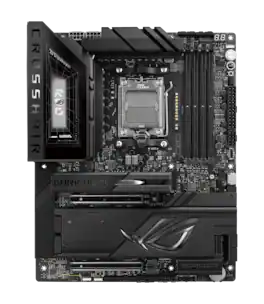
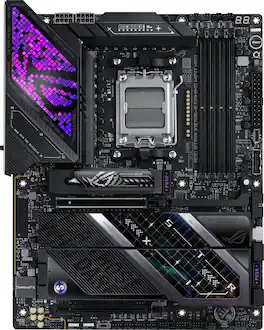
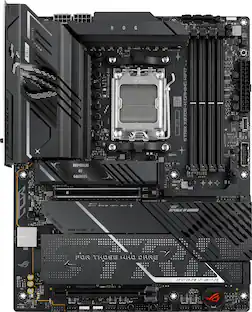
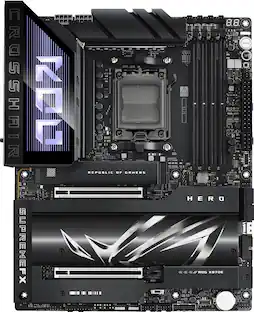
ASUS - ROG CROSSHAIR X870E DARK HERO (Socket AM5) AMD X870E ATX DDR5 Wi-Fi 7 Motherboard - Black

Model: ROG CROSSHAIR X870E DARK HERO
SKU: 6677869
Sold byBest Buy

About this product

ASUS ROG Crosshair X870E Dark Hero ATX motherboard delivers 20+2+2 power stages, DDR5 support, PCIe 5.0, five M.2 slots with 3D VC heatsink, USB4 connectivity, AI Cache Boost, PCIe Slot Q-Release, and AIO Q-Connector for effortless high-end builds focused on stability, cooling efficiency, premium components, and advanced DIY features.
Features
  • Ready for Advanced AI PC

    Designed for the future of AI computing, with the power and connectivity needed for demanding AI applications

  • AMD AM5 Socket

    Ready for AMD Ryzen 9000, 8000 and 7000 Series desktop processors

  • Intelligent Control

    ASUS-exclusive AI Cache Boost, ASUS AI Advisor, AI Overclocking, AI Cooling II, AI Networking II, and AEMP to simplify setup and improve performance

  • ROG Overclocking Technologies

    Dynamic OC Switcher, Core Flex, Asynchronous Clock and PBO Enhancement

  • Robust Power Solution

    20(110A)+2(110A)+2 power stages with ProCool II power connectors, MicroFine alloy chokes and premium metallic capacitors

  • Optimized Thermal Design

    3D VC M.2 heatsink for one PCIe 5.0 M.2 slot, Massive heatsinks integrated with the I/O cover, joined by an L-shaped heatpipe and connected to the power stages with high-conductivity thermal pads

  • Latest M.2 Support

    Two onboard PCIe 5.0 M.2 slots and three PCIe 4.0 M.2 slots, all with substantial cooling solutions

  • Abundant Connectivity

    Dual USB4 Type-C ports, two USB 20Gbps Type-C front-panel connectors (one with Quick Charge 4+ up to 60W and USB Wattage Watcher), nine additional USB 10Gbps ports, two PCIe 5.0 x16 SafeSlots, HDMI port

  • High-Performance Networking

    On-board Wi-Fi 7 (802.11be) with ASUS Wi-Fi Q-Antenna, Realtek 10Gb Ethernet and Realtek 5Gb Ethernet

  • DIY Friendly Design

    AIO Q-Connector, PCIe Slot Q-Release, new M.2 Q-Latch, M.2 Q-Release, M.2 Q-Slide, Q-Antenna, Q-Dashboard, Q-Code, Q-LED, FlexKey button, Start button, BIOS FlashBack button, Clear CMOS button and pre-mounted I/O shield

  • Immersive Audio

    ROG SupremeFX ALC4082 codec with ESS ES9219 Quad DAC for up to 32-Bit/384 kHz playback

  • Unmatched Personalization

    I/O cover with Polymo Lighting II, three Gen 2 ARGB headers, all configurable with ASUS-exclusive Aura Sync RGB lighting

  • Renowned Software

    BIOS 64 MB, ASUS DriverHub, Dolby Atmos, GlideX, HWiNFO, Designed for the future of AI computing, with the power and connectivity needed for demanding AI applications

See all features
Specifications
  • Chipset
    AMD X870
    Form Factor
    ATX
    Processor Socket
    Socket AM5 (LGA 1718)
    Number of PCI-E Slots
    2
    Wireless Networking Standard
    Wi-Fi 7
    Number Of Memory Slots
    4
Sponsored

Reviews

Rating 4.9 out of 5 stars with 11 reviews

5 star rating. 10 reviews4 star rating. 1 review
82% would recommend to a friend

Customer Images

The vast majority of our reviews come from verified purchases. Reviews from customers may include My Best Buy members, employees, and Tech Insider Network members (as tagged). Select reviewers may receive discounted products, promotional considerations or entries into drawings for honest, helpful reviews.

  • Rated 5 out of 5 stars

    Premium MB well worth the price

    This board has all the bells and whistles, protective back and is just cool to look at! It is easy to install M.2, GPU. I/O has all the ports you need/want. I have no complaints and I'm happy I paid up for this board:)

    Posted by RobAMD

  • Rated 5 out of 5 stars

    Everything you need

    The ROG Crosshair X870E Dark Hero will have everything you need and more on the AM5 platform. On top of that it has a really sleek design.

    Posted by SDMav760

  • Rated 5 out of 5 stars

    The Kitchen Sink Motherboard

    It’s difficult to think of anything the X870 Dark Hero doesn’t have. It’s built like a tank, it has all the modern connectivity, and it’s got settings for miles. Even with its vast array of options though it’s still very easy to use if you’re not a tinkerer and I’ve been really happy with its performance The box that the Dark Hero comes in is not like other motherboard boxes I’ve seen. It folds open to reveal 2 distinct compartments - one containing the motherboard itself and the other containing the peripherals and accessories and pulls out like a drawer. The motherboard sits inside a thick foam shell that doubles as a nice surface to build on. My first impression of the motherboard is that this thing is a tank. The PCB sits on a metal backplate and it’s stacked with heavy duty heat sinks for the VRM’s and M.2 drives. I did not weigh it but the thing has to be 5 lbs. at least. As the name would imply, the board is dark throughout and looks great especially for stealth builds. For accessories, you get a WiFi 7 antenna, an optional VRM cooling fan, and various spacers and things like that for installing components on the board. The X870E Dark Hero, as the name would imply, has the AMD X870E chipset, which is currently the highest end chipset you can get for an AMD processor. Internally, there are 2 PCIe 5.0 x16 slots (shared bandwidth) and 5 M.2 storage slots. The first M.2 slot supports PCIe 5.0 drives, as does the second one, though the second M.2 slot shares bandwidth with the USB4 ports. The other 3 slots are PCIe 4.0, though the very last one only supports smaller 2230 drives. There are a couple of considerations to make with where you install your M.2 drives, but as long as you aren’t occupying all 5 slots everything should be able to run at its full potential. You get the usual 4 DDR5 memory module spots and with a Ryzen 9000 series processor that can be manually overclocked up to 8600 MT/s, though whether you can actually reach this speed is really going to depend on your memory. The board has ample fan header connections at various positions around it and lots of front panel headers as well. For external I/O, every USB port runs at at least 10 Gbps and there are even (2) 40 Gbps USB4 ports. Out of a total of 11 USB ports, 5 are USB-C and 6 are USB-A. I’d probably swap a couple of the USB-C ports for USB-A, but it’s more than enough for my purposes.There are 2 Ethernet ports, one that runs at 5 Gbps and one that runs at 10 Gbps. You also get some digital and analog audio ports, along with an HDMI port that runs from the iGPU. For wireless connectivity, you get 320MHz Wi-Fi 7 and Bluetooth 5.4 from a MediaTek MT7927. For my system, I’m utilizing the following components: Ryzen 7 9800X3D CPU Arctic Liquid Freezer III Pro 240 AIO (4) 16GB Crucial Pro DDR5 6000 MHz RAM Modules (2) WD SN850X 2TB PCIe 4.0 SSD Drives Nvidia RTX 5080 Founder’s Edition GPU 850W RM850e Power Supply Fractal North Momentum Edition PC Case Getting the CPU, memory, and storage on the board was very simple and did not require any tools at all. The M.2 storage slots are all covered by large heat sinks, with a particularly large one dedicated to the first M.2 slot. These heat sinks lift away by pushing down on a couple of latches and reveal pre-installed thermal pads underneath them. You don’t need any of those little screws to install the SSD drives and the posts have a tab that you just need to press down then release once the drive is in position. Since my drives were single-side I added some of the included rubber spacers to the bottom of my drives. The board slid into my case without an issue and even with all the big heatsinks positioned around the board, the mounting points for securing the board to my case were easy to get to. Installing the GPU does block access to the SSD drives, but the GPU is at least easy to remove with Asus’ quick PCIe quick release button. The power supply connections are in their usual places and some of the internal I/O connectors are even angled for a cleaner look. There was one additional PCIe power connection I did not make that supplies 60W fast charging to the front panel USB-C port. Without this connection, this port is only capable of 27W, but I can’t think of many scenarios where I’d need 60W charging out of my PC at this point. I installed my AIO in the top-mounted position and my radiator does get awfully close to the I/O cover. I thought it was even pressing against it, but once I got it installed I could see a gap between the cover and my radiator - for oversized boards like this it’s something to keep in mind. Once my build was completed I closed the case up and attached the external WiFi 7 antenna. The antenna is also magnetic and sits nicely on the side of my case. After my initial boot and installing Windows 11 and setting my EXPO profiles, I got to work getting everything up to date. You do get a system notification prompt to install Asus DriverHub, which is a browser based update tool. I’ve used DriverHub in the past and I think it’s fine, but DriverHub recently had some security issues. I think those issues have been patched, but it’s enough to give me some pause about it. Interestingly, DriverHub did not get me the latest BIOS firmware and I had to go find that manually. The other application for controlling the board’s functions is Armoury Crate and that lets you do things like tune the fan curves and personalize the lighting. I know a lot of people don’t like Armoury Crate but I think it’s fine and it generally stays out of the way when it’s not needed. My board was on BIOS version 0502 from January 2026 and I updated to the latest 1002 from July 2026. The BIOS is easy enough to navigate and there’s a ton of adjustments you can make in there. For me, I’m not really interested in getting into every option and pushing everything to its absolute limit, but it’s all there. Besides the basic memory profile setting though, there is also an AI overclocking function that’s supposed to take the guess work out of that and I have that on. The performance of the Dark Hero has been fantastic. The AI overclocking seems to just work and everything has been stable and cool. None of my components or ports are limited by any other, so everything can run at full speed. For lighting, it’s just the “Polymo Lighting II” on the I/O cover. This is an RGB light with different effects, but it’s not an LCD display and unfortunately it can’t be changed from the ROG logo that’s displayed. This isn’t a huge deal for me as I tend to keep as much of the lighting in my PC off as possible. There are a couple of illuminated buttons, as well as an LED number display that shows the CPU temperature and system codes. I don’t know that I have much else to say about the X870E Dark Hero except that it's a fantastic motherboard. It’s definitely one for very-high end builds, but it’s got the specs and performance to back it up.

    Posted by SamG

  • Rated 4 out of 5 stars

    A standout premium MB - impressive performance

    ASUS - ROG CROSSHAIR X870E DARK HERO (Socket AM5) AMD X870E ATX DDR5 Wi-Fi 7 Motherboard – Black The Asus ROG Crosshair X870E Dark Hero combines a sleek all-black look with impressive performance and features, making it a standout premium option for high-end systems. Key features include 10 Gbps Ethernet, a 64 MB BIOS, independent base clock adjustment, and a focus on overclocking, supported by robust power delivery and effective cooling. Its EFI and PCB are well-designed, and it comes with a memory cooling fan. Asus builds on a strong foundation with this model, enhancing power capacity, aesthetics, and thermal management. I've trusted ASUS ROG and TUF military-grade motherboards for years due to their reliability, support, and quality—perfect for both gaming and demanding tasks. ASUS didn’t reinvent the wheel but refined key details that matter in high-end builds. It remains a top-tier AM5 choice, especially when paired with the new Ryzen 7 9850X3D, the centerpiece of my build and AMD’s premium gaming and content creation processor. The motherboard supports a large swath of the new AMD processors and you can’t appreciate how many until you go to their site under support and look at the list. Right out of the box, the Dark Hero presents a more unified appearance. Its all-black PCB, heatsinks, and rear I/O shroud contribute to a sleek, stealthy aesthetic without the flashy contrasts seen in the standard Hero motherboard. It exudes a premium vibe without being ostentatious. The RGB lighting is minimal, with Polymo Lighting II limited to the rear I/O area and kept subtle, which I appreciate. While I enjoy fishbowl-style cases, I prefer avoiding the disco lighting common in many units. The build quality meets high ROG standards: dense heatsinks with good contact, reinforced SafeSlots for PCIe, and secure connectors. This surpasses many competitors, including other ASUS models, with a robust 20+2+2 phase power design (20x 110A for Vcore, 2x 110A for SoC, 2x 80A for auxiliary), dual ProCool II power connectors, MicroFine alloy chokes, and premium capacitors. This motherboard is built like an M1A2 Abrams battle tank. ASUS features several Q-Design elements that greatly simplify assembly, upgrades, and maintenance of the Dark Hero. While the company returned to the dependable PCIe Slot Q-Release design, it remains a practical choice. The M.2 Q-Release and the newer M.2 Q-Latch enable easy SSD installation and removal through tool-free, snap-on mechanisms that securely hold heatsinks and drives. The M.2 Q-Slide helps in aligning components within tight slots. A notable addition and a pleasant surprise is Hero’s primary M.2 heatsink, which employs a 3D vapor chamber (3D VC) combined with a heatpipe design, effectively maintaining the drive’s temperature even under load. Additionally, the Q-Antenna enhances Wi-Fi signal strength and simplifies setup by eliminating cable fuss. These features reduce frustration during initial builds or when swapping components. Both PCIe 5.0 x16 SafeSlots support full-bandwidth graphics cards, and the five onboard M.2 slots provide ample high-speed storage options. This configuration allows you to use both Gen5 M.2 slots along with a PCIe 5.0 x16 graphics card without noticeably affecting storage or GPU performance in typical setups. Adaptive PCIe lane sharing efficiently prioritizes Gen5 devices, avoiding unnecessary reductions in GPU bandwidth. A prominent feature on the board that caught my attention is the small shiny gold or copper dots between the CPU and memory slots, known as the AIO Q-Connector. When used with compatible ROG AIO coolers such as the Strix LC IV, it integrates pump, fan, and LCD signals into one cable, making cable management easier and installation faster. Nevertheless, I believe the price of these components should be reduced to a more reasonable level, perhaps by removing the lighting and info panels. I find it hard to justify paying four times the cost of a high-quality AIO cooler like the ARCTIC Liquid Freezer III Pro 360—which efficiently cools the processor under load—just for this innovative but currently impractical feature. Connectivity and the I/O Rear panel are loaded: dual USB4 Type-C 40Gbps, more USB Type-C 10Gbps, Wi-Fi 7, and dual LAN (10GbE + 5GbE). If you are using more than a quality headphone set for listening to music and games and conferencing, and you want to have desktop speakers, you will need to install a dedicated Sound Card. The Dark Hero only has internal connectors that hook internally to a standard HD Audio front-panel connector on your case. This gives you high-quality headphone + mic jacks that work with the motherboard’s Realtek audio for 7.1 surround (via rear ports for speakers + front for headphones) to ROG SupremeFX (Realtek ALC4082) + ESS ES9219 Quad DAC, High SNR, good headphone amp, full 7.1 support, and Gold-plated jacks + optical out. The ASUS BIOS experience continues to be among the best in the industry. The Dark Hero interface looks even more refined, offering easier navigation for quick adjustments or detailed configuration. A larger 64MB BIOS chip supports better future CPU compatibility, enabling a more robust interface and extended support for the latest and upcoming AM5 processors, ensuring a smooth user experience. While I don’t generally use features like AI Overclocking, AI Cooling II, AI Networking II, AI Cache Boost (which ASUS claims can improve local LLM performance by up to 29%), or AI Advisor, these features could still prove useful, especially if you are exploring local AI projects alongside gaming. And it is always nice to have choices, This motherboard offers stable power, reliable memory support, and low thermals, allowing you to concentrate on performance instead of temperature management. It’s ideal for enthusiasts seeking ample overclocking headroom, future-proof storage or PCIe options, dependable daily use on AM5, and thoughtful features that simplify the build process—all without unnecessary extras.

    Posted by AZEqualizer

  • Rated 5 out of 5 stars

    Interesting Features/Accessories

    The ASUS ROG Crosshair X870E Dark Hero is an excellent motherboard for a high-end AM5 gaming build, especially if you want premium features, strong power delivery, and plenty of room for future upgrades. Build quality is excellent. The board feels very well made, the heatsinks are substantial, and the overall black design looks clean and premium without being overly flashy. It fits especially well in a higher-end build where you want the motherboard to match the rest of the components instead of looking like an afterthought. Connectivity and expansion are major strengths. You get plenty of high-speed storage options, modern USB connectivity, Wi-Fi 7, strong networking features, and enough PCIe expansion for a powerful gaming system. There is also a lot of flexibility for adding additional NVMe storage later, which is important if you have a large game library. The BIOS is another strong point. ASUS gives you a huge amount of control over memory tuning, CPU settings, fan curves, and performance options. For someone using a higher-end Ryzen processor and fast DDR5 memory, there is plenty of room to fine-tune the system. At the same time, most users can enable EXPO, configure their cooling, and leave the rest alone. For gaming, the motherboard itself is unlikely to dramatically increase frame rates compared with a less expensive X870E board, but that really isn't the point of the Dark Hero. You're paying for the stronger overall platform, connectivity, cooling, expansion, troubleshooting features, and enthusiast-level BIOS controls. There are some drawbacks. The biggest is definitely the price. This is an expensive motherboard, and a lot of gamers will never use everything it offers. If you're building a more budget-conscious system, there are significantly cheaper AM5 boards that can run the same processor and graphics card perfectly well. The amount of BIOS options can also be a little overwhelming if you're new to PC building. ASUS software can be hit or miss as well, so I personally prefer handling most settings directly through the BIOS whenever possible. Overall, the ROG Crosshair X870E Dark Hero makes the most sense in a no-compromise or enthusiast-level gaming PC. It offers excellent build quality, strong power delivery, extensive storage and connectivity, Wi-Fi 7, advanced tuning options, and plenty of upgrade potential. It's absolutely overkill for some users, but if you're already investing in a high-end Ryzen CPU, powerful GPU, fast DDR5, and multiple NVMe drives, this motherboard gives you a platform that feels appropriately premium. **Pros:** Excellent build quality, strong VRM and power delivery, extensive M.2 and PCIe expansion, Wi-Fi 7, excellent connectivity, feature-rich BIOS, strong cooling, premium aesthetics, and great upgrade potential. **Cons:** Very expensive, overkill for most gaming builds, BIOS can be intimidating for beginners, and many users may never take advantage of all the enthusiast features.

    Posted by MichaelV

Compare similar products

ASUS - ROG CROSSHAIR X870E DARK HERO (Socket AM5) AMD X870E ATX DDR5 Wi-Fi 7 Motherboard - Black
4.9(11)

ASUS ROG Crosshair X870E Dark Hero ATX motherboard delivers 20+2+2 power stages, DDR5 support, PCIe 5.0, five M.2 slots with 3D VC heatsink, USB4 connectivity, AI Cache Boost, PCIe Slot Q-Release, and AIO Q-Connector for effortless high-end builds focused on stability, cooling efficiency, premium components, and advanced DIY features.

ASUS - ROG STRIX X870E-E GAMING WIFI (Socket AM5) AMD X870 ATX DDR5 Wi-Fi 7 Motherboard - Black
4.6(28)

ASUS ROG STRIX X870E-E GAMING WIFI AMD AM5 X870 ATX motherboard 18+2+2 power stages, Dynamic OC Switcher, Core Flex, DDR5 AEMP, WiFi 7, 5x M.2, PCIe 5.0, Q-Release Slim, USB4, AI OCing & Networking

ASUS - ROG STRIX X870E-E GAMING Wi-FI 7 NEO (Socket AM5) AMD X870E ATX DDR5 Wi-Fi 7 Motherboard - Black
4.8(29)

ASUS ROG STRIX X870E-E GAMING WIFI7 NEO AMD ATX motherboard with 18+2+2 power stages, DDR5 with NitroPath DRAM Technology and AEMP, PCIe 5.0 Ready, four M.2 slots, Wi-Fi 7, Dual USB4, Dynamic OC Switcher, advanced AI tuning with AI Cache Boost and DIY-friendly Q-design with robust thermals.
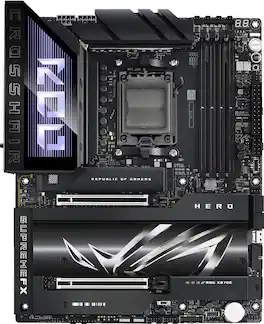
ASUS - ROG CROSSHAIR X870E HERO (Socket AM5) AMD X870 ATX DDR5 Wi-Fi 7 Motherboard - Black
4.2(39)

ASUS ROG CROSSHAIR X870E HERO AMD X870E AM5 ATX motherboard, Advanced AI PC ready, 18+2+2 power stages, DDR5, PCIe 5.0, 5x M.2, Wi-Fi 7, USB4, AI Overclocking, Core Flex, PCIe Slot Q-Release Slim

Pros for ASUS - ROG CROSSHAIR X870E DARK HERO (Socket AM5) AMD X870E ATX DDR5 Wi-Fi 7 Motherboard - Black
There were no pros for this productOverall Performance, Wi-Fi 7Build Quality, BIOS Interface, Connectivity, RGB Lighting, AestheticsOverall Performance, Cooling System, Overclocking
Cons for ASUS - ROG CROSSHAIR X870E DARK HERO (Socket AM5) AMD X870E ATX DDR5 Wi-Fi 7 Motherboard - Black
There were no cons for this productThere were no cons for this productFan Header PowerThere were no cons for this product

Specs

Be the first to ask a question.

We’ll try to get your question answered within 24 hours by a Best Buy customer or brand representative.

No content

Customers often buy these together

Sponsored

Finance Options

My Best Buy® Credit Card
Choose a benefit:Or
Buy Now, Pay Later
Lease to own

Special Offers

Included with Purchase

Finance Options

My Best Buy® Credit Card
Choose a benefit:Or
Buy Now, Pay Later
Lease to own

Special Offers

Included with Purchase