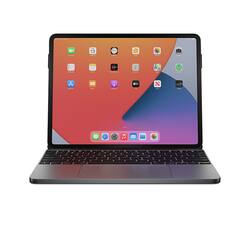
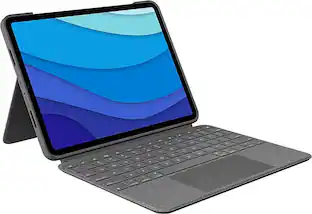
Brydge - 12.9 MAX+ Wireless Keyboard with Multi-Touch Trackpad for iPad Pro 12.9" (3rd, 4th & 5th Gen) - Space Gray
- Key Specs
- Model Compatibility: Apple iPad Pro (3rd Generation) 12.9" 2018, Apple iPad Pro (4th Generation) 12.9" 2020, Apple iPad Pro (5th Generation) 12.9" 2021
- Operating System Compatibility: Apple iOS, Apple iPadOS
- Interface(s): Bluetooth (Refers to the types of connections that devices use to interact and communicate with each other.)
- General
- Brand: Brydge
- Model Number: 56016BBR
- Product Name: 12.9 MAX+ Wireless Keyboard with Multi-Touch Trackpad for iPad Pro 12.9" (3rd, 4th & 5th Gen)
- Color: Space Gray
- Material: Aluminum
- Compatibility
- Brand Compatibility: Apple
- Model Compatibility: Apple iPad Pro (3rd Generation) 12.9" 2018, Apple iPad Pro (4th Generation) 12.9" 2020, Apple iPad Pro (5th Generation) 12.9" 2021
- Operating System Compatibility: Apple iOS, Apple iPadOS
- Maximum Compatible Display Size: 12.9 inches
- Connectivity
- Wireless: true
- Number of USB Port(s): 0
- Interface(s): Bluetooth (Refers to the types of connections that devices use to interact and communicate with each other.)
- Features
- Touchpad: true
- Power
- On/Off Switch: true
- Included
- Number Of Keys: 78
- Palm Rest Included: false (null)
- Dimensions
- Product Height: 0.63 inches (The out of box height of the item. Height is measured as the vertical distance from the bottom of the item to the top as it would be primarily used or placed.)
- Product Width: 8.75 inches (The out of box width of the item. Width is measured as the horizontal distance from one side of the item to the other as it would be primarily used or placed.)
- Product Depth: 11.19 inches (The out of box depth of the item. Depth is measured as the distance from the front of the item to the back as it would be primarily used or placed.)
- Product Weight: 2.19 ounces (The out of box weight of the item.)
- Warranty
- Warranty - Parts: 1 year
- Warranty - Labor: 1 year
- Other
- UPC: 850020315383
Create the ultimate laptop-like experience with the Brydge 12.9 MAX+. Featuring the largest native multi-touch trackpad ever included in a tablet keyboard, the 12.9 MAX+ delivers the most immersive and natural experience iPadOS has ever seen. Together with a new SnapFit™ Case designed to flawlessly match and protect your iPad, the 12.9 MAX+ creates the perfect productivity device for any environment. Brydge is critically acclaimed for their keyboard’s unmatched typing experience, and the Brydge 12.9 MAX+ is no exception. Featuring adjustable backlit keys, Instant-On™ Connectivity, shortcut keys, up to 3-month battery life and 135˚ screen rotation, you’ll have confidence cranking out that paper, clearing your inbox, or tackling whatever task comes your way.
- Native Multi-Touch Trackpad: The largest multi-touch trackpad ever for an iPad keyboard
- Magnetic SnapFit™ Case: Simply snap your iPad into the magnetic back cover and easily remove it for a flexible workflow
- Instant-On™ Connectivity: Instant connection via Bluetooth® 5.0 with zero lag, providing a seamless experience just like Smart Connector-based keyboards
- Premium Typing: Real tactile typing with the feel, sound, and response you expect from a quality keyboard
- Adjustable Backlit Keys: 3 levels of LED backlight to meet visibility demands
Whats Included
- Keyboard
Q: Can I get the keyboard with other languages like Arabic and English both on the same keyboard?
A: Unknown, but avoid this keyboard at all costs. It’s buggy with laggy Bluetooth, if you can get it to connect at all. Try a ZAGG if you do not want an OEM Apple.
Q: Does this work with the 6gen 12.
A: Yeah it does
Q: Will this work on the 2nd generation iPad Pro 12.9"?
A: undefined
Q: does this work with the newest 10th gen?
A: Works great takes a lil getting use too but after that awesome product
Q: Will the Apple gen 2 pencil still be able to charge?
A: undefined
Q: will a wired mouse work if you connect it to this keyboard?
A: No a mouse is not compatible with this keyboard. But with the pen and the built in pad. Really do not need one.
A: This is just the keyboard. Memory will be dependent on the iPad.
People also viewed
 $93.99The price was $139.99
 $69.99The price was $79.99
Today's top picks
 $629.99The price was $1,099.99
 $129.99The price was $219.99
 $49.99The price was $79.99
 $1,399.00The price was $1,499.00
 $149.99The price was $299.99
 $549.99The price was $849.99
 $399.99The price was $499.99