Rating 4.5 out of 5 stars with 1823 reviews
4.5- Print Quality (4)
Customer Images
The vast majority of our reviews come from verified purchases. Reviews from customers may include My Best Buy members, employees, and Tech Insider Network members (as tagged). Select reviewers may receive discounted products, promotional considerations or entries into drawings for honest, helpful reviews.
- Rated 5 out of 5 stars
Amazing Printer!
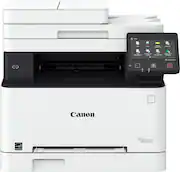
I’ve been using the Canon imageCLASS MF654Cdw for about a month now, and honestly, it’s been a game changer for my home office. Setup was surprisingly painless—connected to Wi-Fi in under five minutes, and my Mac recognized it instantly. The print quality is crisp, colors pop beautifully, and it spits out pages fast enough to make me feel like I’m running a small print shop. The touchscreen interface is super intuitive (finally, a printer menu that doesn’t make me feel like I’m programming a spaceship), and the auto duplex feature saves paper without slowing anything down. I also love that it wakes up almost instantly from sleep—no more waiting forever just to print one page. If I had to nitpick, it’s a little bulky for a small desk, but the performance more than makes up for it. Easily one of the best all-in-one printers I’ve owned—scans, copies, and prints all flawlessly. Canon nailed it with this one.
Posted by RoyA
- Rated 5 out of 5 stars
Excellent home office true Laser printer
I purchased this Canon MR654Cdw to replace my Epson EcoTank printer. In short we are pleased with this Canon MF654Cdw purchase and would recommend a Canon Laser printer and this specific model. I went to the laser on this printer purchase as I am not printing frequently enough for the ink to continue to flow in the Epson. It clogs... using the Epson brand ink and paper. The Canon laser printer prints are very good. Are the prints a "photo quality" image in color? No and it isn't advertised as such. Is it pretty darn good image print - yes (see photo in this review). It prints an excellent image in full color and does so in seconds. Printing a letter / spreadsheet or something in black and white? Superior to anything ink jet. My wife and I both work in technology from home. While we do not print frequently when we do print we want the process to be easy (software drivers that work) and the print quality to be higher that run of the mill inkjet. This Canon MF654Cdw fit our needs. I was looking at other models of Canon Laser as well as a Brother Laser (which I had in a previous office). The features on this Canon won me over. Printed an envelope in my first week as a test... super easy with the feed slot. Was never that easy on my old printers. I have used the scanner with the feed slot - worked great. We are pleased with this purchase and would recommend Canon and this specific model to anyone looking for solid performance, great print resolution in a printer where you don't have to spend a messy 45 minutes cleaning the printhead of an ECOTank because the engineers when cheap and there is no easy way to remove, clean and reinstall the print head... looking right at you Epson... Likes: Print speed. Print quality. Reliability. Ease of use and the ability to print using the home wireless network. About my hardware: Apple Mac based with iPhones and iPads - my wife has a PC for work. It all worked flawlessly on this Canon. A refreshing change from our old printer.
Posted by WilliamC
- Rated 5 out of 5 stars
Easy for kids and office professionals + wives
I purchased this item when it was on sale and it was an offer that was too good to be true. Didn’t really fit in my backseat but it’s okay! I was able to have one of the associates help me shove it into my trunk but in terms of performance, it’s definitely great if you operate your own business and have a need for scanning multiple documents or printing vibrant and colorful images through WiFi connectivity. It prints extremely fast and does the job well as a shared printer for your family too. My son can print his homework with just a usb drive and a couple taps on the touch screen panel. I love being able to see my wife have fun printing out her coupons all by herself! It’s just super heavy and can be loud when it wakes up after sleeping. The printer can also be loud at times too but not as heavy and doesn’t complain about the load of work I give it. It definitely doesn’t disappoint !
Posted by drtybrd
- Rated 5 out of 5 stars
Great print quality and value for money
I recently replaced my 7 year old EcoTank ET-2750 where it's Magenta print head finally got clogged which could not be cleared even forcing cleaning solution... And as a replacement I got the the mf654cdw it was almost the same price of a new EcoTank printer. With my Ecotank Inkjet I had to constantly deal with print head clogs, running multiple clean cycles all for a dull not so vibrant color output This Canon printer has been amazing for my home use with lots of pro features and and excellent, vibrant color quality. I have also used it to print envelopes, card stock, Hallmark greeting cards without any issues MF654Cdw Pros - Much more 'printer' for about the same money .. great value on hardware capability - Sharp, vibrant print quality ... Much better than my inkjet.. although it didn't produce accurate skin colors for photos and made them a bit darker ... But still overall print quality is miles better than EcoTank - Large touch display from which you can do EVERYTHING without using a computer .. including scanning directly to your email, uploading scans to OneDrive etc - Solid ADF - Built in paper tray compare to my EcoTank - Never have to worry about ink drying....toners can last years - OEM 067 toners have more real world yield than comparable HP 206A toners at the same price point - Canon doesn't restrict use of 3rd party toners ... unlike HP MF654Cdw Cons - Huge , heavy and bulky. Plan your office space properly - This thing is LOUD, like really LOUD - Lots of pro level options and features included form their Enterprise ImageRunner class printers might make them a bit complex , too feature rich for some
Posted by FarhanK
- Rated 5 out of 5 stars
Fast and easy to install
It works just as I expected. Easy to set up, it works quick with quality.
Posted by Valle