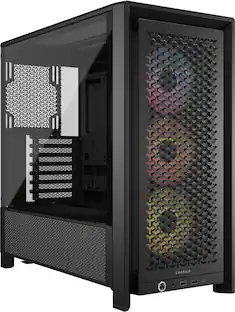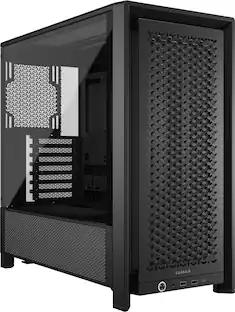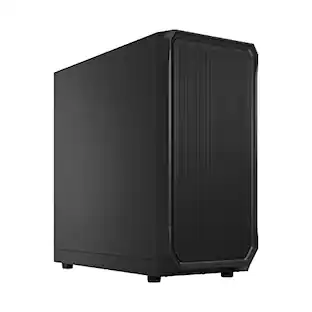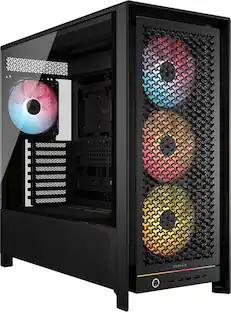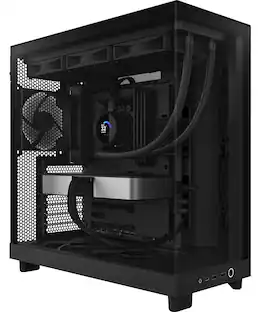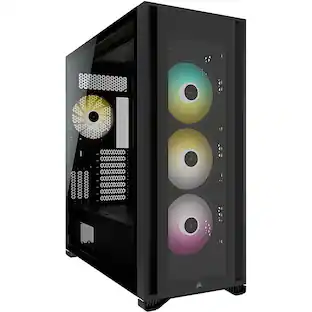
CORSAIR - 4000D AIRFLOW ATX Mid-Tower PC Case - Black
- Key Specs
- Motherboard Form Factor: ATX (Physical size of the motherboard, which can determine how many PCIe slots are available. Smaller board means fewer slots and features.)
- Maximum GPU Length: 360 millimeters
- Product Height: 18.35 inches (The out of box height of the item. Height is measured as the vertical distance from the bottom of the item to the top as it would be primarily used or placed.)
- Product Width: 9.06 inches (The out of box width of the item. Width is measured as the horizontal distance from one side of the item to the other as it would be primarily used or placed.)
- Product Depth: 17.83 inches (The out of box depth of the item. Depth is measured as the distance from the front of the item to the back as it would be primarily used or placed.)
- Window Panel(s): Right side
- Case Material: Steel, Tempered glass, Plastic
- General
- Brand: CORSAIR
- Model Number: CC-9011200-WW
- Product Name: 4000D AIRFLOW ATX Mid-Tower PC Case
- Color: Black
- Case Material: Steel, Tempered glass, Plastic
- Assembly Required: No
- Compatibility
- Motherboard Form Factor: ATX (Physical size of the motherboard, which can determine how many PCIe slots are available. Smaller board means fewer slots and features.)
- Maximum Power Supply Length: 220 millimeters
- Maximum GPU Length: 360 millimeters
- Number of Expansion Slots: 9
- Ports
- USB Port Location: Top
- Number of USB Ports (Total): 2
- USB Ports: 1 x USB-A 3.0, 1 x USB-C 3.1 (The number and type of USB ports the product has.)
- Number of Thunderbolt Ports (Total): 0
- Headphone Jack: true (The device features an interface that allows for the connection of headphones.)
- Microphone Input: true (The device features an input for connecting an external microphone.)
- Bays
- Number Of Internal 2.5" Bays: 2
- Number Of Internal 3.5" Bays: 2
- Number Of External 2.5" Expansion Bays: 0
- Number Of External 3.5" Expansion Bays: 0
- Dimensions
- Product Height: 18.35 inches (The out of box height of the item. Height is measured as the vertical distance from the bottom of the item to the top as it would be primarily used or placed.)
- Product Width: 9.06 inches (The out of box width of the item. Width is measured as the horizontal distance from one side of the item to the other as it would be primarily used or placed.)
- Product Depth: 17.83 inches (The out of box depth of the item. Depth is measured as the distance from the front of the item to the back as it would be primarily used or placed.)
- Product Weight: 276.96 ounces (The out of box weight of the item.)
- Features
- Enclosure Type: Mid tower
- Window Panel(s): Right side
- Customizable Case Lighting: false
- Lighting Type: None
- Screwless Rail Design: true
- Cooling
- Maximum CPU Cooler Height: 170 millimeters
- Number of Fans Supported: 6
- Cooling System: Air (A computer's CPU generates heat while operating and requires a cooling system to keep internal components functioning properly. Air cooling uses fans to draw in cool air and exhaust hot air, while liquid cooling uses coolant-filled tubes and water blocks to regulate internal temperature more efficiently.)
- Cooling Support: up to 8x 120mm or 4x 140mm cooling fans
- Number of Fans Included: 2
- Radiator Support: Front: 360mm / 280mm Top: 280mm with CORSAIR LPX DRAM / 240mm with all CORSAIR DRAM Rear: 120mm
- Liquid Cooling Ready: true
- Warranty
- Warranty - Parts: 2 year limited
- Warranty - Labor: 2 year limited
- Other
- UPC: 840006621904
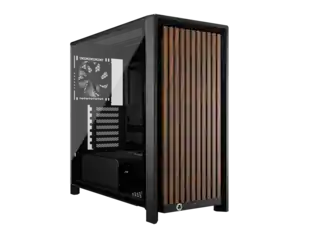
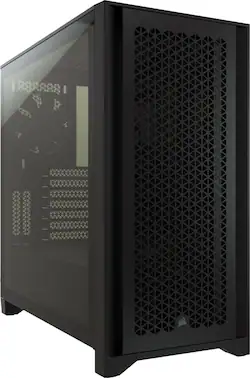
The CORSAIR 4000D AIRFLOW is a distinctive, high-airflow optimized mid-tower ATX case with easy cable management and exceptional cooling. A steel front panel offers optimal airflow to your components, accompanied by two included 120mm AirGuide fans that enhance cooling. CORSAIR RapidRoute design makes it effortless to route major cables through a single channel.
- A Fitting Choice: Combining innovative cable management, concentrated airflow, and proven CORSAIR build quality, choose the 4000D for an immaculate high-performance PC.
- High-Airflow Front Panel: High-Airflow Front Panel, An optimized steel front panel delivers massive airflow to your system for maximum cooling
- RapidRoute Cable Management: CORSAIR RapidRoute Cable Management System Makes it simple and fast to route your major cables through a single channel, with a roomy 25mm of space behind the motherboard for all of your cables.
- Two Included 120mm Fans: CORSAIR AirGuide fans utilize anti-vortex vanes to concentrate airflow and enhance cooling.
- Extreme Cooling Potential: A spacious interior fits up to 6x 120mm or 4x 140mm cooling fans, along with multiple radiators including a 360mm in front and 280mm in the roof (dependent on RAM height).
- Modern Front Panel I/O: Modern Front Panel I/O Puts your connections within easy reach, including a USB 3.1 Type-C Port, USB 3.0 port, and a combination audio/microphone jack.
- All the Storage You Need: Fits up to 2x SSDs and 2x HDDs.
- Tool-Free Tempered Glass Side Panel: Tool-Free Tempered Glass Side Panel Show off your high-profile components and RGB lighting.
Q: Does this PC case have a headphone jack?
A: Yes, the case includes a headphone jack on the front panel.
Q: What is the purpose of the CORSAIR RapidRoute design in this case?
A: The RapidRoute design simplifies cable management by allowing you to route major cables through a single channel.
Q: What type of motherboard form factor does this case support?
A: The case is designed for ATX motherboards.
Q: How many fans are included with the CORSAIR 4000D AIRFLOW case?
A: The case comes with two included 120mm AirGuide fans.
Q: What is the maximum length of a graphics card that can fit in this case?
A: The case supports a maximum GPU length of 360 millimeters.
Q: What is the maximum number of fans that this case can support?
A: The case can support up to six fans.
Q: Does this case come with any pre-installed lighting?
A: No, the case does not come with any pre-installed lighting.
Q: what kind of fans can i add to the case, which are the same specs as the stock ones?
A: One of the few consistent criticisms of the 4000D cases I’ve seen is that Corsair chose to use very inexpensive fans in an otherwise very good case, so pretty much any fans you buy will be as good or better. The ones in there now are basic sleeve bearing fans, which will likely get noisy or fail within a few years. Sleeve bearing fans are generally rated for around 30,000 hrs lifespan. FYI, if you keep the current fans, don’t mount them to the top of the case. Sleeve bearing fans tend to fail much more quickly when mounted horizontally. Any 120mmx25mm case fans will work. If you want to stick with Corsair, their ML120 Magnetic Levitation fans are their best but expensive, or if you like RGB lighting they have a lot of fans to choose from. You can buy multi-fan kits that will save you some money. I replaced my stock fans (and added 2 more) with Noctua NF-A12x25 fans, which have SSO2 fluid/magnetic bearings that are rated for 150,000 hrs lifespan and run much quieter than the stock ones. With fans, you can go with the cheaper ones and expect to replace them every few years, or put in good ones that will run quieter and probably last for the life of the PC. Hope this helps. You can find lots of articles online about fans and the various bearing types, blade designs, etc. that the various manufacturers use.
People also viewed
 $377.99The price was $399.99