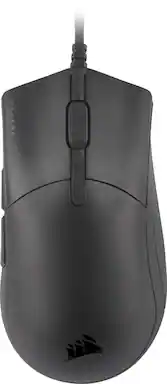
Rating 4.5 out of 5 stars with 131 reviews
4.5- Weight (49)
- DPI (14)
- Cable (11)
- Responsiveness (11)
- Comfort (9)
- RGB Lighting (12)
- Design (4)
- Grip (3)
- Side Buttons (3)
Customer Images
The vast majority of our reviews come from verified purchases. Reviews from customers may include My Best Buy members, employees, and Tech Insider Network members (as tagged). Select reviewers may receive discounted products, promotional considerations or entries into drawings for honest, helpful reviews.
- Rated 5 out of 5 stars
Big Hands rejoice! A palm grippers dream!
If you have large hands you need to give this mouse a try this mouse. I've tried all kinds of mice trying to find the sweet spot, but when I put this in my hands it was like it was made for it. Love the responsiveness, the mouse clicks feel so good. I guess the best way to describe it would be like the first time I typed on a custom built mechanical keyboard with lubed stabs and switches. The side button are in the perfect location for my thumb, I don't feel like I can't reach them like some of the other smaller light weight mice. If your computer can handle it turn polling rate to 8000, like wow. I have the RGB version coming, but will likely keep the non-rgb for my laptop. If your hands are small you should probably look to another mouse. It's now my daily driver.
Posted by XenoHornetX
- Rated 5 out of 5 stars
A Mouse Designed for Performance!
The Corsair Sabre Pro gaming mouse is truly designed for gamers who are looking to take their gaming to the next level. The Sabre Pro offers many features that would enhance your gaming experience overall. This mouse is all plug-and-play and there is very little set-up you will need to do. After using this mouse for a couple of days, all I have to say is that I’ve had a wonderful experience with it so far. In the box, you will receive the Sabre Pro gaming mouse, mouse guide, and a warranty sheet. Note that this mouse is NOT wireless. Also, note that the mouse does not have any visible RGB lighting on top. The only RGB lighting this mouse has is the DPI indicator on the bottom which is customizable through the Corsair iCue software. The Sabre Pro has great responsiveness. When using it for games and such, I did not notice any lag times and any strike of the buttons was completely accurate. I like lighter mouse's more than heavier mouse's, and thus far, this mouse has been one of the lightest mouse's I have used. The mouse only weighs 69g and maneuverability feels a lot more satisfying compared to other mouse's. The mouse does have a braided cable and I have noticed there is little to no drag from it. In other mouse's I have used with braided cables, the drag is noticeable but the drag on this one is minimal. I’m not a professional gamer but do play games occasionally. I mostly tested the mouse on FPS games and the mouse felt responsive and smooth for the most part. The mouse is robust and fits my medium-sized hand well. A superb job on the ergonomics! The buttons feel solid as well and I am sure the mouse will take the 50 million clicks Corsair mentions. I have used my computer more this time of year and have noticed that the mouse did not bring any discomfort from using it for a prolonged amount of time. Comfort-wise, I would give the mouse a solid 10! The iCue software is optional but I would recommend it since the software allows you to fully customize your mouse to your liking. The software so far has an easy-to-follow UI and is overall polished. The following are items you customize on your Sabre Pro: - Key Assignments – This allows you to assign functions to keys on the software profile. - DPI – This allows you to change DPI(up to 18,000 DPI) and set DPI presets. DPI RGB light is also customizable as well. - Surface Calibration – Calibrates your mouse to the mouse surface for the best tracking. - Device Settings – Update mouse firmware, access advanced settings, etc. Overall, the Sabre Pro is a solid mouse built for gaming. I did not run into any issues and have enjoyed using the mouse with any gaming and computer work I have been doing these past couple of days. The mouse’s customizable features and overall ergonomics are some of the prominent features the mouse has to offer. I would have liked more “visible” RGB and possibly the option to go wireless but regardless of this, I do recommend that everyone tries out the Sabre Pro by Corsair.
Posted by BarackObama
- Rated 5 out of 5 stars
Perfect FPS mouse
Awesome mouse. Happy with this purchase. I have a large hand and it’s fits perfect. Very accurate when playing FPS games. Latency is FANTASTIC. EXTREMELY RESPONSIVE. Would totally recommend, ESPECIALLY for the price.
Posted by OC714
- Rated 5 out of 5 stars
Fast accurate gaming mouse
User Evaluation of CORSAIR Sabre Pro Champion Series Gaming Mouse Summary report: Product meets described functions. Upfront this is not a top accent lighted unit! Detailed results: This unit was very light and extremely fast. The cord was flexible, long, and tangle free. High quality unit for a gaming mouse with the right game and computer equipment. This was tested on a gaming computer and the XBOX gaming APP for PC. Downside: If you normally use a game machine with an OEM controller this will be a complete change on how you do gaming. You can link some game controllers to your laptop to retain some of the functionality (XBOX X was ok). However, this mouse and also the game controller normally use a combination of keyboard functions with some mouse/controller functions depending on the game. Games that are designed for multi-use platforms may not do was well as a dedicated PC designed game. Since I have Game Pass Ultimate, I did not purchase any games for PC only. So far the easiest game I have used for this mouse is Dungeon Minecraft. 2020 Flight Simulator (250GB) and more were also tested. Flight simulator was a difficult game to play without a traditional stick as in modern aircraft. Flight controls were keyboard strokes with the mouse viewing cockpit instruments. Minecraft was a joy to play and was more typical mouse oriented game. Published specs: PRODUCT DESCRIPTION Wired from Corsair The Corsair Sabre Pro Gaming Mouse is designed for pros, weighing an ultra-light 69g and equipped with a drag-reducing flexible paracord cable for responsive, unhindered movements. Corsair QUICKSTRIKE Buttons ensure every click is immediate and responsive, while Corsair AXON hyper-processing technology delivers inputs to your PC up to 8x faster with 8,000Hz hyper-polling. The Sabre Pro is equipped with an 18,000 DPI optical sensor customizable in 1 DPI steps, with a DPI button to cycle through five presets on-the-fly. Finished with high-quality materials such as OMRON switches and 100% PTFE glide pads, and a signature plate for your personalization, the Sabre Pro will cut through the competition. Manuf. article number: CH-9303101-EU STOP//// Download software from Corsair!!!! Download “https://www.corsair.com/us/en/downloads” BRAND Corsair, everything a gamer needs - The brand has been a household name since the mid-90s with their PC components and has gone from being a challenging pioneer in gaming to one of the world's most established companies in the gaming industry. In 2014, Corsair expanded its product portfolio to include gaming accessories, including mice, headsets and keyboards. SPECIFICATIONS CONNECTION Connection USB Wireless No OTHER INFORMATION Weight tuning No PROPERTIES Sensor model PixArt PMW3392 Sensor Optical DPI 18000 dpi Number of buttons 6 Ambidextrous No Backlight Yes Scroll wheel Yes Color Black SIZE & WEIGHT Cable length 1.8 m Width 70 mm Depth 129 mm Height 43 mm Weight 69 g WARRANTY Warranty 2 year warranty Key Features 1. Built for Champions: CORSAIR CHAMPION SERIES products are designed for and tested by top esports professionals – helping to carry you to victory with a tournament-grade mouse featuring a comfortable ergonomic shape for claw and palm grips, long-term comfort, and fast movement with hyper-responsive inputs. 2. Ultra-Light Agility: Weighing in at just 69g to support rapid movements and twitch reflexes, the SABRE PRO’s sturdy design keeps up with your longest matches. 3. CORSAIR QUICKSTRIKE Buttons: Spring-loaded design delivers zero gap between the primary mouse buttons and their switches, so your clicks, shots, and spells are faster than ever. 4. CORSAIR AXON Hyper-Processing Technology: Transmits your movements and clicks to your PC up to 8x faster than conventional gaming mice with 8,000Hz hyper-polling. 5. Drag-Reducing Paracord Cable: An extremely light and flexible cable with a paracord weave dramatically reduces resistance and drag to keep your mouse movements fluid and agile. 6. Native 18,000 DPI Optical Sensor: A custom PixArt PMW3392 sensor, with 450 IPS tracking at up to 50G acceleration, delivers unbeatable precision fully customizable in 1 DPI resolution steps. 7. Durable OMRON Switches: Built with trusted OMRON left and right-click switches, guaranteeing tournamentgrade performance for 50 million clicks. 8. Five Onboard DPI Presets: Can be re-programmed to tune your sensitivity steps on-the-fly, and cycled through using a DPI button with LED indication located on the underside of the mouse to prevent accidental changes. 9. 100% PTFE Glide Pads: Mouse feet built from ultra-low friction PTFE pads offer the smoothest glide and quickest movements and are easy to replace if it gets worn down on your journey to the top. 10. Make Your Signature Move: The SABRE PRO’s signature strip lets you personalize your mouse with your or your favorite player’s signature, a personalized sketch, or anything you can imagine. 11. Powerful iCUE Software: Enables quick DPI adjustments, with custom macros or button remaps for all six mouse buttons in a single interface Best Buy link none Cosair link: Imagery and Downloads CORSAIR Logo Usage Guidelines http://www.corsair.com/press Product Images https://corsair.sharepoint.com/:f:/s/MarketingCommunications/ErbCK4SanSZHgcavIs8L2J8BaJ tmPSKDhFe3fmo2dsKjSw?e=G2WxNs CORSAIR iCUE Software Windows | macOS
Posted by ETP1
- Rated 3 out of 5 stars
Good but not great
The Corsair Sabre gaming mouse comes in to help give you the competitive edge in FPS gaming. Rather or not it delivers is going to be based of your own personal perspective. Hopefully this review will help to answer any questions you have. First off out the box you get the main unit and plenty of cable to run your mouse to which ever port you please. The mouse is lightweight and pretty comfortable for the most part. One thing i noticed as far as weight goes is this unit does not provide additional weights to fit the desire of your gaming experience. Me personally i like a little bit of a heaver weight when playing FPS this way i don't over shoot when clicking my quick tabs. Let me get this out of the way right not for all you RGB fans out there, this unit is not RGB and the only thing that comes close to it is the little LED light on the bottom side of the mouse which changes colors to let you know what DPI setting your in. Speaking of which that is the second thing i noticed was the placement of the DPI button. For the life of me i can not understand why Corsair opted to place the DPI button on bottom of the mouse instead of the top near the scroll wheel. This means if you wish to change your DPI setting on the fly you have to lift the mouse up, flip it over and press the button. I guess that's their way of giving you the competitive edge, or are they trying to give your competition the competitive edge? Hmmm.. Anyways for those of you barely getting in to gaming your DPI setting is Dots Per Inch, which basically controls cursor speed or sensitivity. Through the ICue (which you need to have the latest software) you can adjust your key assignments, which are your five buttons. Two on the side, left click, right click, and scroll wheel click. DPI can be set through ICue and you can set it as high as 18000. Also you can adjust and set separate DPI settings for your X and Y axis which is kinda cool. You have five different settings you can set for your DPI along with a sniper mode. Alright enough about that because well, that's pretty much the basics as to what you can do. As far as gameplay goes, this mouse is meant to be used for FPS such as COD or battlefield. I would not use this mouse as a mmo mouse as you have very limited buttons to map. Over all when it came to gameplay the mouse was very responsive and what felt like was a 1ms of responsive time, there was no lag that i could pick up on. The button mapping was easy to manage and quick access to the side buttons made accessing my utilities a breeze. With the DPI setting on the bottom side it made switching between my sniper mode and close quarter mode a big pain. Here's the bottom line guys. This is a very basic entry level mouse that offers a affordable edge for people wanting to get in to FPS. However what really gets me and prevents me from wanting to recommend this to friends is that the DPI button is on the bottom, which makes no sense and the fact that there are better designed FPS mouse out there in this price point makes it hard for me to get behind it. For me this is a hard pass, however if your a fan of corsair then by all means give it a try.
Posted by Crasher