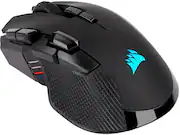
Rating 4.2 out of 5 stars with 701 reviews
4.2- Overall Performance (168)
- Ergonomics (111)
- Connectivity (66)
- Battery Life (53)
- Ease of Use (38)
- Button Quality (47)
- Software (6)
Customer Images
The vast majority of our reviews come from verified purchases. Reviews from customers may include My Best Buy members, employees, and Tech Insider Network members (as tagged). Select reviewers may receive discounted products, promotional considerations or entries into drawings for honest, helpful reviews.
- Rated 4 out of 5 stars
Fantastic Mouse Horrible Software
The reason I went with the Corsair Ironclaw was for its larger ergonomic design. I have larger hands and use a claw grip which would cause cramping on my old Razer Deathadder. I have no problems with this when using the Ironclaw and I am comfortable gaming for long periods. I have owned both the wired and wireless versions of this mouse. The wireless version has an additional three buttons on the mouse which is the main reason I upgrade to this over the wired version. A positive and negative for this mouse is the rubber grips on the side. The rubber gives you a solid grip but the left side will start to deteriorate where my pinkie grips the mouse. The fatal flaw with this mouse is the Corsair iCUE Software. Where do I start the software consistently refuses to save my custom setup on my mouse, will forget my profile when in wireless mode and is annoyingly frustrating when setting up said profiles. The newest issue is where I have set up a certain keystroke on a mouse button which on reboot the profile loses. This just started about a week ago and is frustrating on how unreliable the software is. I would recommend this mouse if you want a large ergonomic gaming mouse. I don't think the software should deter you from buying this mouse as I have heard complaints from my friends on logitech and razer software as well.
Posted by Buzz
- Rated 4 out of 5 stars
Fit like a glove, Superior perf. Corsair delivers.
High quality, great for people who have larger hands. Responsive and delivers superior performance for fast paced gaming. Button placement in my opinion was a little awkward in terms of location, having said that coming from someone who’s double jointed. I would at times would find my self pressing more buttons than intended and was prone to hand cramping up on me mid match. Other than that great product would recommend as always for Corsair. Also, lots of fun customization options for rgb and macros in icue.
Posted by TheRoyalSpartan
- Rated 2 out of 5 stars
Long term Corsair fan disappointed
I've been a long time user of Corsair products. I purchased this mouse specifically because of its ergonomics, which are nice. The mouse fits comfortably in the hand, and has a solid weigh to it. But I cannot recommend this product for long term durability reasons. I've had this mouse roughly two months, and relatively early in its usage (maybe a few weeks to a month), I started noticing what appeared to be fingerprints/smudges. I tried wiping them away with a damp cloth, and then some wet wipes (gentle ones), but I didn't put much effort into it. That being said, it didn't appear to work well. About two months in, I decided I would really put some time in as the grime was getting excessive. Worth noting is that I don't have particularly oily/dirty skin; I've never had any issue like this before on any mouse, Corsair or otherwise. I own (and have subsequently gone back to using) a Dark Core RGB Pro mouse and it never had any issues like this. Well long story short, I began to wipe at the mouse with gentle (soft on skin) wet wipes again, and used paper towels and water, but nothing really seemed to be working. I tried using my fingernail, and that seemed to do a little, but not much. When cleaning it, it appeared to be black flecks coming off, which I believed to be (gross I know) dead skin/oils, but was actually the paint on the product. Apparently, whatever paint Corsair used to paint these (or maybe just this) mice/mouse was being broken down by skin oils... on a mouse...which you touch a lot...with your skin... A little frustrated with the little progress I was making, and unaware at the time that it was paint and not related to bodily oils/grime, I attempted to use some 70% alcohol wet wipes on a localized area, which almost immediately striped the paint entirely (see picture). The rough patches shown, both at the palm rest and fingers is not just some smudge, it feels rough almost, like a mild sandpaper. Even if some might accuse me of causing the damage with the alcohol, the rest of the spots on the mouse are clearly being affected by general usage. So, with all that being said, I can't recommend this product. Maybe this is a one off, but I'm not sure. As I said, I have never had an issue like this before, even on mice that are a quarter of the price. I'm pretty disappointed as, ergonomically, I like the mouse and it functions well, but I will be going back to my Dark Core mouse disappointed with my previous perceptions of Corsair quality.
Posted by Shteve
- Rated 5 out of 5 stars
Trusty Wireless Gaming Mouse, 10/10
This is a good mouse. I'm particular about my mice for shape, and the palm structure of this is wonderful. It's got a long (but not excessive) thumb rest, which is also a big deal for me if I'm buying a mouse. As far as the wireless capabilities go, it's fantastic. Hasn't missed a click on 2 years and counting. The wireless dongle that it comes with (using the 2.4gHz setting) seems to be the best for connectivity, according to the Internet. Personal testing shows it only really matters because of the wireless receiver being plugged in at a USB port ON my mousepad, so I trust it doesn't get much interference. I use a lot of Corsair RGB components, so I'm happy it synchronizes with my entire setup. The iCue software is getting better and better each update, worth tinkering with. The programming and mapping of buttons is a breeze! My only complaint is about the durability of the matte finish plastic coating across the mouse. If you don't clean up your gamer sweat carefully and more frequently so it doesn't build up, you can scratch off and damage it super easily (because the buildup removes the coating with too much abrasive action, whoops) I will be buying another one when money, even against some other newer mice. It's just a shape and a sensor I can trust, and ultimately how good you are at aiming at things is a YOU skill not a mouse skill. This one's good tho
Posted by Alex
- Rated 5 out of 5 stars
Wireless/Bluetooth USB Rechargeable Mouse
When I bought this mouse (for around $80) in December 2019, Best Buy had multiple high end gaming mice that are all wired for the same price this mouse cost. Each of those gaming mice were also available as a wireless version for an extra $100. This mouse doesn't have all the extra programmable buttons that the gaming mice do, but has the capability of being used either wirelessly, via bluetooth connection, and also wired (when plugged in to charge). All of the wireless items I have previously purchased that can be recharged with a USB cable are unusable while they are plugged in to charge. This mouse works at full capacity while it is plugged in and charging.
Posted by Hedder