Rating 4.7 out of 5 stars with 1700 reviews
4.7- Coffee Quality (433)
- Ease of Use (363)
- Overall Performance (297)
- Temperature Control (164)
- Capacity (136)
- Noise Level (19)
- Water Reservoir (14)
- Size (7)
- Pouring Performance (5)
Customer Images
The vast majority of our reviews come from verified purchases. Reviews from customers may include My Best Buy members, employees, and Tech Insider Network members (as tagged). Select reviewers may receive discounted products, promotional considerations or entries into drawings for honest, helpful reviews.
- Rated 5 out of 5 stars
Easy to Use, Great Tasting Coffee!
Our old Cuisinart gave out after almost 4 years and thousands of cups of coffee. It served us well. When I was looking for a replacement I looked at other brands and decided to give Ninja a shot. Unfortunately, there was something we didn't like about it. From the space it took up to the taste of the coffee. We decided to go back to Cuisinart and we're so happy we did! This one is a little larger than the one we had (14 cups), but it is easy to use and makes the same great cup of coffee as our old one. It's a little taller than our old one, but overall takes up less space on the counter. The pricing at Best Buy was excellent and they shipped it to me within a couple of days! I hope it lasts as long as out old one did, or longer!
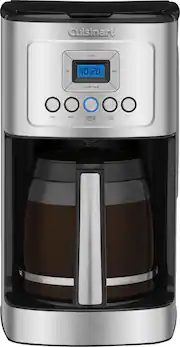
This review is from Cuisinart - PerfectTemp 14 Cup Coffeemaker - Silver
Posted by Fern
- Rated 5 out of 5 stars
Great Coffee Maker
This was purchased to replace a different model cuisinart coffee maker. I am happier with this one so far. The carafe pours without spills even when pouring fast. The coffee temperature after brewing is 189° F. Nice and hot. Easy to program as well. Love the 14 cup capacity. Very pleased.
This review is from Cuisinart - PerfectTemp 14 Cup Coffeemaker - Silver
Posted by Mobyt
- Rated 5 out of 5 stars
Solid, attractive win from reliable Cuisinart
I have always been happy with the quality of my Cuisinart purchases, so I trust that I will get something I will enjoy when I buy a new one. This coffee maker was no exception. Its got a great design aesthetic and does its job very well. 2 minor criticisms would be that it is tricky to pour a carafe full of water into the reservoir without spilling outside the machine as yo finish emptying the carafe. Make sure you can completely open the lid and have free space above the machine to maneuver the carafe to get out the last of the water without spilling. A more defined spout would help this issue. Lastly it gets quite a bit of condensation collecting on the underside of the lid, but this really doesn't affect anything. It really does make great coffee simply, which is what I wanted as I have so many different fancy coffee contraptions that require more effort. Sometimes I want to let a machine do the work while I entertain rather pretending I am a barista.
This review is from Cuisinart - PerfectTemp 14 Cup Coffeemaker - Silver
Posted by Maslux
- Rated 5 out of 5 stars
The great Cuisinart 14
This is my second Cuisinart- Perfect Temp 14 Cup Coffeemaker, the first one lasted several years, after only getting a little over a year of use from other brands, I spent the extra money for the Cuisinart and don't plan on going back to the lesser brands. I like the 14 cup capacity, I like my coffee and this machine brews a great hot cup day after day. The programmable feature is used daily and with a little maintenance I am sure I will get many years of use again.
This review is from Cuisinart - PerfectTemp 14 Cup Coffeemaker - Silver
Posted by Roadservice
- Rated 5 out of 5 stars
Win-Win Upgrade Coffeemaker For Me
I purchased this coffeemaker as a replacement for my Bunn coffee machine that stopped working. As it turns out, I’m delighted the Bunn broke so I could take advantage of Cuisinart’s product features! Honestly, brewing time is so quick, my same coffee that I grind tastes better in this unit with the additional filter and using the gold basket, and I love the perfect temp feature that allows me to adjust to my needs! This was a win-win for me, woo-hoo!
This review is from Cuisinart - PerfectTemp 14 Cup Coffeemaker - Silver
Posted by DLMP