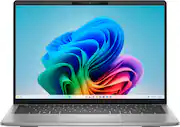
Inspiron 14 Copilot+ PC with on-device AI. Fly through your to-do list with the Copilot+ Inspiron 14 PC, featuring responsive performance and exceptional battery life, virtually anywhere.
Q: What type of CPU does this Inspiron 14 have?
A: This Inspiron 14 uses a Qualcomm Oryon CPU.
Q: Does the Inspiron 14 have a touch screen?
A: No, this laptop does not have a touch screen.
Q: What kind of storage does the Inspiron 14 use?
A: It has a 512GB Solid State Drive (SSD).
Q: Does this Dell laptop have a backlit keyboard?
A: No, this model does not have a backlit keyboard.
Q: What is the screen resolution of this Inspiron laptop?
A: The screen resolution is 1920 x 1200 (WUXGA).
Q: How much RAM does the laptop have?
A: The laptop is equipped with 16GB of LPDDR5X RAM.
Q: Is this Inspiron 14 a 2-in-1 laptop?
A: No, it's a traditional clamshell laptop, not a 2-in-1.
A: There is no Finger print available in this system configuration.

Inspiron 14 Copilot+ PC with on-device AI. Fly through your to-do list with the Copilot+ Inspiron 14 PC, featuring responsive performance and exceptional battery life, virtually anywhere.

A simple way to take on your day. The Inspiron 15 laptop is as stylish on the outside as it is efficient on the inside. Built with up to the latest AMD Ryzen processors, you can finish your to-do list in no time. Enjoy quality video chats with a built-in HD webcam that keeps you looking your best. Adaptive thermals keep your PC running efficiently, whether at your desk or working from your lap.

Power to do what matters most. The reliable processing power of an Intel processor, plus ample storage, powerful graphics and design with recycled materials, give you the power and capacity to do more.

No matter what adventure you chase, the 360° hinge gives you the flexibility to get things done, whether in tablet, tent, stand or laptop modes. An optional active pen allows for natural writing while taking notes or journaling.
| Pros for Dell - Inspiron - Copilot+ PC - 14" 2K Laptop - Snapdragon X X1-26-100 2025 - 16GB Memory - 512GB Storage - Titan Grey | |||
|---|---|---|---|
| There were no pros for this product— | There were no pros for this product— | ||
| Cons for Dell - Inspiron - Copilot+ PC - 14" 2K Laptop - Snapdragon X X1-26-100 2025 - 16GB Memory - 512GB Storage - Titan Grey | |||
| There were no cons for this product— | There were no cons for this product— |
Customers consistently note the excellent build quality, long battery life, and impressively fast boot speed of the Inspiron 14" laptop. Its portability and adequate port selection are also frequently praised. However, the lack of a keyboard backlight is a common point of criticism. The display brightness and color accuracy are also mentioned as areas needing improvement by some users.
The vast majority of our reviews come from verified purchases. Reviews from customers may include My Best Buy members, employees, and Tech Insider Network members (as tagged). Select reviewers may receive discounted products, promotional considerations or entries into drawings for honest, helpful reviews.
I appreciate the sleek-professional look and size of this laptop. The aluminum chassis and deck, along with the smooth edges give it a premium feel, and the subtle logo seems to disappear at certain angles. The lid needs two hands to open but stays firmly without wobble. The construction is solid, and the laptop remains quite portable at 3.3 lbs. The typing experience is enjoyable. They keys have decent travel and spacing. However, it is inconvenient that there is no keyboard backlight. The trackpad is very accurate and responsive. While the color accuracy is subpar and the brightness is quite low (300 nits), I still found the thin bezel 1920x1200, 60Hz screen decent. The anti-glare coating and wide viewing angles help, especially in the daytime. This laptop is superfast online if you have Wi-Fi 7/6E, or at least it will be future proof. Online calls and video meetings are smooth. The 1080p 2MP camera is quite capable. There are many available options such as Windows Studio, backgrounds, eye-tracking, live captions, and AI-related features that are helpful (some gimmicky). The mics pick up voices very well and the AI knocks out a lot of ambient noise. The speakers are mediocre but serviceable as expected from almost any laptop. The camera also has robust privacy features such as a physical cover slider, as well as “away” and “onlooker” detection. I am very happy with the performance of this laptop so far. The Snapdragon X-126100 CPU is quite efficient and capable. I did some rendering tests, and I was fairly impressed. Combined with the Adreno GPU, I was able to play some games as well at decent graphics. I checked the AI features a bit to test the NPU, but I wasn’t able to fully utilize it. Hopefully this will get better usage in the future. Now, the laptop runs on Windows 11 ARM, and while there are plenty of apps and games that are compatible, there are quite a few of them that are not, so I highly recommend checking for compatibility, especially if you use a specific program or game. The efficiency of the Snapdragon ecosystem allows for exceptional battery life. I was able to use the laptop for two full workdays –that is about 18 hours of normal productivity work and some video streaming. The laptop charges via USB-C quickly. There are plenty of ports available, including two USB-C (Thunderbolt 4?), a legacy USB-A 3.2, a headphone/mic jack, and even a micro-SD card slot. Sadly, no HDMI so an adapter may be needed. I was able to connect two monitors at the same time with no issues. In the end, I think this laptop is great for those who need a cost-effective, professional, sleek, long-lasting, capable laptop for typical productivity and content consumption.
Posted by insomniak1
Having the right tools at your disposal to complete the task at hand is vital. I was in need of a device with good battery for school work and light browsing and the Dell Inspiron 14 checked off most of the boxes. I have taken a liking to the idea of the copilot computers with the Snapdragon chipsets. It can be compared to the M series chips of Apple laptops these devices have a lot to offer and after having mine for two weeks there is a lot to like. While I would admit it isn’t a high-end device it does more than I expected. :::General Thoughts::: Upon receiving my Dell device, the experience was a simple one you get the laptop, charger and information pamphlets. A 65-watt charger is included and I added a magnetic USB type C adapter that disconnects easily if I happen to trip over the cable similar to the apple laptops. If you have ever used a Windows device then you know more or less what to expect here it is not anything mind blowing. Although setting up Windows 11 has gotten easier and less time consuming. I like to use Windows Hello (facial recognition) to sign in, it makes it fast and easy to unlock my device. Now more about the Inspiron laptop itself. The ARM version of Windows is very much like the tradition X86 versions. I use my Dell primarily for the Office suite of Applications and the browser for other tasks and sometimes a quick game of Solitaire. Now I have read reviews from other users that there are issues installing X86 programs. I did run into this issue attempting to install the EPSON driver pack for my printer. I was able to figure it out by installing nothing more than the driver itself. More time is needed for ARM based versions of software needs to roll out for these devices. :::Hardware::: The keyboard has a somewhat stiff feel to it and you won’t worry about accidental key strokes, there is a good amount of travel between the keys and they feel good and clicky. There is a downside here and there is no backlit keyboard here and that can be an issue for some. The trackpad is nice as well and is large and responsive. The screen is FHD and plenty bright and responsive. This is not a touchscreen device and that is okay as I do not use that much. The display is matte and not glossy. Opening the device it automatically powers on and that is awesome no need to press a power button. I changed the power settings and have it set to sleep when closing the lid and to power down when pressing the power button. The camera is good enough for what you will use it for and it has a built-in privacy slide (cover). Battery life is great I use Spotify while working and I find that not having a backlit keyboard adds to the battery life. I find myself squeezing 12 hours easily and this can be comparable to Chromebook devices. I find myself not needing my Chromebook anymore due to having a device with good battery life. There are higher end models available but this is basic and does a lot for not too much of a hit to your pocket. You get a headphone jack, two type C, and a full-sized USB and a Micro SD card slot. The speakers are decent and are on the bottom of the device. It can sound good or muffled depending on how you use it. :::Pros & Cons::: Pros: - Hefty feeling (not cheap plastic) - Slim - Good battery life - Anti fingerprint coating Cons: - No backlit keyboard - No touchscreen :::Closing Thoughts::: In general, this is not a budget device but more like mid-tier. It will do a lot but I find myself using for school and daily use nothing intense and I am mostly satisfied there are far more pros than there are cons. :::TL;DR::: Need a Dell to get school work, studying and decent battery life? Then have a look at this one. If you need more then look at the Dell 14 Plus.
Posted by Johnnyboy84
The new Dell Inspiron 14-inch Copilot+ Laptop is an interesting device. It comes with the newest addition to Qualcomm’s latest budget friendly processor, the Snapdragon X. The Dell Inspiron is an ultra-portable laptop with all day battery life and a design and form factor built for portability. It was designed for light office work, AI related tasks, and media consumption. Screen The 14-inch screen has an anti-glare coating. Dell calls the screen type WVA. Not sure if the panel is IPS or VGA, but it looks more like a VGA panel. The screen does not get overly bright, and the colors are just adequate in my opinion. I didn't expect OLED quality from this tier laptop. The panel has a 60 hertz refresh rate at Full HD+ resolution. The panel is also a non-touch display as well. Features After installing all the necessary updates, the laptop worked without any hitches. The start-up was snappy and all the apps I normally use worked just fine. The Windows on Arm experience works much better than my initial experience a few years back. The Dell laptop comes with 16gb ram that is upgradeable. The storage available is a M.2 512gb NVMe SSD and comes equipped with a micro-SD card slot for added storage options. Headphone/microphone jack is included as well. McAfee trial comes pre-loaded as well. Using Windows on Arm a few years back was a nightmare. Slow load times, app incompatibility, and lack of storage options. Gone are those days. The Dell Inspiron laptop has 2 full function USB-C ports with power delivery, data and video. It also has a full-sized USB-A port. The keys are spacious and do not make loud clacking sounds when typing. The track-pad is large and has good response times. There is no back-light on the keys, so late night working will require lighting from another source. The Copilot features also add value. Features like Recall, Co-creator, and having an all-day battery makes this laptop a serious contender for mid-tier power users.
Posted by kriserikka