Rating 4.4 out of 5 stars with 132 reviews
4.4- Performance (40)
- Processor Speed (35)
- SSD (23)
- Graphics Card (19)
- Ease of use (8)
- Fan Noise (10)
- Power Supply (5)
Customer Images
The vast majority of our reviews come from verified purchases. Reviews from customers may include My Best Buy members, employees, and Tech Insider Network members (as tagged). Select reviewers may receive discounted products, promotional considerations or entries into drawings for honest, helpful reviews.
- Rated 4 out of 5 stars
A Good Compromise
Anything is better than what I was using before I bought my XPS 8960, so naturally I'm happy with my new computer, but I wanted more speed and video-processing power since this will probably be my last computer. (I'm old). The XPS 8960 is all I could afford. The bottom line is that the XPS 8960 is a good compromise.
Posted by Customer222
- Rated 4 out of 5 stars
Good for work/school. Gaming let down by RTX3050
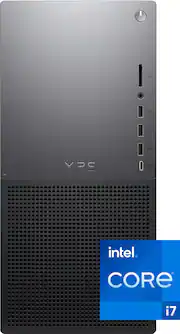
The Dell XPS 8960, on paper, is a reasonably well spec'd machine. With an i17 13th Gen, 16Gb Memory and 512 NVMe+2TB Harddisk and even DDR5 RAM but Dell paired the 8960 with a RTX3050. What this all means is for every day work and school use, this PC is amazing - fast, responsive, and everything you would need for standard home multimedia tasks. Fire up a game, like Fortnite though, and the XPS 8960 maxes out FPS unless you drop down to low. The TLDR; is if you want a good PC for home and office and the occasional sneaky game, the XPS8960 is very good. If you are more concerned with gaming, you may want to consider a PC with a better graphics card. In my tests. General Benchmarks Gaming 88% Desktop 116% Workstation at 100% (with the graphics card the main issue) Gaming Benchmarks (Fortnite) Fortnite @ 1440p, max 20 fps, high 30 fps, medium 35 fps, low 45-50 fps Fortnite @ 1080p, max 30 fps, high 45 fps, medium 50 fps. low 80 fps What this all means? Those specs are mean you really need to be gaming at 1080p on low to get enjoyable game play. Even then, the XPS 8960 fans run loud. Imagine your car AC on high and you can imagine the sound. When not gaming, the XPS 8960 does run quiet. All the internal cooling is fans (no water) and popping open the case (which was easy) there's plenty of scope for upgrades if you want to do so (see photos). Although the power supply may not be ideal if you want to upgrade the graphics card. There are spare slots for another mechanical hard drive and another NVMe. Good to know What is good about the XPS 8960 is you get plenty of ports including a front SD card, 3x USB A, 1x USB C, and a headphone jack. Rear ports are also generous, with more than enough USB A and C ports + ethernet + audio ports. You also get Dell's warranty and driver support (there were BIOS updates on my first setup). Who is the XPS 8960 good for? If you are a home/office PC user not comfortable building your own PC, want warranty and support, and gaming is "nice to have" but not "core. The Dell XPS 8960 is a good mid-to-low-range gaming PC. If you are serious about gaming, this is probably not the PC for you. Tips: Dell install English, French and Spanish versions of Office and Teams out of the box. You can free up space on the NVMe by removing the versions you don't need. There's no real bloat on the default install, but I would recommend uninstalling McAffee.
Posted by teasten
- Rated 4 out of 5 stars
Strong Power in a Simple Compact Tower
This is my fourth Dell XPS computer. All but one have been high performance desktop towers which have never caused disappointment, and even the XPS laptop was a powerful decent machine. The Dell XPS 8960 is a compact mid tower packaged in a 14.7”H by 6.8”W x 16.8”D case. My last XPS case was manufactured in more plastic as compared to the aluminum used in this design. I like this one much better. For the most part the tower arrangement provides for some customization of the components configured. I have always used the XPS for creating and primarily computerized drafting and design. Every XPS that I have owned has been plenty powerful to handle the specification of most design software and all of the high -end software design products used in the design/architectural/engineering fields. The Dell XPS 8960 is powerful enough for gaming and almost equipped with what is needed for some serious gaming. The Intel i7 core is plenty strong enough for design software, but the better gaming computers are usually equipped with the Intel i9. Dell always puts a great graphic card in their XPS models. The Dell XPS 8960 is equipped with NVIDIA GeForce RTX 3050 which has been designed with the graphics performance needed to more than adequately handle the latest games. It also has 16 GB of memory, a 512 SSD and a 2 TB HDD. I will probably end up replacing the 512 SSD with at least a 1 TB like I did with my last XPS because windows downloads, software updates, etc. take more and more space and even if you try to direct all the data to the 2 TB HDD, the SSD drive tends to become overloaded. This computer also has plenty of ports, etc. On the front of the sleek and professional looking case is an SD reader, a headset jack, three USB-A 3.2 Gen 1 ports, and one USB-C 3.2 Gen 2. The USB-C is designed to charge a device even when the computer is powered off. I do miss the DVD+/-RW drive that I have always had before in my XPS computers. I still use that quite often even though many computers are starting to leave it out. It is an option in the configuration so I believe that I can still install one if I find that I cannot live without it. External DVD players are usually just much slower. The rear of the computer tower also has many ports. There are two additional USB-A 3.2 Gen 1 ports, another USB-C Gen 2 x 2 port of twice the speed of the one on the front of the case, two more USB 2.0 ports, a Gigabit Ethernet connection, and a surround audio jack. Included within the case are the Wi-Fi 6E and Bluetooth 5.3 wireless antennas . The graphics card has one HDMI and three DisplayPort video outputs. Upgrading is limited to two DIMM slots that will handle a total of 64GB of RAM and two storage drive slots. The computer comes with a basic wired keyboard and mouse. I cannot give the mouse very much praise, but the keyboard does include the numeric keys on the right and is designed to be perfect for comfortable speed typing. It is ergonomic enough that it really is not a bad keyboard. The computer starts up and runs like a refined product. The graphics and speed are pleasantly very good, and the computer has the power for complex computations needed for production with creative software. I definitely recommend this product. For a Microsoft Windows based computer, I have never been sorry that I owned an XPS to get the work done that I like to do.
Posted by SwigglesMilam
- Rated 5 out of 5 stars
16 G Ram and a beaut
One of my favorite desktops to set up. Many HDMI ports, has at least one USB-C and many USB 2 ports. When you flash the bios or other dell drivers - you will hear the power of this machine.
Posted by amyvan
- Rated 5 out of 5 stars
The “Clark Kent” of Desktop Computers
The Dell XPS 8960 computer is a compact mid-tower desktop with a sleek but “mild mannered” style and excellent build quality. But underneath it’s unassuming good looks is a powerhouse brought to you by a powerful Intel Core i7 13700 processor and a very nice nVidia GeForce RTX 3050 graphics card. It’s the “Clark Kent” of desktop computers. The Dell XPS 8960 Desktop comes with both a wired USB keyboard and mouse. I did not test these as I already have a keyboard and mouse that I’ve gotten used to. The computer comes with plenty of external expansion ports (1 memory card reader, 3 USB-A ports, 1 USB-C port, and a headphone jack at the front of the case along with 4 USB-A ports, 1 USB-C port, 1 Ethernet port, 1 HDMI port, 4 Display Ports and multiple audio jacks in the back) Internal expansion seems good too. There is an empty M2 slot for another NVMe SSD and an empty 3.5 inch bay for another SATA HDD or SSD. I also see an available 1x PCIe slot next to the graphics card. The chassis was very easy to open. All you need to do is loosen one screw, pull up on the lever and the side panel pops out for easy access. The compact graphics card makes the inside very roomy and easy to work with. The computer comes with a proprietary 460 Watt power supply which might limit how far you can upgrade the graphics card in the future. For most people, this shouldn’t be too much of a problem as the nVidia GeForce RTX 3050 is a decent mid range card that can handle most games at a playable frame rate in the present and near future. Since future graphics cards usually offer more power with lower power requirements, it is probable that you will be able to upgrade to a more powerful graphics card in the future if the need arises. But personally, I wish Dell used standard power supplies instead of proprietary power supplies to make this easier. Cooling and airflow seem good with the CPU temperature hovering around 71.7 C average and the GPU temperature hovering at 44.6 C average while playing around with Daz3D software. Most of the time, the computer is very quiet although some of the fans do rev up very loudly for a short period of time before becoming silent again whenever I do something like rendering a scene with Daz3D. This Dell XPS 8960 came configured with the following components: Intel Core i7 13700 processor 16 GB of Samsung DDR5-4800 memory nVidia GeForce RTX 3050 OEM with 8 GB DDR6 memory SK Hynix PC801 MVMe 512GB Gen4x4 SSD rated up to 7000 MB/s read and 6500 MB/s write speeds Seagate Barracuda 2TB 7200RPM SATA hard drive Killer E3100G 2.5 Gigabit Ethernet Killer Wi-Fi 6E AX1675i Wireless Adapter I consider all of the components used to be excellent. In its stock configuration, this computer is a powerhouse that is capable of handling pretty much any task you throw at it. Browsing the web, reading email, general office tasks like word processing, spreadsheets, powerpoint etc., and media consumption are all easily handled with this computer. More intensive tasks like software development are also easily handled by this computer. Installing Visual Studio Community 2022 (with a nearly full workload configuration) took only about 15 minutes. Writing, compiling, and debugging programs was very pleasant and responsive on this computer. This computer will make an excellent software development system for programmers and students. The inclusion of an nVidia GeForce RTX 3050 graphics card makes this an excellent computer for content creators as most content creation software prefer nVidia based graphics cards for hardware assist and acceleration. And lastly, the Dell XPS 8960 plays games very nicely. While a hard core gamer might not be entirely satisfied, I think most casual gamers would be happy with it. I’m the type of gamer that prefers games like XCom and Marvel’s Midnight Suns and both play great with the nVidia GeForce RTX 3050. I am able to play Marvel’s Midnight Suns averaging 60 fps at 2560 x 1440 with DLSS enabled. The game looks gorgeous with this graphics card. I have experienced some issues with loading times but that’s only because I installed the games on the hard drive instead of the SSD. Overall, I can easily recommend the Dell XPS 8960 Desktop. In its stock configuration, it is a powerhouse and can handle pretty much any task you throw at it. It is easily expandable and can grow with the user as their needs grow. It will make an excellent computer for a family, business, or student.
Posted by DoctorHoo