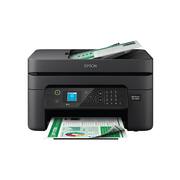
Enjoy hassle-free business printing with the WorkForce WF-2930. An efficient, all-in-one solution, the WF-2930 streamlines workflow with a built-in scanner, copier, fax and Auto Document Feeder. Perfect for printing presentations, contracts and corporate graphics, as well as occasional prints for the home or family, it features Epson’s industry-leading printing technology to consistently deliver documents with sharp text and vivid colors. Plus, with effortless setup and wireless connectivity, it’s the convenient choice for everyday home office printing.
Q: What is the automatic document feeder capacity of this Epson printer?
A: The automatic document feeder capacity of this Epson printer is 30 sheets.
Q: Can I print on both sides of the paper with this Epson printer?
A: Yes, this Epson printer supports automatic 2-sided printing.
Q: Does this Epson printer have a display screen?
A: Yes, this Epson printer has a 1.4 inches display screen.
Q: Is this Epson printer compatible with any voice assistants?
A: Yes, this Epson printer is compatible with Amazon Alexa and Siri for hands-free printing.
Q: How many ink cartridges are included with this Epson printer?
A: This Epson printer comes with 1 black ink cartridge and 3 color ink cartridges.
Q: What is the scanner resolution of this Epson printer?
A: The scanner resolution of this Epson printer is up to 1200 x 2400.
Q: does this print black if you take out colored cartriges
A: Not sure if you actually take out the cartridges (not sure why you need to until you are ready to replace), but it will still work if you are out of color ink.
Q: Does the printer have a paper, loading tray?
A: Hello Sm1. The WF-2930 has a rear loading tray that can hold approximately 100 sheets of 8.5" x 11" plain paper. If you are planning on using anything larger, you must load one sheet at a time. Regards, Kevin - The Epson Team.

Enjoy hassle-free business printing with the WorkForce WF-2930. An efficient, all-in-one solution, the WF-2930 streamlines workflow with a built-in scanner, copier, fax and Auto Document Feeder. Perfect for printing presentations, contracts and corporate graphics, as well as occasional prints for the home or family, it features Epson’s industry-leading printing technology to consistently deliver documents with sharp text and vivid colors. Plus, with effortless setup and wireless connectivity, it’s the convenient choice for everyday home office printing.

Enjoy easy, everyday printing—plain and simple—with the Expression Home XP-4200. From coupons to directions, recipes to homework, the XP-4200 delivers the documents you need without missing a beat. Engineered with Epson’s state-of-the-art imaging technology, this high-performance, all-in-one solution also supports all your creative projects with exceptional image quality for remarkable prints and borderless photos. Plus, it offers convenient features and simple installation.

Bring a new level of productivity to your business with the ultra efficient WorkForce Pro WF-3820 all-in-one printer. Designed for high-volume print environments, the WF-3820 delivers precise, professional-quality prints at fast speeds up to 21 (black)/11 (color) ISO ppm† using vibrant DURABrite Ultra instant-dry pigment inks. A breakthrough in business printing, the WF-3820 features Epson’s innovative PrecisionCore Heat-Free Technology designed for enhanced reliability with minimal downtime. Built with convenience in mind, the WF-3820 offers a variety of user-friendly features to support easy, streamlined printing for small workgroups, including auto 2-sided printing, a large, 250-sheet paper capacity, built-in wireless and a 2.7" color touchscreen for quick navigation and control.

You’re looking for an easy-to-use Supertank printer that will get the job done. That’s why we developed the EcoTank ET-2400 – an innovative cartridge-free solution that uses high-capacity, easily refillable ink tanks. So you’ll worry less about running out of ink, and save a lot on replacement ink (1). The ET-2400 features genuine Epson print quality and a high-resolution flatbed scanner – making it a convenient choice for essential, everyday home printing.
| Pros for Epson - WorkForce WF-2930 All-in-One Inkjet Printer - Black | |||
|---|---|---|---|
| Print Quality, Ease of use, Setup, Size, Price | Ease of use, Print Quality, Overall Performance, Size, Connectivity | Print Quality, Ease of use, Overall Performance, Setup, Price | Print Quality, Ease of use, Overall Performance, Setup, Price |
| Cons for Epson - WorkForce WF-2930 All-in-One Inkjet Printer - Black | |||
| Control Panel | There were no cons for this product— | Wireless Connectivity, Paper Tray | Connectivity, Noise Level, Automatic Document Feeder, Paper Jam |
Customers highly value the WorkForce WF-2930 All-in-One Inkjet Printer for its print quality and ease of use, with many finding the setup process straightforward. The printer's size is also appreciated, as it fits well in home offices. A suggested improvement is to enhance the control panel with better lighting.
The vast majority of our reviews come from verified purchases. Reviews from customers may include My Best Buy members, employees, and Tech Insider Network members (as tagged). Select reviewers may receive discounted products, promotional considerations or entries into drawings for honest, helpful reviews.
Easy to use! Only down side is I can’t connect the printer with the app on my computer. I was however able to print with the iPhone app Which is just as good!
Posted by smontiel12
Absolutely what I needed for the price does everything print scan fax connects to my iPhone to print documents from emails.
Posted by CornleiousH
Good print for basic printing doesn’t work for subliminal and the pin are very delicate put in carefully and is almost impossible to find parts to fix
Posted by ElijahB