Rating 4.3 out of 5 stars with 91 reviews
4.3- Range (16)
- GPS (15)
- Radar Detection (14)
- Accuracy (10)
- Performance (6)
- False Alarms (11)
- Price (8)
Customer Images
The vast majority of our reviews come from verified purchases. Reviews from customers may include My Best Buy members, employees, and Tech Insider Network members (as tagged). Select reviewers may receive discounted products, promotional considerations or entries into drawings for honest, helpful reviews.
- Rated 4 out of 5 stars
A Very SMART RELIABLE Radar Detector
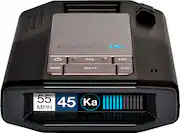
Having owned several Radar detector’s over the years, when the opportunity came to review this new Escort iXc came, I jumped on it. Now I was thinking with today Interactive GPS Apps that can identify “Police Reported Ahead” I thought I was covered. But then there’s the times such as this trip, on the road for 3 days, late night hours, no other app users on the road to possibly report the officer. Always the concern. So, we were off cross country. Now the last radar detector I owned was a great Beltronics 880. This new Escort is a far cry from Radar detectors of years past. This is by Far the smartest radar detector I’ve seen to date. How so? Read on. First it arrived, it’s well packaged, so well it’s like opening a box in a box. Once opened, you can feel the weight and how well designed it is. Several button on the top but I have yet to use ANY of them. I came with its special 12v plug power adapter, a travel case and the windshield (or Dashboard) suction mount. Assembly of the windshield mount is easy, it quick look at the quick set up pamphlet is all it took. Now the detector is designed with the use of the optional M1 Hi Definition Dash Camera. The M1 Camera comes with a longer mounting screw for the hinge point of the Suction cup to allow the camera to mount. The Camera mounts to the Suction cup mount and plugs into the radar detector. The Power plug plugs into the camera so its daisy chained to power both the camera and the detector. The power plug has a USB so you can plug a USB cell power charge cable to it and not require a second 12v outlet and has a mute button. If the iXc goes off, one push mutes that alert one time. The next alert will alert as normal and you can push it again. I did plug my LG V30 into the iXc’s power plug and although my V30 did not show fast charging, it was. My cell reported the same time required to 100% using this charger as the Anker 12v charger that fast charges and displays it on my cells screen. The iXc mounts to the suction cup via a small pad and hidden Magnet! Yes its clips onto the mount magnetically and requires some force to detach them! Ok, So it’s all set up, I had a business trip pop up from Myrtle Beach to Mesa Arizona, perfect timing to test it over 3 days of travel. Now I’m running my interactive GPS app, leaving the city the detector goes off, yep, soon enough there is the sheriff with his radar gun and nothing on my app! Hmm, off we continue! Now unlike my OLD unit, which would go off quite a bit, you get used to the false alert’s caused by radars used by supermarket doors that open automatically and past other vehicles with radar detectors, this unit did give some false reports but I swear I could count them under 2 dozen. You will think 2 dozen?! Yes but that’s over 3 days of 12 hours a day driving across the country! One the first day we left SC, crossed Ga and was in Alabama and didn’t get a false alert! We were wondering if it was even working but it was. I will explain later how they cut the false alerts and new false alerts in a bit. You’ll need to download 2 apps, Escort M1 Dash Cam App and Escort Live app. It connects Via 2.4 Ghtz Wifi and Bluetooth. To the Escort iXc and M1 Dash Cam. First, if you use the optional dash cam, you will need to download the Escort M1 Dash Cam App. It does 2 main things. It links your cell to the M1 Camera via Wifi so you can see what the camera see’s to assure proper camera alignment. It lets you adjust the cameras resolution and other features/settings such as, it lets you download the cameras stored video to your cell phone but you can also do so via Micro USB cord or just pulling the micro SD card. The Camera came with a Sandisk 16 GB MicroSD Card. It’s set to video loop every 3 minutes BUT you can change that thru the app. The Camera has a G sensor, on impact such as an accident, it locks the stored video for review later. The video is Hi Def, wide and clear. Night use is excellent as well. See my M1 review for Screenshot pictures. Now the Escort Live App. This app lets you link your cell to the iXc via Bluetooth and play with the settings. Once connected you have a world of options available from changing the displays colors to fine tuning the radar bands. It just unreal how many settings there are! KA has so many different frequencies and you can check them off or on. The iXc has built in GPS, the display has a screen that is preset to display 70MPH, once you pass this preset speed , you will get an over speed protection warning. This set speed can be change BUT it’s not GPS informed. In other words, it’s not GPS controlled to display the speed limit of where you are. This was a con as unless you drive in a say town that is all 45 MPH and set it to display 50 MPH, it’s really an irrelevant feature. So you can change what speed it displays to warn you when you pass that set speed, but that’s all. Now you can change it to display none and it will display the cars voltage. Now if you do set the speed say to 75 mph as that’s the speed limit, and you are driving cruise control at 75 mph or LESS, the iXc will now its on cruise control as the speed is GPS’d, it sees your under it and if the Escort iXc gets a radar hit, it will be silent as you are under the speed limit but you will still get a visual alert. That makes sense. Now some other cool features, it has an aircraft setting, if your vehicles 12v outlet is always on, when you shut off your ignition it senses a voltage drop and a timer starts. It will then shut your detector off after 10 minutes. There are so many more features and settings all turned on or off via the Escort Live App. So, the few false alerts? Well, taking a close up picture with your cell phone will trigger a laser alert! New technology such as Auto Braking on 18 wheelers and vehicles, lane change assist, all these new technologies use radar and are new causes of false alerts. While the iXc does a great job of cutting them down, it doesn’t have a display showing which direction the radar is hitting you on. The iXc is a mid-range priced unit, Escort however does have a upper end Radar detector that does have this feature and uses a distinctive different tone for side radar hits from these lane change assist radar to show you it’s a false. I had cars drive by the opposite lane and it quickly triggered the radar alert. That’s a Con and you may want to spend a few more bucks for the side ID feature on a more expensive model. Another issue I felt was a Con is the common phone style plug. If you remove the Escort iXc, you need to squeeze the plastic tang to release the plug. We all have had a phone cord with a broken tang, the cord falls out! So you have two options, remove the iXc from the mount and unplug it from the camera leaving the camera and power cord intact or unplug the power cord from the camera and remove both the iXc and camera together. Another thought is the camera is hard mounted to the suction mount. The iXc is magnetic. On impact, the detector may detaches from its mount? I don’t know but if it does, it’s still connected to the camera via a small cable with that phone plug and plastic tang. There has to be a better way such as the new USB-C plugs used in today’s cell phones. This would make plugging and unplugging quick and easy! My last Con is the OSP (Over speed Protections) doesn’t change when the speed limit changes. Although via the app setting you van select different set OSP limit, it would be fantastic if it did so automatically as it already has GPS. Maybe Escort in the future can do so via tether and its app. Right now you set it at the MAX speed and it just gives you a slight aural warning once its surpassed. Now the unit has many more features, I can write a book. It learns fake alerts and remember the location via GPS. It reports to a cloud and can learn from other Escort units via Escort Live app much like Waze. I opted to use Waze and the iXc together. While nothing can be 100 %, 3 days of driving across county we felt secure. All in all it’s a fantastic unit, smart, firmware can be updated via wifi and well-built great looking unit. Coupled with the camera, you’ll be set for sure!
Posted by iampete
- Rated 5 out of 5 stars
Excellent Detector with Many Useful Features
==== Summary ==== The Escort iXc radar & laser detector is an excellent early-warning system that provides drivers with peace-of-mind, safety, and protection from speed radars, speed cams, and speed traps. Via useful features such as Intelligent Speed Sensitivity scanning, updatable IVT filters, AutoLearn, and Defender Database, the frequency of false alerts are greatly reduced & true "threats" are quickly identified. In addition, the design & build-quality is top-notch with nice extras such as the 12V SmartCord USB cord & the ability to connect via Wifi or Bluetooth for easy updates. It is a fantastic and very helpful road companion. _____ Pro's: -Easy to install & setup. -Uses a very sturdy & quick mounting system with a STRONG magnetic mounting mechanism. -Looks cool. -Comes with a nice, durable carrying case. -Bright, easy-to-read, and informative OLED screen. -Updatable Defender Database alerts for Red Light Camera & Speed Trap locations. -Auto-Learn GPS tech rejects false alerts. -Updatable IVT (In-Vehicle Technology) filter prevents false alerts. -SmartCord USB power cable can also charge your phone at the same time (at up to 2A). -The Escort Live companion app offers numerous settings to fine-tune the detection range. -The iXc's mounting mechanism is compatible with Escort's M1 dashcam that reduces cord clutter. -Easily & quickly connects to Wifi (car Wifi, mobile HotSpot) and Bluetooth that unlocks extra functionality and fine-tuning. _____ Neutral: -Defender Database updates require a subscription after the 1-year complimentary period. It's $49.95 for 3 years. If this service was free, I'm sure a lot more people would contribute to the crowd-sourced database. -Voice alerts aren't very clear & sound a bit artificial. -Doesn't come with a physical user manual that explains all the detector settings & what they are for. I had to look up information online. At least a concise paper guide with settings recommendations for different states would've been nice to have. _____ Cons: -None ==== Design, Build Quality, & Usage Experience ==== The Escort iXc is quite a handsome & durable detector kit. The unit feels solid and well-made with tight manufacturing tolerances. Its design, I believe, will allow it to easily blend in with most car interiors. The "EZ Mag Mount" mounting mechanism is super solid & secure. Not once did I feel afraid that the iXc will become loose from its magnetic mount. Because of the strong magnet being used, one has to apply a bit of pressure when detaching it but that is a good thing. You don't want your $450 investment becoming loose & getting dinged up. My petite wife, who weighs about 100 lbs, had no problem attaching and detaching the iXc. Although I didn't find the audio quality to be "Crystal Clear" during voice alerts per Escort's marketing, the volume level was good & easily adjustable. For the most part, speech was intelligible. I wish the voice alerts sounded a little less robotic & more natural like Google's voice assistant. The beeps and bloops coming out of the iXc, on the other hand, are loud & clear and grabs your attention immediately. The iXc comes with a 12V SmartCord USB cord and it is great because in addition to providing power to the iXc, the extra USB receptacle on it can be used to charge up a mobile device such as a tablet or a smartphone. It doesn't support fast-charging but the 2A it offers should suffice for most situations and people. Another nice extra is that the "EZ Mag Mount" mounting system can also accommodate Escort's new M1 dashcam camera. By being able to use just one mounting system and one power cord, clutter is greatly reduced for a cleaner install and look. Inside the hardware, Escort claims that the iXc (which replaces the outgoing iX detector) offers up to 70% increase in alerting range thanks to their new "M4+" platform that gives you 3-4 dB more in sensitivity over the iX. Although I don't have the older iX detector to make a direct comparison with, my impressions so far have been very positive. As far as I am aware, there have been no false alerts when driving around town & on highways from the usual suspects (e.g., IVT from other cars, automatic door openers). The alerts I did receive have been quick, accurate, and timely. The iXc detected from very far away speed cameras in residential neighborhoods and other heavy-traffic areas. I live in southern California so I adjusted the detection settings within the Escort Live app accordingly. I turned off POP, X-Band, and RDR. Laser, Ka-Band, and K-Band detection were all turned on & I made sure that the radio frequencies most often used by my local law enforcement agencies were also turned on - Ka-Band Narrow 2, 5, and 8. For extra peace of mind, the following settings were also turned on - "Other," "Speed Trap," "Speed Camera," and "Red Light Camera." Driving around in unfamiliar territory can sometimes make one feel anxious and nervous. With the iXc inside my car, I definitely felt safer and more confident in my environments. With crowd-sourced & official Escort updates that arrived & continue to arrive frequently via my Wifi & Bluetooth connection to my smartphone (Galaxy S10+), I feel good knowing that I'm constantly "protected." I look forward to adding my own contributions to the Database. ==== Verdict ==== I can highly & confidently recommend the iXc to anyone who seek "road protection" from those pesky speed cams, speed traps, and speed radars. No one I know likes to feel ambushed by such sneaky traps. The Escort iXc - with its quick-reacting reflexes, great detection range and capability, and updatable IVT & false alert database updates - offer a great peace of mind and sense of security. It's good stuff.
Posted by optimummind
- Rated 5 out of 5 stars
Great radar detector
Quality- The feel of the Escort iXc lets me know that it is built to last. I noticed that even when I touch the device it does not leave behind smudges. I’m also happy with how sturdy the mount is and I feel confident that it will not drop after any bump on the road. Appearance- The picture on the box made me believe that it would be bigger but I’m glad that it is a lot smaller. I like the sleek look to it and it does not look outdated. Compatibility- It’s compatible with Androids and iPhones after downloading the recommended Escort live app. My car is not a connected car but it’s good to know that I have the option available to me for later. The Escort iXc is compatible with the Escort M1 dash cam. Contents- 1. Manual for a quick setup 2. SmartCord that lets you power the Escort device and/or your phone at the same time. 3. Windshield mount that stays mounted with a magnet to easily remove or mount your Escort iXc. 4. Carrying case that you can use to pack your device so you do not leave it in your car to prevent theft. 5. Escort iXc is obviously the main content. Final thoughts- I consider myself a safe driver but to know I have the Escort iXc watching out for me I can enjoy my rides more without wondering what police trap is ahead of me. If I get a citation or accident when I’m driving safe I will now have some proof for any disputes especially when it’s paired with my Escort M1 dash cam. I was looking for a great dash cam and together they complete my vehicle. I only wish that it was designed with the dash cam instead of 2 separate devices but for upgrading later it makes sense. For the times I used the Escort iXc radar detector I find it to be accurate with alerting me with speed cameras, light cameras and it lets me know when I’m driving over the speed limit. Using the Escort live app you can see where the alerts are coming from otherwise you may assume they are false alerts since the radar pick up long range signals. I think as I continue to use the Escort iXc it will get even better because it has a auto learn feature that “uses the power of GPS and intelligently rejects false alerts”. The Escort M1 dash cam is sold separately and it is not included with the Escort Escort iXc purchase.
Posted by DSPARKA
- Rated 4 out of 5 stars
Price is the only bad thing I see here!
This is a very accurate radar detector, and does well on the highway. It picked up state troopers with ease, and kept a good range.
Posted by mrjlwilliams
- Rated 1 out of 5 stars
Not good - detects but too late
Not happy. tried to change bunch of settings and ended up enabling all bands and protocols but still poor performance. Only thing what seems to working great is speed alerts when connected to phone app, everything else alerts you too late.Changing modes did help either except when on highway there is several false k band alerts Positive: Very good suction cup mount Option to add dash cam Design App interface Speed limit alerts Negative Late alerts - see below: Ended up stuck in construction traffic then received beeping alert (about construction zone) Stationed speed radar in my street detected when I got only few feet's away On several occasion detected police when I got next to them
Posted by Erik77