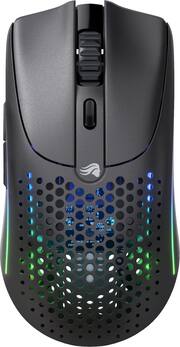
Introducing the Model O 2 Wireless, the highly anticipated sequel to our award-winning and revolutionary gaming mouse, the Model O. Prepare to embark on a new era of gaming dominance as we unveil the best FPS mouse yet, crafted to perfection for gamers of all grip styles. With cutting-edge technology and unparalleled precision, this mouse will take your gaming experience to unprecedented heights, elevating your skills and unleashing your true potential on the battlefield. The Model O 2 Wireless pushes the boundaries of performance with its enhanced sensor technology. Featuring the BAMF 2.0 Sensor, this mouse delivers pixel-perfect tracking, allowing you to hit every shot with unrivaled accuracy. Combined with Motion Sync technology, your mouse movements are seamlessly translated into precise in-game actions, giving you the competitive edge you need to outperform your opponents. The battery life has been extended to provide weeks of uninterrupted gaming, ensuring you never miss a crucial moment. With three ways to play, including 2.4GHz wireless for performance mode (110 hours of battery life), Bluetooth 5.2 LE for efficiency mode (210 hours of battery life), and the option to play wired while charging, the Model O 2 Wireless offers unmatched flexibility and convenience. Immerse yourself in the ultimate gaming experience with the Model O 2 Wireless's exceptional tech specs. Equipped with next-gen switches rated for 80 million crisp clicks, this mouse guarantees long-lasting durability and responsiveness that will withstand the test of time. Its ultralight weight, coming in at an ultralight 68 grams, surpasses its predecessor, offering effortless maneuverability and swift flick shots. The symmetrical design of the mouse caters to all grip styles, ensuring maximum comfort and control during extended gaming sessions.
Q: How can I connect through Bluetooth?
A: Power On the Mouse: Ensure that the mouse is powered on. Some wireless mice have a physical on/off switch on the bottom. Insert Batteries or Charge: If the mouse uses replaceable batteries, make sure they are correctly inserted. If it's rechargeable, connect it to a USB cable to charge it before attempting to connect. Connect the Wireless Receiver: If your mouse comes with a USB wireless receiver, plug it into an available USB port on your computer. Make sure it's securely connected. Install Drivers/Software: Some gaming mice require specific drivers or software to be installed for full functionality. Check the manufacturer's website for the latest drivers or software. Pairing (If Necessary): If the mouse uses Bluetooth, ensure that your computer has Bluetooth enabled, and follow the manufacturer's instructions for pairing the mouse. Check for a Connect Button: Some wireless mice have a connect button on the bottom. Press this button to initiate the connection process. Follow Manufacturer's Instructions: Consult the user manual or any included documentation for specific instructions related to your mouse model. Test the Mouse: Move the mouse to see if the cursor on your computer screen responds. If not, there may be an issue with the connection or drivers. Adjust Settings (Optional): Install any customization software that came with the mouse to adjust settings like sensitivity, button assignments, and lighting. Remember that these are general instructions, and it's crucial to refer to the specific user manual or support documentation provided by Glorious for your Model O 2 mouse. Additionally, check the Glorious website for any firmware updates or troubleshooting guides that may be available. If you encounter difficulties, reaching out to Glorious customer support may also be helpful.
Q: Could I change the colors to the mouse? I want it to look solid blue.
A: If you're referring to the lighting, yes. You can absolutely change it to a solid blue. (:
Q: Does it work with iPad 9th generation
A: undefined
A: Pretty much. Soft push and makes some noise but not very noticeable.

Introducing the Model O 2 Wireless, the highly anticipated sequel to our award-winning and revolutionary gaming mouse, the Model O. Prepare to embark on a new era of gaming dominance as we unveil the best FPS mouse yet, crafted to perfection for gamers of all grip styles. With cutting-edge technology and unparalleled precision, this mouse will take your gaming experience to unprecedented heights, elevating your skills and unleashing your true potential on the battlefield. The Model O 2 Wireless pushes the boundaries of performance with its enhanced sensor technology. Featuring the BAMF 2.0 Sensor, this mouse delivers pixel-perfect tracking, allowing you to hit every shot with unrivaled accuracy. Combined with Motion Sync technology, your mouse movements are seamlessly translated into precise in-game actions, giving you the competitive edge you need to outperform your opponents. The battery life has been extended to provide weeks of uninterrupted gaming, ensuring you never miss a crucial moment. With three ways to play, including 2.4GHz wireless for performance mode (110 hours of battery life), Bluetooth 5.2 LE for efficiency mode (210 hours of battery life), and the option to play wired while charging, the Model O 2 Wireless offers unmatched flexibility and convenience. Immerse yourself in the ultimate gaming experience with the Model O 2 Wireless's exceptional tech specs. Equipped with next-gen switches rated for 80 million crisp clicks, this mouse guarantees long-lasting durability and responsiveness that will withstand the test of time. Its ultralight weight, coming in at an ultralight 68 grams, surpasses its predecessor, offering effortless maneuverability and swift flick shots. The symmetrical design of the mouse caters to all grip styles, ensuring maximum comfort and control during extended gaming sessions.

PRO X SUPERLIGHT 2 SE was designed in collaboration with the world’s top esports players—and engineered to win. PRO X SUPERLIGHT 2 SE features a symmetric 60 g award winning design, pro-grade LIGHTFORCE switches, the reliability of LIGHTSPEED wireless, and the most advanced HERO 2 sensor in gaming.

Model O3 Wireless pairs ultralight ergonomics and radiant RGB with our InfinitePlay swappable battery system for true wireless freedom and zero downtime —engineered for nonstop competitive play

Elevate your gameplay like never before with the Model I 2 Wireless, the most comfortable gaming mouse in its class. Crafted with precision, this mouse combines an ergonomic design, ultra-lightweight construction, and a dedicated thumb rest, making it the perfect choice for gamers utilizing claw and palm grips. This next-gen mouse provides unrivaled comfort, allowing you to focus on your gameplay and achieve peak performance. The Model I 2 Wireless is a multi-genre mouse that caters to a wide range of gaming genres, including Battle Royale, MOBA, FPS, and more. Engineered with enhanced the BAMF 2.0 26K Optical Sensor and new Motion Sync technology, it ensures pixel-perfect tracking and flawless accuracy. Weighing a featherlight 75 grams, the Model I 2 Wireless offers lightning-fast speed and effortless maneuverability. The structural integrity has been vastly improved, while the redesigned buttons provide a satisfying click with each press, ensuring optimal comfort and responsiveness. With 9 programmable buttons at your fingertips, you can easily assign in-game actions, custom macros, and game-enhancing features to boost your gameplay. Tailor the shape of the mouse to your playstyle by swapping two of its side button positions with included alternate shapes; magnets make the process quick and easy. The Model I 2 Wireless provides an unrivaled gaming experience with its DPI Shift and Layer Shift features, allowing you to instantly adjust sensitivity and unlock a second programmable layer for even more customization. Enjoy extended gameplay with its impressive battery life and choose between 3 ways to play: 2.4GHz wireless for a strong connection, Bluetooth 5.2 LE for extended battery life, or wired mode for uninterrupted gameplay.
| Pros for Glorious - Model O 2 Lightweight Wireless Optical Gaming Mouse with BAMF 2.0 Sensor - Wireless - Matte Black | |||
|---|---|---|---|
| Weight, Battery Life, Quality, RGB, Ease of use | Weight, Overall Performance, Battery Life, Ergonomics | Battery Life, Weight, Overall Performance, RGB Lighting, Polling Rate | Weight, Buttons, Comfort, Responsiveness, Size |
| Cons for Glorious - Model O 2 Lightweight Wireless Optical Gaming Mouse with BAMF 2.0 Sensor - Wireless - Matte Black | |||
| Wireless, Software | There were no cons for this product— | Dongle Size | Software, Wireless, Battery Life, Scroll Wheel |
Customers highly value the Model O 2 Lightweight Wireless Optical Gaming Mouse for its lightweight design, impressive battery life, and overall quality. Users appreciate the aesthetic appeal of the RGB lighting, the ease of setup and use, and the mouse's precise response time. However, some customers have reported issues with the wireless connectivity and expressed dissatisfaction with the software.
The vast majority of our reviews come from verified purchases. Reviews from customers may include My Best Buy members, employees, and Tech Insider Network members (as tagged). Select reviewers may receive discounted products, promotional considerations or entries into drawings for honest, helpful reviews.
This mouse is very hyped up in the gaming community. I bought it thinking that it would fit all of my needs, something lightweight, ergonomic, and has fast polling and sensor rate. It does check all of these boxes, however the form factor of the mouse is very flat. Compared to the first generation Model O, this mouse feels like I’m quite literally dragging my bare hand flat against my mouse pad’s surface. It’s very hard to properly grip and adjust to. That’s not why it gets three stars though, the reason it gets three stars is due to its software. The mouse requires you to download the GLORIOUS CORE software in order to properly update and use the mouse, however this software is very glitchy and it was hard to even initially update my mouse’s firmware. After I thought I got that figured out, my mouse constantly did this thing where it would disconnect and reconnect to my pc. I have constantly browsed forums and did some troubleshooting, I even plugged in a different mouse to see if it had the same issue, but nothing. It would do this so often mid-game or even mid-scroll on a website that I got sick and tired of it and this mouse is now just sitting in a drawer next to my desk. It’ll probably stay there and collect dust, and now I feel like I just dropped $100 on a mouse that was doomed. Does not feel great.
hyuno Posted
Cant express how much i love this mouse, I had gen 1 since 2020 until i purchased this mouse a week ago. Perfectly balanced for me, responsive. Fantastic battery life and no issues with the software. Software has definitely improved since 2020!! Feels great in my hand and the mouse clicks are very satisfying. love the matte finish to the mouse as well. Would absolutely recommend, the price to performance is exceptional.
EnriqueG Posted
This mouse was super easy to setup and use with no drivers to install. I love all the different rgb modes to change through. I use the BT when connecting to my tablet and 2.4gz & wired for my PC and its seamless to switch between both. The only con I have is long gameplay with big hands may get cramped.
CheesyLint Posted