Rating 4.3 out of 5 stars with 3356 reviews
4.3- USB (544)
- Ease of use (328)
- Ports (233)
- Size (153)
- Design (102)
- Compatibility (280)
- Price (90)
- Connection (66)
- Heat (39)
Customer Images
The vast majority of our reviews come from verified purchases. Reviews from customers may include My Best Buy members, employees, and Tech Insider Network members (as tagged). Select reviewers may receive discounted products, promotional considerations or entries into drawings for honest, helpful reviews.
- Rated 5 out of 5 stars
I love it!
Incredibly fast speeds. Stays cool. Sleek design. Comes with a leather sleeve. Only downside is that you can’t use this with a snap on case for your computer. So I did some research and I purchased a skin from iCarbon. Now I can use my hub without having to take off a case, my computer stays protected and best of all, it looks amazing. iCarbon also makes a skin for the Hyperdrive too.
Posted by Jonathan
- Rated 5 out of 5 stars
Great attachment for MacBooks!
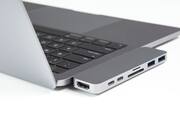
I was worried that when I made the switch from an HP to a MacBook Air, I wouldn't be able to plug in my phone cord, flash drives, HDMI cables, SD cards, etc. but then I discovered this! It plugs into the side of your MacBook and a little blue light will turn on at the end of the device signifying that it's working. It comes with a little black pouch to carry it in as well. You can still charge your computer while this is plugged in, as there are two ports that fit the MacBook charger. So far it has been of great use and there has been no problems, however, I have noticed that it gets warm fairly quickly but it does not impact the functioning or usability.
Posted by Dess
- Rated 3 out of 5 stars
Switched
I bought this for my new MacBook Pro 15”. Let me preference this review by saying this product is the only one of its type I’ve tried and I’m not a “techie” ( if that’s even the correct spelling!), Following are my reasons for purchase. 1. Availability. I didn’t have time to wait for the one I researched and wanted. 2. Though my second choice was available, I found it to be heavier and larger than expected. I travel. A lot. 3. I liked the sleek design and it was on my list, though further down. 4. Very lightweight with all of the ports I required. Conundrums: 1. Not certain if it is an issue with the device or my MacBook Pro since it’s own power USB C, has issues staying inserted. Issues: 1. Connection isn’t perfect to my Pro, which allows device to disengage regularly. This problem is exacerbated by me moving (traveling) quite often. 2. The outside ports are SUPER tight. When I try to pull out any of my USB wireless connectors (mouse, etc) I end up disengaging the whole hub just to switch out or remove any devices that I have plugged in and even then it’s hard to remove them. It would seem that even if it is my Mac, the issues on the other side of the hub are not optimal either. I do really like the look, weight and portability of this hub but for me constantly having to wiggle and reconnect to my Mac coupled with actually having to remove the entire device just to switch out other components is more trouble than I want. If they switched the “grip ability” from the ports to the connection with the Mac it would be perfect. Or, if it’s me and I’m inserting it incorrectly, state this in the information booklet, again I’m not tech savvy, which, I think, describe alot of other people.
Posted by scoped
- Rated 5 out of 5 stars
Must Have Accessory
MacBook dropped the USB port leaving only 2 Lightning 3 ports on each side of the laptop. Big problem solved by this little power house. The Hyper-drive connects to the Lightning 3 ports and provides card reader slots and 2 or more USB ports. There are 2 sizes to choose from. I chose the small one for the price and it met my video editing need for at least 2 USB ports. I haven’t seen any slow down between the MacBook and the external drives I’ve connected. It’s really a necessity so I was glad it didn’t break the bank. It’s sturdy and comes with a vinyl pouch for protection in you bag or backpack. I highly recommend this accessory.
Posted by seymore7
- Rated 5 out of 5 stars
All the ports you need
The hyperdrive has every port I need and then some. I like how it plugs into both ports on my MacBook Pro—making it a more secure connection than if it was only one port. My only issue is that my Apple cd/dvd drive does not work with this. I'm not sure if there is an option to get the Apple dvd drive to work on a newer model MacBook Pro.
Posted by Tricia