Insignia™ - 22-Key Bluetooth Scissor Switch Number Keypad for Windows, macOS, ChromeOS, iPadOS and Android - Black
Customers are saying
Customers commend the 22-Key Bluetooth Scissor Switch Number Keypad for its ease of use and overall performance, especially with MacBooks. The keypad's Bluetooth connectivity and perfect size are also appreciated, along with its lightweight design and the convenience of a numeric keypad for laptops. While some users noted the key feel was stiff, others did not notice any lag.
Features
Works with Windows, macOS, ChromeOS, iPadOS and Android
Connect your keypad to a computer or tablet running Windows 11, Windows 10, macOS 10.12 through 11.4, ChromeOS 89, iPadOS 14.4.2 or Android 6.
Essential keys
This numeric keypad has 22 keys, including numbers, symbols and special functions.
Scissor switch technology
Provides a quieter typing experience.
Bluetooth connection
Provides wireless connectivity from up to 32.81 ft (10 m) away.
LED indicators
Show when specific functions are on or when the keypad is receiving power.
Battery powered
Uses one AAA battery (included).
Specifications
- BrandInsignia™Model NumberNS-PK3KANB24Product Name22-Key Bluetooth Scissor Switch Number Keypad for Windows, macOS, ChromeOS, iPadOS and AndroidColorBlackLeague/AssociationNot ApplicableKeyboard TypeNumeric keypad
Reviews
Rating 4.6 out of 5 stars with 297 reviews
- Ease of use (68)
- Connectivity (50)
- Overall Performance (47)
- Size (23)
- Numeric Keypad (10)
- Lag (7)
Customer Images
The vast majority of our reviews come from verified purchases. Reviews from customers may include My Best Buy members, employees, and Tech Insider Network members (as tagged). Select reviewers may receive discounted products, promotional considerations or entries into drawings for honest, helpful reviews.
Questions & Answers
Is this compatible with the new MacBook Neo?
Answered by InsigniaCustomerSupportHello, thank you for the question. Yes, the Insignia 22 Key Bluetooth Scissor Switch Number Keypad is compatible with the new MacBook Neo because it supports macOS and connects through standard Bluetooth. You can pair it in your Mac Bluetooth settings and begin using it right away. Poojitha | Insignia
Why won't my laptop detect my 22-key number keypad?
Answered by InsigniaCustomerSupportHello! Thank you for your question. We’d be happy to help you connect your laptop with the Insignia 22‑Key Bluetooth Scissor Switch Number Keypad. For further assistance, you can reach our Insignia support team at 1‑877‑467‑4289 or email us at insigniasupport@bestbuy.com. Darshan | Insignia
How do I keep The number lock on? I’ll be typing on the 10-key with the number lock on, but it keeps switching to the other functions on its own (direction keeps and page up/ down). I’ll hit num lock, and sometimes it helps and sometimes not.
Answered by InsigniaCustomerSupportIt sounds frustrating to have the number lock keep switching off on your Insignia™ 22-Key Bluetooth Scissor Switch Number Keypad. Here are a few steps you can try to keep the number lock on: 1. Check the Battery: Ensure the battery is fully charged or replace it with a new one. A low battery can sometimes cause connectivity issues. 2. Re-pair the Keypad: Disconnect and then reconnect the keypad to your device. This can sometimes reset the connection and resolve any issues. 3. Update Drivers: Make sure your device's Bluetooth drivers are up to date. Outdated drivers can cause connectivity problems. 4. Use the On-Screen Keyboard: If the problem persists, try using the on-screen keyboard to toggle the number lock on. This can sometimes help in maintaining the number lock state. If these steps don't resolve the issue, it might be worth reaching out to our customer support for further assistance. Let me know if there's anything else I can help with!

How far away can I use this keypad from my device?
This keypad provides wireless connectivity from up to 32.81 ft (10 m) away.
This question and answer was generated by AI based on customer and product data.What type of switch technology does this keypad use?
This keypad uses scissor switch technology for a quieter typing experience.
This question and answer was generated by AI based on customer and product data.

More to consider
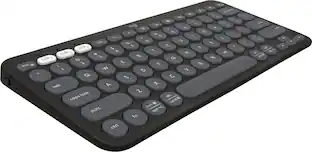 $37.99The price was $39.99
Explore related products Sponsored
 $289.99The price was $399.99